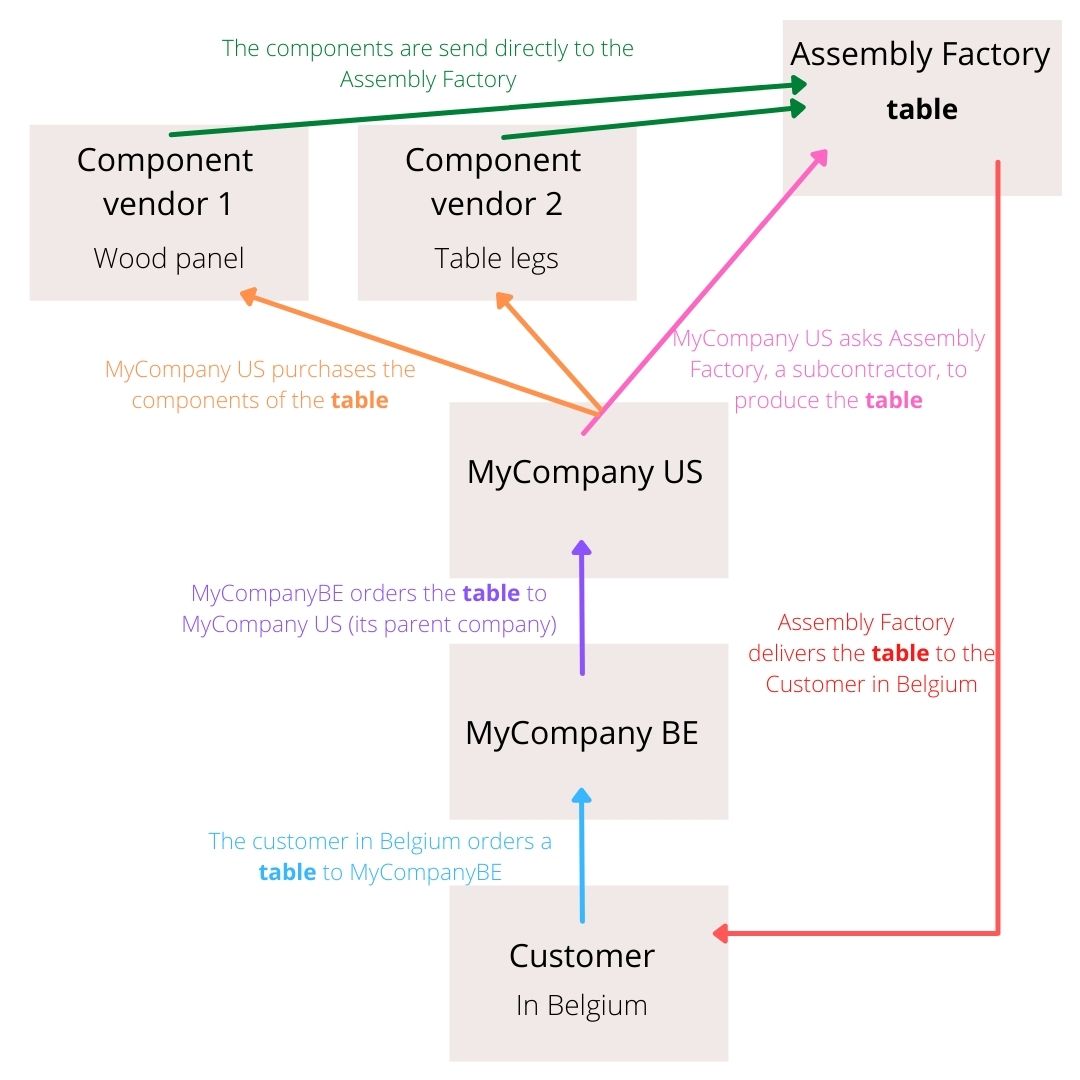
How to create this flow in Odoo

Odoo is the world's easiest all-in-one management software.
It includes hundreds of business apps:

How to create this flow in Odoo
For this flow you’ll need these apps : Sales, Purchase, Inventory, Manufacturing
You need to activate Dropshipping (in the purchase app), activate Multi-Step Routes (in the Inventory app), and activate Subcontracting (in the Manufacturing app). In the Inventory App, in the routes, unarchive the MTO route.
1) In the Settings app, General Settings, Multi-Company : Select synchronize Sales and Purchase Order + Automatic Validation. Repeat this operation for both your companies (MyCompanyBE and MyCompanyUS) → This way, a SO will automatically become a PO from one company to the other.
2) MyCompanyUS : in the Manufacturing app, Product > Bills of Materials : create a BOM for the final product (the Table), add the component (Wood panel and Table legs), select as BOM type “Subcontracting” and add the Assembly Factory
3) MyCompanyBE : In the product (Table), in the purchase tab, add “MyCompanyUS” as the vendor. In the inventory tab, select Replenish on Order (MTO) → with MTO, Odoo will check if you have the product in stock, if not a PO will be created. It can also work with reordering rules.
4) MyCompanyUS: in the product (Table), in the purchase tab, add the Assembly Factory as the vendor + in the inventory tab, select Buy and Replenish on Order (MTO)
How this 1st flow looks like :
→ From MyCompanyBE , create a SO from the customer , confirm.
You can see that a Purchase Order has been created, click on it. It’s a PO from MyCompanyBE to MyCompanyUS. Confirm.
Switch toMyCompanyUS. You can see that a Sales Order has been created. From there a Purchase Order is automatically created to buy the table from the Assembly Factory. Confirm. There you go, the first part is done.
Now we are adding the dropshipping route to display the final customer’s address to the Assembly Factory so they can deliver the Table
1) in MyCompanyBE : In your product, in the inventory tab, you select Dropship
In MyCompanyUS : In your product, in the inventory tab, you select Dropship
How this 2st flow looks like:
From MyCompanyBE , create a SO from the customer , confirm.
You can see that a Purchase Order has been created, click on it. It’s a PO from MyCompanyBE to MyCompanyUS. Confirm.
Switch toMyCompanyUS. You can see that a Sales Order has been created. From there a Purchase Order is automatically created to buy the table from the Assembly Factory. If you check the “Other Information” tab, you can see that the Drop Ship address is the Customer’s in Belgium. Confirm. There you go, the second part is done
Now we are adding the Resupply Subcontractor route which means that when you order the final product to the Assembly Factory, Odoo will automatically orders the component (if not in stock) to build the product to the supplier(s) and asks the supplier(s) to send directly the component to the Assembly Factory
In MyCompanyUS : Go in the Inventory App, Configuration, Routes : Duplicate the Dropship route to create the route “Dropship Subcontractor”, and select as company specific for “MyCompanyUS”. On this route, in Operation Type, create a new one called “Dropship Subcontractor” and create a Rules with the Source Location : Partner Locations/Vendors and Destination Location : Physical Locations/Subcontracting Location. As you’ll be creating this rule, you will at the same time create an Operation Type.
Select your two company : In the Inventory App, Configuration, Operations types : Check if the “Dropship Subcontractor” operation is set correctly
In this specific flow, there is identified bug that hasn’t been solutionned yet, for which, Odoo only recognises 1 subcontracting location per company. This means that it doesn’t matter how automated this flow is , you’ll need to manually enter the Subcontracting location on the Resupply Subcontractor PO (if you don’t have Studio). But first, considering you don’t have Studio, you need to change the settings of the Subcontracting Location. Go in the Inventory App, Configurations, Locations, Select the Subcontracting Location, change the Location Type to Customer Location so the “DropShip Address” field will appear in your PO.
In MyCompanyUS : In the products menu, select your first component, in the purchase tab : add your vendor , in the inventory tab : select Dropship Subcontractor + Resupply Subcontractor on Order + Replenish on Order (MTO). Do the same for the other component of the BOM
From MyCompanyBE , create a SO from the customer , confirm.
You can see that a Purchase Order has been created, click on it. It’s a PO from MyCompanyBE to MyCompanyUS. Confirm.
Switch toMyCompanyUS. You can see that a Sales Order has been created. From there a Purchase Order is automatically created to buy the table from the Assembly Factory. If you check the “Other Information” tab, you can see that the Drop Ship address is the Customer’s in Belgium. Confirm.
From there, another Purchase Order is generated to your Component vendor. In the Other Information tab, you can see that it’s to deliver to the Subcontractor. Add the Assembly Factory in the Drop Ship address. Confirm it.
Special thanks to GVR for the help on this flow.

Waiting for the solution...
This video and others from this channel are a great help in the subcontracting subject: https://www.youtube.com/watch?v=TsAKXvtX_Fw&t=901s
Create an account today to enjoy exclusive features and engage with our awesome community!
Sign up| Related Posts | Replies | Views | Activity | |
|---|---|---|---|---|

|
1
Sep 25
|
5586 | ||

|
1
Apr 25
|
10559 | ||

|
0
Mar 25
|
2393 | ||
|
|
1
Mar 25
|
30 | ||
|
|
0
Mar 25
|
2113 |
1. Use the live chat to ask your questions.
2. The operator answers within a few minutes.


