コンテンツへスキップ
Odoo メニュー
  • サインイン
  • 無料で15日試す
  • アプリ
    財務
    • 会計
    • 請求
    • 経費
    • スプレッドシート(BI)
    • ドキュメント管理
    • 署名
    販売
    • CRM
    • 販売
    • POS店舗
    • POSレストラン
    • サブスクリプション
    • レンタル
    ウェブサイト
    • ウェブサイトビルダー
    • eコマース
    • ブログ
    • フォーラム
    • ライブチャット
    • eラーニング
    サプライチェーン
    • 在庫
    • 製造
    • 製品ライフサイクル管理 (PLM)
    • 購買
    • 整備
    • 品質
    人事業務
    • 従業員管理
    • 採用
    • 休暇管理
    • 人事評価
    • リファラル
    • フリート
    マーケティング
    • ソーシャルマーケティング
    • メールマーケティング
    • SMSマーケティング
    • イベント
    • マーケティングオートメーション
    • アンケート調査
    サービス
    • プロジェクト管理
    • タイムシート
    • フィールドサービス
    • ヘルプデスク
    • 計画
    • アポイントメント
    生産性向上ツール
    • ディスカッション
    • 承認
    • IoT
    • VoIP
    • ナレッジ
    • WhatsApp
    サードパーティアプリ Odooスタジオ Odooクラウドプラットホーム
  • インダストリー(業種別ソリューション)
    小売
    • 書店
    • アパレルショップ
    • 家具専門店
    • 食料品店
    • 金物店
    • 玩具店
    飲食・ホスピタリティ業界
    • バー・パブ
    • レストラン
    • ファストフード
    • ゲストハウス
    • 飲料販売代理店
    • ホテル
    不動産
    • 不動産会社
    • 建築事務所
    • 建設
    • 不動産管理
    • 造園
    • 住宅所有者組合
    コンサルティング
    • 会計事務所
    • Odooパートナー
    • マーケティングエージェンシー
    • 法律事務所
    • 人材派遣
    • 監査・認証
    製造
    • テキスタイル
    • 金属
    • 家具
    • 飲食
    • 醸造所
    • コーポレートギフト
    ヘルス & フィットネス
    • スポーツクラブ
    • 眼鏡店
    • フィットネスセンター
    • ウェルネス専門家
    • 薬局
    • ヘアサロン
    業種
    • 便利屋
    • IT ハードウェア・サポート
    • 太陽エネルギーシステム
    • 靴メーカー
    • クリーニングサービス
    • 空調設備サービス
    その他
    • 非営利団体
    • 環境機関
    • ビルボードレンタル
    • 写真
    • 自転車リース
    • ソフトウェアリセラー
    すべての業種を見る
  • コミュニティ
    学ぶ
    • チュートリアル
    • ドキュメンテーション
    • 認定
    • トレーニング
    • ブログ
    • ポッドキャスト
    教育サポート
    • 教育プログラム
    • Scale Up! ビジネスゲーム
    • Odooオフィス訪問
    ソフトを入手
    • ダウンロード
    • エディションを比較
    • リリース
    コラボレーション
    • Github
    • フォーラム
    • イベント
    • 翻訳
    • パートナーになる
    • パートナー様向けサービス
    • 会計事務所を登録
    サービス利用
    • パートナー一覧
    • 会計事務所一覧
    • 今すぐ相談する
    • 導入支援サービス
    • お客様一覧
    • サポート
    • アップグレード
    Github Youtube Twitter Linkedin Instagram Facebook Spotify
    +1 (650) 691-3277
    製品デモを利用する
  • 料金
  • ヘルプ

Odoo is the world's easiest all-in-one management software.
It includes hundreds of business apps:

  • CRM
  • e-Commerce
  • 会計
  • 在庫
  • PoS
  • プロジェクト
  • MRP
All apps
コミュニティで交流するには登録する必要があります。
全てのポスト 人々 バッジ
タグ (全て表示)
odoo accounting v14 pos v15
このフォーラムについて
コミュニティで交流するには登録する必要があります。
全てのポスト 人々 バッジ
タグ (全て表示)
odoo accounting v14 pos v15
このフォーラムについて
ヘルプ

Create Tasks per Quantity in Order Line

購読

この投稿に活動があった際に通知を受け取ります

この質問にフラグが付けられました
3 返信
1129 ビュー
アバター
Ken De Nil

I have an order with 2 products that need to be installed, along with 2 installation fees. The installation product is configured as a service that automatically creates a task. However, when I order a quantity of 2, only one task is created.

How can I make sure that two tasks are created instead?

I suppose this can be done using an automation or server action, but I'm not sure how to approach this correctly, especially since Odoo already creates one task by default.

Thanks in advance!

0
アバター
破棄
アバター
D Enterprise
最善の回答

Hii,

Option 1: Customize sale.order to create tasks based on quantity
  • Override or extend the method that creates tasks from the sale order line.
  • Instead of creating just one task, loop over the quantity and create that many tasks.

from odoo import models


class SaleOrder(models.Model):

    _inherit = 'sale.order'


    def _create_service_tasks(self):

        for order in self:

            for line in order.order_line.filtered(lambda l: l.product_id.type == 'service' and l.product_id.service_tracking == 'task_global'):

                # Remove the default single task creation

                # Create one task per product quantity

                for _ in range(int(line.product_uom_qty)):

                    # Create task logic here, e.g.:

                    order.env['project.task'].create({

                        'name': line.name,

                        'project_id': line.id,

                        # add other fields as needed

                    })

Call this method after confirmation, and skip or remove the default single task creation.

Option 2: Use a Server Action or Automated Action (less flexible):
  • Create an automated action triggered after sale.order confirmation.
  • In Python code of the server action, loop over service lines and create tasks based on quantity.
  • You must ensure the default task creation is disabled or deleted to avoid duplicates.
Important tips:
  • The default task creation usually happens in sale_order._create_task() or similar — you may want to override or extend this method.
  • Ensure the tasks are linked properly to the sales order line (sale_line_id) for traceability.
  • Consider how to handle task names if you want them to be distinct (e.g., add suffix “#1”, “#2”).
-2
アバター
破棄
アバター
Christoph Farnleitner
最善の回答

Firstly, it's intended behavior for a particular reason:

The quantity provided in the sale order is directly affecting the task in a way that it defines the allocated time on that very task, because usually (not always, not necessarily) a service product leading to a task has a time tracking UoM assigned to it and therefore the quantity on the sale order line becomes the time to spend on that task. In any case, Odoo will convert the UoM of the service product to a 'time-trackable' unit for the task.

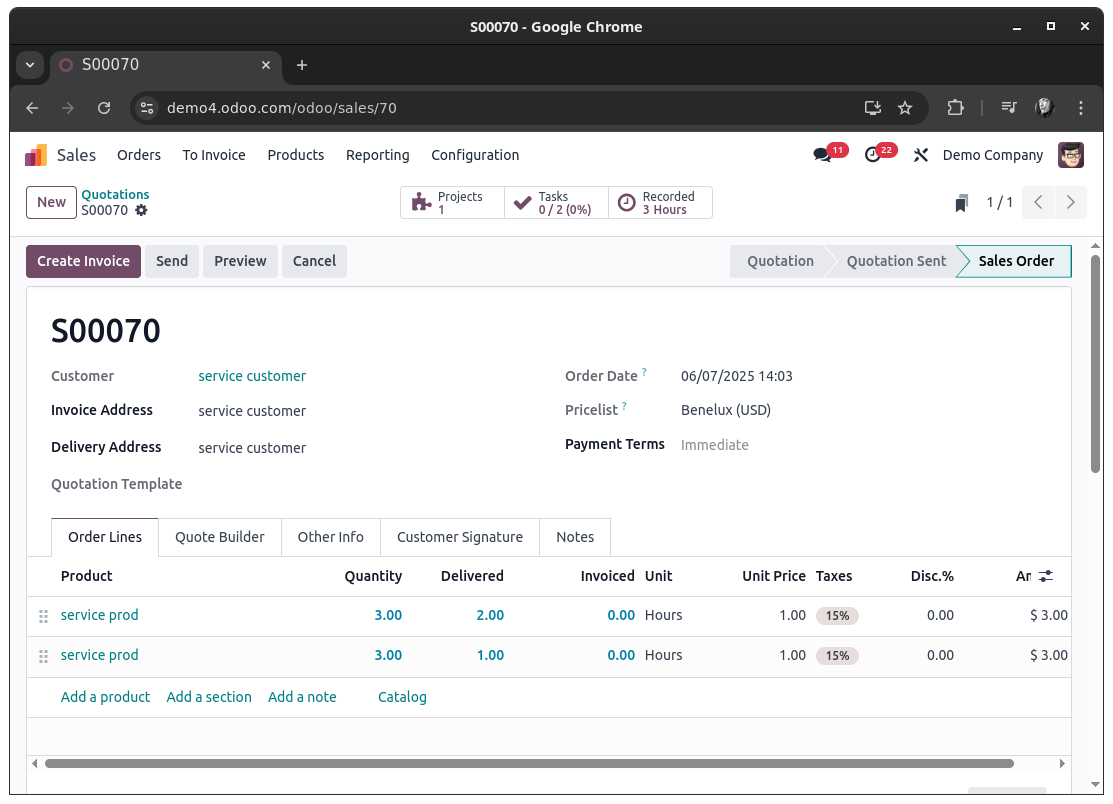
The native workaround would be to create multiple sale order lines instead of setting a combined quantity on just one line. Each line will then lead to a dedicated task for that line:


Now, if you want a more sophisticated approach you will certainly have to dig into sale_project, to ensure things go in a predictable way.

Since you've been asked for approaches using automation or server actions: yes, it probably is possible to utilize these to achieve your goal - with certain levels of pain due to the ways Tasks are crated for Sale Order Lines in the first place. It will probably be more easy to have this done in a dedicated module. Anyways, the ways I would be going about this would probably be either of these:


Duplication of Sale Order Lines:

Upon confirming a Sale Order (state change to sale or done, depending on your configuration), find all Sale Order Lines with a Quantity greater 1 and a product of type Service that are defined to create a Task. For each of these Lines, get the Quantity and do a copy() action 'Quantity - 1' times of that Sale Order Line.
Finally, write the updated Quantity (supposedly 1, but will require additional checks for floating point numbers) onto the original Sale Order Line and all of its copies (this might as well be done prior to copying the Sale Order Line to prevent writing after copying when you keep track about how many copies should be created beforehand).

Doing so will end you up with a Sale Order that can be drafted directly with with the product quantities needed and have Odoo convert it to a 'multi-task-creation-friendly' one upon confirming it. Each Sale Order Line will be linked to a specific Task in this scenario.


Duplication of Tasks:

Another way to go about it is to keep the Sale Order as is and duplicate the task itself at the time of its creation. For this you would check for the values a task is about to be created with. If these values hold a sale_line_id and have allocated_hours greater 1, then this is a task you most likely want to duplicate - and reset the allocated_hours again as well.

Doing so will end you up with a Sale Order that is completely unchanged and just have multiple Tasks linked to one Sale Order Line.


Both approaches will require you to implement a thoughtful check on when and why a Task (or Sale Order Line) duplicate is to be created, because Sale Order Lines can be changed post Order confirmation as well. This is certainly a case the must be considered as well.


Bottom line, this does not seem to be a task trivially achievable by the means of a simple automation and without understanding the actual flow of when and with what information a Task is created for a Sale Order Line.

Tasks are ultimately created in this function: https://github.com/odoo/odoo/blob/18.0/addons/sale_project/models/sale_order_line.py#L307

Since this this function is designed to return exactly one task, it is used in a way that expects exactly this singleton (a single record that can be used later). This on its own makes it more complex to 'just create another task' already.

1
アバター
破棄
Christoph Farnleitner

Note: This is a handwritten, non-AI generate answer. It therefore may lack of a possibly desired 'this is your code, copy it' section as I'm not willing to actually develop ones use case in a forum; Partly because this is my job and partly because I do believe that describing the problem and explaining the inner workings is more fruitful for every reader. This is especially the case for situations in which workarounds are available within Odoo itself already.
That being said, I'm happy to consider updating my answer in case OP is investing itself into the topic.

アバター
Ken De Nil
著作者 最善の回答

Thank you for your help!!

0
アバター
破棄
ディスカッションを楽しんでいますか?読むだけでなく、参加しましょう!

今すぐアカウントを作成して、限定機能を利用したり、素晴らしいコミュニティと交流しましょう!

登録
コミュニティ
  • チュートリアル
  • ドキュメンテーション
  • フォーラム
オープンソース
  • ダウンロード
  • Github
  • Runbot
  • 翻訳
サービス
  • Odoo.shホスティング
  • サポート
  • アップグレード
  • カスタム開発
  • 教育プログラム
  • 会計事務所一覧
  • パートナー一覧
  • パートナーになる
企業情報
  • 会社概要
  • ブランドアセット
  • お問い合わせ
  • 採用情報
  • イベント
  • ポッドキャスト
  • ブログ
  • お客様一覧
  • リーガル情報 • プライバシーポリシー
  • セキュリティ
الْعَرَبيّة Català 简体中文 繁體中文 (台灣) Čeština Dansk Nederlands English Suomi Français Deutsch हिंदी Bahasa Indonesia Italiano 日本語 한국어 (KR) Lietuvių kalba Język polski Português (BR) română русский язык Slovenský jazyk slovenščina Español (América Latina) Español ภาษาไทย Türkçe українська Tiếng Việt

Odoo(オドゥー)は、CRM、eコマース、会計、在庫管理、POS、プロジェクト管理など、企業のさまざまな業務を一つのシステムで管理できる、ベルギー発のオープンソースのERPソフトウェアです。

高機能で使いやすく、完全に統合されたERPとして、ユニークな価値を提供しています。

Website made with

Odoo Experience on YouTube

1. Use the live chat to ask your questions.
2. The operator answers within a few minutes.

Live support on Youtube
Watch now