Overslaan naar inhoud
Odoo Menu
  • Aanmelden
  • Probeer het gratis
  • Apps
    Financiën
    • Boekhouding
    • Facturatie
    • Onkosten
    • Spreadsheet (BI)
    • Documenten
    • Ondertekenen
    Verkoop
    • CRM
    • Verkoop
    • Kassasysteem winkel
    • Kassasysteem Restaurant
    • Abonnementen
    • Verhuur
    Websites
    • Websitebouwer
    • E-commerce
    • Blog
    • Forum
    • Live Chat
    • eLearning
    Bevoorradingsketen
    • Voorraad
    • Productie
    • PLM
    • Inkoop
    • Onderhoud
    • Kwaliteit
    Personeelsbeheer
    • Werknemers
    • Werving & Selectie
    • Verlof
    • Evaluaties
    • Aanbevelingen
    • Wagenpark
    Marketing
    • Social media Marketing
    • E-mailmarketing
    • SMS Marketing
    • Evenementen
    • Marketingautomatisering
    • Enquêtes
    Diensten
    • Project
    • Urenstaten
    • Buitendienst
    • Helpdesk
    • Planning
    • Afspraken
    Productiviteit
    • Chat
    • Goedkeuringen
    • IoT
    • VoIP
    • Kennis
    • WhatsApp
    Apps van derden Odoo Studio Odoo Cloud Platform
  • Bedrijfstakken
    Detailhandel
    • Boekhandel
    • kledingwinkel
    • Meubelzaak
    • Supermarkt
    • Bouwmarkt
    • Speelgoedwinkel
    Food & Hospitality
    • Bar en Pub
    • Restaurant
    • Fastfood
    • Gastenverblijf
    • Drankenhandelaar
    • Hotel
    Vastgoed
    • Makelaarskantoor
    • Architectenbureau
    • Bouw
    • Vastgoedbeheer
    • Tuinieren
    • Vereniging van eigenaren
    Consulting
    • Accountantskantoor
    • Odoo Partner
    • Marketingbureau
    • Advocatenkantoor
    • Talentenwerving
    • Audit & Certificering
    Productie
    • Textiel
    • Metaal
    • Meubels
    • Eten
    • Brewery
    • Relatiegeschenken
    Gezondheid & Fitness
    • Sportclub
    • Opticien
    • Fitnesscentrum
    • Wellness-medewerkers
    • Apotheek
    • Kapper
    Trades
    • Klusjesman
    • IT-hardware & support
    • Zonne-energiesystemen
    • Schoenmaker
    • Schoonmaakdiensten
    • HVAC-diensten
    Andere
    • Non-profitorganisatie
    • Milieuagentschap
    • Verhuur van Billboards
    • Fotograaf
    • Fietsleasing
    • Softwareverkoper
    Browse all Industries
  • Community
    Leren
    • Tutorials
    • Documentatie
    • Certificeringen
    • Training
    • Blog
    • Podcast
    Versterk het onderwijs
    • Onderwijs- programma
    • Scale Up! Business Game
    • Bezoek Odoo
    Download de Software
    • Downloaden
    • Vergelijk edities
    • Releases
    Werk samen
    • Github
    • Forum
    • Evenementen
    • Vertalingen
    • Word een Partner
    • Services for Partners
    • Registreer je accountantskantoor
    Diensten
    • Vind een partner
    • Vind een boekhouder
    • Een adviseur ontmoeten
    • Implementatiediensten
    • Klantreferenties
    • Ondersteuning
    • Upgrades
    Github Youtube Twitter Linkedin Instagram Facebook Spotify
    +1 (650) 691-3277
    Vraag een demo aan
  • Prijzen
  • Help

Odoo is the world's easiest all-in-one management software.
It includes hundreds of business apps:

  • CRM
  • e-Commerce
  • Boekhouding
  • Voorraad
  • PoS
  • Project
  • MRP
All apps
Je moet geregistreerd zijn om te kunnen communiceren met de community.
Alle posts Personen Badges
Labels (Bekijk alle)
odoo accounting v14 pos v15
Over dit forum
Je moet geregistreerd zijn om te kunnen communiceren met de community.
Alle posts Personen Badges
Labels (Bekijk alle)
odoo accounting v14 pos v15
Over dit forum
Help

Create Tasks per Quantity in Order Line

Inschrijven

Ontvang een bericht wanneer er activiteit is op deze post

Deze vraag is gerapporteerd
3 Antwoorden
1122 Weergaven
Avatar
Ken De Nil

I have an order with 2 products that need to be installed, along with 2 installation fees. The installation product is configured as a service that automatically creates a task. However, when I order a quantity of 2, only one task is created.

How can I make sure that two tasks are created instead?

I suppose this can be done using an automation or server action, but I'm not sure how to approach this correctly, especially since Odoo already creates one task by default.

Thanks in advance!

0
Avatar
Annuleer
Avatar
D Enterprise
Beste antwoord

Hii,

Option 1: Customize sale.order to create tasks based on quantity
  • Override or extend the method that creates tasks from the sale order line.
  • Instead of creating just one task, loop over the quantity and create that many tasks.

from odoo import models


class SaleOrder(models.Model):

    _inherit = 'sale.order'


    def _create_service_tasks(self):

        for order in self:

            for line in order.order_line.filtered(lambda l: l.product_id.type == 'service' and l.product_id.service_tracking == 'task_global'):

                # Remove the default single task creation

                # Create one task per product quantity

                for _ in range(int(line.product_uom_qty)):

                    # Create task logic here, e.g.:

                    order.env['project.task'].create({

                        'name': line.name,

                        'project_id': line.id,

                        # add other fields as needed

                    })

Call this method after confirmation, and skip or remove the default single task creation.

Option 2: Use a Server Action or Automated Action (less flexible):
  • Create an automated action triggered after sale.order confirmation.
  • In Python code of the server action, loop over service lines and create tasks based on quantity.
  • You must ensure the default task creation is disabled or deleted to avoid duplicates.
Important tips:
  • The default task creation usually happens in sale_order._create_task() or similar — you may want to override or extend this method.
  • Ensure the tasks are linked properly to the sales order line (sale_line_id) for traceability.
  • Consider how to handle task names if you want them to be distinct (e.g., add suffix “#1”, “#2”).
-2
Avatar
Annuleer
Avatar
Christoph Farnleitner
Beste antwoord

Firstly, it's intended behavior for a particular reason:

The quantity provided in the sale order is directly affecting the task in a way that it defines the allocated time on that very task, because usually (not always, not necessarily) a service product leading to a task has a time tracking UoM assigned to it and therefore the quantity on the sale order line becomes the time to spend on that task. In any case, Odoo will convert the UoM of the service product to a 'time-trackable' unit for the task.

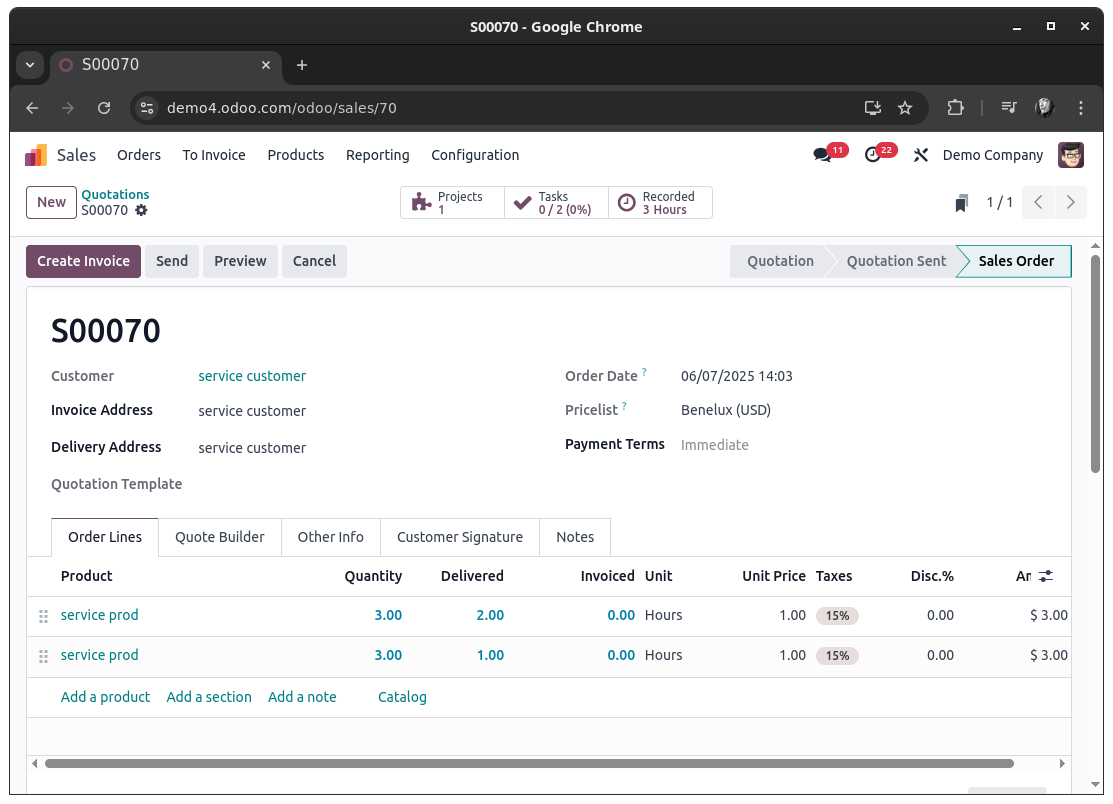
The native workaround would be to create multiple sale order lines instead of setting a combined quantity on just one line. Each line will then lead to a dedicated task for that line:


Now, if you want a more sophisticated approach you will certainly have to dig into sale_project, to ensure things go in a predictable way.

Since you've been asked for approaches using automation or server actions: yes, it probably is possible to utilize these to achieve your goal - with certain levels of pain due to the ways Tasks are crated for Sale Order Lines in the first place. It will probably be more easy to have this done in a dedicated module. Anyways, the ways I would be going about this would probably be either of these:


Duplication of Sale Order Lines:

Upon confirming a Sale Order (state change to sale or done, depending on your configuration), find all Sale Order Lines with a Quantity greater 1 and a product of type Service that are defined to create a Task. For each of these Lines, get the Quantity and do a copy() action 'Quantity - 1' times of that Sale Order Line.
Finally, write the updated Quantity (supposedly 1, but will require additional checks for floating point numbers) onto the original Sale Order Line and all of its copies (this might as well be done prior to copying the Sale Order Line to prevent writing after copying when you keep track about how many copies should be created beforehand).

Doing so will end you up with a Sale Order that can be drafted directly with with the product quantities needed and have Odoo convert it to a 'multi-task-creation-friendly' one upon confirming it. Each Sale Order Line will be linked to a specific Task in this scenario.


Duplication of Tasks:

Another way to go about it is to keep the Sale Order as is and duplicate the task itself at the time of its creation. For this you would check for the values a task is about to be created with. If these values hold a sale_line_id and have allocated_hours greater 1, then this is a task you most likely want to duplicate - and reset the allocated_hours again as well.

Doing so will end you up with a Sale Order that is completely unchanged and just have multiple Tasks linked to one Sale Order Line.


Both approaches will require you to implement a thoughtful check on when and why a Task (or Sale Order Line) duplicate is to be created, because Sale Order Lines can be changed post Order confirmation as well. This is certainly a case the must be considered as well.


Bottom line, this does not seem to be a task trivially achievable by the means of a simple automation and without understanding the actual flow of when and with what information a Task is created for a Sale Order Line.

Tasks are ultimately created in this function: https://github.com/odoo/odoo/blob/18.0/addons/sale_project/models/sale_order_line.py#L307

Since this this function is designed to return exactly one task, it is used in a way that expects exactly this singleton (a single record that can be used later). This on its own makes it more complex to 'just create another task' already.

1
Avatar
Annuleer
Christoph Farnleitner

Note: This is a handwritten, non-AI generate answer. It therefore may lack of a possibly desired 'this is your code, copy it' section as I'm not willing to actually develop ones use case in a forum; Partly because this is my job and partly because I do believe that describing the problem and explaining the inner workings is more fruitful for every reader. This is especially the case for situations in which workarounds are available within Odoo itself already.
That being said, I'm happy to consider updating my answer in case OP is investing itself into the topic.

Avatar
Ken De Nil
Auteur Beste antwoord

Thank you for your help!!

0
Avatar
Annuleer
Geniet je van het gesprek? Blijf niet alleen lezen, doe ook mee!

Maak vandaag nog een account aan om te profiteren van exclusieve functies en deel uit te maken van onze geweldige community!

Aanmelden
Community
  • Tutorials
  • Documentatie
  • Forum
Open Source
  • Downloaden
  • Github
  • Runbot
  • Vertalingen
Diensten
  • Odoo.sh Hosting
  • Ondersteuning
  • Upgrade
  • Gepersonaliseerde ontwikkelingen
  • Onderwijs
  • Vind een boekhouder
  • Vind een partner
  • Word een Partner
Over ons
  • Ons bedrijf
  • Merkelementen
  • Neem contact met ons op
  • Vacatures
  • Evenementen
  • Podcast
  • Blog
  • Klanten
  • Juridisch • Privacy
  • Beveiliging
الْعَرَبيّة Català 简体中文 繁體中文 (台灣) Čeština Dansk Nederlands English Suomi Français Deutsch हिंदी Bahasa Indonesia Italiano 日本語 한국어 (KR) Lietuvių kalba Język polski Português (BR) română русский язык Slovenský jazyk slovenščina Español (América Latina) Español ภาษาไทย Türkçe українська Tiếng Việt

Odoo is een suite van open source zakelijke apps die aan al je bedrijfsbehoeften voldoet: CRM, E-commerce, boekhouding, inventaris, kassasysteem, projectbeheer, enz.

Odoo's unieke waardepropositie is om tegelijkertijd zeer gebruiksvriendelijk en volledig geïntegreerd te zijn.

Website made with

Odoo Experience on YouTube

1. Use the live chat to ask your questions.
2. The operator answers within a few minutes.

Live support on Youtube
Watch now