Ir al contenido
Odoo Menú
  • Iniciar sesión
  • Pruébalo gratis
  • Aplicaciones
    Finanzas
    • Contabilidad
    • Facturación
    • Gastos
    • Hoja de cálculo (BI)
    • Documentos
    • Firma electrónica
    Ventas
    • CRM
    • Ventas
    • PdV para tiendas
    • PdV para restaurantes
    • Suscripciones
    • Alquiler
    Sitios web
    • Creador de sitios web
    • Comercio electrónico
    • Blog
    • Foro
    • Chat en vivo
    • eLearning
    Cadena de suministro
    • Inventario
    • Manufactura
    • PLM
    • Compras
    • Mantenimiento
    • Calidad
    Recursos humanos
    • Empleados
    • Reclutamiento
    • Vacaciones
    • Evaluaciones
    • Referencias
    • Flotilla
    Marketing
    • Redes sociales
    • Marketing por correo
    • Marketing por SMS
    • Eventos
    • Automatización de marketing
    • Encuestas
    Servicios
    • Proyectos
    • Registro de horas
    • Servicio externo
    • Soporte al cliente
    • Planeación
    • Citas
    Productividad
    • Conversaciones
    • Aprobaciones
    • IoT
    • VoIP
    • Artículos
    • WhatsApp
    Aplicaciones externas Studio de Odoo Plataforma de Odoo en la nube
  • Industrias
    Venta minorista
    • Librería
    • Tienda de ropa
    • Mueblería
    • Tienda de abarrotes
    • Ferretería
    • Juguetería
    Alimentos y hospitalidad
    • Bar y pub
    • Restaurante
    • Comida rápida
    • Casa de huéspedes
    • Distribuidora de bebidas
    • Hotel
    Bienes inmuebles
    • Agencia inmobiliaria
    • Estudio de arquitectura
    • Construcción
    • Gestión de bienes inmuebles
    • Jardinería
    • Asociación de propietarios
    Consultoría
    • Firma contable
    • Partner de Odoo
    • Agencia de marketing
    • Bufete de abogados
    • Adquisición de talentos
    • Auditorías y certificaciones
    Manufactura
    • Textil
    • Metal
    • Muebles
    • Comida
    • Cervecería
    • Regalos corporativos
    Salud y ejercicio
    • Club deportivo
    • Óptica
    • Gimnasio
    • Especialistas en bienestar
    • Farmacia
    • Peluquería
    Trades
    • Personal de mantenimiento
    • Hardware y soporte de TI
    • Sistemas de energía solar
    • Zapateros y fabricantes de calzado
    • Servicios de limpieza
    • Servicios de calefacción, ventilación y aire acondicionado
    Otros
    • Organización sin fines de lucro
    • Agencia para la protección del medio ambiente
    • Alquiler de anuncios publicitarios
    • Fotografía
    • Alquiler de bicicletas
    • Distribuidor de software
    Descubre todas las industrias
  • Odoo Community
    Aprende
    • Tutoriales
    • Documentación
    • Certificaciones
    • Capacitación
    • Blog
    • Podcast
    Fortalece la educación
    • Programa educativo
    • Scale Up! El juego empresarial
    • Visita Odoo
    Obtén el software
    • Descargar
    • Compara ediciones
    • Versiones
    Colabora
    • GitHub
    • Foro
    • Eventos
    • Traducciones
    • Conviértete en partner
    • Servicios para partners
    • Registra tu firma contable
    Obtén servicios
    • Encuentra un partner
    • Encuentra un contador
    • Contacta a un consultor
    • Servicios de implementación
    • Referencias de clientes
    • Soporte
    • Actualizaciones
    GitHub YouTube Twitter LinkedIn Instagram Facebook Spotify
    +1 (650) 691-3277
    Solicita una demostración
  • Precios
  • Ayuda

Odoo is the world's easiest all-in-one management software.
It includes hundreds of business apps:

  • CRM
  • e-Commerce
  • Contabilidad
  • Inventario
  • PoS
  • Proyectos
  • MRP
All apps
Debe estar registrado para interactuar con la comunidad.
Todas las publicaciones Personas Insignias
Etiquetas (Ver todo)
odoo accounting v14 pos v15
Acerca de este foro
Debe estar registrado para interactuar con la comunidad.
Todas las publicaciones Personas Insignias
Etiquetas (Ver todo)
odoo accounting v14 pos v15
Acerca de este foro
Ayuda

Create Tasks per Quantity in Order Line

Suscribirse

Reciba una notificación cuando haya actividad en esta publicación

Se marcó esta pregunta
3 Respuestas
1123 Vistas
Avatar
Ken De Nil

I have an order with 2 products that need to be installed, along with 2 installation fees. The installation product is configured as a service that automatically creates a task. However, when I order a quantity of 2, only one task is created.

How can I make sure that two tasks are created instead?

I suppose this can be done using an automation or server action, but I'm not sure how to approach this correctly, especially since Odoo already creates one task by default.

Thanks in advance!

0
Avatar
Descartar
Avatar
D Enterprise
Mejor respuesta

Hii,

Option 1: Customize sale.order to create tasks based on quantity
  • Override or extend the method that creates tasks from the sale order line.
  • Instead of creating just one task, loop over the quantity and create that many tasks.

from odoo import models


class SaleOrder(models.Model):

    _inherit = 'sale.order'


    def _create_service_tasks(self):

        for order in self:

            for line in order.order_line.filtered(lambda l: l.product_id.type == 'service' and l.product_id.service_tracking == 'task_global'):

                # Remove the default single task creation

                # Create one task per product quantity

                for _ in range(int(line.product_uom_qty)):

                    # Create task logic here, e.g.:

                    order.env['project.task'].create({

                        'name': line.name,

                        'project_id': line.id,

                        # add other fields as needed

                    })

Call this method after confirmation, and skip or remove the default single task creation.

Option 2: Use a Server Action or Automated Action (less flexible):
  • Create an automated action triggered after sale.order confirmation.
  • In Python code of the server action, loop over service lines and create tasks based on quantity.
  • You must ensure the default task creation is disabled or deleted to avoid duplicates.
Important tips:
  • The default task creation usually happens in sale_order._create_task() or similar — you may want to override or extend this method.
  • Ensure the tasks are linked properly to the sales order line (sale_line_id) for traceability.
  • Consider how to handle task names if you want them to be distinct (e.g., add suffix “#1”, “#2”).
-2
Avatar
Descartar
Avatar
Christoph Farnleitner
Mejor respuesta

Firstly, it's intended behavior for a particular reason:

The quantity provided in the sale order is directly affecting the task in a way that it defines the allocated time on that very task, because usually (not always, not necessarily) a service product leading to a task has a time tracking UoM assigned to it and therefore the quantity on the sale order line becomes the time to spend on that task. In any case, Odoo will convert the UoM of the service product to a 'time-trackable' unit for the task.

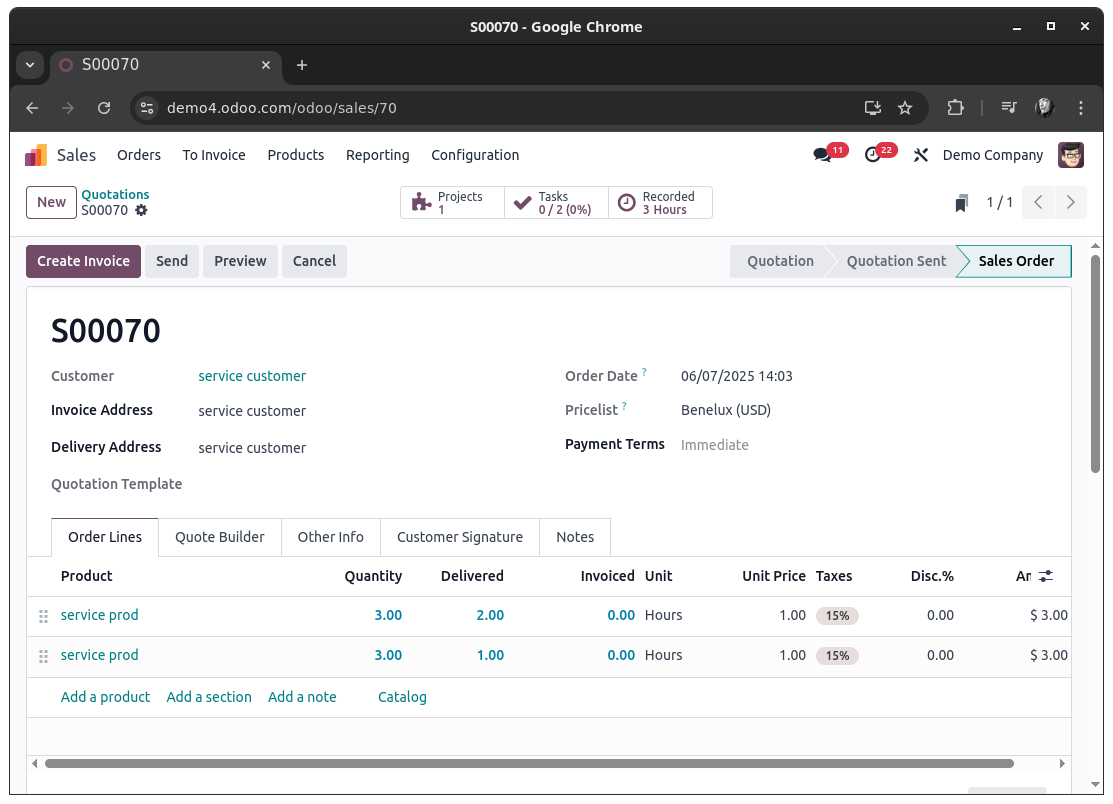
The native workaround would be to create multiple sale order lines instead of setting a combined quantity on just one line. Each line will then lead to a dedicated task for that line:


Now, if you want a more sophisticated approach you will certainly have to dig into sale_project, to ensure things go in a predictable way.

Since you've been asked for approaches using automation or server actions: yes, it probably is possible to utilize these to achieve your goal - with certain levels of pain due to the ways Tasks are crated for Sale Order Lines in the first place. It will probably be more easy to have this done in a dedicated module. Anyways, the ways I would be going about this would probably be either of these:


Duplication of Sale Order Lines:

Upon confirming a Sale Order (state change to sale or done, depending on your configuration), find all Sale Order Lines with a Quantity greater 1 and a product of type Service that are defined to create a Task. For each of these Lines, get the Quantity and do a copy() action 'Quantity - 1' times of that Sale Order Line.
Finally, write the updated Quantity (supposedly 1, but will require additional checks for floating point numbers) onto the original Sale Order Line and all of its copies (this might as well be done prior to copying the Sale Order Line to prevent writing after copying when you keep track about how many copies should be created beforehand).

Doing so will end you up with a Sale Order that can be drafted directly with with the product quantities needed and have Odoo convert it to a 'multi-task-creation-friendly' one upon confirming it. Each Sale Order Line will be linked to a specific Task in this scenario.


Duplication of Tasks:

Another way to go about it is to keep the Sale Order as is and duplicate the task itself at the time of its creation. For this you would check for the values a task is about to be created with. If these values hold a sale_line_id and have allocated_hours greater 1, then this is a task you most likely want to duplicate - and reset the allocated_hours again as well.

Doing so will end you up with a Sale Order that is completely unchanged and just have multiple Tasks linked to one Sale Order Line.


Both approaches will require you to implement a thoughtful check on when and why a Task (or Sale Order Line) duplicate is to be created, because Sale Order Lines can be changed post Order confirmation as well. This is certainly a case the must be considered as well.


Bottom line, this does not seem to be a task trivially achievable by the means of a simple automation and without understanding the actual flow of when and with what information a Task is created for a Sale Order Line.

Tasks are ultimately created in this function: https://github.com/odoo/odoo/blob/18.0/addons/sale_project/models/sale_order_line.py#L307

Since this this function is designed to return exactly one task, it is used in a way that expects exactly this singleton (a single record that can be used later). This on its own makes it more complex to 'just create another task' already.

1
Avatar
Descartar
Christoph Farnleitner

Note: This is a handwritten, non-AI generate answer. It therefore may lack of a possibly desired 'this is your code, copy it' section as I'm not willing to actually develop ones use case in a forum; Partly because this is my job and partly because I do believe that describing the problem and explaining the inner workings is more fruitful for every reader. This is especially the case for situations in which workarounds are available within Odoo itself already.
That being said, I'm happy to consider updating my answer in case OP is investing itself into the topic.

Avatar
Ken De Nil
Autor Mejor respuesta

Thank you for your help!!

0
Avatar
Descartar
¿Le interesa esta conversación? ¡Participe en ella!

Cree una cuenta para poder utilizar funciones exclusivas e interactuar con la comunidad.

Registrarse
Comunidad
  • Tutoriales
  • Documentación
  • Foro
Código abierto
  • Descargar
  • GitHub
  • Runbot
  • Traducciones
Servicios
  • Alojamiento en Odoo.sh
  • Soporte
  • Actualizaciones del software
  • Desarrollos personalizados
  • Educación
  • Encuentra un contador
  • Encuentra un partner
  • Conviértete en partner
Sobre nosotros
  • Nuestra empresa
  • Activos de marca
  • Contáctanos
  • Empleos
  • Eventos
  • Podcast
  • Blog
  • Clientes
  • Legal • Privacidad
  • Seguridad
الْعَرَبيّة Català 简体中文 繁體中文 (台灣) Čeština Dansk Nederlands English Suomi Français Deutsch हिंदी Bahasa Indonesia Italiano 日本語 한국어 (KR) Lietuvių kalba Język polski Português (BR) română русский язык Slovenský jazyk slovenščina Español (América Latina) Español ภาษาไทย Türkçe українська Tiếng Việt

Odoo es un conjunto de aplicaciones de código abierto que cubren todas las necesidades de tu empresa: CRM, comercio electrónico, contabilidad, inventario, punto de venta, gestión de proyectos, etc.

La propuesta única de valor de Odoo es ser muy fácil de usar y estar totalmente integrado.

Sitio web hecho con

Odoo Experience on YouTube

1. Use the live chat to ask your questions.
2. The operator answers within a few minutes.

Live support on Youtube
Watch now