Skip to Content
Odoo Меню
  • Увійти
  • Спробуйте це безкоштовно
  • Додатки
    Фінанси
    • Бухоблік
    • Виставлення рахунку
    • Витрати
    • Електронні таблиці (BI)
    • Документи
    • Підпис
    Продажі
    • CRM
    • Продажі
    • POS Магазин
    • POS Ресторан
    • Підписки
    • Оренда
    Веб-сайти
    • Конструктор веб-сайту
    • Електронна комерція
    • Блог
    • Форум
    • Живий чат
    • Електронне навчання
    Ланцюг поставок
    • Склад
    • Виробництво
    • PLM
    • Купівлі
    • Технічне обслуговування
    • Якість
    Кадри
    • Співробітники
    • Рекрутинг
    • Відпустки
    • Оцінювання
    • Рекомендації
    • Автотранспорт
    Маркетинг
    • Маркетинг соцмереж
    • Email-маркетинг
    • SMS-маркетинг
    • Події
    • Автом. маркетингу
    • Опитування
    Послуги
    • Проект
    • Табелі
    • Виїзне обслуговування
    • Служба підтримки
    • Планування
    • Призначення
    Продуктивність
    • Обговорення
    • Схвалення
    • IoT
    • IP-телефонія
    • База знань
    • WhatsApp
    Сторонні модулі Odoo Studio Платформа Odoo Cloud
  • Сфери
    Роздрібна торгівля
    • Книжковий магазин
    • Магазин одягу
    • Магазин меблів
    • Продуктовий магазин
    • Магазин будівельних матеріалів
    • Магазин іграшок
    Food & Hospitality
    • Бар та паб
    • Ресторан
    • Фастфуд
    • Guest House
    • Дистриб'ютор напоїв
    • Hotel
    Нерухомість
    • Real Estate Agency
    • Архітектурна фірма
    • Будівництво
    • Управління нерухомістю
    • Садівництво
    • Асоціація власників нерухомості
    Консалтинг
    • Бухгалтерська компанія
    • Партнер Odoo
    • Агенція маркетингу
    • Юридична фірма
    • Придбання Талантів
    • Аудит та сертифікація
    Виробництво
    • Textile
    • Metal
    • Меблі
    • Їжа
    • Brewery
    • Корпоративні подарунки
    Здоров'я & Фітнес
    • Спортивний клуб
    • Оптика
    • Фітнес-центр
    • Практики здоров'я
    • Аптека
    • Салон краси
    Trades
    • Ремонтник
    • IT-обладнання та Підтримка
    • Системи сонячної енергії
    • Shoe Maker
    • Cleaning Services
    • HVAC Services
    Інші
    • Nonprofit Organization
    • Екологічна агенція
    • Оренда білбордів
    • Фотографія
    • Лізинг велосипедів
    • Реселлер програмного забезпечення
    Browse all Industries
  • Спільнота
    Навчання
    • Навчальний посібник
    • Документація
    • Сертифікації
    • Тренування
    • Блог
    • Подкаст
    Сприяйте Освіті
    • Програма навчання
    • Бізнес гра Scale Up!
    • Відвідайте Odoo
    Отримайте програмне забезпечення
    • Завантаження
    • Порівняйте версії
    • Релізи
    Співпрацюйте
    • Github
    • Форум
    • Події
    • Переклади
    • Стати партнером
    • Services for Partners
    • Зареєструйте вашу бухгалтерську фірму
    Отримайте послуги
    • Знайдіть партнера
    • Знайдіть бухгалтера
    • Зустріньтеся з консультантом
    • Послуги з впровадження
    • Референси клієнтів
    • Підтримка
    • Оновлення
    Github Youtube Twitter Linkedin Instagram Facebook Spotify
    +1 (650) 691-3277
    Отримати демо
  • Ціни
  • Допомога

Odoo is the world's easiest all-in-one management software.
It includes hundreds of business apps:

  • CRM
  • e-Commerce
  • Бухоблік
  • Склад
  • PoS
  • Проект
  • MRP
All apps
Вам необхідно зареєструватися, щоб взаємодіяти зі спільнотою.
All Posts Люди Значки
Мітки (View all)
odoo accounting v14 pos v15
Про цей форум
Вам необхідно зареєструватися, щоб взаємодіяти зі спільнотою.
All Posts Люди Значки
Мітки (View all)
odoo accounting v14 pos v15
Про цей форум
Допомога

Pull rules from same destination based on conditions

Підписатися

Отримуйте сповіщення про активність щодо цієї публікації

Це запитання позначене
domain_filterroutes
2 Відповіді
1138 Переглядів
Аватар
Pablo Perugini

Hi, we are implementing Odoo so I'm a newbie here....


I'm trying to prevent a pull rule from triggering in a route based on the virtual quantity available in the warehouse. I read that this might be achievable using domain filters (maybe I missunderstood)

What I want to do is create a route with two pull rules originating from the partners/customers location. The first rule, with higher priority, should try to take stock from warehouse A. If not available in Warehouse A, maybe it will trigger  the second rule from warehouse B.

This approach would allow me to reduce the number of routes and make the sales process more user-friendly without using virtual warehouses.


The route I want to achieve would something like this (simplified to explain what I need)

A/Stock -> A/Packing -> A/Out -> Partners/Customers

But if there is no stock in A/Stock, execute:

B/Stock -> B/Packing -> A/Out -> Partners/Customers


This is because I want to transfer already packed products to avoid reception process and I don't want to sales people to select from too many routes (We have several warehouses) 


Can this be achievable? 

0
Аватар
Відмінити
Pablo Perugini
Автор

Thank you, Jaideep, your explanation was very clear. I have one more question for you.

Using the logic you showed me, is there a way to auto-cancel the items from order WH/PICK/00002 that were requested from WH2 to avoid accidentally duplicating the delivery?

Jaideep

The operation would not reserve the items that are not available, so I guess the only way to duplicate pick would be to manually change the done qty.

The case in your post might be representing only 1 of many scenarios. I would believe in practice a sales order might have multiple products with availability across WHs or maybe partial quantities of a product available in main WH.

These might require decisions on how and where these orders would be fulfilled prior leading to canceling the operation.

Jaideep

If I understand correctly your intention is to modify the demand qty of the product in the 1st operation. Am not certain if that is possible.

Аватар
Jaideep
Найкраща відповідь

Yes, it is possible. 

The latest version accomplishes multi step deliveries using Push rules, ensuring the subsequent operations are created on based on the arrival of products to destination location, also there is flexibility to change destination location on the operations. 

1.Enable 3step delivery on both the WHs Inventory > Configuration > Warehouses

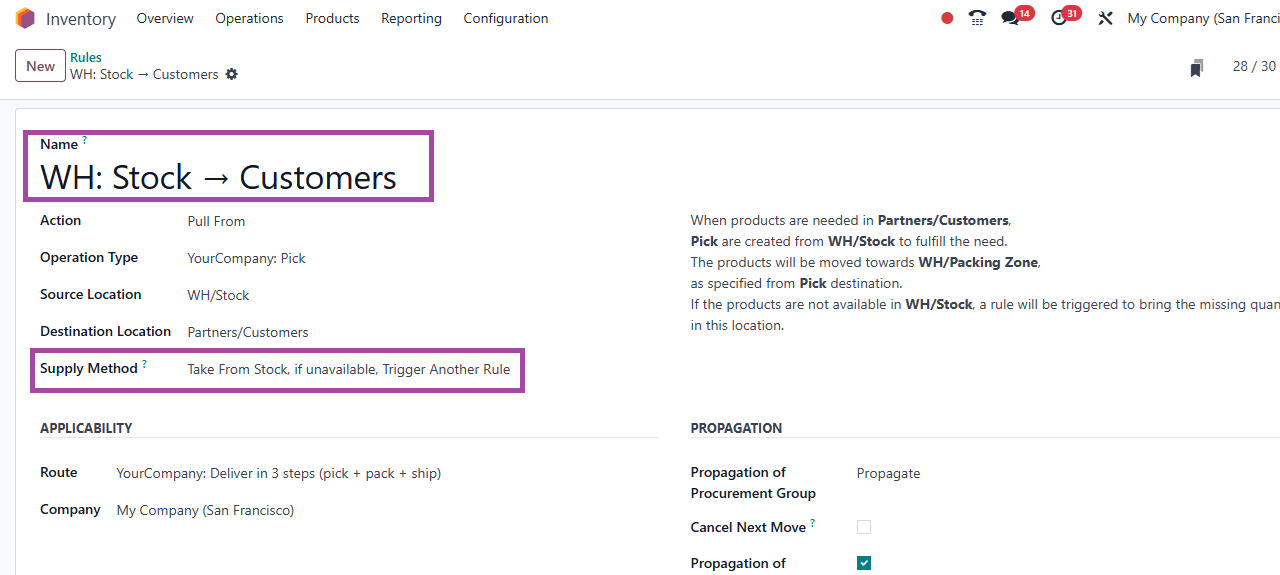
2.On the rule WH: Stock → Customers (main WH) change supply method to Take from stock if unavailable trigger another rule

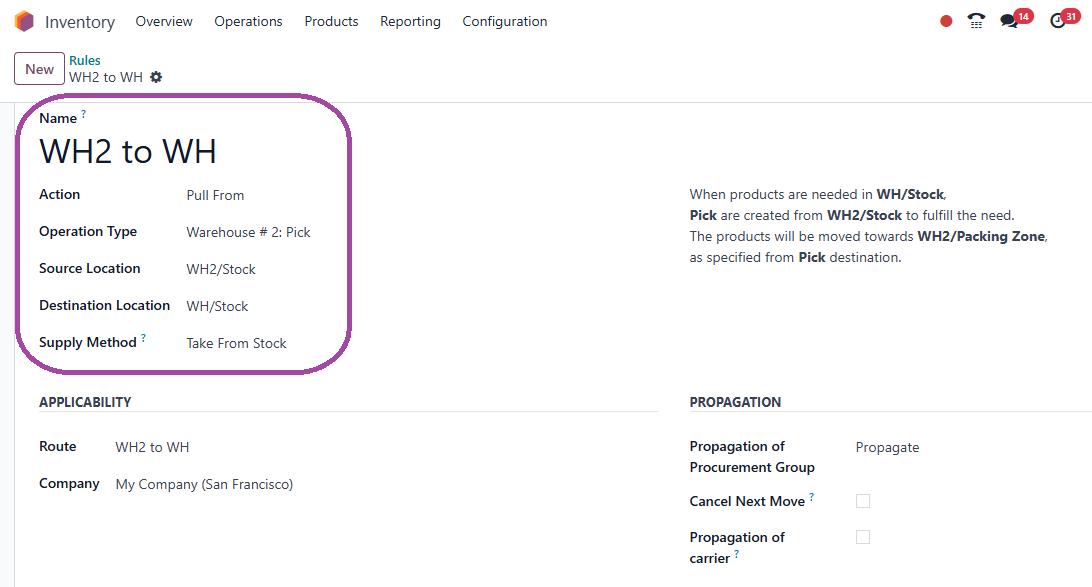
3.Create new route WH2 to WH 

Pull from - WH2/stock to WH/Stock

Operation - Warehouse 2: Pick (this is critical so a Pick is created in WH2 from stock to Packing zone)

Supply method - In this example take from stock, but you would add multiple rules eg. if stock not in WH2, then pull from WH3 etc..

4. Select this route on the product or product category.

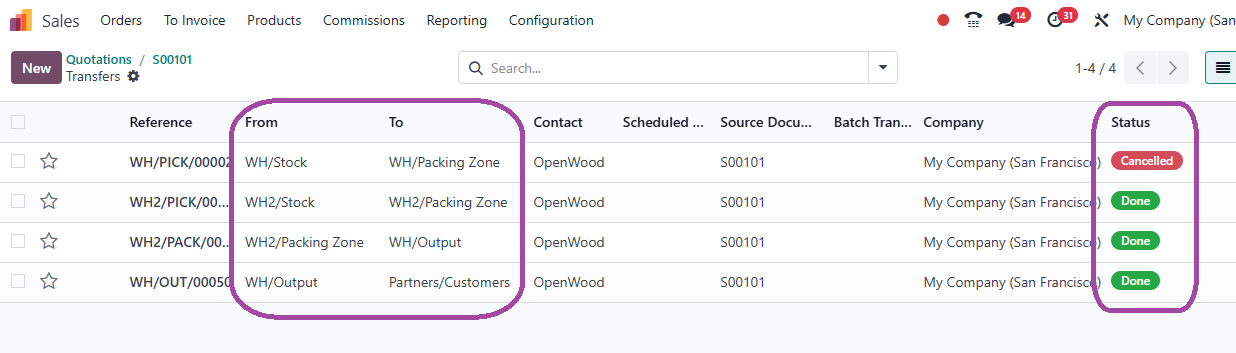
On confirming the sales order (where products are not available in WH) 2 routes would be created. a. Pick in WH from WH/stock to WH/packing locations and b. Pick in WH2 from WH2/Stock to WH2/packing. The 1st operation Pick in WH can be cancelled. Subsequent routes would be created based on the destination locations selected. In practice the product route could be WH2/Stock -> WH2/Packing -> Wh2/Output -> Customer as well

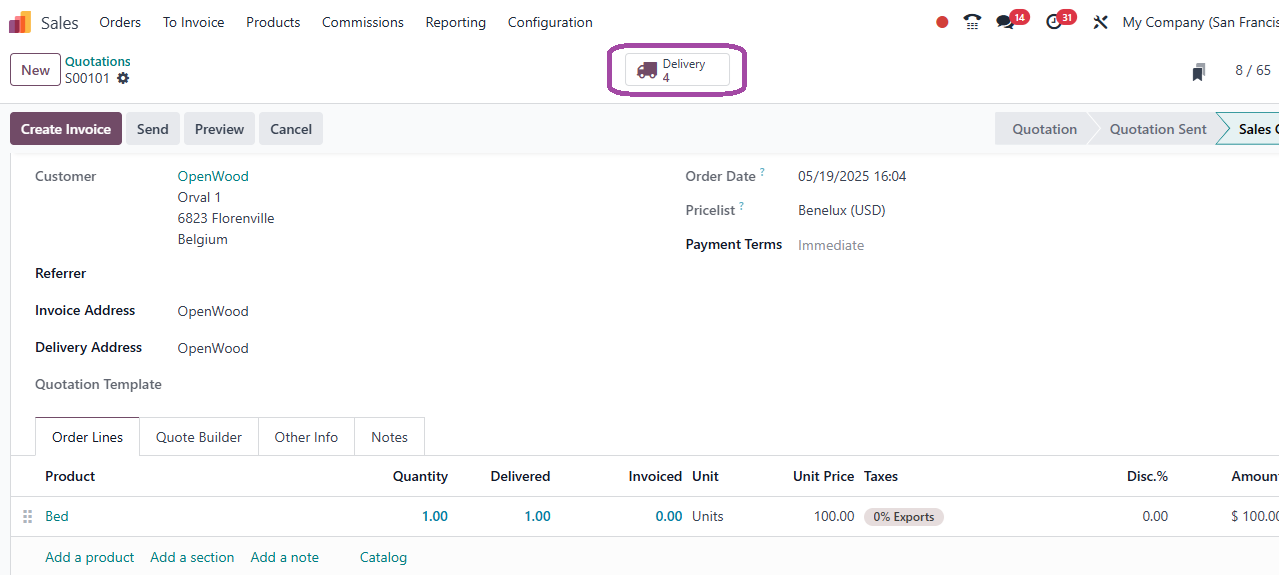
Here is an example of a sale

In the above example, route was as asked in your post.

Please do treat this above as a proof of concept and not a final solution which would I believe need to be specific to your business circumstances.

0
Аватар
Відмінити
Аватар
Pablo Perugini
Автор Найкраща відповідь

Exactly, for example, if I create a sales order for 10 units and there are 5 in warehouse A and 2 in warehouse B, I would like a picking order to be generated for 8 units in A and another for 2 units in B. Then, when processing the 5 units from A, a backorder for 3 units would be generated.

0
Аватар
Відмінити
Jaideep

The demand qty on an operation can be modified by unlocking. This option is available in the action menu -- (gear icon top left on the operation)

In your example above 2 pick operation is triggered with demand qty 10 in WH1 and demand 5 in WH2. Unlock these 2 operations and modify demand to 8 in WHA and 2 in WHB

Enjoying the discussion? Don't just read, join in!

Create an account today to enjoy exclusive features and engage with our awesome community!

Реєстрація
Related Posts Відповіді Переглядів Дія
MO Pick BOM Components Issue
routes
Аватар
0
трав. 25
1672
Route for 2 product lines
routes
Аватар
Аватар
1
лип. 24
2366
Dynamic Domain for states
domain_filter
Аватар
Аватар
1
трав. 24
3417
Odoo v16 domain, how to create a domain by user.company_id
domain_filter
Аватар
Аватар
1
лист. 22
6035
Filtering domain
domain_filter
Аватар
Аватар
2
лип. 22
4534
Спільнота
  • Навчальний посібник
  • Документація
  • Форум
Open Source
  • Завантаження
  • Github
  • Runbot
  • Переклади
Послуги
  • Хостинг Odoo.sh
  • Підтримка
  • Оновлення
  • Кастомні доробки
  • Навчання
  • Знайдіть бухгалтера
  • Знайдіть партнера
  • Стати партнером
Про нас
  • Наша компанія
  • Торгові активи
  • Зв'яжіться з нами
  • Вакансії
  • Події
  • Подкаст
  • Блог
  • Клієнти
  • Юридичні документи • Конфіденційність
  • Безпека
الْعَرَبيّة Català 简体中文 繁體中文 (台灣) Čeština Dansk Nederlands English Suomi Français Deutsch हिंदी Bahasa Indonesia Italiano 日本語 한국어 (KR) Lietuvių kalba Język polski Português (BR) română русский язык Slovenský jazyk slovenščina Español (América Latina) Español ภาษาไทย Türkçe українська Tiếng Việt

Odoo - це набір програм для роботи з відкритим кодом, які охоплюють всі ваші потреби компанії: CRM, електронна комерція, бухгалтерський облік, склад, точка продажу, управління проектами тощо.

Унікальна пропозиція Odoo - це одночасно дуже проста у використанні та повністю інтегрована.

Website made with

Odoo Experience on YouTube

1. Use the live chat to ask your questions.
2. The operator answers within a few minutes.

Live support on Youtube
Watch now