Overslaan naar inhoud
Odoo Menu
  • Aanmelden
  • Probeer het gratis
  • Apps
    Financiën
    • Boekhouding
    • Facturatie
    • Onkosten
    • Spreadsheet (BI)
    • Documenten
    • Ondertekenen
    Verkoop
    • CRM
    • Verkoop
    • Kassasysteem winkel
    • Kassasysteem Restaurant
    • Abonnementen
    • Verhuur
    Websites
    • Websitebouwer
    • E-commerce
    • Blog
    • Forum
    • Live Chat
    • eLearning
    Bevoorradingsketen
    • Voorraad
    • Productie
    • PLM
    • Inkoop
    • Onderhoud
    • Kwaliteit
    Personeelsbeheer
    • Werknemers
    • Werving & Selectie
    • Verlof
    • Evaluaties
    • Aanbevelingen
    • Wagenpark
    Marketing
    • Sociale media-marketing
    • E-mailmarketing
    • Sms-marketing
    • Evenementen
    • Marketingautomatisering
    • Enquêtes
    Diensten
    • Project
    • Urenstaten
    • Buitendienst
    • Helpdesk
    • Planning
    • Afspraken
    Productiviteit
    • Chat
    • Goedkeuringen
    • IoT
    • VoIP
    • Kennis
    • WhatsApp
    Apps van derden Odoo Studio Odoo Cloud Platform
  • Bedrijfstakken
    Detailhandel
    • Boekhandel
    • kledingwinkel
    • Meubelzaak
    • Supermarkt
    • Bouwmarkt
    • Speelgoedwinkel
    Food & Hospitality
    • Bar en Pub
    • Restaurant
    • Fastfood
    • Gastenverblijf
    • Drankenhandelaar
    • Hotel
    Vastgoed
    • Makelaarskantoor
    • Architectenbureau
    • Bouw
    • Vastgoedbeheer
    • Tuinieren
    • Vereniging van eigenaren
    Consulting
    • Accountantskantoor
    • Odoo Partner
    • Marketingbureau
    • Advocatenkantoor
    • Talentenwerving
    • Audit & Certificering
    Productie
    • Textiel
    • Metaal
    • Meubels
    • Eten
    • Brewery
    • Relatiegeschenken
    Gezondheid & Fitness
    • Sportclub
    • Opticien
    • Fitnesscentrum
    • Wellness-medewerkers
    • Apotheek
    • Kapper
    Trades
    • Klusjesman
    • IT-hardware & support
    • Zonne-energiesystemen
    • Schoenmaker
    • Schoonmaakdiensten
    • HVAC-diensten
    Andere
    • Non-profitorganisatie
    • Milieuagentschap
    • Verhuur van Billboards
    • Fotograaf
    • Fietsleasing
    • Softwareverkoper
    Browse all Industries
  • Community
    Leren
    • Tutorials
    • Documentatie
    • Certificeringen
    • Training
    • Blog
    • Podcast
    Versterk het onderwijs
    • Onderwijs- programma
    • Scale Up! Business Game
    • Bezoek Odoo
    Download de Software
    • Downloaden
    • Vergelijk edities
    • Releases
    Werk samen
    • Github
    • Forum
    • Evenementen
    • Vertalingen
    • Word een Partner
    • Services for Partners
    • Registreer je accountantskantoor
    Diensten
    • Vind een partner
    • Vind een boekhouder
    • Een adviseur ontmoeten
    • Implementatiediensten
    • Klantreferenties
    • Ondersteuning
    • Upgrades
    Github Youtube Twitter Linkedin Instagram Facebook Spotify
    +1 (650) 691-3277
    Vraag een demo aan
  • Prijzen
  • Help

Odoo is the world's easiest all-in-one management software.
It includes hundreds of business apps:

  • CRM
  • e-Commerce
  • Boekhouding
  • Voorraad
  • PoS
  • Project
  • MRP
All apps
Je moet geregistreerd zijn om te kunnen communiceren met de community.
Alle posts Personen Badges
Labels (Bekijk alle)
odoo accounting v14 pos v15
Over dit forum
Je moet geregistreerd zijn om te kunnen communiceren met de community.
Alle posts Personen Badges
Labels (Bekijk alle)
odoo accounting v14 pos v15
Over dit forum
Help

Odoo Firefox compatibility issue menu

Inschrijven

Ontvang een bericht wanneer er activiteit is op deze post

Deze vraag is gerapporteerd
chromefirefox
3 Antwoorden
1203 Weergaven
Avatar
Diana Oseguera

I have attempted several common solutions without success. Here are the results of my tests:

  1. Clearing Firefox cache and cookies for the Odoo site: Performed. Did not resolve the issue.
  2. SSL Certificate Verification: The certificate for *.grobitt.com is valid, issued by Let's Encrypt, and its expiration date is in the future (confirmed with image_10b07c.png). Therefore, the initial "speculative insecure TCP connection" warning in the console does not appear to be the cause.
  3. Disabling all Firefox extensions/add-ons: Performed. Did not resolve the issue.
  4. Checking the browser console:
    • Initially showed some "insecure TCP connection" warnings and Favicon errors (see image_10b784.png).
    • After clearing cache and retesting, the console is mostly clean, showing only Odoo debug messages (like _app[data-menu-xmlid=...]) and an "unreachable code" warning in tours.min.js, none of which seem critical for the menu's display (see image_10a8e3.png).
  5. Attempts to inspect the menu element in Firefox's Inspector: I found it difficult to inspect the dropdown menu div as it quickly disappears when the focus is removed from the button, even when trying to pause JavaScript with F8. I was unable to obtain CSS information showing obvious truncation.
  6. Testing in Firefox Safe Mode: Performed. The menu still does not fully expand.
  7. Disabling hardware acceleration in Firefox: Performed. The problem persists.
  8. Testing with a new Firefox profile: (Describe the result here: "Performed. The issue persists / was resolved in the new profile.")

Any insights or suggestions from the community would be greatly appreciated. Thank you in advance for your help!

0
Avatar
Annuleer
Christoph Farnleitner

Ok, but what is the issue?

Diana Oseguera
Auteur

Oh, my bad — in Firefox the menu doesn’t fully display, but in Chrome it does. I thought the photos had been copied. For some reason I use the same user in Firefox and I see fewer options in the settings menu. 


Christoph Farnleitner

Website? Backend? Also, what version of Odoo are you running and should we be aware about any previous customization? Some images showing the actual issue would be more than helpful.

Diana Oseguera
Auteur

My version is 17 Enterprise, sorry, my Karma level doesn’t allow me to upload photos. It's in the Customer Service module from the backend — in the settings menu, I get more options when using Chrome, but not in Firefox, Safari, or Edge. I've done everything they asked me to do, but nothing worked. :(

Diana Oseguera
Auteur

I'll try tomorrow, otherwise, if I can't, can I ask you again? hehe

Avatar
Dhrumi (Wan Buffer Services)
Beste antwoord
  • Possible Causes:
    • Cached JavaScript or CSS issues in Firefox.
    • Extensions or ad blockers interfering with Odoo’s JS.
    • Firefox version compatibility problem (outdated browser).
    • DOM rendering issue specific to Firefox (e.g., CSS z-index or overflow problems).
  • Solutions:
    • Clear Firefox cache and hard reload the page (Ctrl+Shift+R).
    • Disable all extensions and retry.
    • Update Firefox to the latest version.
    • Try in incognito mode to rule out profile issues.
    • If the issue persists only in Firefox but works in Chrome, raise a bug with Odoo including console logs.

0
Avatar
Annuleer
Avatar
Diana Oseguera
Auteur Beste antwoord

No, it's a module with a green and white cross. In both cases, I'm not in developer mode, but the configuration menu doesn't expand. I'm attaching links to some pictures. I tried using different browsers.


https://imgur.com/a/4tsRWnc


0
Avatar
Annuleer
Christoph Farnleitner

This is the Helpdesk App, yes. If you didn't try enable Developer Mode just do i now. The apperance of the menu fits exactly the screen of mine.

Diana Oseguera
Auteur

I'll try tomorrow, otherwise, if I can't, can I ask you again? hehe

Avatar
Christoph Farnleitner
Beste antwoord

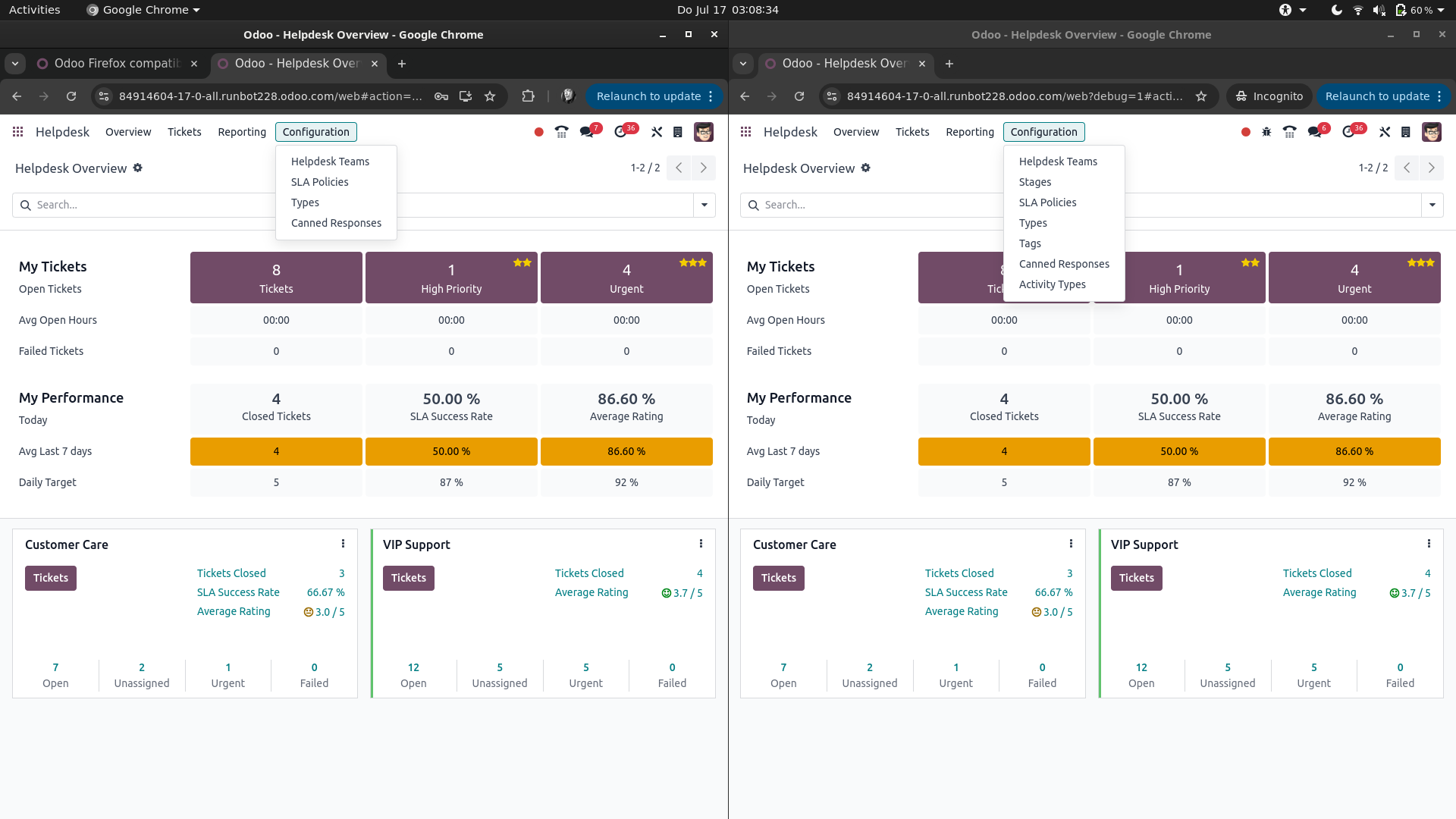
There is no Customer Service App in Odoo, but I guess you're talking about the Helpdesk and by Settings menu you're probably referring to Configuration (probably just got lost in translation somewhere).

If that's the case, and you're actually logged in with the same user, then in Google Chrome you're most likely having the Developer Mode active, while your fresh log ins in Mozilla Firefox and Microsoft Edge don't.

This would look something like this (left: Developer Mode not active, right: Developer Mode is active):


You can enable the Developer Mode from Settings -> General Settings -> scroll to the bottom of the page and find Activate the developer mode. See also https://www.odoo.com/documentation/17.0/applications/general/developer_mode.html

Note: the Developer Mode is just a '?debug=1' in the URL / address bar of you browser. Changes are you've saved it as a bookmark or it's just in your browser's history.

0
Avatar
Annuleer
Geniet je van het gesprek? Blijf niet alleen lezen, doe ook mee!

Maak vandaag nog een account aan om te profiteren van exclusieve functies en deel uit te maken van onze geweldige community!

Aanmelden
Gerelateerde posts Antwoorden Weergaven Activiteit
[{JetBlue#mex}]¿Cómo hablo con alguien en JetBlue?
pdf chrome firefox
Avatar
0
dec. 25
42
【@Avianca ✈ Soporte Live】¿Cómo llamar a Avianca Ecuador?
follower chrome firefox
Avatar
0
nov. 25
3
PhonePe में गलत अकाउंट में भेजे गए पैसे कैसे रिकवर करें?
chrome
Avatar
0
dec. 25
26
Accounting in Odoo 17
chrome
Avatar
0
dec. 25
5
{{%Teléfono*Latam $RD}}¿Cómo llamar a Latam desde República Dominicana?
chrome
Avatar
0
dec. 25
4
Community
  • Tutorials
  • Documentatie
  • Forum
Open Source
  • Downloaden
  • Github
  • Runbot
  • Vertalingen
Diensten
  • Odoo.sh Hosting
  • Ondersteuning
  • Upgrade
  • Gepersonaliseerde ontwikkelingen
  • Onderwijs
  • Vind een boekhouder
  • Vind een partner
  • Word een Partner
Over ons
  • Ons bedrijf
  • Merkelementen
  • Neem contact met ons op
  • Vacatures
  • Evenementen
  • Podcast
  • Blog
  • Klanten
  • Juridisch • Privacy
  • Beveiliging
الْعَرَبيّة Català 简体中文 繁體中文 (台灣) Čeština Dansk Nederlands English Suomi Français Deutsch हिंदी Bahasa Indonesia Italiano 日本語 한국어 (KR) Lietuvių kalba Język polski Português (BR) română русский язык Slovenský jazyk slovenščina Español (América Latina) Español ภาษาไทย Türkçe українська Tiếng Việt

Odoo is een suite van open source zakelijke apps die aan al je bedrijfsbehoeften voldoet: CRM, E-commerce, boekhouding, inventaris, kassasysteem, projectbeheer, enz.

Odoo's unieke waardepropositie is om tegelijkertijd zeer gebruiksvriendelijk en volledig geïntegreerd te zijn.

Website made with

Odoo Experience on YouTube

1. Use the live chat to ask your questions.
2. The operator answers within a few minutes.

Live support on Youtube
Watch now