Passa al contenuto
Odoo Menu
  • Accedi
  • Provalo gratis
  • App
    Finanze
    • Contabilità
    • Fatturazione
    • Note spese
    • Fogli di calcolo (BI)
    • Documenti
    • Firma
    Vendite
    • CRM
    • Vendite
    • Punto vendita Negozio
    • Punto vendita Ristorante
    • Abbonamenti
    • Noleggi
    Siti web
    • Configuratore sito web
    • E-commerce
    • Blog
    • Forum
    • Live chat
    • E-learning
    Supply chain
    • Magazzino
    • Produzione
    • PLM
    • Acquisti
    • Manutenzione
    • Qualità
    Risorse umane
    • Dipendenti
    • Assunzioni
    • Ferie
    • Valutazioni
    • Referral dipendenti
    • Parco veicoli
    Marketing
    • Social marketing
    • E-mail marketing
    • SMS marketing
    • Eventi
    • Marketing automation
    • Sondaggi
    Servizi
    • Progetti
    • Fogli ore
    • Assistenza sul campo
    • Helpdesk
    • Pianificazione
    • Appuntamenti
    Produttività
    • Comunicazioni
    • Approvazioni
    • IoT
    • VoIP
    • Knowledge
    • WhatsApp
    App di terze parti Odoo Studio Piattaforma cloud Odoo
  • Settori
    Retail
    • Libreria
    • Negozio di abbigliamento
    • Negozio di arredamento
    • Alimentari
    • Ferramenta
    • Negozio di giocattoli
    Cibo e ospitalità
    • Bar e pub
    • Ristorante
    • Fast food
    • Pensione
    • Grossista di bevande
    • Hotel
    Agenzia immobiliare
    • Agenzia immobiliare
    • Studio di architettura
    • Edilizia
    • Gestione immobiliare
    • Impresa di giardinaggio
    • Associazione di proprietari immobiliari
    Consulenza
    • Società di contabilità
    • Partner Odoo
    • Agenzia di marketing
    • Studio legale
    • Selezione del personale
    • Audit e certificazione
    Produzione
    • Tessile
    • Metallo
    • Arredamenti
    • Alimentare
    • Birrificio
    • Ditta di regalistica aziendale
    Benessere e sport
    • Club sportivo
    • Negozio di ottica
    • Centro fitness
    • Centro benessere
    • Farmacia
    • Parrucchiere
    Commercio
    • Tuttofare
    • Hardware e assistenza IT
    • Ditta di installazione di pannelli solari
    • Calzolaio
    • Servizi di pulizia
    • Servizi di climatizzazione
    Altro
    • Organizzazione non profit
    • Ente per la tutela ambientale
    • Agenzia di cartellonistica pubblicitaria
    • Studio fotografico
    • Punto noleggio di biciclette
    • Rivenditore di software
    Carica tutti i settori
  • Community
    Apprendimento
    • Tutorial
    • Documentazione
    • Certificazioni 
    • Formazione
    • Blog
    • Podcast
    Potenzia la tua formazione
    • Programma educativo
    • Scale Up! Business Game
    • Visita Odoo
    Ottieni il software
    • Scarica
    • Versioni a confronto
    • Note di versione
    Collabora
    • Github
    • Forum
    • Eventi
    • Traduzioni
    • Diventa nostro partner
    • Servizi per partner
    • Registra la tua società di contabilità
    Ottieni servizi
    • Trova un partner
    • Trova un contabile
    • Incontra un esperto
    • Servizi di implementazione
    • Testimonianze dei clienti
    • Supporto
    • Aggiornamenti
    GitHub Youtube Twitter Linkedin Instagram Facebook Spotify
    +1 (650) 691-3277
    Richiedi una demo
  • Prezzi
  • Aiuto

Odoo is the world's easiest all-in-one management software.
It includes hundreds of business apps:

  • CRM
  • e-Commerce
  • Contabilità
  • Magazzino
  • PoS
  • Progetti
  • MRP
All apps
È necessario essere registrati per interagire con la community.
Tutti gli articoli Persone Badge
Etichette (Mostra tutto)
odoo accounting v14 pos v15
Sul forum
È necessario essere registrati per interagire con la community.
Tutti gli articoli Persone Badge
Etichette (Mostra tutto)
odoo accounting v14 pos v15
Sul forum
Assistenza

Odoo Firefox compatibility issue menu

Iscriviti

Ricevi una notifica quando c'è un'attività per questo post

La domanda è stata contrassegnata
chromefirefox
3 Risposte
1242 Visualizzazioni
Avatar
Diana Oseguera

I have attempted several common solutions without success. Here are the results of my tests:

  1. Clearing Firefox cache and cookies for the Odoo site: Performed. Did not resolve the issue.
  2. SSL Certificate Verification: The certificate for *.grobitt.com is valid, issued by Let's Encrypt, and its expiration date is in the future (confirmed with image_10b07c.png). Therefore, the initial "speculative insecure TCP connection" warning in the console does not appear to be the cause.
  3. Disabling all Firefox extensions/add-ons: Performed. Did not resolve the issue.
  4. Checking the browser console:
    • Initially showed some "insecure TCP connection" warnings and Favicon errors (see image_10b784.png).
    • After clearing cache and retesting, the console is mostly clean, showing only Odoo debug messages (like _app[data-menu-xmlid=...]) and an "unreachable code" warning in tours.min.js, none of which seem critical for the menu's display (see image_10a8e3.png).
  5. Attempts to inspect the menu element in Firefox's Inspector: I found it difficult to inspect the dropdown menu div as it quickly disappears when the focus is removed from the button, even when trying to pause JavaScript with F8. I was unable to obtain CSS information showing obvious truncation.
  6. Testing in Firefox Safe Mode: Performed. The menu still does not fully expand.
  7. Disabling hardware acceleration in Firefox: Performed. The problem persists.
  8. Testing with a new Firefox profile: (Describe the result here: "Performed. The issue persists / was resolved in the new profile.")

Any insights or suggestions from the community would be greatly appreciated. Thank you in advance for your help!

0
Avatar
Abbandona
Christoph Farnleitner

Ok, but what is the issue?

Diana Oseguera
Autore

Oh, my bad — in Firefox the menu doesn’t fully display, but in Chrome it does. I thought the photos had been copied. For some reason I use the same user in Firefox and I see fewer options in the settings menu. 


Christoph Farnleitner

Website? Backend? Also, what version of Odoo are you running and should we be aware about any previous customization? Some images showing the actual issue would be more than helpful.

Diana Oseguera
Autore

My version is 17 Enterprise, sorry, my Karma level doesn’t allow me to upload photos. It's in the Customer Service module from the backend — in the settings menu, I get more options when using Chrome, but not in Firefox, Safari, or Edge. I've done everything they asked me to do, but nothing worked. :(

Diana Oseguera
Autore

I'll try tomorrow, otherwise, if I can't, can I ask you again? hehe

Avatar
Dhrumi (Wan Buffer Services)
Risposta migliore
  • Possible Causes:
    • Cached JavaScript or CSS issues in Firefox.
    • Extensions or ad blockers interfering with Odoo’s JS.
    • Firefox version compatibility problem (outdated browser).
    • DOM rendering issue specific to Firefox (e.g., CSS z-index or overflow problems).
  • Solutions:
    • Clear Firefox cache and hard reload the page (Ctrl+Shift+R).
    • Disable all extensions and retry.
    • Update Firefox to the latest version.
    • Try in incognito mode to rule out profile issues.
    • If the issue persists only in Firefox but works in Chrome, raise a bug with Odoo including console logs.

0
Avatar
Abbandona
Avatar
Diana Oseguera
Autore Risposta migliore

No, it's a module with a green and white cross. In both cases, I'm not in developer mode, but the configuration menu doesn't expand. I'm attaching links to some pictures. I tried using different browsers.


https://imgur.com/a/4tsRWnc


0
Avatar
Abbandona
Christoph Farnleitner

This is the Helpdesk App, yes. If you didn't try enable Developer Mode just do i now. The apperance of the menu fits exactly the screen of mine.

Diana Oseguera
Autore

I'll try tomorrow, otherwise, if I can't, can I ask you again? hehe

Avatar
Christoph Farnleitner
Risposta migliore

There is no Customer Service App in Odoo, but I guess you're talking about the Helpdesk and by Settings menu you're probably referring to Configuration (probably just got lost in translation somewhere).

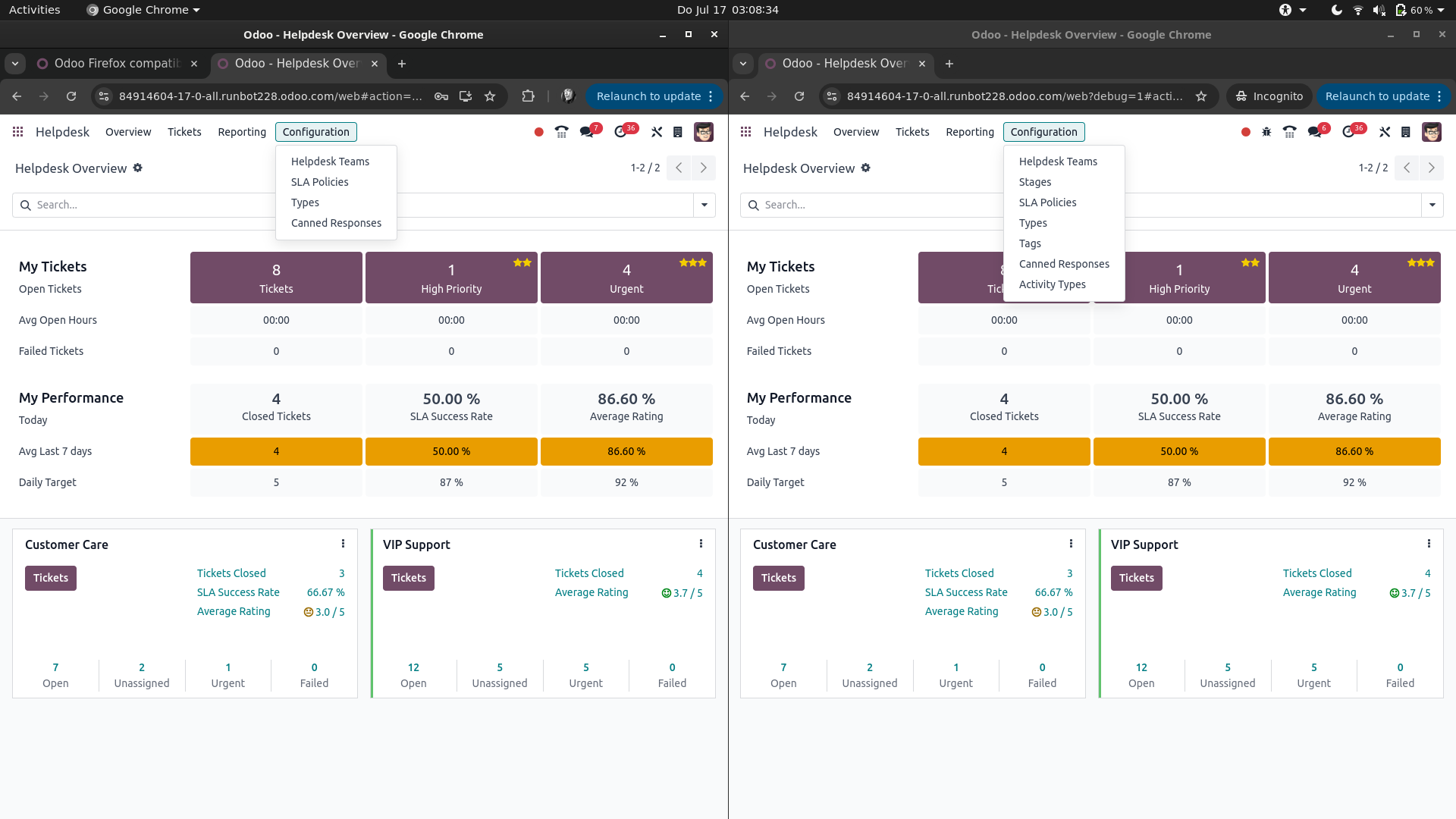
If that's the case, and you're actually logged in with the same user, then in Google Chrome you're most likely having the Developer Mode active, while your fresh log ins in Mozilla Firefox and Microsoft Edge don't.

This would look something like this (left: Developer Mode not active, right: Developer Mode is active):


You can enable the Developer Mode from Settings -> General Settings -> scroll to the bottom of the page and find Activate the developer mode. See also https://www.odoo.com/documentation/17.0/applications/general/developer_mode.html

Note: the Developer Mode is just a '?debug=1' in the URL / address bar of you browser. Changes are you've saved it as a bookmark or it's just in your browser's history.

0
Avatar
Abbandona
Ti stai godendo la conversazione? Non leggere soltanto, partecipa anche tu!

Crea un account oggi per scoprire funzionalità esclusive ed entrare a far parte della nostra fantastica community!

Registrati
Post correlati Risposte Visualizzazioni Attività
[{JetBlue#mex}]¿Cómo hablo con alguien en JetBlue?
pdf chrome firefox
Avatar
0
dic 25
42
【@Avianca ✈ Soporte Live】¿Cómo llamar a Avianca Ecuador?
follower chrome firefox
Avatar
0
nov 25
3
PhonePe में गलत अकाउंट में भेजे गए पैसे कैसे रिकवर करें?
chrome
Avatar
0
dic 25
42
Accounting in Odoo 17
chrome
Avatar
0
dic 25
5
{{%Teléfono*Latam $RD}}¿Cómo llamar a Latam desde República Dominicana?
chrome
Avatar
0
dic 25
4
Community
  • Tutorial
  • Documentazione
  • Forum
Open source
  • Scarica
  • Github
  • Runbot
  • Traduzioni
Servizi
  • Hosting Odoo.sh
  • Supporto
  • Aggiornamenti
  • Sviluppi personalizzati
  • Formazione
  • Trova un contabile
  • Trova un partner
  • Diventa nostro partner
Chi siamo
  • La nostra azienda
  • Branding
  • Contattaci
  • Lavora con noi
  • Eventi
  • Podcast
  • Blog
  • Clienti
  • Note legali • Privacy
  • Sicurezza
الْعَرَبيّة Català 简体中文 繁體中文 (台灣) Čeština Dansk Nederlands English Suomi Français Deutsch हिंदी Bahasa Indonesia Italiano 日本語 한국어 (KR) Lietuvių kalba Język polski Português (BR) română русский язык Slovenský jazyk slovenščina Español (América Latina) Español ภาษาไทย Türkçe українська Tiếng Việt

Odoo è un gestionale di applicazioni aziendali open source pensato per coprire tutte le esigenze della tua azienda: CRM, Vendite, E-commerce, Magazzino, Produzione, Fatturazione elettronica, Project Management e molto altro.

Il punto di forza di Odoo è quello di offrire un ecosistema unico di app facili da usare, intuitive e completamente integrate tra loro.

Website made with

Odoo Experience on YouTube

1. Use the live chat to ask your questions.
2. The operator answers within a few minutes.

Live support on Youtube
Watch now