Skip to Content
Odoo Menu
  • Prijavi
  • Try it free
  • Aplikacije
    Finance
    • Knjigovodstvo
    • Obračun
    • Stroški
    • Spreadsheet (BI)
    • Dokumenti
    • Podpisovanje
    Prodaja
    • CRM
    • Prodaja
    • POS Shop
    • POS Restaurant
    • Naročnine
    • Najem
    Spletne strani
    • Website Builder
    • Spletna trgovina
    • Blog
    • Forum
    • Pogovor v živo
    • eUčenje
    Dobavna veriga
    • Zaloga
    • Proizvodnja
    • PLM
    • Nabava
    • Vzdrževanje
    • Kakovost
    Kadri
    • Kadri
    • Kadrovanje
    • Odsotnost
    • Ocenjevanja
    • Priporočila
    • Vozni park
    Marketing
    • Družbeno Trženje
    • Email Marketing
    • SMS Marketing
    • Dogodki
    • Avtomatizacija trženja
    • Ankete
    Storitve
    • Projekt
    • Časovnice
    • Storitve na terenu
    • Služba za pomoč
    • Načrtovanje
    • Termini
    Produktivnost
    • Razprave
    • Odobritve
    • IoT
    • Voip
    • Znanje
    • WhatsApp
    Third party apps Odoo Studio Odoo Cloud Platform
  • Industrije
    Trgovina na drobno
    • Book Store
    • Trgovina z oblačili
    • Trgovina s pohištvom
    • Grocery Store
    • Trgovina s strojno opremo računalnikov
    • Trgovina z igračami
    Food & Hospitality
    • Bar and Pub
    • Restavracija
    • Hitra hrana
    • Guest House
    • Beverage Distributor
    • Hotel
    Nepremičnine
    • Real Estate Agency
    • Arhitekturno podjetje
    • Gradbeništvo
    • Estate Management
    • Vrtnarjenje
    • Združenje lastnikov nepremičnin
    Svetovanje
    • Računovodsko podjetje
    • Odoo Partner
    • Marketinška agencija
    • Law firm
    • Pridobivanje talentov
    • Audit & Certification
    Proizvodnja
    • Tekstil
    • Metal
    • Pohištvo
    • Hrana
    • Brewery
    • Poslovna darila
    Health & Fitness
    • Športni klub
    • Trgovina z očali
    • Fitnes center
    • Wellness Practitioners
    • Lekarna
    • Frizerski salon
    Trades
    • Handyman
    • IT Hardware & Support
    • Sistemi sončne energije
    • Izdelovalec čevljev
    • Čistilne storitve
    • HVAC Services
    Ostali
    • Neprofitna organizacija
    • Agencija za okolje
    • Najem oglasnih panojev
    • Fotografija
    • Najem koles
    • Prodajalec programske opreme
    Browse all Industries
  • Skupnost
    Learn
    • Tutorials
    • Dokumentacija
    • Certifikati
    • Šolanje
    • Blog
    • Podcast
    Empower Education
    • Education Program
    • Scale Up! Business Game
    • Visit Odoo
    Get the Software
    • Prenesi
    • Compare Editions
    • Releases
    Collaborate
    • Github
    • Forum
    • Dogodki
    • Prevodi
    • Become a Partner
    • Services for Partners
    • Register your Accounting Firm
    Get Services
    • Find a Partner
    • Find an Accountant
    • Meet an advisor
    • Implementation Services
    • Sklici kupca
    • Podpora
    • Upgrades
    Github Youtube Twitter Linkedin Instagram Facebook Spotify
    +1 (650) 691-3277
    Get a demo
  • Določanje cen
  • Pomoč

Odoo is the world's easiest all-in-one management software.
It includes hundreds of business apps:

  • CRM
  • e-Commerce
  • Knjigovodstvo
  • Zaloga
  • PoS
  • Projekt
  • MRP
All apps
You need to be registered to interact with the community.
All Posts People Badges
Ključne besede (View all)
odoo accounting v14 pos v15
About this forum
You need to be registered to interact with the community.
All Posts People Badges
Ključne besede (View all)
odoo accounting v14 pos v15
About this forum
Pomoč

Odoo Firefox compatibility issue menu

Naroči se

Get notified when there's activity on this post

This question has been flagged
chromefirefox
3 Odgovori
1239 Prikazi
Avatar
Diana Oseguera

I have attempted several common solutions without success. Here are the results of my tests:

  1. Clearing Firefox cache and cookies for the Odoo site: Performed. Did not resolve the issue.
  2. SSL Certificate Verification: The certificate for *.grobitt.com is valid, issued by Let's Encrypt, and its expiration date is in the future (confirmed with image_10b07c.png). Therefore, the initial "speculative insecure TCP connection" warning in the console does not appear to be the cause.
  3. Disabling all Firefox extensions/add-ons: Performed. Did not resolve the issue.
  4. Checking the browser console:
    • Initially showed some "insecure TCP connection" warnings and Favicon errors (see image_10b784.png).
    • After clearing cache and retesting, the console is mostly clean, showing only Odoo debug messages (like _app[data-menu-xmlid=...]) and an "unreachable code" warning in tours.min.js, none of which seem critical for the menu's display (see image_10a8e3.png).
  5. Attempts to inspect the menu element in Firefox's Inspector: I found it difficult to inspect the dropdown menu div as it quickly disappears when the focus is removed from the button, even when trying to pause JavaScript with F8. I was unable to obtain CSS information showing obvious truncation.
  6. Testing in Firefox Safe Mode: Performed. The menu still does not fully expand.
  7. Disabling hardware acceleration in Firefox: Performed. The problem persists.
  8. Testing with a new Firefox profile: (Describe the result here: "Performed. The issue persists / was resolved in the new profile.")

Any insights or suggestions from the community would be greatly appreciated. Thank you in advance for your help!

0
Avatar
Opusti
Christoph Farnleitner

Ok, but what is the issue?

Diana Oseguera
Avtor

Oh, my bad — in Firefox the menu doesn’t fully display, but in Chrome it does. I thought the photos had been copied. For some reason I use the same user in Firefox and I see fewer options in the settings menu. 


Christoph Farnleitner

Website? Backend? Also, what version of Odoo are you running and should we be aware about any previous customization? Some images showing the actual issue would be more than helpful.

Diana Oseguera
Avtor

My version is 17 Enterprise, sorry, my Karma level doesn’t allow me to upload photos. It's in the Customer Service module from the backend — in the settings menu, I get more options when using Chrome, but not in Firefox, Safari, or Edge. I've done everything they asked me to do, but nothing worked. :(

Diana Oseguera
Avtor

I'll try tomorrow, otherwise, if I can't, can I ask you again? hehe

Avatar
Dhrumi (Wan Buffer Services)
Best Answer
  • Possible Causes:
    • Cached JavaScript or CSS issues in Firefox.
    • Extensions or ad blockers interfering with Odoo’s JS.
    • Firefox version compatibility problem (outdated browser).
    • DOM rendering issue specific to Firefox (e.g., CSS z-index or overflow problems).
  • Solutions:
    • Clear Firefox cache and hard reload the page (Ctrl+Shift+R).
    • Disable all extensions and retry.
    • Update Firefox to the latest version.
    • Try in incognito mode to rule out profile issues.
    • If the issue persists only in Firefox but works in Chrome, raise a bug with Odoo including console logs.

0
Avatar
Opusti
Avatar
Diana Oseguera
Avtor Best Answer

No, it's a module with a green and white cross. In both cases, I'm not in developer mode, but the configuration menu doesn't expand. I'm attaching links to some pictures. I tried using different browsers.


https://imgur.com/a/4tsRWnc


0
Avatar
Opusti
Christoph Farnleitner

This is the Helpdesk App, yes. If you didn't try enable Developer Mode just do i now. The apperance of the menu fits exactly the screen of mine.

Diana Oseguera
Avtor

I'll try tomorrow, otherwise, if I can't, can I ask you again? hehe

Avatar
Christoph Farnleitner
Best Answer

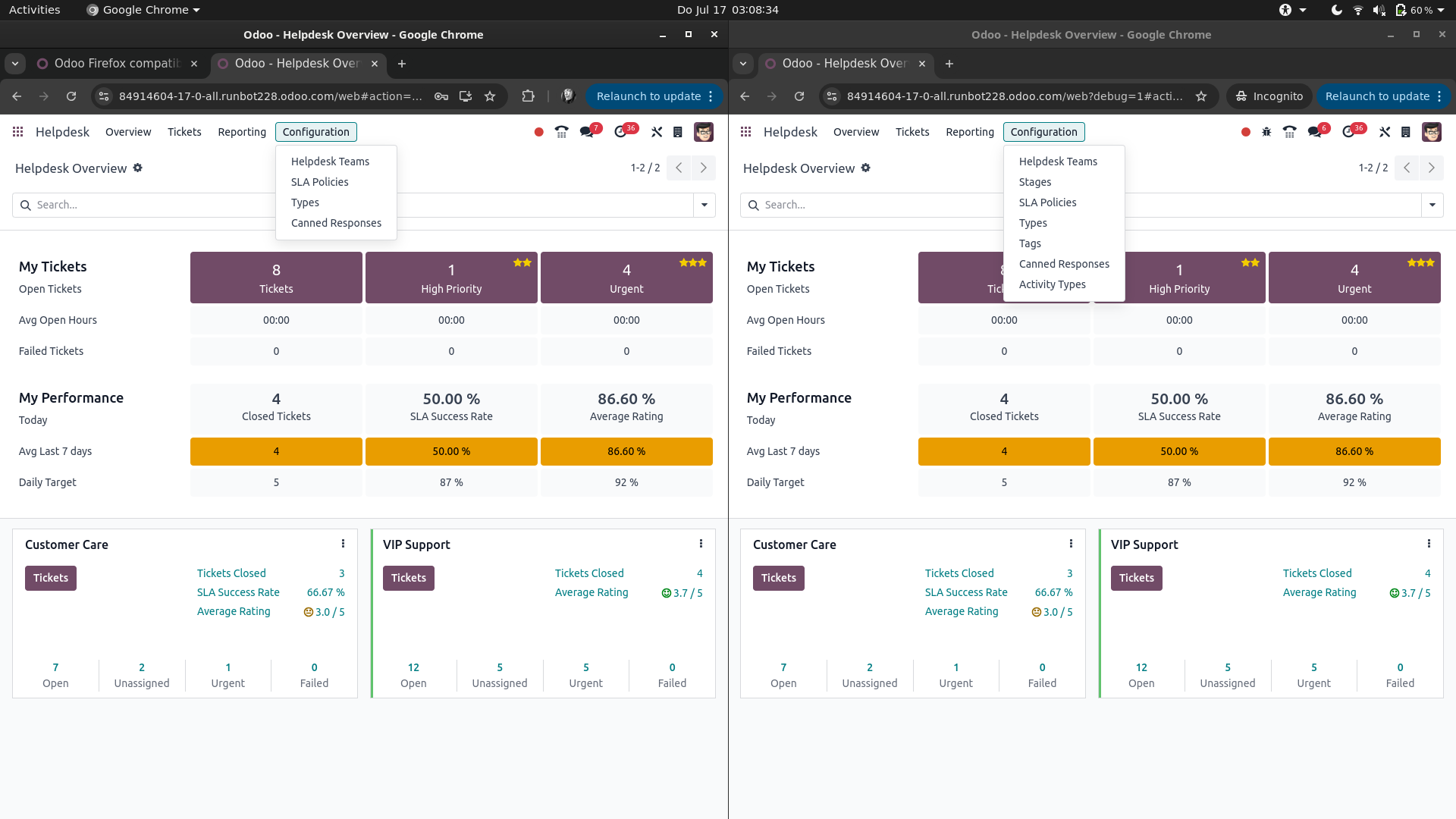
There is no Customer Service App in Odoo, but I guess you're talking about the Helpdesk and by Settings menu you're probably referring to Configuration (probably just got lost in translation somewhere).

If that's the case, and you're actually logged in with the same user, then in Google Chrome you're most likely having the Developer Mode active, while your fresh log ins in Mozilla Firefox and Microsoft Edge don't.

This would look something like this (left: Developer Mode not active, right: Developer Mode is active):


You can enable the Developer Mode from Settings -> General Settings -> scroll to the bottom of the page and find Activate the developer mode. See also https://www.odoo.com/documentation/17.0/applications/general/developer_mode.html

Note: the Developer Mode is just a '?debug=1' in the URL / address bar of you browser. Changes are you've saved it as a bookmark or it's just in your browser's history.

0
Avatar
Opusti
Enjoying the discussion? Don't just read, join in!

Create an account today to enjoy exclusive features and engage with our awesome community!

Prijavi
Related Posts Odgovori Prikazi Aktivnost
[{JetBlue#mex}]¿Cómo hablo con alguien en JetBlue?
pdf chrome firefox
Avatar
0
dec. 25
42
【@Avianca ✈ Soporte Live】¿Cómo llamar a Avianca Ecuador?
follower chrome firefox
Avatar
0
nov. 25
3
PhonePe में गलत अकाउंट में भेजे गए पैसे कैसे रिकवर करें?
chrome
Avatar
0
dec. 25
41
Accounting in Odoo 17
chrome
Avatar
0
dec. 25
5
{{%Teléfono*Latam $RD}}¿Cómo llamar a Latam desde República Dominicana?
chrome
Avatar
0
dec. 25
4
Community
  • Tutorials
  • Dokumentacija
  • Forum
Open Source
  • Prenesi
  • Github
  • Runbot
  • Prevodi
Services
  • Odoo.sh Hosting
  • Podpora
  • Nadgradnja
  • Custom Developments
  • Izobraževanje
  • Find an Accountant
  • Find a Partner
  • Become a Partner
About us
  • Our company
  • Sredstva blagovne znamke
  • Kontakt
  • Zaposlitve
  • Dogodki
  • Podcast
  • Blog
  • Stranke
  • Pravno • Zasebnost
  • Varnost
الْعَرَبيّة Català 简体中文 繁體中文 (台灣) Čeština Dansk Nederlands English Suomi Français Deutsch हिंदी Bahasa Indonesia Italiano 日本語 한국어 (KR) Lietuvių kalba Język polski Português (BR) română русский язык Slovenský jazyk slovenščina Español (América Latina) Español ภาษาไทย Türkçe українська Tiếng Việt

Odoo is a suite of open source business apps that cover all your company needs: CRM, eCommerce, accounting, inventory, point of sale, project management, etc.

Odoo's unique value proposition is to be at the same time very easy to use and fully integrated.

Website made with

Odoo Experience on YouTube

1. Use the live chat to ask your questions.
2. The operator answers within a few minutes.

Live support on Youtube
Watch now