Se rendre au contenu
Odoo Menu
  • Se connecter
  • Essai gratuit
  • Applications
    Finance
    • Comptabilité
    • Facturation
    • Notes de frais
    • Feuilles de calcul (BI)
    • Documents
    • Signature
    Ventes
    • CRM
    • Ventes
    • PdV Boutique
    • PdV Restaurant
    • Abonnements
    • Location
    Sites web
    • Site Web
    • eCommerce
    • Blog
    • Forum
    • Live Chat
    • eLearning
    Chaîne d'approvisionnement
    • Inventaire
    • Fabrication
    • PLM
    • Achats
    • Maintenance
    • Qualité
    Ressources Humaines
    • Employés
    • Recrutement
    • Congés
    • Évaluations
    • Recommandations
    • Parc automobile
    Marketing
    • Marketing Social
    • E-mail Marketing
    • SMS Marketing
    • Événements
    • Marketing Automation
    • Sondages
    Services
    • Projet
    • Feuilles de temps
    • Services sur Site
    • Assistance
    • Planification
    • Rendez-vous
    Productivité
    • Discussion
    • Validations
    • Internet des Objets
    • VoIP
    • Connaissances
    • WhatsApp
    Applications tierces Odoo Studio Plateforme Cloud d'Odoo
  • Industries
    Commerce de détail
    • Librairie
    • Magasin de vêtements
    • Magasin de meubles
    • Épicerie
    • Quincaillerie
    • Magasin de jouets
    Food & Hospitality
    • Bar et Pub
    • Restaurant
    • Fast-food
    • Maison d’hôtes
    • Distributeur de boissons
    • Hôtel
    Immobilier
    • Agence immobilière
    • Cabinet d'architecture
    • Construction
    • Gestion immobilière
    • Jardinage
    • Association de copropriétaires
    Consultance
    • Cabinet d'expertise comptable
    • Partenaire Odoo
    • Agence Marketing
    • Cabinet d'avocats
    • Aquisition de talents
    • Audit & Certification
    Fabrication
    • Textile
    • Métal
    • Meubles
    • Alimentation
    • Brewery
    • Cadeaux d'entreprise
    Santé & Fitness
    • Club de sports
    • Opticien
    • Salle de fitness
    • Praticiens bien-être
    • Pharmacie
    • Salon de coiffure
    Trades
    • Bricoleur
    • Matériel informatique et support
    • Systèmes photovoltaïques
    • Cordonnier
    • Services de nettoyage
    • Services CVC
    Autres
    • Organisation à but non lucratif
    • Agence environnementale
    • Location de panneaux d'affichage
    • Photographie
    • Leasing de vélos
    • Revendeur de logiciel
    Browse all Industries
  • Communauté
    Apprenez
    • Tutoriels
    • Documentation
    • Certifications
    • Formation
    • Blog
    • Podcast
    Renforcer l'éducation
    • Programme éducatif
    • Business Game Scale-Up!
    • Rendez-nous visite
    Obtenir le logiciel
    • Téléchargement
    • Comparez les éditions
    • Versions
    Collaborer
    • Github
    • Forum
    • Événements
    • Traductions
    • Devenez partenaire
    • Services for Partners
    • Enregistrer votre cabinet comptable
    Nos Services
    • Trouver un partenaire
    • Trouver un comptable
    • Rencontrer un conseiller
    • Services de mise en œuvre
    • Références clients
    • Assistance
    • Mises à niveau
    Github Youtube Twitter Linkedin Instagram Facebook Spotify
    +1 (650) 691-3277
    Obtenir une démonstration
  • Tarification
  • Aide

Odoo is the world's easiest all-in-one management software.
It includes hundreds of business apps:

  • CRM
  • e-Commerce
  • Comptabilité
  • Inventaire
  • PoS
  • Projet
  • MRP
All apps
Vous devez être inscrit pour interagir avec la communauté.
Toutes les publications Personnes Badges
Étiquettes (Voir toutl)
odoo accounting v14 pos v15
À propos de ce forum
Vous devez être inscrit pour interagir avec la communauté.
Toutes les publications Personnes Badges
Étiquettes (Voir toutl)
odoo accounting v14 pos v15
À propos de ce forum
Aide

Poor UX in Appointment Cancellation Flow

S'inscrire

Recevez une notification lorsqu'il y a de l'activité sur ce poste

Cette question a été signalée
CalendarAppointmentsUX
1 Répondre
1184 Vues
Avatar
Eileen Ang

My appointment set-up assignment method is "Pick User/Resource then Time". It seems that because of this, I get a poor appointment cancellation UX. 


What happens: 

When a customer clicks "Cancel Appointment" on the online booking page, they are immediately redirected to the "Choose Resource" screen with no confirmation or visual indication that the appointment was cancelled. 

Only after they have clicked on a resource, are they then shown the "Appointment Cancelled" page. 

This causes confusion - customers will assume the cancellation didn't go through. The actual cancellation confirmation only appears after selecting a resource again, which is illogical and very poor user experience. 

To add to this, it doesn't matter what resource they've clicked, it doesn't even have to be the one they booked. As long as they click on any resource, they are redirected to the cancellation confirmation page. This seems very illogical to me and causes even myself a lot of confusion. 


How can I fix this? I feel that this is a UX flaw that should be corrected in the original module. 


Expected behaviour: 

  • After clicking "Cancel Appointment", the user should immediately be shown a cancellation confirmation 
  • There should be no further navigation required to confirm the action, especially when there is no explanation on the choosing resource page on what to do next 

I'm using odoo online so I cannot access the routes. How else can I fix this? 

2
Avatar
Ignorer
Avatar
Christoph Farnleitner
Meilleure réponse

This apparently is a bug and should be reported to https://odoo.com/help. The behavior can be reproduced in https://demo.odoo.com using - and this is an important side note - Assignment Method 'Pick User/Resource then Time' AND Availability on 'Resources (e.g. Tables, Courts, Rooms, ...)'. Since this configuration works as you've suggested when Availability on is set to 'Users' it seems to me like a simple oversight in testing.

If the current behavior bothers you too much, you can do the following hotfix (a temporary solution only!):

Enable the Developer Mode (https://www.odoo.com/documentation/18.0/applications/general/developer_mode.html), then navigate to Settings -> Technical --> User Interface -> Views.

Here, you will need to modify two view templates:

  • Key: appointment.appointment_info (Appointment: Appointment Info)
  • Key: website_appointment.appointment_select_operator (Appointment: Appointment Operators)

appointment.appointment_info:

Line 41 to 44 should currently read:

<div t-if="state == 'cancel'" role="alert" class="o_appointment_cancelled alert alert-danger">
<strong>Appointment cancelled!</strong>
You can now choose a different schedule that suits you better.
</div>

Replace it with:

<!-- hotfix to address missing cancellation message: start -->
<!-- this will prevent the cancellation message from being displayed a second time when re-scheduling right after a cancel event -->
<!-- see https://www.odoo.com/forum/1/280749 for details -->
<!--
<div t-if="state == 'cancel'" role="alert" class="o_appointment_cancelled alert alert-danger">
<strong>Appointment cancelled!</strong>
You can now choose a different schedule that suits you better.
</div>
-->
<!-- hotfix to address missing cancellation message: end -->

(This will prevent the cancellation message from appearing in the time-slot selection view future onwards. Make sure this does not clash with other appointment types in your system!)


website_appointment.appointment_select_operator:

Line 22 to 23 should currently read:

<div class="row">
<div t-if="appointment_type.schedule_based_on == 'users'" t-foreach="users_possible" t-as="staff_user" class="col-md-6 col-lg-4 mb-4">

In between these two lines, add this:

<!-- hotfix to address missing cancellation message: start -->
<!-- this will fetch the GET parameter 'state' from the URL and display a cancellation message if that parameter's value is 'cancel' -->
<!-- see https://www.odoo.com/forum/1/280749 for details -->
<div t-if="request.params.get('state') == 'cancel'" role="alert" class="o_appointment_cancelled alert alert-danger">
<strong>Appointment cancelled!</strong>
You can now choose a different schedule that suits you better.
</div>
<!-- hotfix to address missing cancellation message: end -->


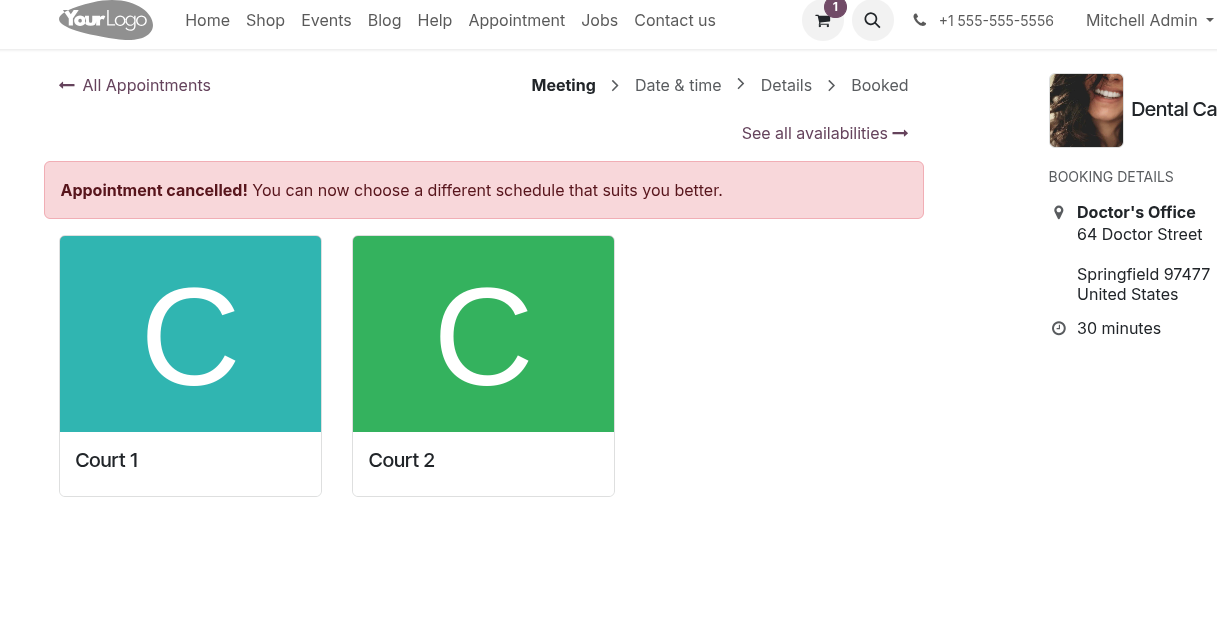
Your result will look like this then:


Please note:

This is not a recommended, update-safe way of implementing changes to templates! In my opinion it is however a doable approach when a custom hot fix needs to be applied in Odoo Online until the issue is resolved in core.


Note as well: 

This change may has to be manually reverted or reset, once/when/if a solution is provided by Odoo help desk.
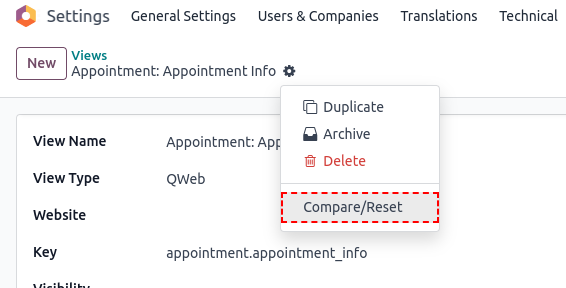
To do so, you can navigate to these two views again, click the Actions cog -> Compare/Reset


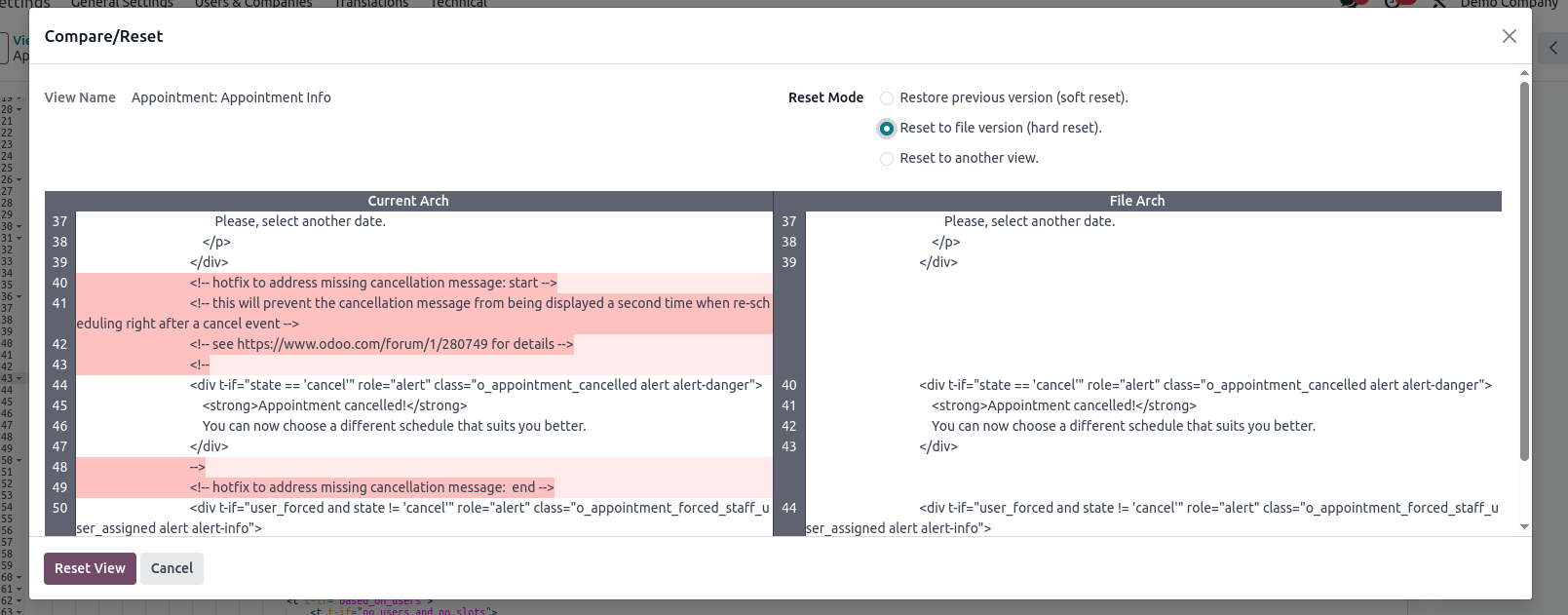
In the appearing wizard view, select Reset Mode 'Reset to file version (hard reset)' and click Reset View

(the source it will reset to may differ from what has been changed / is visible in the screen in case a fix by Odoo was applied to either of these files)


Final note: Above hotfix works, because 'There should be no further navigation required to confirm the action' is actually not needed. The cancellation has happened at the time of (prior to) being redirected and the problem is just a visual one.

1
Avatar
Ignorer
Eileen Ang
Auteur

Thank you so much for looking into the issue and your extremely detailed response. I will be submitting a bug report on this issue to Odoo. I really appreciate your help also in identifying a hotfix as well as highlighting how to reverse the fix if/when the core issue has been resolved.

Vous appréciez la discussion ? Ne vous contentez pas de lire, rejoignez-nous !

Créez un compte dès aujourd'hui pour profiter de fonctionnalités exclusives et échanger avec notre formidable communauté !

S'inscrire
Publications associées Réponses Vues Activité
How to add new answer type to questions in Appointments
Appointments
Avatar
Avatar
1
avr. 25
1237
Multi-booking for appointments?
Appointments
Avatar
0
févr. 25
2190
Issue with Double Bookings in Appointment Module Due to Extra Availability
Appointments
Avatar
0
févr. 25
1726
Online appointment causing duplicate contacts
duplicate Appointments
Avatar
0
mars 25
1439
Where is Appointment tag added to meeting for website appointments
categories Appointments
Avatar
0
nov. 24
1233
Communauté
  • Tutoriels
  • Documentation
  • Forum
Open Source
  • Téléchargement
  • Github
  • Runbot
  • Traductions
Services
  • Hébergement Odoo.sh
  • Assistance
  • Migration
  • Développements personnalisés
  • Éducation
  • Trouver un comptable
  • Trouver un partenaire
  • Devenez partenaire
À propos
  • Notre société
  • Actifs de la marque
  • Contactez-nous
  • Emplois
  • Événements
  • Podcast
  • Blog
  • Clients
  • Informations légales • Confidentialité
  • Sécurité.
الْعَرَبيّة Català 简体中文 繁體中文 (台灣) Čeština Dansk Nederlands English Suomi Français Deutsch हिंदी Bahasa Indonesia Italiano 日本語 한국어 (KR) Lietuvių kalba Język polski Português (BR) română русский язык Slovenský jazyk slovenščina Español (América Latina) Español ภาษาไทย Türkçe українська Tiếng Việt

Odoo est une suite d'applications open source couvrant tous les besoins de votre entreprise : CRM, eCommerce, Comptabilité, Inventaire, Point de Vente, Gestion de Projet, etc.

Le positionnement unique d'Odoo est d'être à la fois très facile à utiliser et totalement intégré.

Website made with

Odoo Experience on YouTube

1. Use the live chat to ask your questions.
2. The operator answers within a few minutes.

Live support on Youtube
Watch now