
I am getting an error "There is no Chart of Accounts configured on the company. Please go to the invoicing settings to install a Chart of Accounts" when creating a POS
Odoo is the world's easiest all-in-one management software.
It includes hundreds of business apps:
- CRM
- e-Commerce
- Buchhaltung
- Lager
- PoS
- Projekte
- MRP
Diese Frage wurde gekennzeichnet
1
Antworten
1154
Ansichten


Hello,
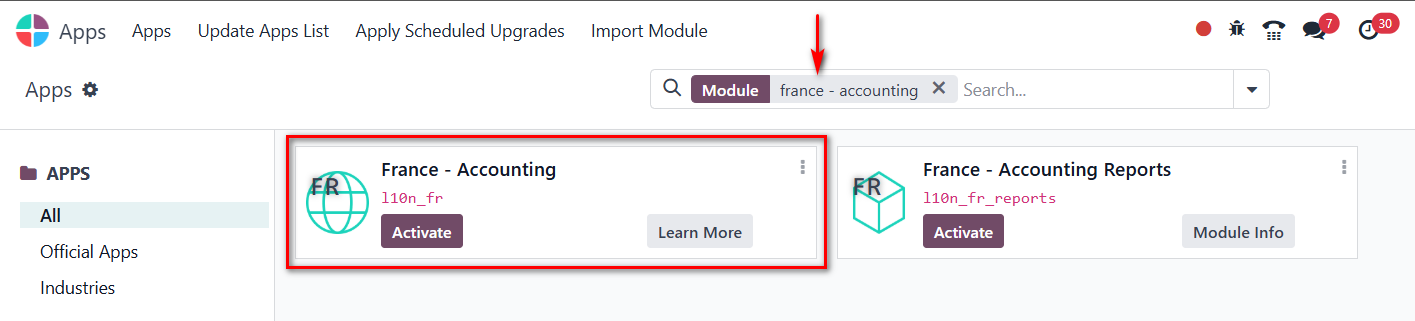
First of all, you need to install a chart of accounts from the apps menu (e.g.: type France - Accounting to install the French chart of accounts). Once installed, you can configure it in the invoicing settings.
Diskutieren Sie gerne? Treten Sie bei, statt nur zu lesen!
Erstellen Sie heute ein Konto, um exklusive Funktionen zu nutzen und mit unserer tollen Community zu interagieren!
Registrieren
To create a Chart of Accounts in your Invoicing settings, go to Settings → Chart of Accounts → Create. Add a new account by choosing the Account Type (like income, expense, or liability), enter a clear Account Name, and save it. Once added, you can assign these accounts to products, taxes, or journals in your invoicing setup to ensure every transaction posts correctly.
Thank issue was resolved