Zum Inhalt springen
Odoo Menü
  • Anmelden
  • Jetzt gratis testen
  • Apps
    Finanzen
    • Buchhaltung
    • Rechnungsstellung
    • Spesenabrechnung
    • Tabellenkalkulation (BI)
    • Dokumente
    • E-Signatur
    Vertrieb
    • CRM
    • Vertrieb
    • Kassensystem – Shop
    • Kassensystem – Restaurant
    • Abonnements
    • Vermietung
    Websites
    • Website-Builder
    • E-Commerce
    • Blog
    • Forum
    • Livechat
    • E-Learning
    Lieferkette
    • Lager
    • Fertigung
    • PLM
    • Einkauf
    • Wartung
    • Qualität
    Personalwesen
    • Mitarbeiter
    • Personalbeschaffung
    • Abwesenheiten
    • Mitarbeiterbeurteilung
    • Personalempfehlungen
    • Fuhrpark
    Marketing-
    • Social Marketing
    • E-Mail-Marketing
    • SMS-Marketing
    • Veranstaltungen
    • Marketing-Automatisierung
    • Umfragen
    Dienstleistungen
    • Projekte
    • Zeiterfassung
    • Außendienst
    • Kundendienst
    • Planung
    • Termine
    Produktivität
    • Dialog
    • Genehmigungen
    • IoT
    • VoIP
    • Wissensdatenbank
    • WhatsApp
    Apps von Drittanbietern Odoo Studio Odoo Cloud-Plattform
  • Branchen
    Einzelhandel
    • Buchladen
    • Kleidergeschäft
    • Möbelhaus
    • Lebensmittelgeschäft
    • Baumarkt
    • Spielwarengeschäft
    Essen & Gastgewerbe
    • Bar und Kneipe
    • Restaurant
    • Fast Food
    • Gästehaus
    • Getränkehändler
    • Hotel
    Immobilien
    • Immobilienagentur
    • Architekturbüro
    • Baugewerbe
    • Immobilienverwaltung
    • Gartenarbeit
    • Eigentümervereinigung
    Beratung
    • Buchhaltungsfirma
    • Odoo-Partner
    • Marketingagentur
    • Anwaltskanzlei
    • Talentakquise
    • Prüfung & Zertifizierung
    Fertigung
    • Textil
    • Metall
    • Möbel
    • Speisen
    • Brauerei
    • Firmengeschenke
    Gesundheit & Fitness
    • Sportklub
    • Brillengeschäft
    • Fitnessstudio
    • Therapeut
    • Apotheke
    • Friseursalon
    Handel
    • Handyman
    • IT-Hardware & -Support
    • Solarenergiesysteme
    • Schuster
    • Reinigungsdienstleistungen
    • HLK-Dienstleistungen
    Sonstiges
    • Gemeinnützige Organisation
    • Umweltschutzagentur
    • Plakatwandvermietung
    • Fotostudio
    • Fahrrad-Leasing
    • Software-Händler
    Alle Branchen ansehen
  • Community
    Lernen
    • Tutorials
    • Dokumentation
    • Zertifizierungen
    • Schulung
    • Blog
    • Podcast
    Bildung fördern
    • Bildungsprogramm
    • Scale-Up! Planspiel
    • Odoo besuchen
    Software anfragen
    • Herunterladen
    • Editionen vergleichen
    • Releases
    Zusammenarbeiten
    • Github
    • Forum
    • Veranstaltungen
    • Übersetzungen
    • Partner werden
    • Dienstleistungen für Partner
    • Buchhaltungsfirma registrieren
    Services anfragen
    • Partner finden
    • Buchhalter finden
    • Einen Experten treffen
    • Implementierungsservices
    • Kundenreferenzen
    • Support
    • Upgrades
    Github Youtube Twitter Linkedin Instagram Facebook Spotify
    +1 (650) 691-3277
    Eine Demo erhalten
  • Preiskalkulation
  • Hilfe

Odoo is the world's easiest all-in-one management software.
It includes hundreds of business apps:

  • CRM
  • e-Commerce
  • Buchhaltung
  • Lager
  • PoS
  • Projekte
  • MRP
All apps
Sie müssen registriert sein, um mit der Community zu interagieren.
Alle Beiträge Personen Abzeichen
Stichwörter (Alle anzeigen)
odoo accounting v14 pos v15
Über dieses Forum
Sie müssen registriert sein, um mit der Community zu interagieren.
Alle Beiträge Personen Abzeichen
Stichwörter (Alle anzeigen)
odoo accounting v14 pos v15
Über dieses Forum
Hilfe

How to configure multiple options for each of my choices in the Combo

Abonnieren

Erhalten Sie eine Benachrichtigung, wenn es eine Aktivität zu diesem Beitrag gibt

Diese Frage wurde gekennzeichnet
productcomboQuickstartSF-ExpertsOdoo18.0
2 Antworten
5994 Ansichten
Avatar
Vasudevan Padmanabhan (vpd)

How can I configure combos, with some of my products having options?

1
Avatar
Verwerfen
Pierre-Yves Puech

Why is this only working with the variant creation set to "never"?? it makes no sense to me! that feature would be an absolute savior for my current implementation dealing with multi attributes configurable products and sales combo, but i can't use it because it just doesn't work with regular variants as combo options (could be just as simple as being able to put the product.template in the combo option instead of product.product, or maybe specify special combo attributes on top the the regular ones, so when the option is selected then the configuration popup comes... today i have to put all my thousands of variants as options, and instead of having a simple configurator for the user popping up, i have an unusable table of thousand of products to chose from!)

Avatar
Vasudevan Padmanabhan (vpd)
Autor Beste Antwort

Combo products were introduced in Odoo 17 for POS. It has now been improved significantly with the ability to add options within each choice. And we can now have combo products on Sales and eCommerce.

For this example, I will be creating a burger combo product which will have a burger and a drink.

First we would have to create products which will be part of the combo product.

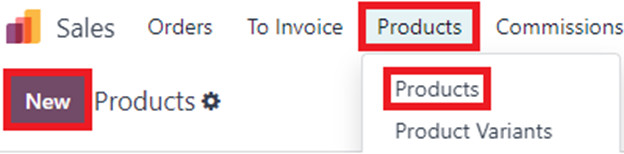
Go to Sales -> Products and create a product.
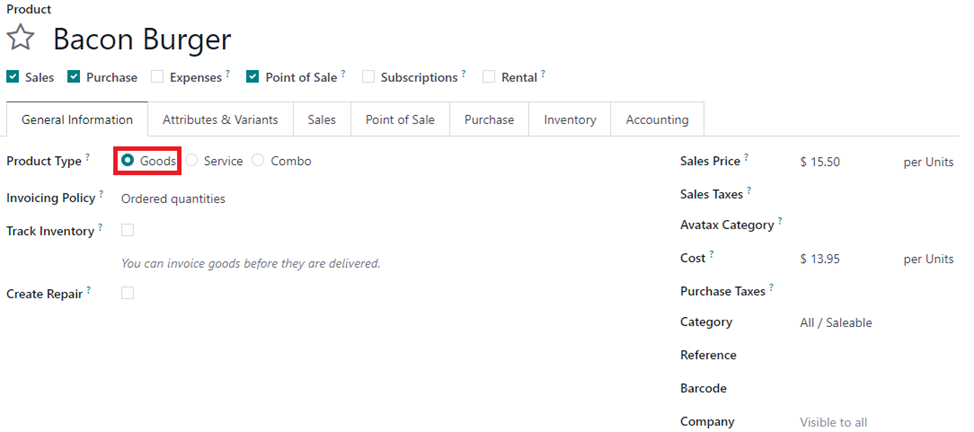
Set the Product type as Goods
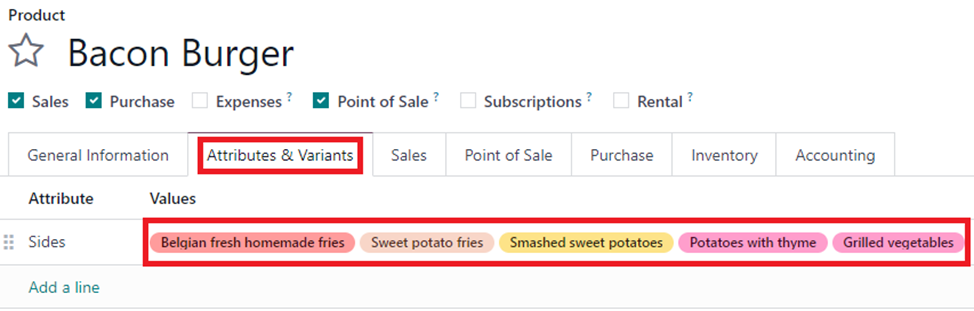
Add the options for combo choices as Attributes and Values

In this example, For the bacon burger, there are options foe some sides that go along with it.
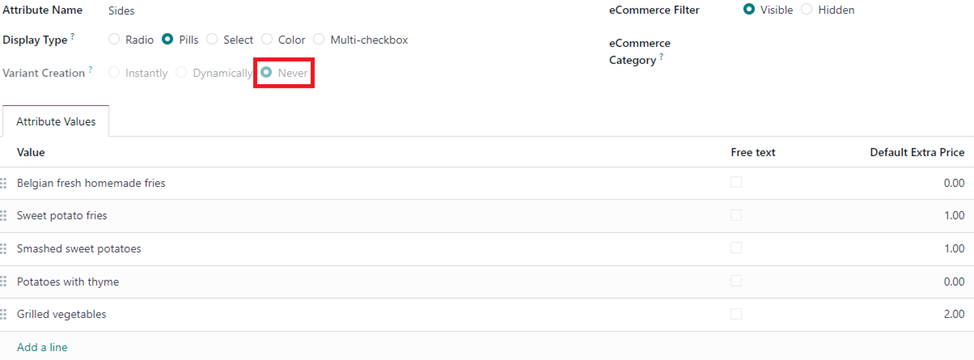
Make sure to have the attribute and value has Never as Variant creation mode.
Once all the products for choices are created, we can create the combo choices.

Go to Sales -> Configuration -> Combo Choices
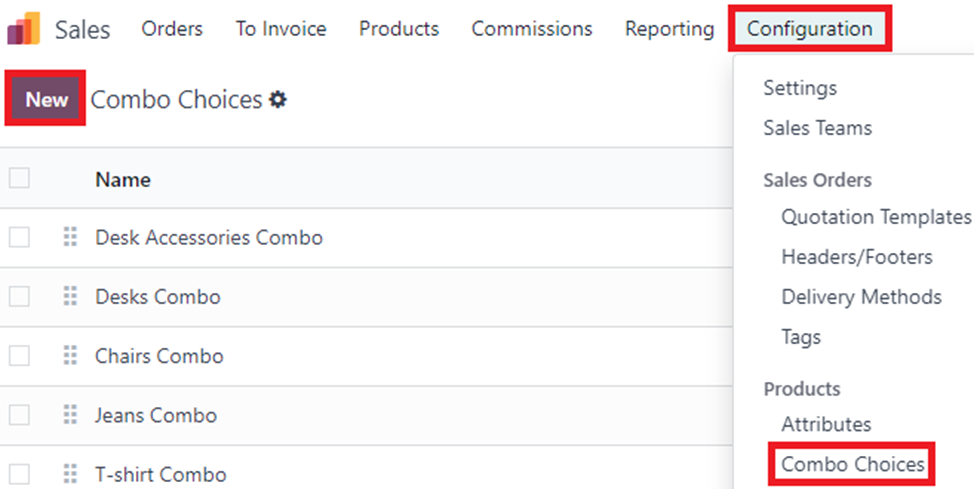
Create a new combo choice, for this example I will create a Burger and Drinks combo choice

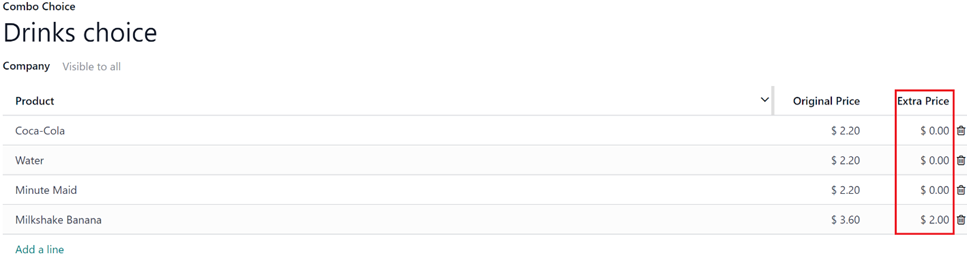
If a specific choice is more expensive, extra price can be added.

Once attributes and combo choices are created, we can create the Combo product.

Set the product type as Combo. Add the Combo choices on the Combo Choice field.
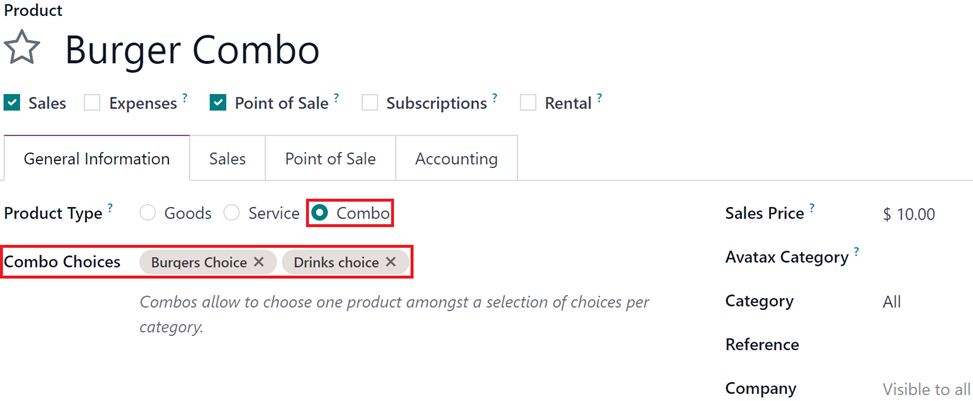
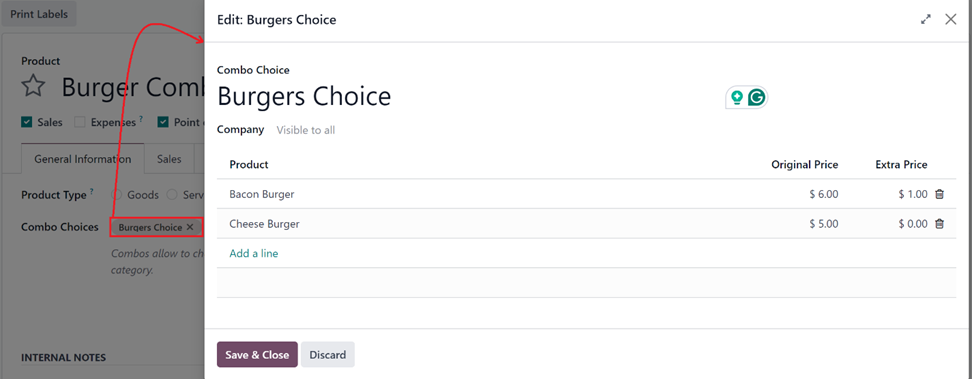
Selecting the Choice will open a popup of the choices, and the choices can then be edited if needed.
In POS app select the Combo product
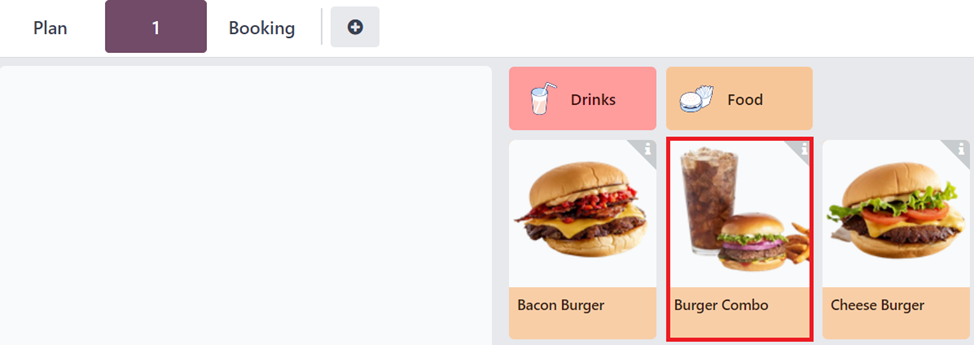
This will open up the choices for the combo product in a pop-up window.
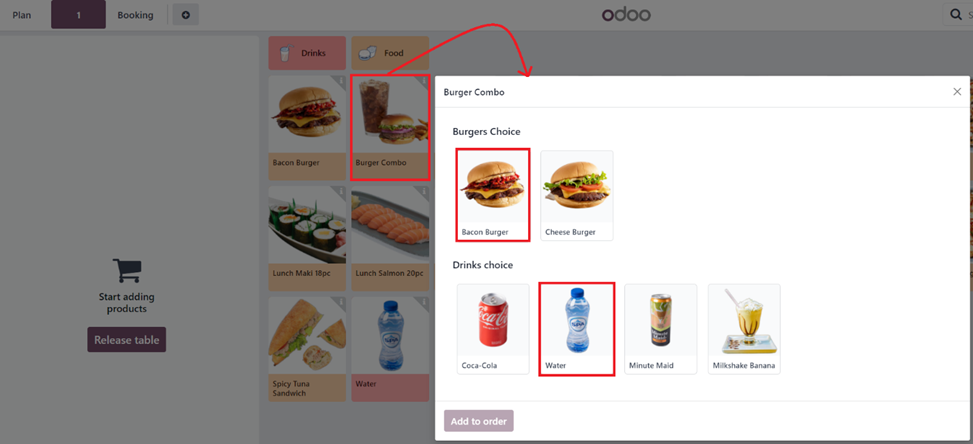
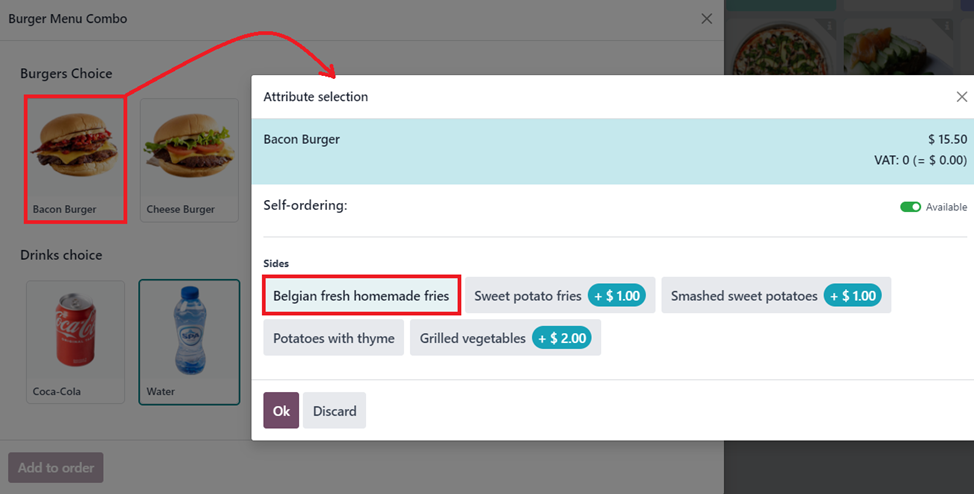
When an option that has attributes and values like the Bacon burger is selected, it opens another pop-up window where the options can be selected.
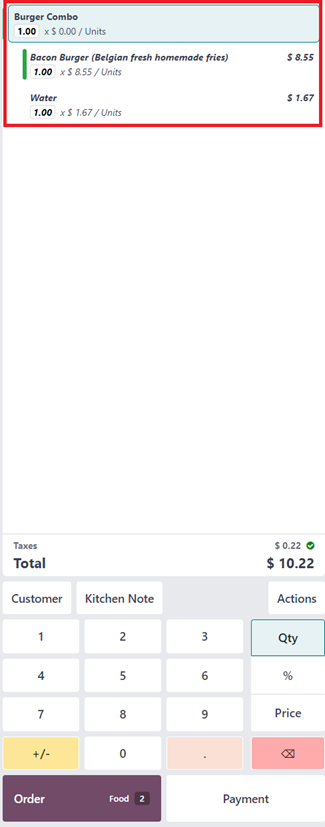
Once the options for the choices are made the product combo will be added to the order.
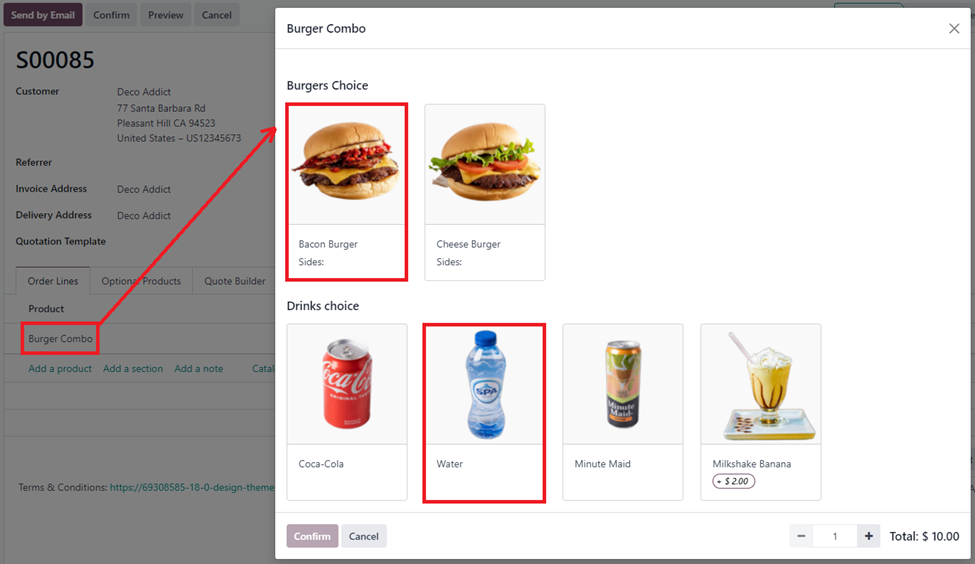
In the sales app when a combo product is selected on the sale order line a pop-up to choose the products from the option is displayed for the user to pick from the choices of the products.
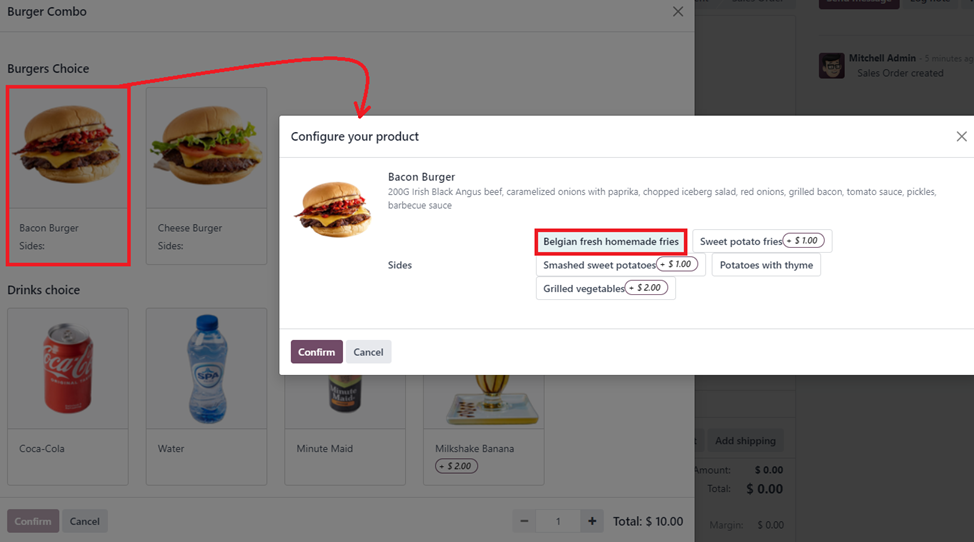
When a product with variants is selected it opens up another pop-up where attributes and values can be selected.
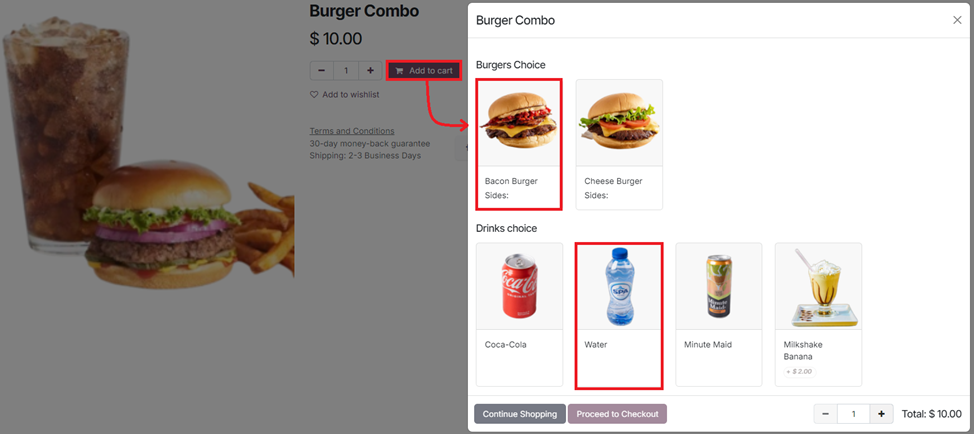
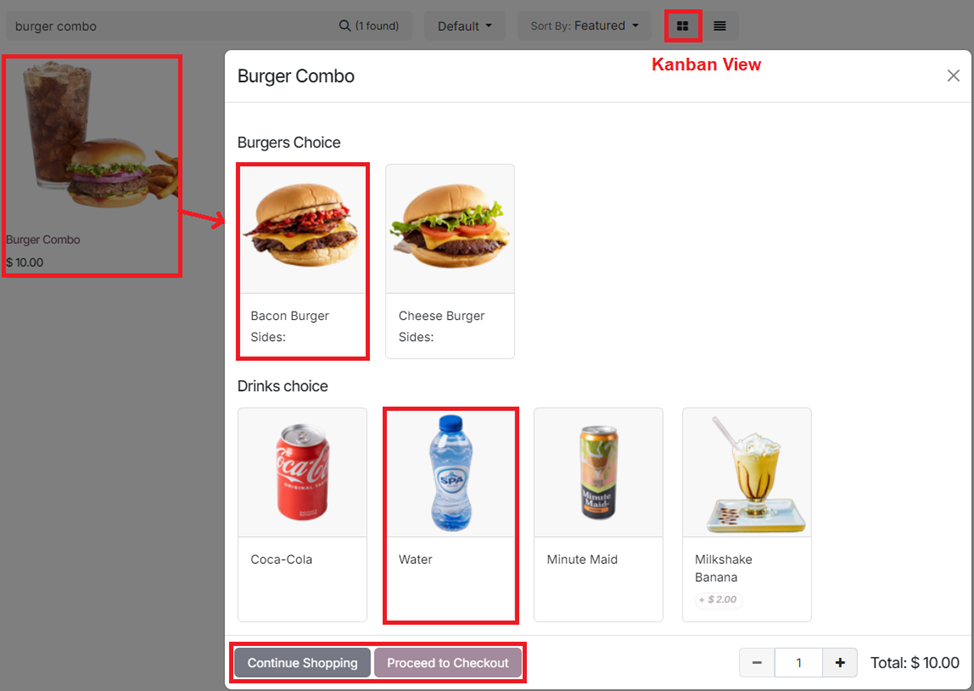
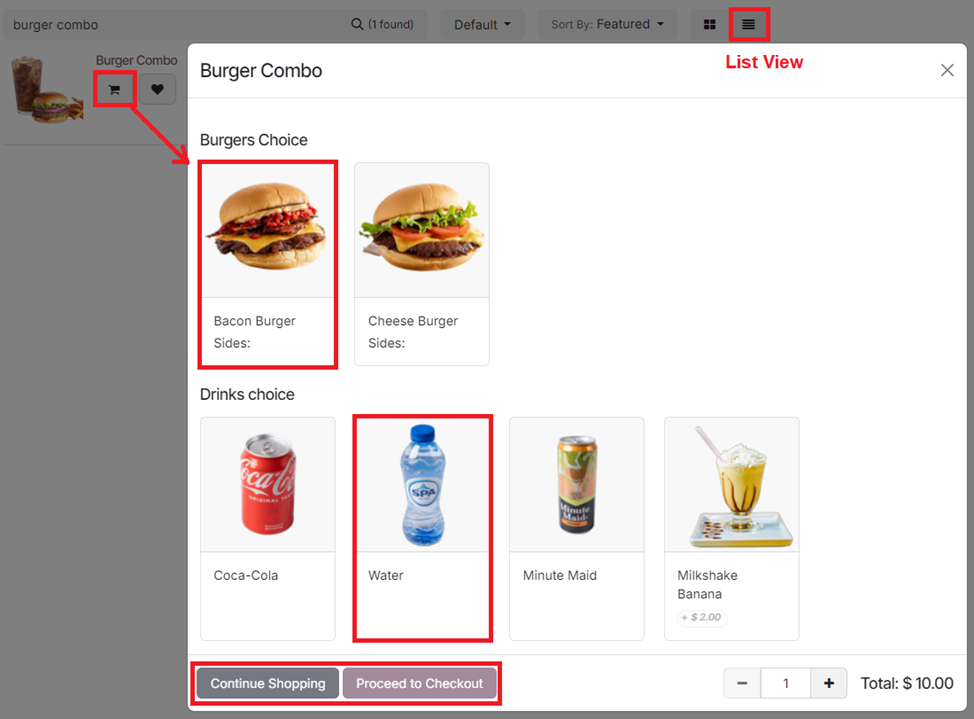
In eCommerce, when a combo product is added to the cart, it opens the combo pop-up menu, where the visitor can select the items needed on their combo and can either continue shopping or proceed to checkout.
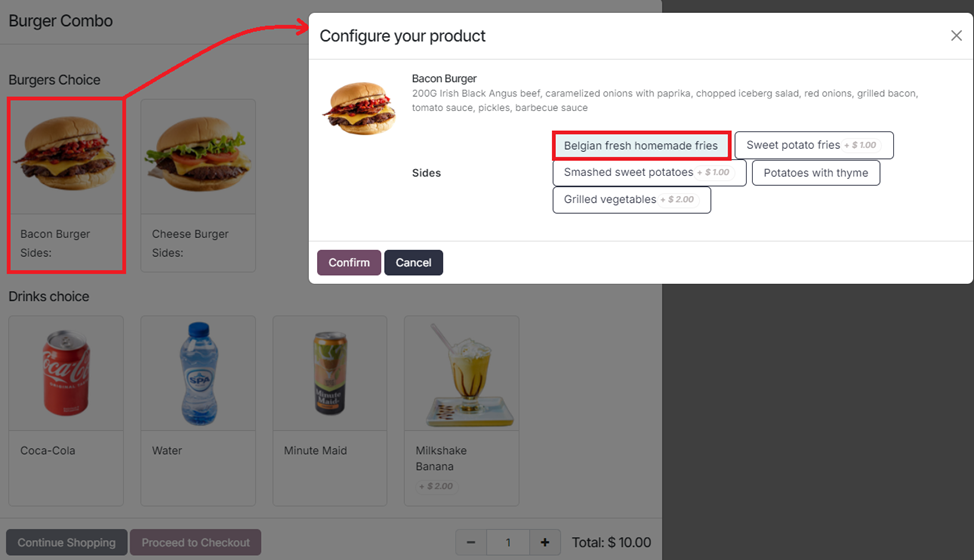
For products with variants, it opens up the attribute and values where it can be selected.
The functionality also works on the Shop page when combo products are added to cart (in both Kanban and List view)

Kanban View
List View
1
Avatar
Verwerfen
Avatar
Midhun Madhu K
Beste Antwort

Can we add quantity for invidual items inside combo? while I selecting a combo choice I can select products from different combo choice but can't define quantity of that item inside that combo. For ex I have a combo of Cricket Kit I need one bat one ball two gloves like that I need to predefine, is that possible?

0
Avatar
Verwerfen
Diskutieren Sie gerne? Treten Sie bei, statt nur zu lesen!

Erstellen Sie heute ein Konto, um exklusive Funktionen zu nutzen und mit unserer tollen Community zu interagieren!

Registrieren
Verknüpfte Beiträge Antworten Ansichten Aktivität
How to import images from the import wizard Gelöst
product image Quickstart SF-Experts Odoo18.0
Avatar
Avatar
Avatar
3
Juli 25
7320
Prevent sale of some product variants on the website Gelöst
product eCommers Quickstart Variants SF-Experts
Avatar
1
März 24
3494
Using Cost per employee and Employee capacity correctly Gelöst
Quickstart SF-Experts
Avatar
Avatar
2
Mai 25
6656
Why is there an Invoicing App Legacy Banner on my Invoice? Gelöst
Quickstart SF-Experts
Avatar
1
Apr. 25
2412
How to configure customizable BOMs in Odoo? Gelöst
Quickstart SF-Experts
Avatar
Avatar
2
Okt. 24
6223
Community
  • Tutorials
  • Dokumentation
  • Forum
Open Source
  • Herunterladen
  • Github
  • Runbot
  • Übersetzungen
Dienstleistungen
  • Odoo.sh-Hosting
  • Support
  • Upgrade
  • Individuelle Entwicklungen
  • Bildung
  • Buchhalter finden
  • Partner finden
  • Partner werden
Über uns
  • Unsere Firma
  • Markenwerte
  • Kontakt
  • Karriere
  • Veranstaltungen
  • Podcast
  • Blog
  • Kunden
  • Rechtliches • Datenschutz
  • Sicherheit
الْعَرَبيّة Català 简体中文 繁體中文 (台灣) Čeština Dansk Nederlands English Suomi Français Deutsch हिंदी Bahasa Indonesia Italiano 日本語 한국어 (KR) Lietuvių kalba Język polski Português (BR) română русский язык Slovenský jazyk slovenščina Español (América Latina) Español ภาษาไทย Türkçe українська Tiếng Việt

Odoo ist eine Suite von Open-Source-Betriebsanwendungen, die alle Bedürfnisse Ihres Unternehmens abdecken: CRM, E-Commerce, Buchhaltung, Lager, Kassensystem, Projektmanagement etc.

Das einzigartige Wertversprechen von Odoo ist, dass es gleichzeitig sehr einfach zu bedienen und voll integriert ist.

Website made with

Odoo Experience on YouTube

1. Use the live chat to ask your questions.
2. The operator answers within a few minutes.

Live support on Youtube
Watch now
