概述
This whitepaper is designed to help you understand the differences between leading project management applications: Odoo and Monday.com. It evaluates their ability to improve team coordination and streamline project task management. The document begins with a brief introduction to project management software, followed by an overview of the software landscape, a detailed functional comparison, and concluding insights.
Project management software:
Coordinating tasks and people
The modern practice of project management began with simple, manual tools. Whiteboards and sticky notes were the main means to track chunks of work (or “tasks”) that needed to be done. Graphical concepts like Gantt charts*, first used in the early 20th century, helped teams map out timelines and task dependencies. These early methods were highly visual and collaborative, but difficult to scale, share, or update efficiently.
With the rise of personal computers in the ‘80s and ’90s, digital project management took shape. Tools like Microsoft Project introduced dynamic scheduling, resource tracking, and budgeting features. While powerful, these early desktop-based tools were often very complex and required specialized training.
The 2000s marked a turning point with the arrival of cloud-based platforms like Jira and Basecamp. These tools emphasized ease of use, real-time collaboration, and visual task tracking—making project management more accessible to a wider range of teams and industries.
Today, modern project management software streamlines planning, communication, and execution. Solutions like Monday.com and Odoo integrate task management, file sharing, timelines, and team coordination in one place—replacing the need for scattered tools and manual updates, and allowing teams to stay aligned.
* The Gantt chart is named after American engineer Henry Gantt, who popularized it in the early 20th century. However, a similar concept was originally developed in the late 19th century by Polish engineer Karol Adamiecki, who called it a harmonogram.
Beyond project management:
Connecting business operations
with broad-scope solutions
More and more businesses are turning to broad-scope, user-friendly platforms to streamline their entire operations. Solutions like Odoo go beyond traditional ERP functions such as order management and accounting—they also cover areas like project management and CRM, which are often managed using separate, specialized applications.
While tools like Monday.com have revolutionized project management by providing great user experience and functionality, similar innovations have emerged across other domains—CRM, marketing automation, website building, accounting, and more. Specialized applications often excel within their specific domain, but they fall short when it comes to cross-functional process integration and data sharing.
Organizations that over-rely on single-function apps find themselves with a patchwork of disconnected apps—each with its own subscription, updates, data sets, and integration challenges. This fragmented setup creates complexity, friction, and hidden costs, ultimately eroding the efficiency and agility these tools are meant to provide.
Modern, broad-scope platforms combine the usability and flexibility of specialized apps with embedded integration across all core business functions. By connecting project management with sales, finance, marketing, and HR, these solutions help businesses manage their processes end to end—reducing overhead, improving visibility, and enabling smarter, faster decision-making.
Odoo
Odoo is a comprehensive, open-core platform designed to revolutionize the business software landscape by providing a fully integrated suite of capabilities that streamline operations across departments. From accounting and CRM to project management and website, Odoo combines powerful features with a user-friendly interface in a single, unified system.
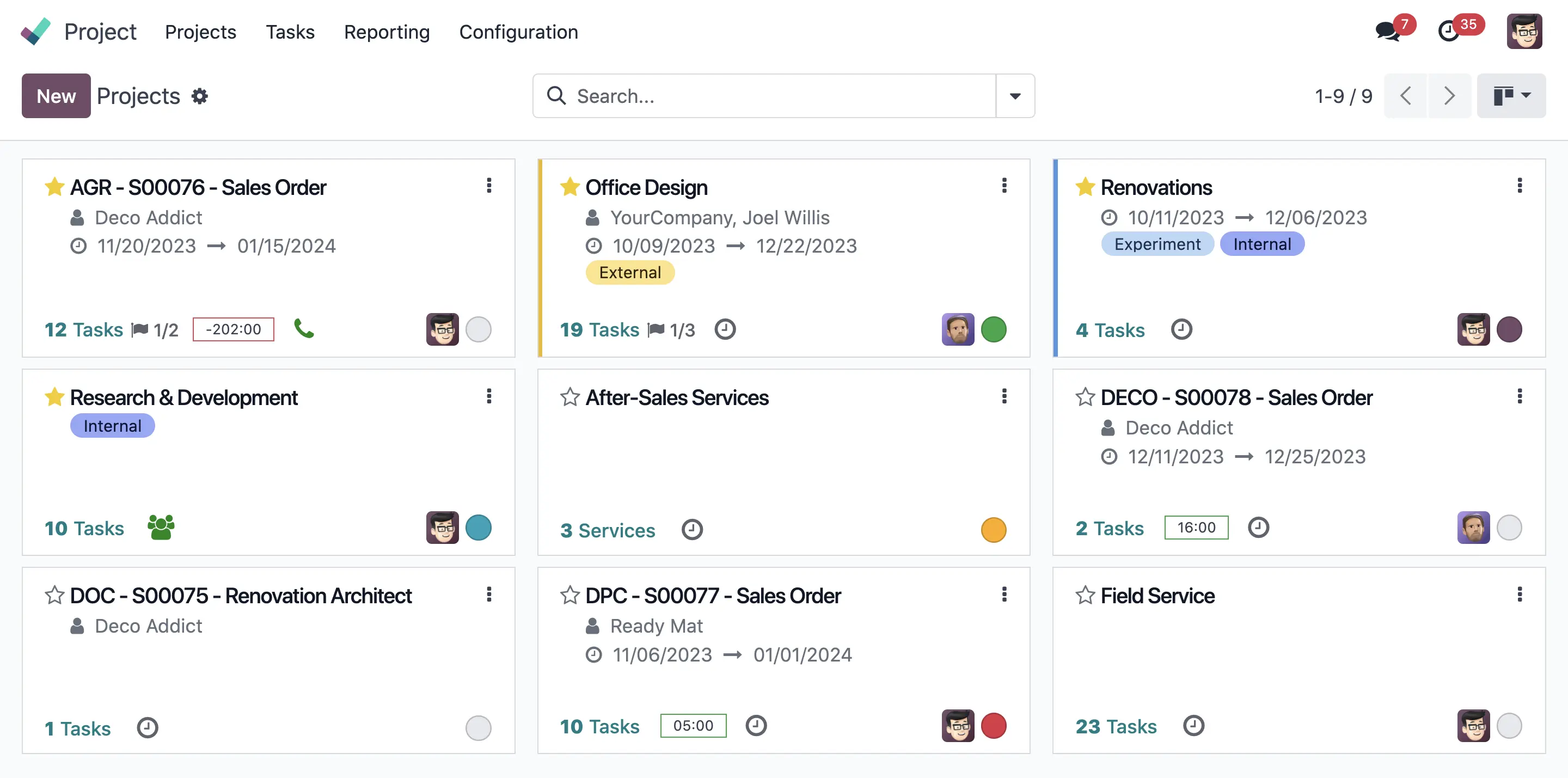
Odoo’s Project app delivers powerful capabilities through its intuitive interface. It offers multiple views—kanban, Gantt charts, calendars, and lists—to suit different preferences and needs. The built-in Chatter feature streamlines both internal communication and client interactions, while custom fields, advanced dashboards, and robust automation tools help teams stay focused on what matters most.
Thanks to its fully integrated design, Odoo offers thorough visibility and enables complete control over both sales activities and project finances. Prospect interactions, quotes, and customer orders are easily accessible through the Project and CRM apps, while built-in budget monitoring provides strong financial oversight. Invoicing is seamless as well—based on time, milestones, or both—Odoo supports flexible payment terms, including advance payments.
In short, Odoo simplifies business operations by replacing fragmented tools with a single, integrated platform—without sacrificing functionality or user experience. Its flexibility, automation, and all-in-one design make it a great choice for companies aiming to boost efficiency and gain end-to-end visibility across their workflow.
1200萬+
使用者
44,000+
應用程式
23,000 +
partners
8,000 +
employees
Monday.com
Monday.com is a cloud-based Work Operating System (Work OS) that enables teams to build custom workflows and manage projects. The company pioneered a user-first approach, and was one of the first to offer a highly visual and intuitive interface with support for Kanban boards, Gantt charts, calendars, and other views to help teams plan, track, and execute work efficiently.
The solution includes powerful features like task management, time tracking, workload visualization, and robust dashboards. Users can create custom workflows using no-code building blocks and over 200 pre-built automation recipes to eliminate repetitive tasks and optimize processes. Integration options—over 200 apps such as Slack, Google Drive, Zoom, Microsoft Teams, and Excel—ensure smooth alignment with existing tech ecosystems.
In summary, Monday.com centralizes work management by combining customizable workflows, visual project tracking, and integration support into a single tool. Its emphasis on usability, flexibility, and automation makes it a compelling solution for teams of any size looking to boost collaboration, transparency, and efficiency across their workflows.
250,000 +
paying customers
1
app
200
global partners
3,800 +
employees
功能比較
一般
Odoo
Monday.com
Mobile Access
Automatic Task Assignment
Project-specific Fields
Custom Branding
Autosave
Multiple Assignees
Quick Record Creation
Integrations with other Modules
Third-Party Integrations
自訂功能
Flexible UI
Task Management
Odoo
Monday.com
Create tasks (with titles, descriptions, etc.)
Create subtasks
Assign tasks to people
Track task completion and status
Create checklists within tasks
Add tags for categorization
Mark Tasks as Dependant on Others
Set reminders
Search and filter tasks
Track Time Spent on Tasks
Log Work Times Manually
Set Time Estimates for Tasks
Create timesheet reports
Track billable hours
Batch Edit Multiple Tasks
Copy and paste tasks
Split tasks
Percentage completion on tasks
Resource planning
Cost estimation per task
Task priority levels
Gamification elements
External task dependencies
Task logging
Recurring tasks
Task delegation
Import/Export in batches
Archive tasks
Delete tasks
Send SMS from task
在任務畫面傳送電郵(任務內聊天區域)
Share a project outside
Customizable Task Stages
Custom Fields
Access Rights on tasks
Drag and Drop system
Color Coding
Add followers on tasks
Keyboard shortcuts
Cover image on tasks
Click to sign
for existing users only
Templates & Automation
Odoo
Monday.com
Project Templates
Task templates
Email notifications automation
Approved Quotes Trigger Full Project Plans
Webhooks
Task and Project Tracking
Odoo
Monday.com
Kanban View
Gantt Chart
List View
Calendar View
Graph View
Pivot Table View
Milestones
Project Phases
Deadline tracking
Employee vacation visibility
透過電子郵件建立任務
Task Creation From Web Form
Convert a task to ticket
Private tasks
Filter tasks by teams
工時管理
Task creation from SO
SO creation from Project
Time Remaining Display
Communication and Collaboration
Odoo
Monday.com
Chatter
Email Integration
Real-Time Collaboration
VoIP Integration
Emoji Reactions
Customer Portal
Client feedback surveys & analytics
Rich Text Editor
Custom Alerts
In-app Chat with Users
Schedule Meeting and integrate with video conferencing
Add Internal Notes
Assign followers to tasks
Budgeting & Reporting
Odoo
Monday.com
Set budget for projects
Track expenses
Define Cost Categories
Receive budget overrun notifications
Track project revenue
Generate reports
Create custom reports
Access Pre-Defined Dashboards
Analyze project expenses
Implement Earned Value Management
Real-Time Insights
Resource reports
Predictive analytics
Customizable dashboards
Drill-down capabilities
Profitability Tracking
Analytic Accounts
Filter by stages
Filter by Assignee
Filter by Tags
Filter by Deadline
Group by Option
View of personal tasks
Burndown chart
Security and Access Control
Odoo
Monday.com
Two-factor authentification (2FA)
Data encryption at rest and in transit
User Activity Audit Logs
Role-Based Access Control
Additional Features
Odoo
Monday.com
Generate invoices based on timesheets (fixed price, milestones, time, and materials)
Track Changes Made to Tasks and Doc
Receive notifications about updates, deadlines, and mentions
Access in multiple languages
Manage project-related inventory
Integration with Manufacturing
Integration with CRM
with Monday CRM package
Integration with Inventory
Integration with Accounting
Custom API Integrations
Calendar Integration
Email Integrations
Manage project in different currencies
Develop custom modules and fields
Pricing & Conditions
Odoo
Monday.com
Monthly pricing (per user)
Starting €19.9 | The standalone Project app is free
Starting €9 | A limited package with up to 3 boards is free
Billing Term
Billed annually
Billed annually
免費試用
30-day (all apps)
30-day
Free Upgrade
Upgrades to Future Versions
Hosting & Maintenance
Customer Support (Technical & Functional)
Rating
Odoo
Monday.com
g2Crowd 評分
4.4/5.0 (Project app)
4.7/5.0
GetApp 評分
4.2/5.0
4.6/5.0
Capterra 評分
4.2/5.0
4.6/5.0
不同方案,不同需求
為你的業務選擇合適軟件時,應根據你自己的特定需求,評估幾項準則。
Business scope measures a software’s ability to meet your comprehensive business needs through its features, customization options, and integration with other tools.
對使用者友善程度衡量軟件解決方案對於團隊使用上有多簡單直接和對使用者有多友善,盡量需要最少的培訓或複雜的工序。此外,它還會考慮公司內部初始配置所需的時間、精力及資源需求等因素,評估軟件安裝有多簡便。
For companies of any size looking to streamline project operations with seamless integration across their business, Odoo is a smart, scalable choice.
As a standalone project management tool, Odoo delivers a clean, intuitive interface that gives project teams full visibility into their work. Built-in automation and collaboration features help streamline workflows, while multiple task and project views, in-app email, timesheets, and calendar integration support day-to-day execution. Additionally, Odoo’s integrated dashboards provide managers with a clear project overview and help in identifying potential risks before they escalate.
But Odoo goes far beyond project management. As a true all-in-one platform, it seamlessly connects projects with sales, accounting, inventory, company website, and more—unlocking powerful efficiencies, especially for service-based businesses. With excellent value for money and easy implementation, it’s a compelling option—even for small businesses and startups. Odoo’s modular structure lets you start small, or even for free, and scale up as your needs grow.
That said, companies looking to transform their entire operations should be aware that a full Odoo implementation requires time, effort, and investment. Unlike narrow, single-purpose tools, a broad Odoo rollout requires a certain degree of commitment to change—but one that brings significantly greater long-term value.
Monday.com delivers a top-tier user experience, paired with some of the strongest project management features on the market. It goes a step further with a CRM package that includes quoting and invoicing, making it a versatile option for teams seeking both operational and sales support.
Built on Monday’s flexible Work OS, the software features a clean, colorful interface with intuitive drag-and-drop functionality. Teams can tailor their workspace with multiple views—such as boards, timelines, Gantt charts, and workload tracking—while customizable, widget-based dashboards provide real-time insights into task status, project performance, and profitability. Built-in reporting tools make it easy to track budgets, billed hours, and financial metrics.
Monday CRM is fully integrated with Monday’s Work Management platform, though it’s offered as a separate paid package. It includes the Quotes & Invoices feature, which lets users generate quotes and invoices directly from sales boards—complete with templated line items, taxes, discounts, and automated data pulled from contacts and product lists.
However, Monday.com has its limitations when it comes to advanced financial features and fiscal compliance. It lacks capabilities like analytical accounting, handling of advance payments, and support for Electronic Data Interchange (EDI). Businesses with more complex financial needs will likely require integrations with tools like QuickBooks or Xero.
Overall, Monday.com is a strong choice for teams looking for a visually engaging, customizable platform that combines project management with basic sales and invoicing functionality. It excels in usability and visibility, but may need to be supplemented for organizations requiring better financial control or compliance.
結語
When it comes to project management, businesses have a wide range of tools to choose from, each tailored to different needs, functional scope, and team types. Whether you're a service-based business looking to centralize operations or a development team managing technical sprints, choosing the right platform depends on your business objectives.
Odoo is ideal for companies seeking tight integration between their project teams and broader operations. As an all-in-one platform, it links projects with various departments such as sales, accounting, and inventory. This connectivity makes it particularly beneficial for service-oriented businesses or companies managing projects that include tangible goods. While setup can require time and planning, Odoo’s modular structure and exceptional value for money make it accessible to both small businesses and growing enterprises.
Monday.com is a highly visual platform that offers robust project management features in addition to other business capabilities. Its Quotes & Invoices package gives it basic CRM and invoicing abilities, though more advanced financial or compliance features require external integrations. It’s especially effective for service teams and consultancies.
In summary, choosing the right tool is not always a straightforward decision. Odoo suits those seeking full operational integration. Monday.com offers extensive functionality that goes beyond project management.
