
How do I activate developer mode when there is no "About" menu option, when I click on my name (I started the database)?
Bu soru işaretlendi
1
Cevapla
9935
Görünümler


Hi
There are multiple ways to activate debug mode.
1. You can activate Google Chrome Extension which allows users to activate debug mode.
You can search for Odoo Debug and Add it to your Chrome

2. Go to Settings --> Scroll Down to the developer tools section
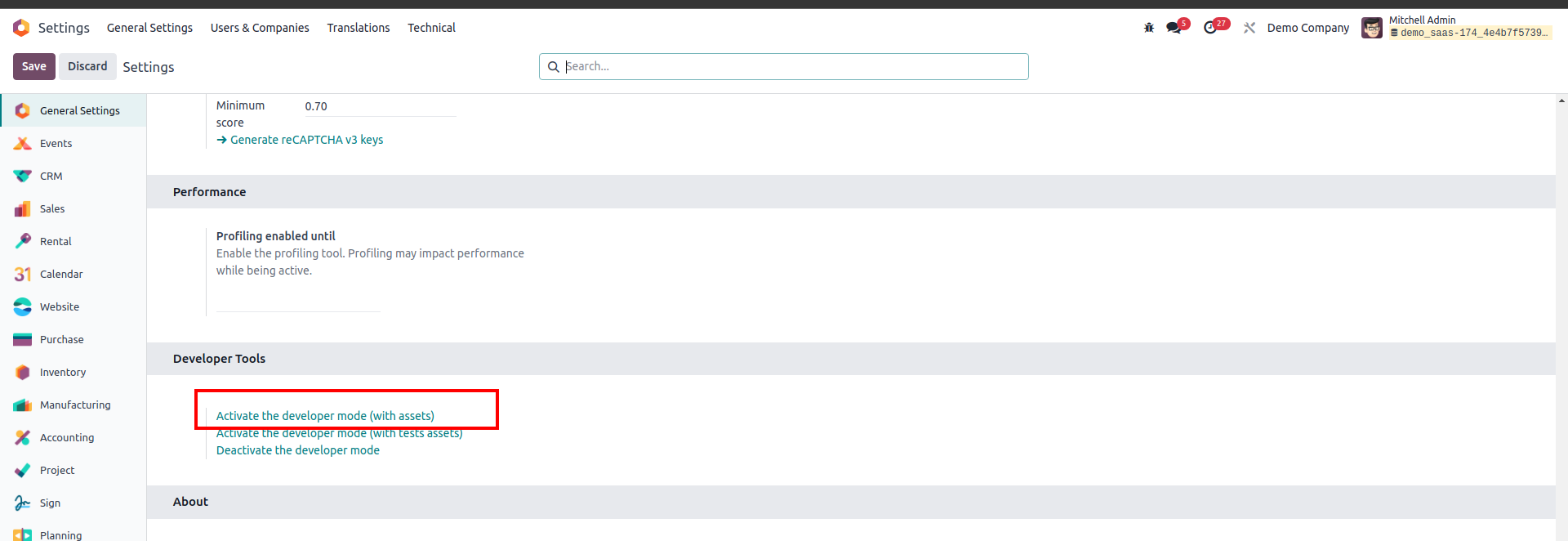
3 . Add "/web?debug=1" to the end of your Odoo URL. For example http://your-odoo-url.com/web?debug=1
Regards
Tartışma hoşunuza mı gidiyor? Sadece okumakla kalmayın, katılın!
Özel özelliklerden yararlanmak ve harika topluluğumuzla etkileşime geçmek için bugün bir hesap oluşturun!
Üye Ol| İlgili Gönderiler | Cevaplar | Görünümler | Aktivite | |
|---|---|---|---|---|


|
1
Haz 16
|
5994 | ||

|
0
May 24
|
2385 | ||

|
0
Eyl 23
|
3962 | ||


|
3
Ağu 22
|
21776 | ||
|
Developer mode (with assets)
Çözüldü
|


|
1
Oca 24
|
10753 |
