
How do I activate developer mode when there is no "About" menu option, when I click on my name (I started the database)?
Dette spørgsmål er blevet anmeldt
1
Svar
10294
Visninger


Hi
There are multiple ways to activate debug mode.
1. You can activate Google Chrome Extension which allows users to activate debug mode.
You can search for Odoo Debug and Add it to your Chrome

2. Go to Settings --> Scroll Down to the developer tools section
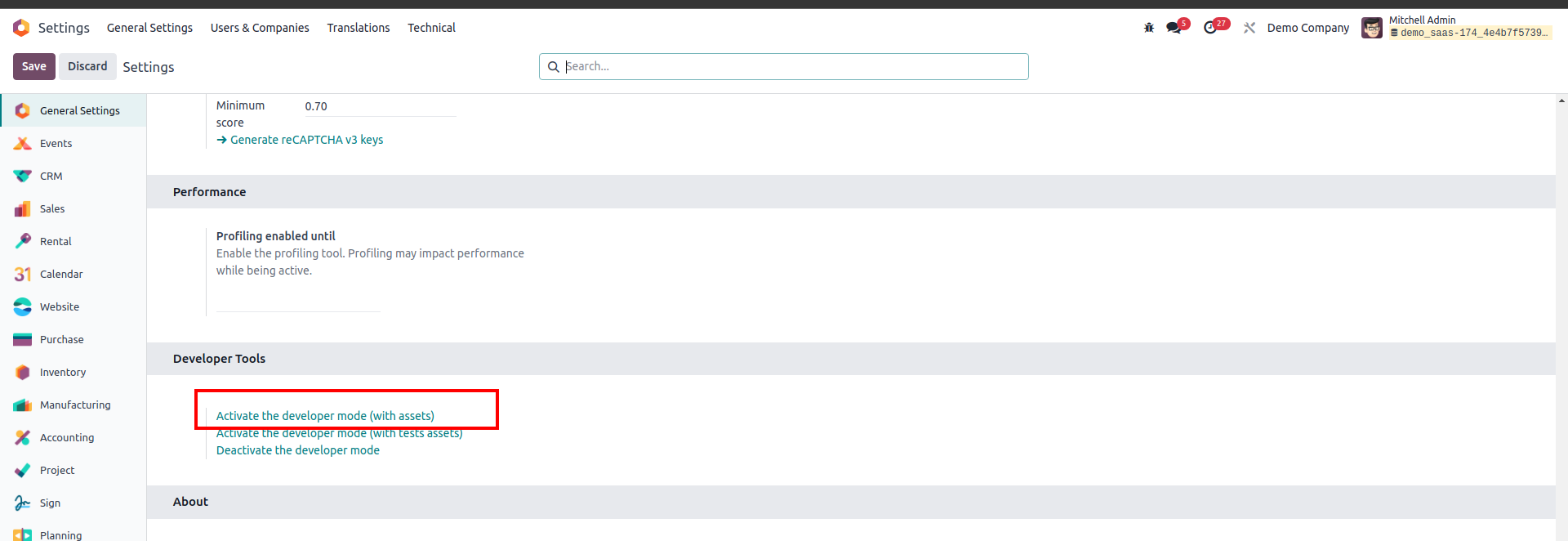
3 . Add "/web?debug=1" to the end of your Odoo URL. For example http://your-odoo-url.com/web?debug=1
Regards
Kan du lide at diskutere? Læs ikke bare med, deltag aktivt i debatten!
Opret en konto i dag for at få glæde af eksklusive funktioner, og bliv en del af vores skønne fællesskab!
Tilmeld dig| Relaterede indlæg | Besvarelser | Visninger | Aktivitet | |
|---|---|---|---|---|


|
1
jun. 16
|
6102 | ||

|
0
maj 24
|
2422 | ||

|
0
sep. 23
|
4032 | ||


|
3
aug. 22
|
21900 | ||


|
1
jan. 24
|
10889 |
