
I created a Odoo.com account to see what it is like. I am now needing to delete/remove the account permanently , but I cannot understand out how it is done. Can you please please help me get rid of my account? please help.
Odoo is the world's easiest all-in-one management software.
It includes hundreds of business apps:
- ลูกค้าสัมพันธ์
- e-Commerce
- ระบบบัญชี
- สินค้าคงคลัง
- PoS
- โปรเจกต์
- MRP
คำถามนี้ถูกตั้งค่าสถานะ
2
ตอบกลับ
7197
มุมมอง


Contact Odoo support to request your account removal.
Go to https://www.odoo.com/help.
Happy to help :) an upvote will be awesome

UPDATED FOR ODOO 16 - JAN 2023
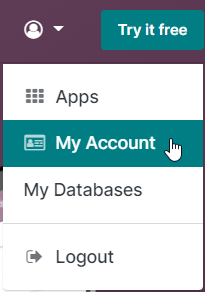
1. Click MY ACCOUNT from the dropdown User Icon on the right of the screen: |
|
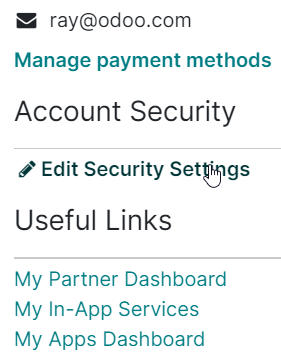
2. Click EDIT SECURITY SETTINGS: |
|
| 3. Scroll down and click DELETE ACCOUNT: | 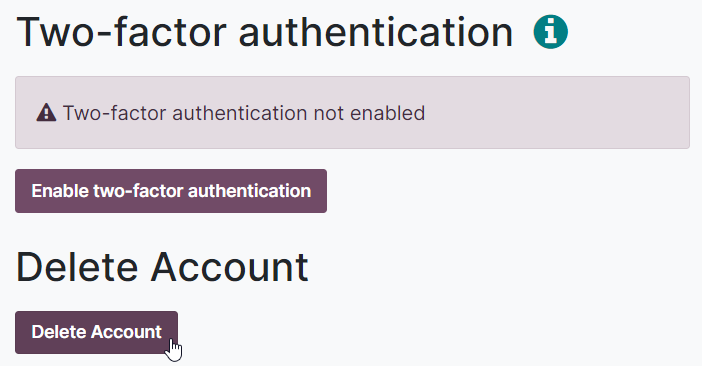 |
If you have any problems, please open a ticket with our Support team at https://www.odoo.com/help so they can close your Odoo.com account.
สนุกกับการพูดคุยนี้ใช่ไหม? เข้าร่วมเลย!
สร้างบัญชีวันนี้เพื่อเพลิดเพลินไปกับฟีเจอร์พิเศษและมีส่วนร่วมกับคอมมูนิตี้ที่ยอดเยี่ยมของเรา!
ลงชื่อ| Related Posts | ตอบกลับ | มุมมอง | กิจกรรม | |
|---|---|---|---|---|
|
How to delete my user account
แก้ไขแล้ว
|


|
1
ธ.ค. 23
|
20031 | |

|
0
มี.ค. 15
|
4489 | ||


|
3
มี.ค. 15
|
20201 | ||


|
1
ส.ค. 19
|
4946 | ||

|
2
ต.ค. 24
|
34 |
