Ir al contenido
Odoo Menú
  • Identificarse
  • Pruébalo gratis
  • Aplicaciones
    Finanzas
    • Contabilidad
    • Facturación
    • Gastos
    • Hoja de cálculo (BI)
    • Documentos
    • Firma electrónica
    Ventas
    • CRM
    • Ventas
    • TPV para tiendas
    • TPV para restaurantes
    • Suscripciones
    • Alquiler
    Sitios web
    • Creador de sitios web
    • Comercio electrónico
    • Blog
    • Foro
    • Chat en directo
    • e-learning
    Cadena de suministro
    • Inventario
    • Fabricación
    • PLM
    • Compra
    • Mantenimiento
    • Calidad
    Recursos Humanos
    • Empleados
    • Reclutamiento
    • Ausencias
    • Evaluación
    • Referencias
    • Flota
    Marketing
    • Marketing social
    • Marketing por correo electrónico
    • Marketing por SMS
    • Eventos
    • Automatización de marketing
    • Encuestas
    Servicios
    • Proyecto
    • Partes de horas
    • Servicio de campo
    • Servicio de asistencia
    • Planificación
    • Citas
    Productividad
    • Conversaciones
    • Aprobaciones
    • IoT
    • VoIP
    • Conocimientos
    • WhatsApp
    Aplicaciones de terceros Studio de Odoo Plataforma de Odoo Cloud
  • Industrias
    Comercio al por menor
    • Librería
    • Tienda de ropa
    • Tienda de muebles
    • Tienda de ultramarinos
    • Ferretería
    • Juguetería
    Alimentación y hostelería
    • Bar y pub
    • Restaurante
    • Comida rápida
    • Casa de huéspedes
    • Distribuidor de bebidas
    • Hotel
    Inmueble
    • Agencia inmobiliaria
    • Estudio de arquitectura
    • Construcción
    • Gestión inmobiliaria
    • Jardinería
    • Asociación de propietarios
    Consultoría
    • Empresa contable
    • Partner de Odoo
    • Agencia de marketing
    • Bufete de abogados
    • Adquisición de talentos
    • Auditorías y certificaciones
    Fabricación
    • Textil
    • Metal
    • Muebles
    • Alimentos
    • Cervecería
    • Regalos de empresas
    Salud y bienestar
    • Club deportivo
    • Óptica
    • Gimnasio
    • Terapeutas
    • Farmacia
    • Peluquería
    Oficios
    • Handyman
    • Hardware y soporte técnico
    • Sistemas de energía solar
    • Zapatero
    • Servicios de limpieza
    • Servicios de calefacción, ventilación y aire acondicionado
    Otros
    • Organización sin ánimo de lucro
    • Agencia de protección del medio ambiente
    • Alquiler de paneles publicitarios
    • Estudio fotográfico
    • Alquiler de bicicletas
    • Distribuidor de software
    Explorar todos los sectores
  • Comunidad
    Aprender
    • Tutoriales
    • Documentación
    • Certificaciones
    • Formación
    • Blog
    • Podcast
    Potenciar la educación
    • Programa de formación
    • Scale Up! El juego empresarial
    • Visita Odoo
    Obtener el software
    • Descargar
    • Comparar ediciones
    • Versiones
    Colaborar
    • GitHub
    • Foro
    • Eventos
    • Traducciones
    • Convertirse en partner
    • Servicios para partners
    • Registrar tu empresa contable
    Obtener servicios
    • Encontrar un partner
    • Encontrar un asesor fiscal
    • Contacta con un experto
    • Servicios de implementación
    • Referencias de clientes
    • Ayuda
    • Actualizaciones
    GitHub YouTube Twitter Linkedin Instagram Facebook Spotify
    +1 (650) 691-3277
    Solicitar una demostración
  • Precios
  • Ayuda

Need to know more about Certifications ?

How can I purchase a certification?​ Can I have a preview of what the certification will look like? How can I exercise before taking the test? I purchased a certification, where can I take it? I purchased a certification but I would like to change the version, is it possible? How can I start with a certification? Is it possible to pause the certification while taking it? There was a bug with Odoo while taking the test, what should I do? I failed the certification, how can I know my results? I took the certification with the wrong user, can we update the certificate? I am certified but I am leaving my company, how can I keep my certification?

How can I purchase a certification?​

  • Ask your account manager for a quotation

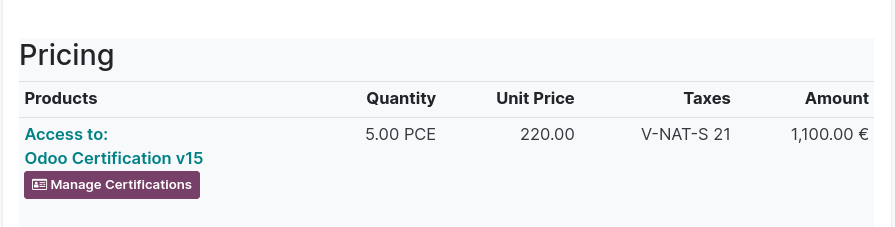
    Once paid, a button "Manage certification" will appear on the SO. From that button, you will be able to share the access link with the employee of your choice via the SO. It’s the easiest option as it gives you the flexibility of purchasing one or multiple certifications and assigning them to whoever is ready to take the test in your team.


  • Purchase through the website

    You can also directly purchase a certification through our website. Bear in mind that the access will automatically be granted to the user who purchased the certification (=person who is logged in on odoo.com). In short, the certification will be assigned to the person who purchased it, and it’s not possible to reassign the certification to another employee.

Certifications are nominative, which means that they need to be linked to an individual (employee) and cannot be taken with the company user. If you want to purchase a certification through our website, make sure you are not logged in with the company user.


Can I have a preview of what the certification will look like? How can I exercise before taking the test?

Yes! You can:

  • Check-out our free e-learning platform: https://www.odoo.com/slides
    You’ll find step-by-step tutorials and quizzes on each Odoo application
  • Play with our Scale-Up game: https://www.odoo.com/page/scale-up-business-game
  • Try the Odoo Certification Sample for free here: https://www.odoo.com/slides/odoo-certification-sample-test-50
    It will give you an idea of what the quiz will look like and get familiar with the interface. Once you feel ready you can take your official Certification.

I purchased a certification, where can I take it?

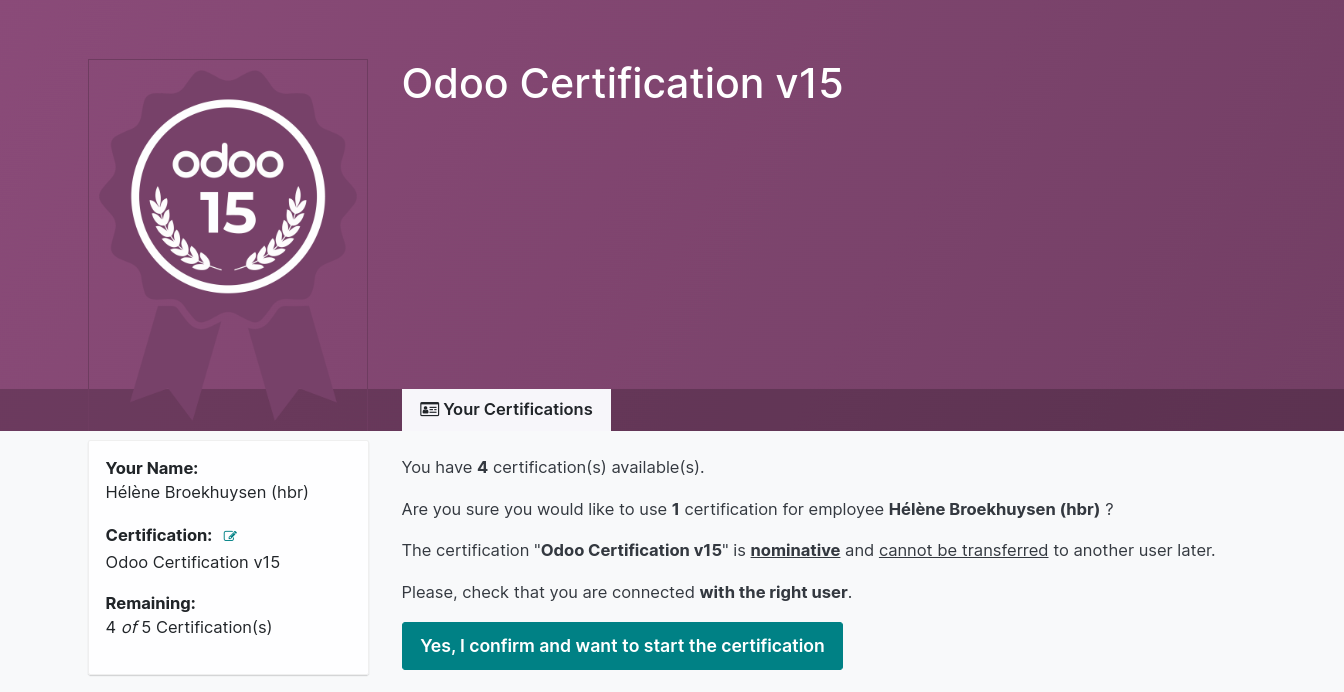
  • If you purchased the certification via your account manager: simply go to the SO and click on the “Manage certification button”. 
  • Then confirm that you wish to use 1 certification with the user you are logged in with.
    Make sure you are logged in with the user that is related to your company (not your personal account) :

  • If you purchased the certification yourself: Simply log into www.odoo.com/slides with your personal user, then click on “Certifications” and you’ll see the one you have access to. 

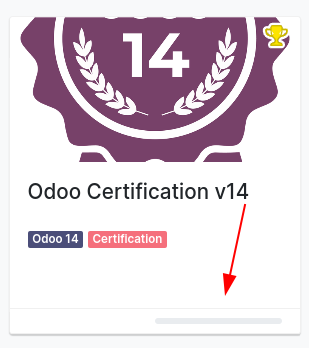
    Tip: you can quickly see if you have access to a certification or not by checking the gray progress bar (if it’s there, it means you have access!).


I purchased a certification but I would like to change the version, is it possible?

Yes, if you purchased the certification via your account manager! Simply click on the “Manage Certification” button, then in the left side of the page you’ll be able to change the version. 


How can I start with a certification?

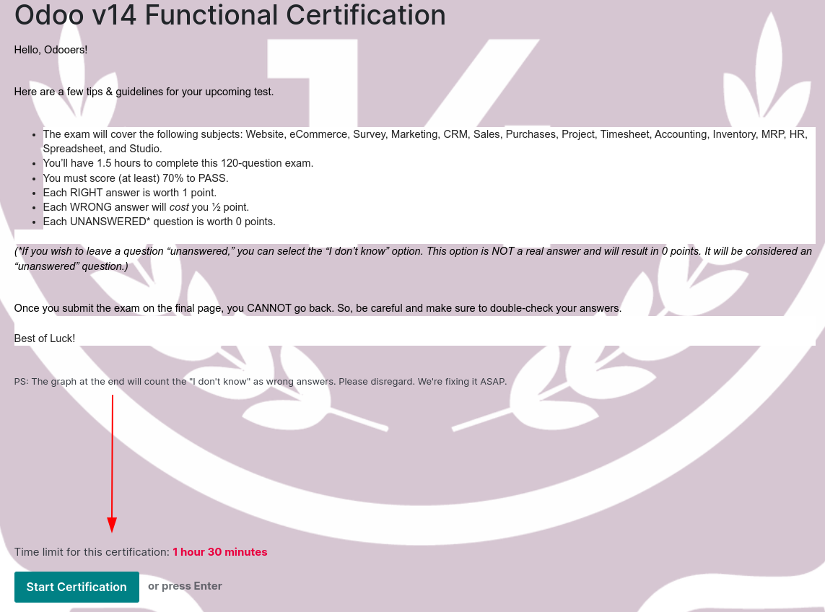
Depending on how you purchased your certification, simply click on “Start Now” (through your portal) or “Yes I confirm and I want to take a certification now” (through your SO), you’ll be redirected to the Introduction Page of the quiz, where all the guidelines are explained. Then click on “Start Certification”: you’ll see the first question and the timer will start running.
Is it possible to pause the certification while taking it?

No, it is not possible. Once you start the certification, a timer will start and you won’t be able to pause the test.

There was a bug with Odoo while taking the test, what should I do?

It is extremely rare, but a bug on our end can still happen. If you’re facing a bug (with or without traceback) try to take a screenshot of your page and contact your Account Manager.

I failed the certification, how can I know my results?

Your score will appear once you’re done with the certification. You’ll see a breakdown of your results.
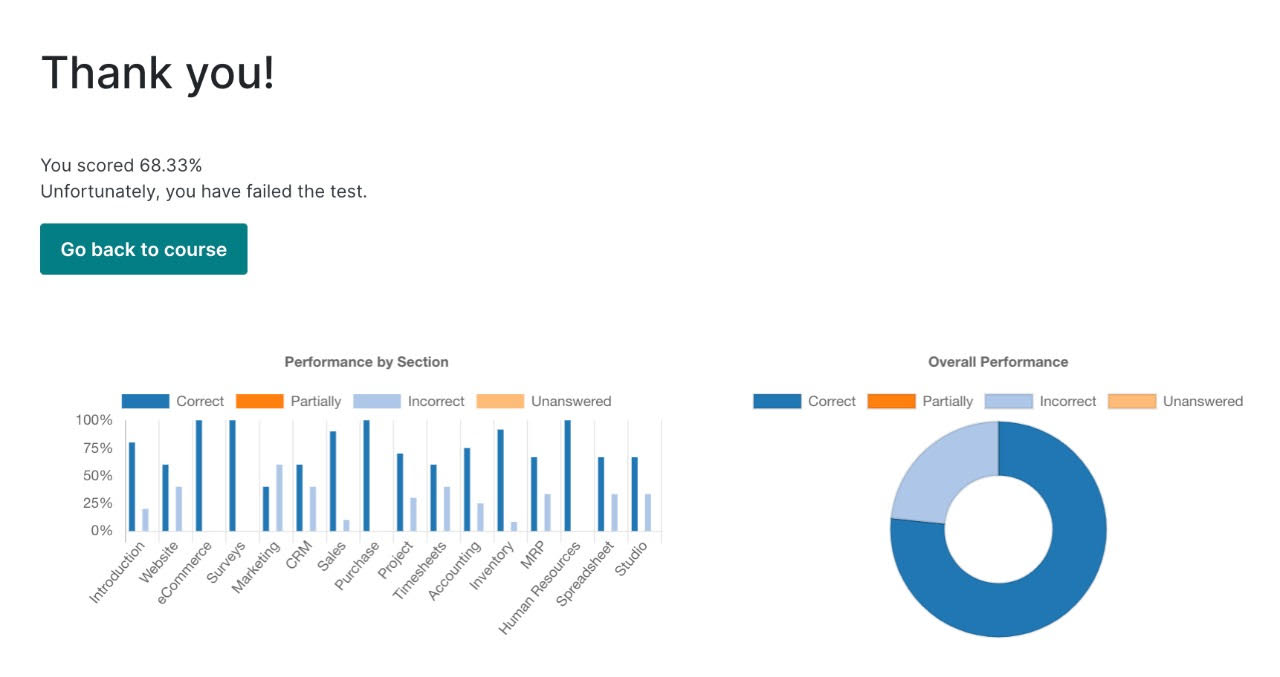
The graph does not display the “I don’t know” answers properly. As mentioned in the Introduction Page of the certification: “*If you wish to leave a question “unanswered,” you can select the “I don’t know” option. This option is NOT a real answer and will result in 0 points. It will be considered an “unanswered” question. The graph at the end will count the "I don't know" as wrong answers. Please disregard. We're fixing it ASAP.”


I took the certification with the wrong user, can we update the certificate?

No, certifications are nominative so they need to be taken with the right user. If you take the certification with a colleague’s user, we won’t be able to re-assign you the certification.

I am certified but I am leaving my company, how can I keep my certification?

Yes, certifications are nominative! Your certificate is under your own name. If you’d like to keep your certification tag (e.g. you are becoming a partner yourself or you are now employed with another partner) contact our support team on  www.odoo.com/help . They will switch your tag to your new Odoo user. 

Comunidad
  • Tutoriales
  • Documentación
  • Foro
Código abierto
  • Descargar
  • GitHub
  • Runbot
  • Traducciones
Servicios
  • Alojamiento Odoo.sh
  • Ayuda
  • Actualizar
  • Desarrollos personalizados
  • Educación
  • Encontrar un asesor fiscal
  • Encontrar un partner
  • Convertirse en partner
Sobre nosotros
  • Nuestra empresa
  • Activos de marca
  • Contacta con nosotros
  • Puestos de trabajo
  • Eventos
  • Podcast
  • Blog
  • Clientes
  • Información legal • Privacidad
  • Seguridad
الْعَرَبيّة Català 简体中文 繁體中文 (台灣) Čeština Dansk Nederlands English Suomi Français Deutsch हिंदी Bahasa Indonesia Italiano 日本語 한국어 (KR) Lietuvių kalba Język polski Português (BR) română русский язык Slovenský jazyk slovenščina Español (América Latina) Español ภาษาไทย Türkçe українська Tiếng Việt

Odoo es un conjunto de aplicaciones empresariales de código abierto que cubre todas las necesidades de tu empresa: CRM, comercio electrónico, contabilidad, inventario, punto de venta, gestión de proyectos, etc.

La propuesta única de valor de Odoo es ser muy fácil de usar y estar totalmente integrado.

Website made with

Odoo Experience on YouTube

1. Use the live chat to ask your questions.
2. The operator answers within a few minutes.

Live support on Youtube
Watch now