Hoppa till innehåll
Odoo Meny
  • Logga in
  • Prova gratis
  • Appar
    Finanstjänster
    • Bokföring
    • Fakturering
    • Utgifter
    • Kalkylark (Affärsanalyser)
    • Dokument
    • Underskrifter
    Försäljning
    • CRM
    • Försäljning
    • Kassasystem Butik
    • Kassasystem Restaurang
    • Prenumerationer
    • Uthyrning
    Hemsidor
    • Hemsidesverktyg
    • E-handel
    • Blogg
    • Forum
    • Livechatt
    • Utbildning
    Försörjningskedja
    • Lager
    • Produktion
    • Produktens livscykel (PLM)
    • Inköp
    • Underhåll
    • Kvalitet
    HR
    • Anställda
    • Rekrytering
    • Ledighet
    • Utvärderingar
    • Rekommendationer
    • Fordon
    Marknadsföring
    • Sociala medier
    • E-postmarknadsföring
    • Sms-marknadsföring
    • Evenemang
    • Automatiserad marknadsföring
    • Enkäter
    Tjänster
    • Projekt
    • Tidrapporter
    • Fältservice
    • Kundtjänst
    • Planering
    • Tidsbokningar
    Produktivitet
    • Diskutera
    • Godkännanden
    • IoT
    • VoIP
    • Kunskap
    • WhatsApp
    Community-appar Odoo Studio Odoo Cloud
  • Branscher
    Butiker
    • Bokaffärer
    • Klädbutiker
    • Möbelaffärer
    • Mataffärer
    • Byggvaruhus
    • Leksaksaffärer
    Restaurang & Hotell
    • Barer och pubar
    • Gourmetrestauranger
    • Snabbmatsrestauranger
    • Gästhus
    • Dryckesdistributörer
    • Hotell
    Fastigheter
    • Fastighetsbyråer
    • Arkitektfirmor
    • Byggföretag
    • Fastighetsägare
    • Trädgårdsmästare
    • Bostadsrättsföreningar
    Hitta en konsult
    • Redovisningsbyrå
    • Odoo Partner
    • Reklambyråer
    • Advokatbyråer
    • Rekrytering
    • Revisioner och certifieringar
    Produktion
    • Textilproduktion
    • Metallproduktion
    • Möbelproduktion
    • Livsmedelsproduktion
    • Bryggerier
    • Företagsgåvor
    Hälsa & Fitness
    • Sportklubbar
    • Optiker
    • Träningscenter
    • Hälsovård
    • Apotek
    • Frisörsalonger
    Hantverk
    • Hantverkare
    • IT-utrustning och kundtjänst
    • Solenergi
    • Skomakare
    • Städtjänster
    • VVS-tjänster
    Övrigt
    • Ideella föreningar
    • Miljöförvaltningar
    • Uthyrning av reklamtavlor
    • Fotografer
    • Cykeluthyrning
    • Återförsäljare av mjukvara
    Upptäck alla Branscher
  • Community
    Utbildning
    • Instruktionsvideor
    • Dokumentation
    • Certifiering
    • Utbildningar
    • Blogg
    • Podcast
    Lär dig med oss
    • Workshops
    • Företagsspelet Scale Up!
    • Studiebesök hos Odoo
    Mjukvaran
    • Ladda ner
    • Jämför utgåvor
    • Tidigare versioner
    Samverkan
    • GitHub
    • Forum
    • Evenemang
    • Översättningar
    • Bli en partner
    • Partnertjänster
    • Registrera din redovisningsbyrå
    Våra tjänster
    • Partners
    • Revisorer
    • Träffa en rådgivare
    • Implementering
    • Kundrecensioner
    • Kundtjänst
    • Uppgraderingar
    GitHub Youtube Twitter Linkedin Instagram Facebook Spotify
    +1 (650) 691-3277
    Boka en demo
  • Priser
  • Hjälp

Need to know more about Certifications ?

How can I purchase a certification?​ Can I have a preview of what the certification will look like? How can I exercise before taking the test? I purchased a certification, where can I take it? I purchased a certification but I would like to change the version, is it possible? How can I start with a certification? Is it possible to pause the certification while taking it? There was a bug with Odoo while taking the test, what should I do? I failed the certification, how can I know my results? I took the certification with the wrong user, can we update the certificate? I am certified but I am leaving my company, how can I keep my certification?

How can I purchase a certification?​

  • Ask your account manager for a quotation

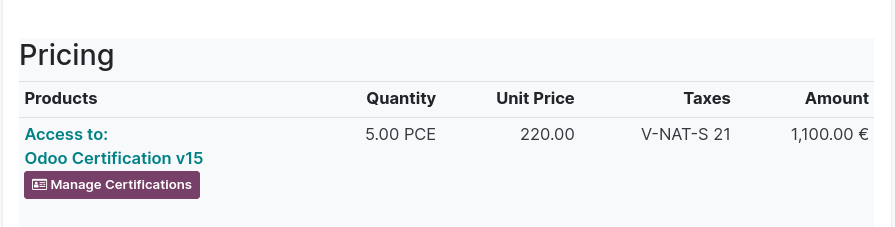
    Once paid, a button "Manage certification" will appear on the SO. From that button, you will be able to share the access link with the employee of your choice via the SO. It’s the easiest option as it gives you the flexibility of purchasing one or multiple certifications and assigning them to whoever is ready to take the test in your team.


  • Purchase through the website

    You can also directly purchase a certification through our website. Bear in mind that the access will automatically be granted to the user who purchased the certification (=person who is logged in on odoo.com). In short, the certification will be assigned to the person who purchased it, and it’s not possible to reassign the certification to another employee.

Certifications are nominative, which means that they need to be linked to an individual (employee) and cannot be taken with the company user. If you want to purchase a certification through our website, make sure you are not logged in with the company user.


Can I have a preview of what the certification will look like? How can I exercise before taking the test?

Yes! You can:

  • Check-out our free e-learning platform: https://www.odoo.com/slides
    You’ll find step-by-step tutorials and quizzes on each Odoo application
  • Play with our Scale-Up game: https://www.odoo.com/page/scale-up-business-game
  • Try the Odoo Certification Sample for free here: https://www.odoo.com/slides/odoo-certification-sample-test-50
    It will give you an idea of what the quiz will look like and get familiar with the interface. Once you feel ready you can take your official Certification.

I purchased a certification, where can I take it?

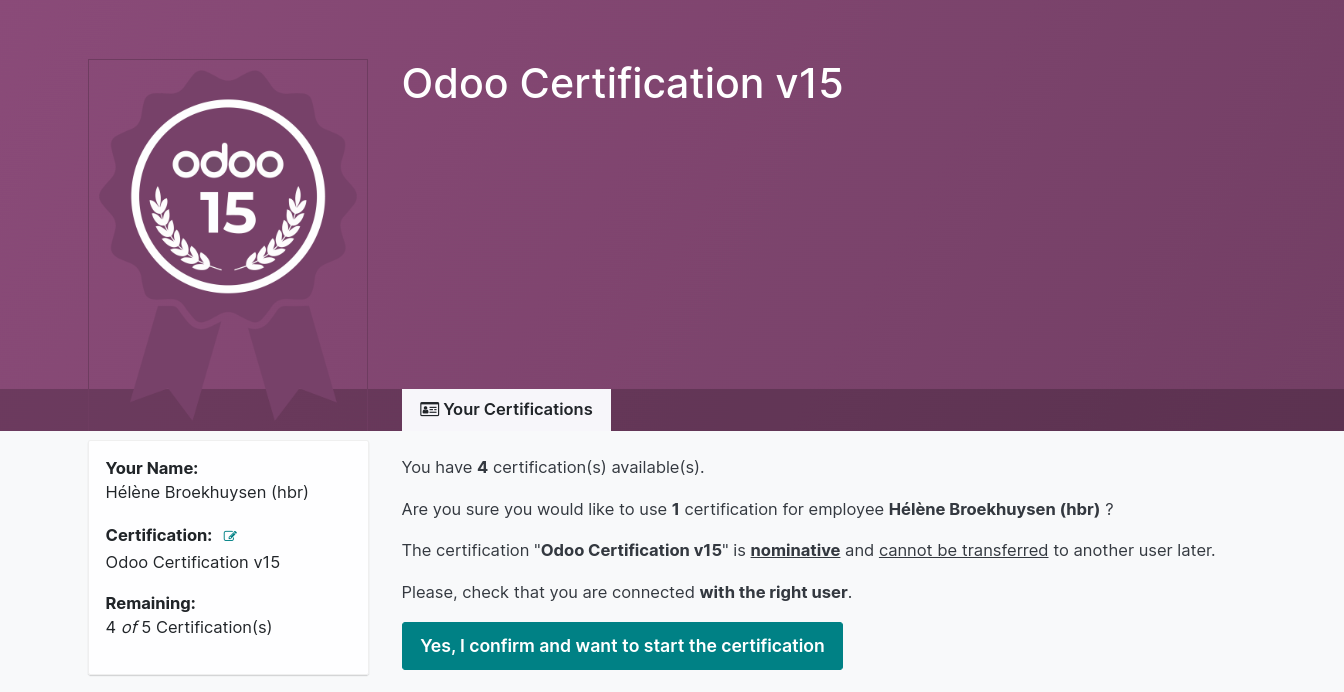
  • If you purchased the certification via your account manager: simply go to the SO and click on the “Manage certification button”. 
  • Then confirm that you wish to use 1 certification with the user you are logged in with.
    Make sure you are logged in with the user that is related to your company (not your personal account) :

  • If you purchased the certification yourself: Simply log into www.odoo.com/slides with your personal user, then click on “Certifications” and you’ll see the one you have access to. 

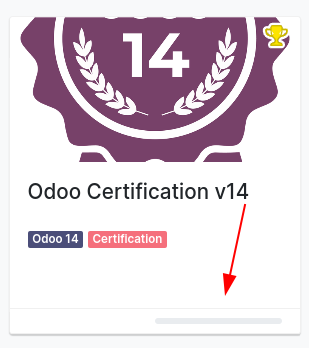
    Tip: you can quickly see if you have access to a certification or not by checking the gray progress bar (if it’s there, it means you have access!).


I purchased a certification but I would like to change the version, is it possible?

Yes, if you purchased the certification via your account manager! Simply click on the “Manage Certification” button, then in the left side of the page you’ll be able to change the version. 


How can I start with a certification?

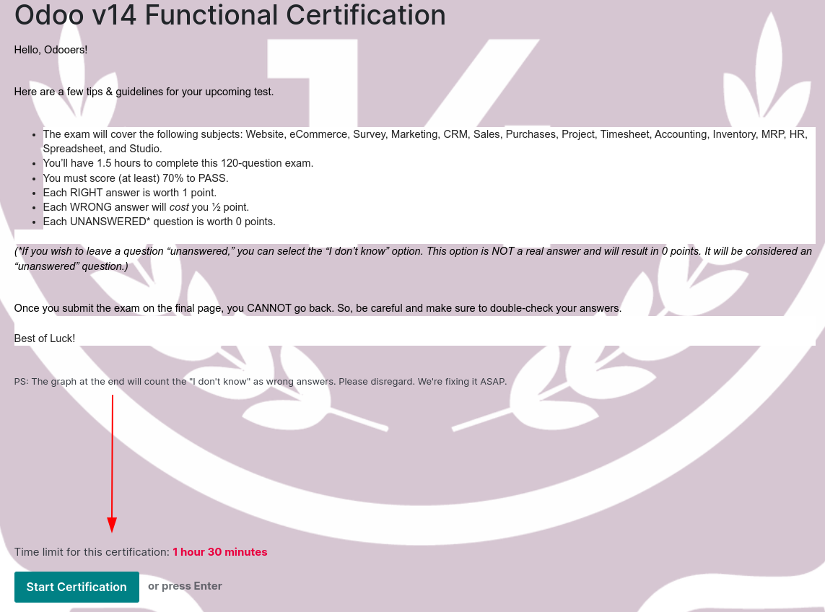
Depending on how you purchased your certification, simply click on “Start Now” (through your portal) or “Yes I confirm and I want to take a certification now” (through your SO), you’ll be redirected to the Introduction Page of the quiz, where all the guidelines are explained. Then click on “Start Certification”: you’ll see the first question and the timer will start running.
Is it possible to pause the certification while taking it?

No, it is not possible. Once you start the certification, a timer will start and you won’t be able to pause the test.

There was a bug with Odoo while taking the test, what should I do?

It is extremely rare, but a bug on our end can still happen. If you’re facing a bug (with or without traceback) try to take a screenshot of your page and contact your Account Manager.

I failed the certification, how can I know my results?

Your score will appear once you’re done with the certification. You’ll see a breakdown of your results.
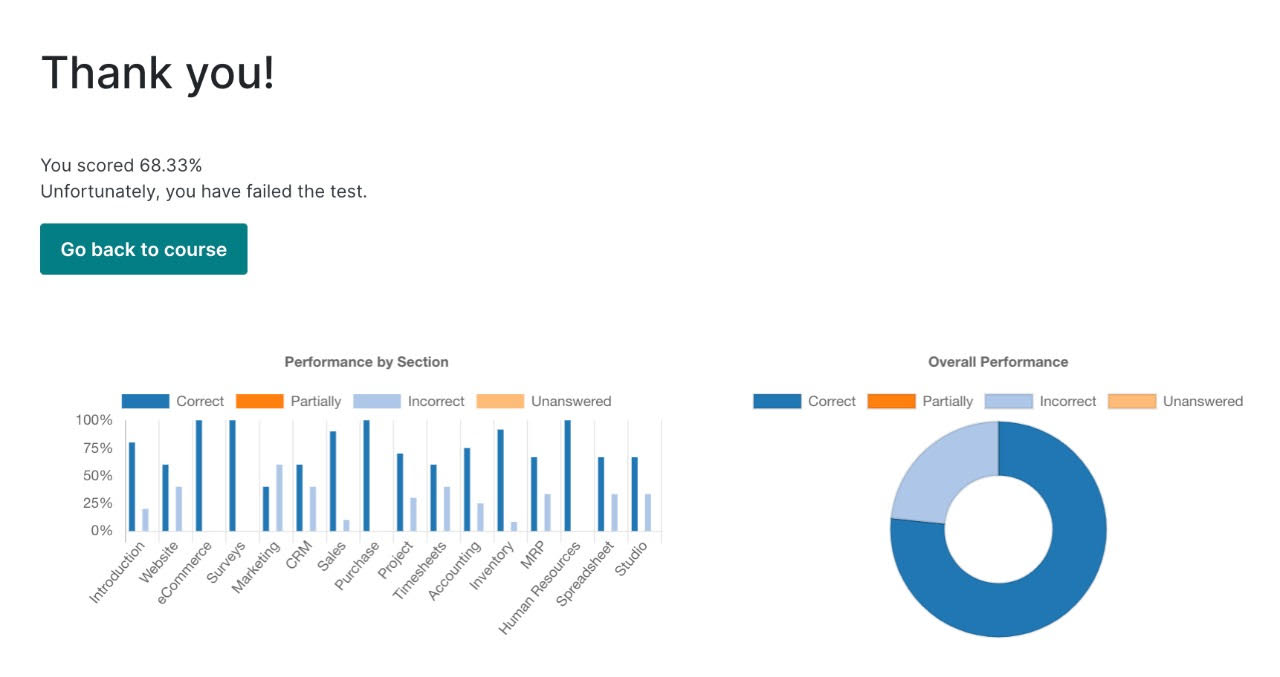
The graph does not display the “I don’t know” answers properly. As mentioned in the Introduction Page of the certification: “*If you wish to leave a question “unanswered,” you can select the “I don’t know” option. This option is NOT a real answer and will result in 0 points. It will be considered an “unanswered” question. The graph at the end will count the "I don't know" as wrong answers. Please disregard. We're fixing it ASAP.”


I took the certification with the wrong user, can we update the certificate?

No, certifications are nominative so they need to be taken with the right user. If you take the certification with a colleague’s user, we won’t be able to re-assign you the certification.

I am certified but I am leaving my company, how can I keep my certification?

Yes, certifications are nominative! Your certificate is under your own name. If you’d like to keep your certification tag (e.g. you are becoming a partner yourself or you are now employed with another partner) contact our support team on  www.odoo.com/help . They will switch your tag to your new Odoo user. 

Community
  • Instruktionsvideor
  • Dokumentation
  • Forum
Öppen källkod
  • Ladda ner
  • GitHub
  • Runbot
  • Översättningar
Tjänster
  • Odoo.sh Hosting
  • Kundtjänst
  • Uppgradera
  • Anpassningsbara modifikationer
  • Utbildning
  • Revisorer
  • Partners
  • Bli en partner
Om oss
  • Vårt företag
  • Varumärkestillgångar
  • Kontakta oss
  • Jobb
  • Evenemang
  • Podcast
  • Blogg
  • Kunder
  • Juridiskt • Integritet
  • Säkerhet
الْعَرَبيّة Català 简体中文 繁體中文 (台灣) Čeština Dansk Nederlands English Suomi Français Deutsch हिंदी Bahasa Indonesia Italiano 日本語 한국어 (KR) Lietuvių kalba Język polski Português (BR) română русский язык Slovenský jazyk Slovenščina Español (América Latina) Español Svenska ภาษาไทย Türkçe українська Tiếng Việt

Odoo är ett affärssystem med öppen källkod som täcker alla dina företagsbehov: CRM, e-handel, bokföring, lager, kassasystem, projektledning, och så vidare.

Odoos unika värdeförslag är att samtidigt vara väldigt enkel att använda men också helt integrerad.

Website made with

Odoo Experience on YouTube

1. Use the live chat to ask your questions.
2. The operator answers within a few minutes.

Live support on Youtube
Watch now