
In Odoo 16, in the Accounting module in Invoices, I can download the invoice file after clicking the SEND & PRINT button. I need to download this file and save it in the directory I want through my Python script. How do I implement this?
Odoo is the world's easiest all-in-one management software.
It includes hundreds of business apps:
- CRM
- e-Commerce
- Buchhaltung
- Lager
- PoS
- Projekte
- MRP
Diese Frage wurde gekennzeichnet
6
Antworten
12432
Ansichten


To download an invoice file in PDF format in Odoo 16 using Python, you can use the Odoo XML-RPC API to connect to your Odoo instance and download the PDF file.
Here is an example Python code that you can use to download an invoice file in PDF format:
python
import xmlrpc.client

# Connect to the Odoo instance
url = 'http://localhost:8069'
db = 'my_database'
username = 'my_username'
password = 'my_password'
common = xmlrpc.client.ServerProxy('{}/xmlrpc/2/common'.format(url))
uid = common.authenticate(db, username, password, {})

# Create a new XML-RPC client object
models = xmlrpc.client.ServerProxy('{}/xmlrpc/2/object'.format(url))

# Find the invoice you want to download
invoice_ids = models.execute_kw(db, uid, password, 'account.move', 'search', [[['state', '=', 'posted'], ['type', '=', 'out_invoice']]])

# Download the PDF file for the first invoice in the list
invoice = models.execute_kw(db, uid, password, 'account.move', 'read', [invoice_ids[0]], {'fields': ['name', 'invoice_date', 'amount_total']})
pdf_file = models.execute_kw(db, uid, password, 'account.move', 'invoice_print', [invoice_ids[0], 'pdf'])

# Save the PDF file to disk
filename = '{}_{}.pdf'.format(invoice['name'], invoice['invoice_date'])
with open(filename, 'wb') as f:
    f.write(pdf_file)
In this example, you first connect to your Odoo instance using the XML-RPC API, then you search for the invoices you want to download. Once you find the invoice you want, you call the invoice_print method to download the PDF file.
Finally, you save the PDF file to disk using the open function in binary mode. You can customize the filename and directory where the PDF file is saved by modifying the filename variable.
Note that this is just an example code, and you will need to adapt it to your specific needs and customize it to handle errors and exceptions.

import xmlrpc.client
# Odoo connection details
url = "http://your-odoo-instance.com"
db = "your-database-name"
username = "your-username"
password = "your-password"
# Authenticate
common = xmlrpc.client.ServerProxy(f"{url}/xmlrpc/2/common")
uid = common.authenticate(db, username, password, {})
models = xmlrpc.client.ServerProxy(f"{url}/xmlrpc/2/object")
# Search for the invoice
invoice_ref = "INV/2025/0001"
invoice_ids = models.execute_kw(
db, uid, password,
'account.move', 'search',
[[['name', '=', invoice_ref]]]
)
if invoice_ids:
invoice_id = invoice_ids[0]
# Generate the PDF
pdf_data = models.execute_kw(
db, uid, password,
'report.account.report_invoice', 'render_qweb_pdf',
[invoice_id]
)
pdf_content, filename = pdf_data
# Save the PDF
output_path = f"/path/to/save/{filename}"
with open(output_path, "wb") as pdf_file:
pdf_file.write(pdf_content)
print(f"Invoice PDF saved to {output_path}")
else:
print("Invoice not found!")

in v17, the call :
pdf_file_url = models.execute_kw(db, uid, password, 'account.move.send', 'action_send_and_print', [4, [invoice_id]])
returns :
<Fault 2: 'Record does not exist or has been deleted.\n(Record: account.move.send(4,), User: 6)'>
What do ye have to do for the PDF to be generated ?

Hi,
There is already a default function to print the invoice from the action menu. Please check it whether it meets your need
open any invoice -> Action button -> print -> invoices
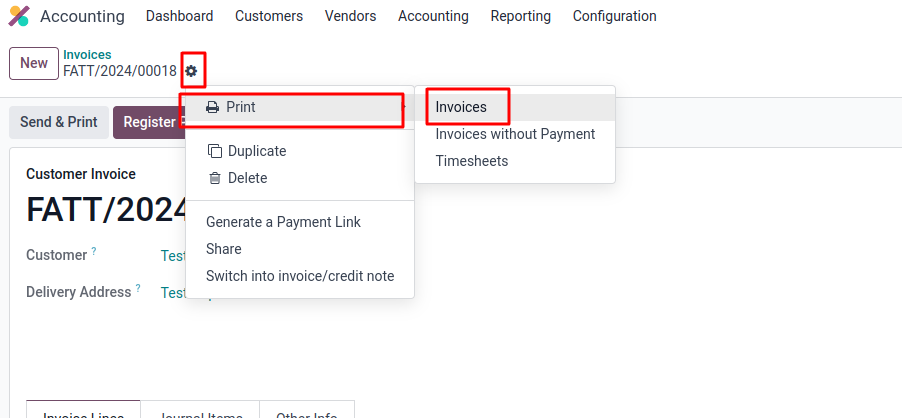
Hope it helps

Try this code to download an invoice file in PDF in Odoo 17 using Python.
# Import necessary modules from Flask framework and other libraries
from flask import Flask, request, jsonify, send_file
import xmlrpc.client
import requests

# Set up credentials and URL for Odoo instance
url = 'https://your_odoo_instance_url.com'
db = 'your_odoo_database'
username = 'your_odoo_username'
password = 'your_odoo_password'

# Authenticate and get session ID from Odoo
session_url = f'{url}web/session/authenticate'
data = {
    'jsonrpc': '2.0',
    'method': 'call',
    'params': {
        "service": "common",
        "method": "login",
        'db': db,
        'login': username,
        'password': password,
    }
}
session_response = requests.post(session_url, json=data)
session_data = session_response.json()
session_id = session_response.cookies['session_id']

# Set up XML-RPC connection to Odoo
common = xmlrpc.client.ServerProxy('{}/xmlrpc/2/common'.format(url))
uid = common.authenticate(db, username, password, {})
models = xmlrpc.client.ServerProxy('{}/xmlrpc/2/object'.format(url))

# Specify the ID of the invoice to retrieve
invoice_id = 21566

# Retrieve information about the specified invoice from Odoo
invoice = models.execute_kw(db, uid, password, 'account.move', 'read', [invoice_id], {'fields': ['name']})

# Trigger the action to send and print the invoice, and retrieve the URL of the generated PDF
pdf_file_url = models.execute_kw(db, uid, password, 'account.move.send', 'action_send_and_print', [4, [invoice_id]])

# Set up headers with the session ID for downloading the PDF
headers = {'Cookie': f'session_id={session_id}'}
download_url = f'{url}{pdf_file_url["url"]}'

# Download the PDF content of the invoice
response = requests.get(download_url, headers=headers)
pdf_content = response.content

# Specify the filename for the downloaded PDF based on the invoice name
filename = '{}.pdf'.format(invoice[0]['name'])

# Save the PDF content to a file
with open(filename, 'wb') as f:
    f.write(pdf_content)
Let me know if this works. It worked for me.

Hello,
I tried this script in odoo 17, but I have this error :
AttributeError: type object 'account.move' has no attribute 'invoice_print'
Do I need something else to make it work ?
Best regards
Diskutieren Sie gerne? Treten Sie bei, statt nur zu lesen!
Erstellen Sie heute ein Konto, um exklusive Funktionen zu nutzen und mit unserer tollen Community zu interagieren!
Registrieren| Verknüpfte Beiträge | Antworten | Ansichten | Aktivität | |
|---|---|---|---|---|


|
3
Feb. 23
|
6643 | ||


|
3
Nov. 24
|
4530 | ||


|
4
Mai 25
|
15128 | ||

|
1
Feb. 24
|
2970 | ||


|
1
Nov. 23
|
2389 |
