Zum Inhalt springen
Odoo Menü
  • Anmelden
  • Jetzt gratis testen
  • Apps
    Finanzen
    • Buchhaltung
    • Rechnungsstellung
    • Spesenabrechnung
    • Tabellenkalkulation (BI)
    • Dokumente
    • E-Signatur
    Vertrieb
    • CRM
    • Vertrieb
    • Kassensystem – Shop
    • Kassensystem – Restaurant
    • Abonnements
    • Vermietung
    Websites
    • Website-Builder
    • E-Commerce
    • Blog
    • Forum
    • Livechat
    • E-Learning
    Lieferkette
    • Lager
    • Fertigung
    • PLM
    • Einkauf
    • Wartung
    • Qualität
    Personalwesen
    • Mitarbeiter
    • Personalbeschaffung
    • Abwesenheiten
    • Mitarbeiterbeurteilung
    • Personalempfehlungen
    • Fuhrpark
    Marketing-
    • Social Marketing
    • E-Mail-Marketing
    • SMS-Marketing
    • Veranstaltungen
    • Marketing-Automatisierung
    • Umfragen
    Dienstleistungen
    • Projekte
    • Zeiterfassung
    • Außendienst
    • Kundendienst
    • Planung
    • Termine
    Produktivität
    • Dialog
    • Genehmigungen
    • IoT
    • VoIP
    • Wissensdatenbank
    • WhatsApp
    Apps von Drittanbietern Odoo Studio Odoo Cloud-Plattform
  • Branchen
    Einzelhandel
    • Buchladen
    • Kleidergeschäft
    • Möbelhaus
    • Lebensmittelgeschäft
    • Baumarkt
    • Spielwarengeschäft
    Essen & Gastgewerbe
    • Bar und Kneipe
    • Restaurant
    • Fast Food
    • Gästehaus
    • Getränkehändler
    • Hotel
    Immobilien
    • Immobilienagentur
    • Architekturbüro
    • Baugewerbe
    • Immobilienverwaltung
    • Gartenarbeit
    • Eigentümervereinigung
    Beratung
    • Buchhaltungsfirma
    • Odoo-Partner
    • Marketingagentur
    • Anwaltskanzlei
    • Talentakquise
    • Prüfung & Zertifizierung
    Fertigung
    • Textil
    • Metall
    • Möbel
    • Speisen
    • Brauerei
    • Firmengeschenke
    Gesundheit & Fitness
    • Sportklub
    • Brillengeschäft
    • Fitnessstudio
    • Therapeut
    • Apotheke
    • Friseursalon
    Handel
    • Handyman
    • IT-Hardware & -Support
    • Solarenergiesysteme
    • Schuster
    • Reinigungsdienstleistungen
    • HLK-Dienstleistungen
    Sonstiges
    • Gemeinnützige Organisation
    • Umweltschutzagentur
    • Plakatwandvermietung
    • Fotostudio
    • Fahrrad-Leasing
    • Software-Händler
    Alle Branchen ansehen
  • Community
    Lernen
    • Tutorials
    • Dokumentation
    • Zertifizierungen
    • Schulung
    • Blog
    • Podcast
    Bildung fördern
    • Bildungsprogramm
    • Scale-Up! Planspiel
    • Odoo besuchen
    Software anfragen
    • Herunterladen
    • Editionen vergleichen
    • Releases
    Zusammenarbeiten
    • Github
    • Forum
    • Veranstaltungen
    • Übersetzungen
    • Partner werden
    • Dienstleistungen für Partner
    • Buchhaltungsfirma registrieren
    Services anfragen
    • Partner finden
    • Buchhalter finden
    • Einen Experten treffen
    • Implementierungsservices
    • Kundenreferenzen
    • Support
    • Upgrades
    Github Youtube Twitter Linkedin Instagram Facebook Spotify
    +1 (650) 691-3277
    Eine Demo erhalten
  • Preiskalkulation
  • Hilfe

Odoo is the world's easiest all-in-one management software.
It includes hundreds of business apps:

  • CRM
  • e-Commerce
  • Buchhaltung
  • Lager
  • PoS
  • Projekte
  • MRP
All apps
Sie müssen registriert sein, um mit der Community zu interagieren.
Alle Beiträge Personen Abzeichen
Stichwörter (Alle anzeigen)
odoo accounting v14 pos v15
Über dieses Forum
Sie müssen registriert sein, um mit der Community zu interagieren.
Alle Beiträge Personen Abzeichen
Stichwörter (Alle anzeigen)
odoo accounting v14 pos v15
Über dieses Forum
Hilfe

How can I see the value / variance of an Inventory Adjustment / Physical Inventory before validating / applying it?

Abonnieren

Erhalten Sie eine Benachrichtigung, wenn es eine Aktivität zu diesem Beitrag gibt

Diese Frage wurde gekennzeichnet
inventoryvaluequickstartadjustmentsv13impact19.0
1 Antworten
4032 Ansichten
Avatar
Community Question

I want to know by how much (financially) a cycle count / inventory adjustment / physcial inventory will impact us.

In our industry, adjustments of more than 3% of our average monthly sales can cause us to be out of compliance with industry regulations.

How can I see the "cost" or "impact" or "variance" of each count / adjustment to make sure the total change in a given month is within 3%?

In other systems I have used, there are reports called: Stock Variance, Inventory Variation, Inventory Write-Off, Cycle Count Variance, etc.

The goal is to analyze the financial impact of inventory adjustments, calculate inventory variance as a percentage of sales, and monitor inventory adjustment compliance.


0
Avatar
Verwerfen
Avatar
Ray Carnes (ray)
Beste Antwort

Without either of these changes, you can already Filter the Physical Inventory by "To Apply" and export the product, on hand quantity, value, counted quantity, and difference to calculate the variance outside of Odoo.


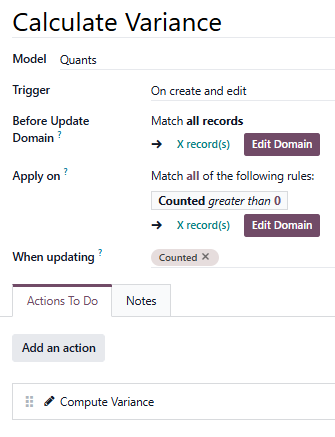
To do this inside Odoo, one of the following solutions should work:


UPDATED FOR Odoo 19.0:

Create a custom x_variance field:


Use an Automation Rule (this will NOT trigger Line of Code - LOC - maintenance charges):

record.value / record.quantity * record.inventory_diff_quantity if record.inventory_quantity != 0 else 0


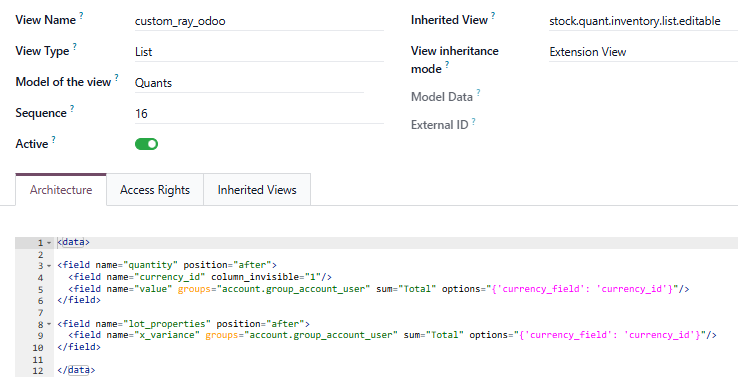
Then finally a Custom View like this:

<data>
   
<field name="quantity" position="after">
  <field name="currency_id" column_invisible="1"/>
  <field name="value" groups="account.group_account_user"
sum="Total" options="{'currency_field': 'currency_id'}"/> 
</field>

<field name="lot_properties" position="after">
  <field name="x_variance" groups="account.group_account_user"
sum="Total" options="{'currency_field': 'currency_id'}"/>   
</field>

</data>


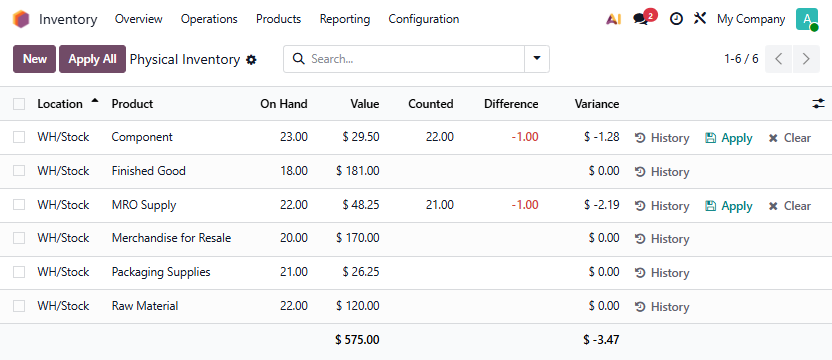
This restricts the value and variance fields to those in the Accounting --> Book Keeping group.


Result:


UPDATED FOR Odoo 18.0:


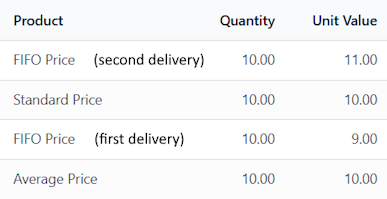
Given the following values and costing methods for Products:


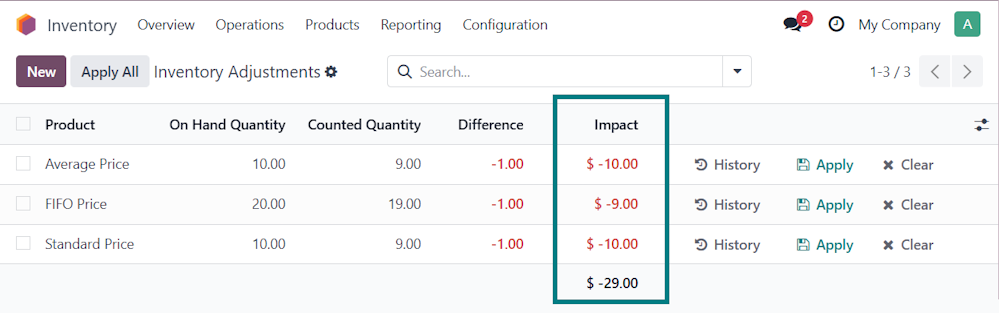
The Physical Inventory Menu would then show something like this:

Here, the loss of 1 unit of each product has a financial impact of $29 in lost value.


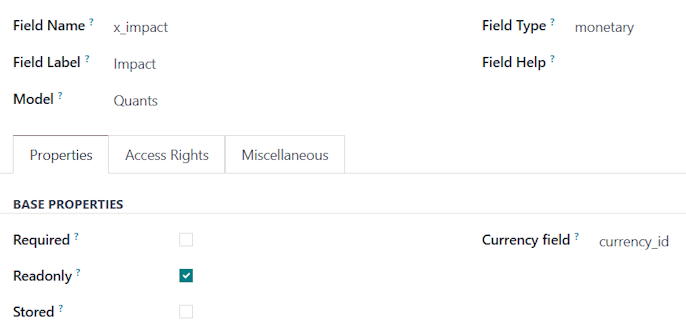
Custom Field (this WILL trigger Line of Code - LOC - maintenance charges):

Dependencies:

inventory_quantity_set, product_id

Compute:

for record in self:
    cost = 0.0
    if record.inventory_quantity_set:
        product = record.product_id
        if product.cost_method in ['standard', 'average']:
            cost = product.standard_price
        elif product.cost_method == 'fifo':
            valuation_layers = record.env['stock.valuation.layer'].search([
                ('product_id', '=', product.id),('remaining_qty', '>', 0)], order='create_date asc')
            qty_to_consume = abs(record.inventory_diff_quantity)
            cost = 0.0
            for layer in valuation_layers:
                if qty_to_consume <= 0:
                    break
                qty_from_layer = min(layer.remaining_qty, qty_to_consume)
                cost += qty_from_layer * (layer.unit_cost or 0.0)
                qty_to_consume -= qty_from_layer
    record['x_impact'] = record.inventory_diff_quantity * cost


Note: these are prototypes, not solutions, and make assumptions about how products are deplenished from inventory (financial fifo). Your Odoo Digital Advisor or Odoo Partner can help you implement something similar in your own Odoo database. You can also extend these approaches to calculate the percentage variance.


1
Avatar
Verwerfen
Diskutieren Sie gerne? Treten Sie bei, statt nur zu lesen!

Erstellen Sie heute ein Konto, um exklusive Funktionen zu nutzen und mit unserer tollen Community zu interagieren!

Registrieren
Verknüpfte Beiträge Antworten Ansichten Aktivität
How to create multiple delivery orders on the same SO by product category or inventory location? Gelöst
inventory quickstart v12 v13
Avatar
Avatar
2
März 23
8940
How can we access the inventory adjustment difference report? Gelöst
inventory report quickstart adjustments
Avatar
1
Nov. 25
6068
Odoo 19 - How do I manage consignment when I am the one consigning the inventory? Gelöst
management inventory quickstart 19.0 consignee
Avatar
Avatar
1
Nov. 25
866
Inventory Valuation - moving from Manual (periodic) to Automated (real time) - process / best practices? Gelöst
inventory change quickstart v13 v14
Avatar
Avatar
Avatar
Avatar
3
März 25
22043
How to add 2 steps picking on subcontracting route Gelöst
manufacturing inventory quickstart v13 v14
Avatar
Avatar
2
Apr. 23
4228
Community
  • Tutorials
  • Dokumentation
  • Forum
Open Source
  • Herunterladen
  • Github
  • Runbot
  • Übersetzungen
Dienstleistungen
  • Odoo.sh-Hosting
  • Support
  • Upgrade
  • Individuelle Entwicklungen
  • Bildung
  • Buchhalter finden
  • Partner finden
  • Partner werden
Über uns
  • Unsere Firma
  • Markenwerte
  • Kontakt
  • Karriere
  • Veranstaltungen
  • Podcast
  • Blog
  • Kunden
  • Rechtliches • Datenschutz
  • Sicherheit
الْعَرَبيّة Català 简体中文 繁體中文 (台灣) Čeština Dansk Nederlands English Suomi Français Deutsch हिंदी Bahasa Indonesia Italiano 日本語 한국어 (KR) Lietuvių kalba Język polski Português (BR) română русский язык Slovenský jazyk slovenščina Español (América Latina) Español ภาษาไทย Türkçe українська Tiếng Việt

Odoo ist eine Suite von Open-Source-Betriebsanwendungen, die alle Bedürfnisse Ihres Unternehmens abdecken: CRM, E-Commerce, Buchhaltung, Lager, Kassensystem, Projektmanagement etc.

Das einzigartige Wertversprechen von Odoo ist, dass es gleichzeitig sehr einfach zu bedienen und voll integriert ist.

Website made with

Odoo Experience on YouTube

1. Use the live chat to ask your questions.
2. The operator answers within a few minutes.

Live support on Youtube
Watch now