Zum Inhalt springen
Odoo Menü
  • Anmelden
  • Jetzt gratis testen
  • Apps
    Finanzen
    • Buchhaltung
    • Rechnungsstellung
    • Spesenabrechnung
    • Tabellenkalkulation (BI)
    • Dokumente
    • E-Signatur
    Vertrieb
    • CRM
    • Vertrieb
    • Kassensystem – Shop
    • Kassensystem – Restaurant
    • Abonnements
    • Vermietung
    Websites
    • Website-Builder
    • E-Commerce
    • Blog
    • Forum
    • Livechat
    • E-Learning
    Lieferkette
    • Lager
    • Fertigung
    • PLM
    • Einkauf
    • Wartung
    • Qualität
    Personalwesen
    • Mitarbeiter
    • Personalbeschaffung
    • Abwesenheiten
    • Mitarbeiterbeurteilung
    • Personalempfehlungen
    • Fuhrpark
    Marketing-
    • Social Marketing
    • E-Mail-Marketing
    • SMS-Marketing
    • Veranstaltungen
    • Marketing-Automatisierung
    • Umfragen
    Dienstleistungen
    • Projekte
    • Zeiterfassung
    • Außendienst
    • Kundendienst
    • Planung
    • Termine
    Produktivität
    • Dialog
    • Genehmigungen
    • IoT
    • VoIP
    • Wissensdatenbank
    • WhatsApp
    Apps von Drittanbietern Odoo Studio Odoo Cloud-Plattform
  • Branchen
    Einzelhandel
    • Buchladen
    • Kleidergeschäft
    • Möbelhaus
    • Lebensmittelgeschäft
    • Baumarkt
    • Spielwarengeschäft
    Essen & Gastgewerbe
    • Bar und Kneipe
    • Restaurant
    • Fast Food
    • Gästehaus
    • Getränkehändler
    • Hotel
    Immobilien
    • Immobilienagentur
    • Architekturbüro
    • Baugewerbe
    • Immobilienverwaltung
    • Gartenarbeit
    • Eigentümervereinigung
    Beratung
    • Buchhaltungsfirma
    • Odoo-Partner
    • Marketingagentur
    • Anwaltskanzlei
    • Talentakquise
    • Prüfung & Zertifizierung
    Fertigung
    • Textil
    • Metall
    • Möbel
    • Speisen
    • Brauerei
    • Firmengeschenke
    Gesundheit & Fitness
    • Sportklub
    • Brillengeschäft
    • Fitnessstudio
    • Therapeut
    • Apotheke
    • Friseursalon
    Handel
    • Handyman
    • IT-Hardware & -Support
    • Solarenergiesysteme
    • Schuster
    • Reinigungsdienstleistungen
    • HLK-Dienstleistungen
    Sonstiges
    • Gemeinnützige Organisation
    • Umweltschutzagentur
    • Plakatwandvermietung
    • Fotostudio
    • Fahrrad-Leasing
    • Software-Händler
    Alle Branchen ansehen
  • Community
    Lernen
    • Tutorials
    • Dokumentation
    • Zertifizierungen
    • Schulung
    • Blog
    • Podcast
    Bildung fördern
    • Bildungsprogramm
    • Scale-Up! Planspiel
    • Odoo besuchen
    Software anfragen
    • Herunterladen
    • Editionen vergleichen
    • Releases
    Zusammenarbeiten
    • Github
    • Forum
    • Veranstaltungen
    • Übersetzungen
    • Partner werden
    • Dienstleistungen für Partner
    • Buchhaltungsfirma registrieren
    Services anfragen
    • Partner finden
    • Buchhalter finden
    • Einen Experten treffen
    • Implementierungsservices
    • Kundenreferenzen
    • Support
    • Upgrades
    Github Youtube Twitter Linkedin Instagram Facebook Spotify
    +1 (650) 691-3277
    Eine Demo erhalten
  • Preiskalkulation
  • Hilfe

Odoo is the world's easiest all-in-one management software.
It includes hundreds of business apps:

  • CRM
  • e-Commerce
  • Buchhaltung
  • Lager
  • PoS
  • Projekte
  • MRP
All apps
Sie müssen registriert sein, um mit der Community zu interagieren.
Alle Beiträge Personen Abzeichen
Stichwörter (Alle anzeigen)
odoo accounting v14 pos v15
Über dieses Forum
Sie müssen registriert sein, um mit der Community zu interagieren.
Alle Beiträge Personen Abzeichen
Stichwörter (Alle anzeigen)
odoo accounting v14 pos v15
Über dieses Forum
Hilfe

Can I automatically print my product labels in Odoo?

Abonnieren

Erhalten Sie eine Benachrichtigung, wenn es eine Aktivität zu diesem Beitrag gibt

Diese Frage wurde gekennzeichnet
posinventoryhardwarelabelsquickstart
4 Antworten
19447 Ansichten
Avatar
Marius Toussaint (mrt)

I want to manage my labels directly from Odoo but I do not understand if it is possible or not to print them automatically with a label printer such as Zebra ZD410.

1
Avatar
Verwerfen
Avatar
Yurii Razumovskyi
Beste Antwort

Hello Marius

With the standard Odoo functionality, you cannot print product labels without first downloading a PDF file.

You should use additional Odoo apps, that can allow you to print labels direct to your printer or your system printer manager.

They are implemented in several approaches:

1) Ones of them are using of third-party servers, such as "qz.io", "PrintNode", and etc., to connect your local printers. Usually, the using of these servers is paid.

2) Another modules handle the PDF generation process and open a new browser window, where you can select one of your local printer and send file to it. Apps with this way of printing can be as paid, and free as well.

You can find solutions with these approaches in Odoo Apps by the search term "direct print": https://apps.odoo.com/apps/modules/browse?search=direct+print

If you are interested in creating and designing the own PDF product labels through UI, might the "Product Label Builder" solution will be helpful for you. It contains the ability to print PDF labels directly with the second approach - generate a PDF file in background and provide you a browser print window. You can found out more about it in this video: https://youtu.be/NqZMPPCRMOk

If you have any additional questions, please feel free to ask here.


Best regards, Yurii Razumovskyi.

Company Garazd Creation - Odoo solutions for eCommerce, SEO, Data Feeds, Marketing and Analytics.

https://garazd.biz


2
Avatar
Verwerfen
Avatar
Vasily Puntus | VentorTech
Beste Antwort

Hello Marius,

yes, you can easily print your product labels and other reports in Odoo instantly to a printer without downloading.

Please watch this video - https://youtu.be/vabMJ5zAHts

This module is good because it doesn't require additional hardware and very simple in usage (no tech knowledge needed). 

6
Avatar
Verwerfen
Avatar
Marius Toussaint (mrt)
Autor Beste Antwort

Since Odoo allows you to manage your labels, you might wonder if it's possible to print them easily. The answer is divided in 2 parts. Beforehand, remember that Odoo proposes you to print them thanks to the ZPL protocol which is integrated in the Zebra ZD410 printer, as you can see on that website page.

I don't have an IoT Box : 

  1. In that case, you can click the "print label" button on the product form. 
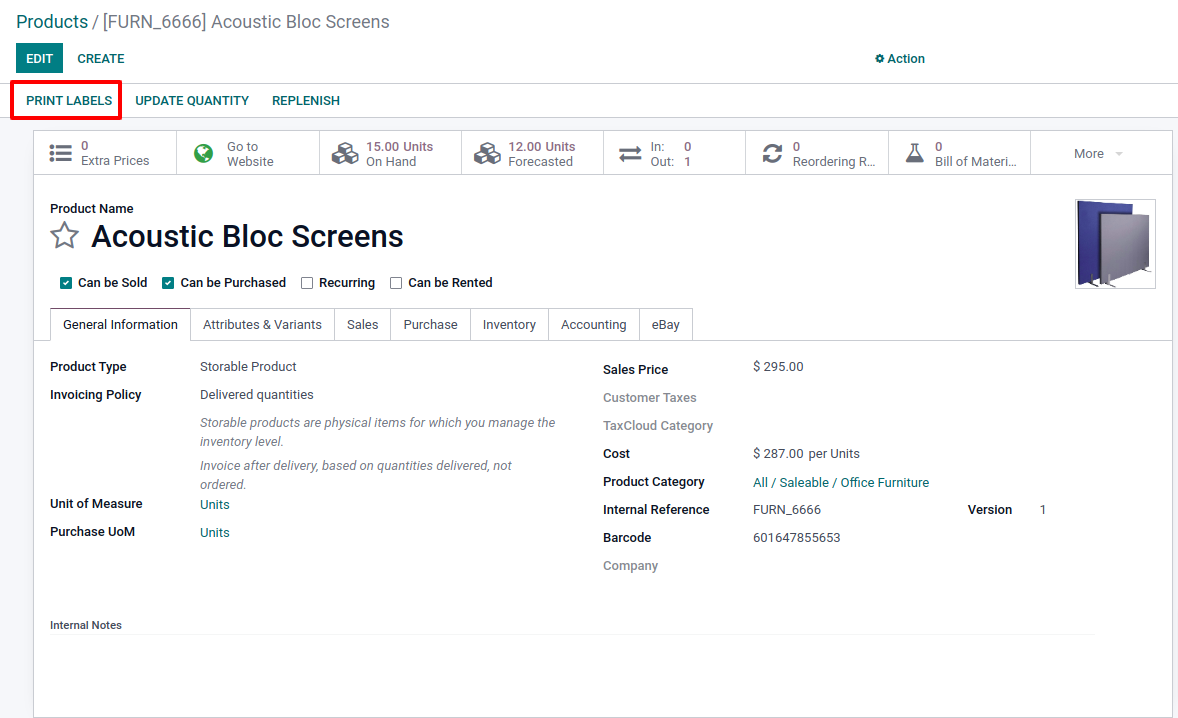
  2. A pop-up appears with the possibility to select the format. You can select one of the zpl formats. Odoo will download the file on your computer and you will be able to print it from your Zebra printer thanks to the driver integrated to your computer. 

I do have an IoT box : 

  1. In that case, the automatic printing is possible. From your IoT app, select your box and then, the zebra printer linked to it. Enter the "Printer Reports" tab and add the label report in zpl format in the lines. 
  2. Once it is done, when coming back to the action of "print label" on the product form, Odoo will automatically send the information to the Zebra to print the label and you do not need to download the file on your computer anymore. 
4
Avatar
Verwerfen
Adrian

do you have an idea why I don't have the option to Add a line in the Zebra printer popup under Printer Reports?

Loan Sens (lse)

If your are missing the "Add a line", it is probably because you are looking at the printer through the IoT Boxes view. As this view can't be edited, you can't edit the related sub-views neither.
Make sure to go to IoT > Devices menu then choose the printer there. See:
https://watch.screencastify.com/v/S0zpKDQgCpvpEDO1Bvo9

Related Odoo documentation:
https://www.odoo.com/documentation/15.0/applications/productivity/iot/devices/printer.html#to-reports

Avatar
warlos hoger
Beste Antwort

Choose the right label paper. While many kinds of paper can be used in a printer, picking a paper specifically for the labels you want to print works best.
Inspect the label paper through thermal shipping label printer. 
Design the label. 
Test the label. 
Load the label paper.
Set print settings. 
Print.

0
Avatar
Verwerfen
Diskutieren Sie gerne? Treten Sie bei, statt nur zu lesen!

Erstellen Sie heute ein Konto, um exklusive Funktionen zu nutzen und mit unserer tollen Community zu interagieren!

Registrieren
Verknüpfte Beiträge Antworten Ansichten Aktivität
How to discount POS sales in a combined warehouse. Gelöst
pos inventory quickstart
Avatar
1
Apr. 22
3119
Use FIFO/LIFO in POS for products with lot numbers Gelöst
pos inventory quickstart
Avatar
1
Apr. 22
4211
POS: What is the configuration “inventory: real time vs at closing of the session” and how to use it? Gelöst
pos inventory quickstart Point Of Sale
Avatar
1
Feb. 22
5822
Can I select the products that I do not want to send on my kitchen printer in my Odoo PoS restaurant? Gelöst
pos printer restaurant hardware quickstart
Avatar
1
Aug. 24
3713
When to use a connected payment terminal in the Point of Sale? Gelöst
pos payment hardware quickstart PaymentTerminal
Avatar
1
Aug. 22
3981
Community
  • Tutorials
  • Dokumentation
  • Forum
Open Source
  • Herunterladen
  • Github
  • Runbot
  • Übersetzungen
Dienstleistungen
  • Odoo.sh-Hosting
  • Support
  • Upgrade
  • Individuelle Entwicklungen
  • Bildung
  • Buchhalter finden
  • Partner finden
  • Partner werden
Über uns
  • Unsere Firma
  • Markenwerte
  • Kontakt
  • Karriere
  • Veranstaltungen
  • Podcast
  • Blog
  • Kunden
  • Rechtliches • Datenschutz
  • Sicherheit
الْعَرَبيّة Català 简体中文 繁體中文 (台灣) Čeština Dansk Nederlands English Suomi Français Deutsch हिंदी Bahasa Indonesia Italiano 日本語 한국어 (KR) Lietuvių kalba Język polski Português (BR) română русский язык Slovenský jazyk slovenščina Español (América Latina) Español ภาษาไทย Türkçe українська Tiếng Việt

Odoo ist eine Suite von Open-Source-Betriebsanwendungen, die alle Bedürfnisse Ihres Unternehmens abdecken: CRM, E-Commerce, Buchhaltung, Lager, Kassensystem, Projektmanagement etc.

Das einzigartige Wertversprechen von Odoo ist, dass es gleichzeitig sehr einfach zu bedienen und voll integriert ist.

Website made with

Odoo Experience on YouTube

1. Use the live chat to ask your questions.
2. The operator answers within a few minutes.

Live support on Youtube
Watch now
