
I'm confused why resupply to subcontractor is not working properly, instead of the resupply button appearing in the purchase order, it doesn't and when I checked it creates a manufacturing order for the item
Odoo is the world's easiest all-in-one management software.
It includes hundreds of business apps:
- CRM
- e-Commerce
- Бухгалтерия
- Склад
- PoS
- Проекты
- MRP
Этот вопрос был отмечен
1
Ответить
1085
Представления


Hello @Rick Armand De Leon,
Below is the complete steps to achive the Odoo resupply to subcontractor.
STEP 1 :
Configuration :
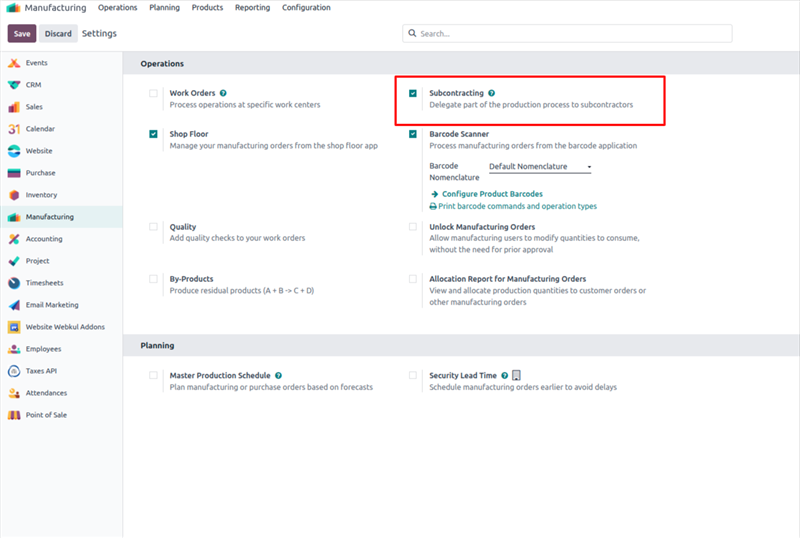
To use the Resupply Subcontractor on Order route, navigate to Manufacturing app ‣ Configuration ‣ Settings,
and enable the checkbox next to Subcontracting, under the Operations heading as shown in below image.
Once the Subcontracting setting is enabled, it is also necessary to properly configure the subcontracted product,
the product’s bill of materials (BoM), and the components listed on the BoM.
STEP 2 :
Configure product
To configure a product for the Resupply Subcontractor on Order route, navigate to Inventory app ‣ Products ‣ Products,
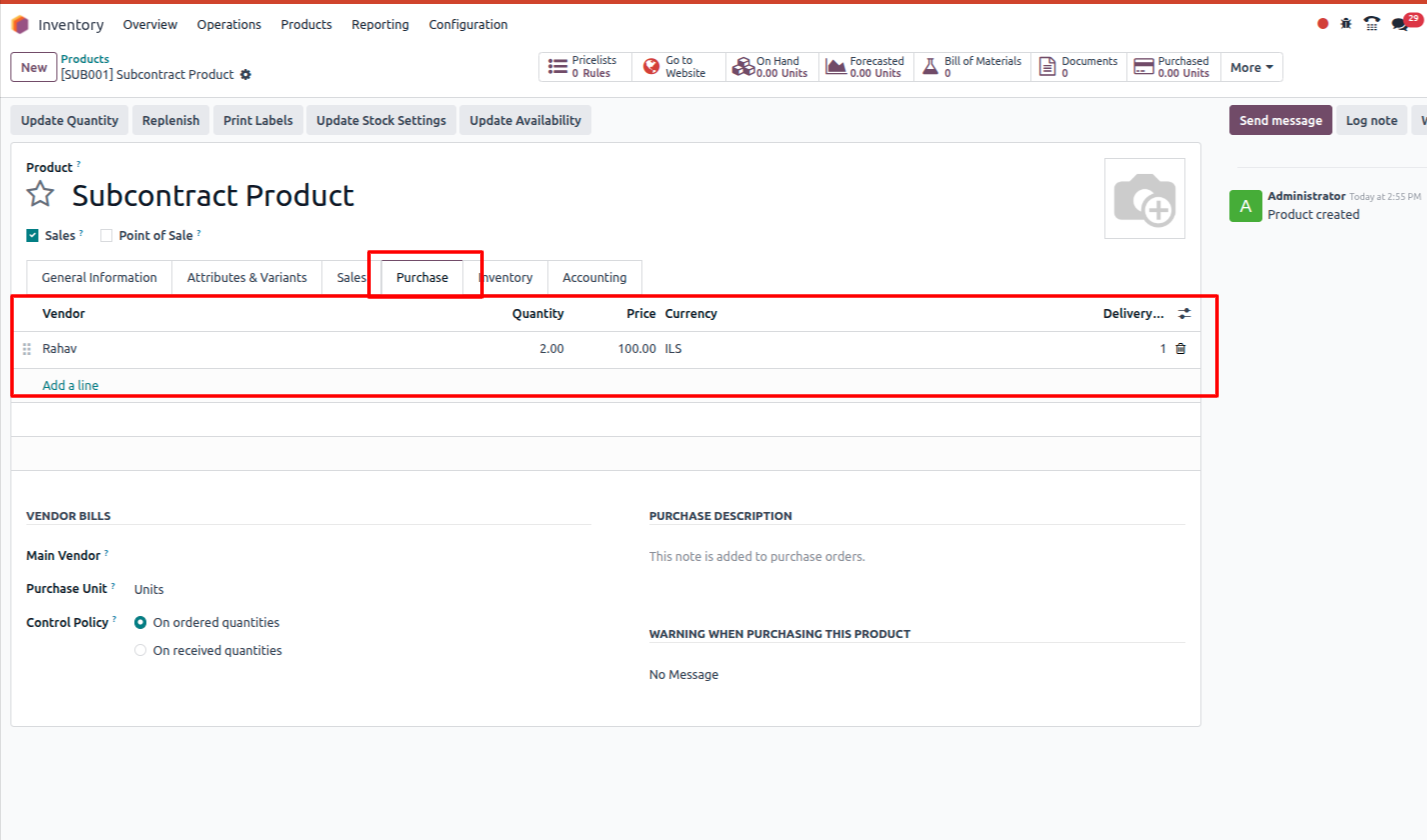
and select a product, or create a new one by clicking New, and create a subcontrcat product as shown in below image
Select the Purchase tab, and add the product’s subcontractor as a vendor by clicking Add a line,
selecting the subcontractor in the Vendor drop-down menu, and entering a price in the Price field.
Here I have seletced 'Rahav'as a vendor. as shown in below image.
Then, click on the Inventory tab to configure a route that determines what happens to the finished product,
once it has been manufactured by the subcontractor.
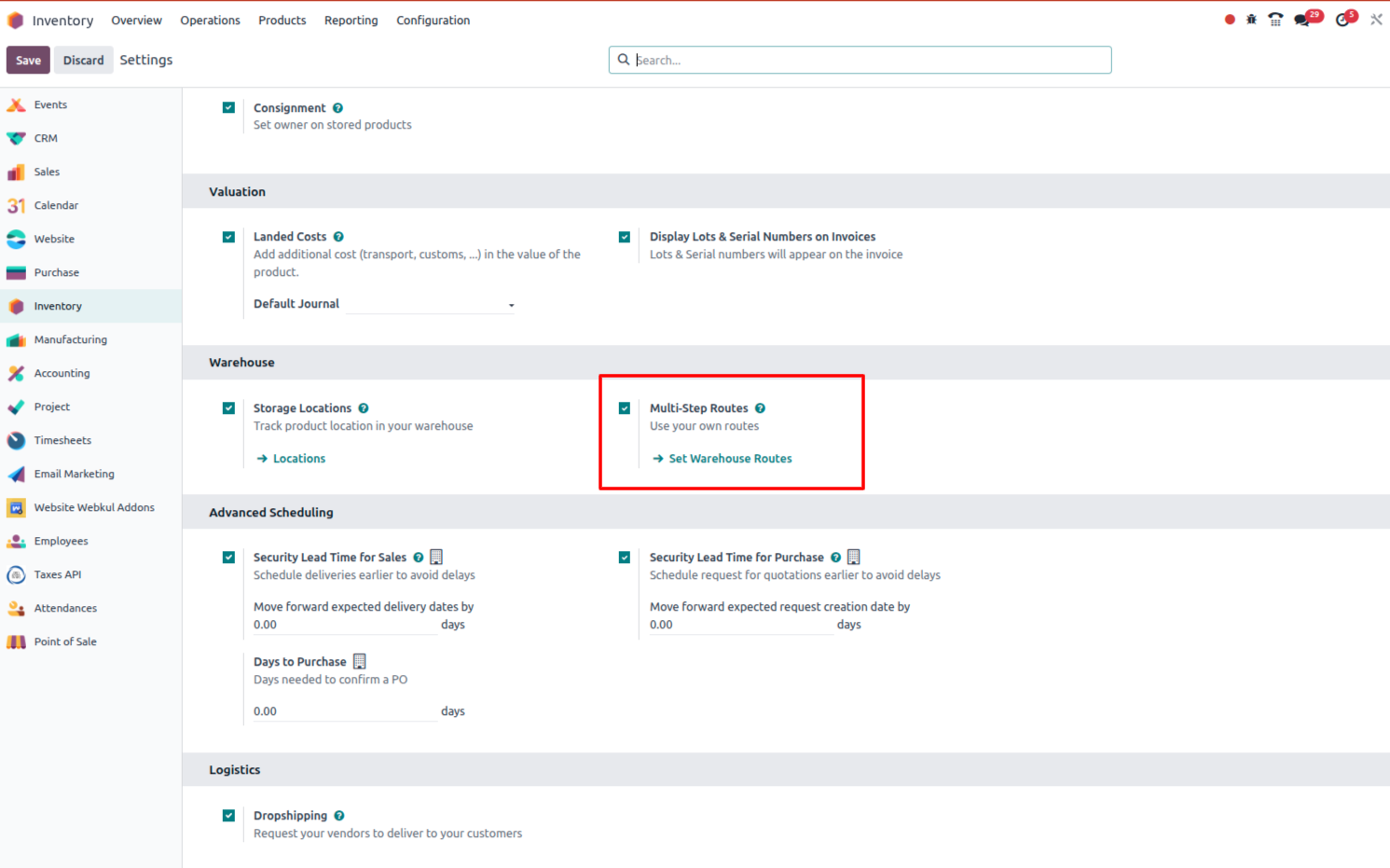
Beofre that make sure that, Multi step route configuration is enable in your databse, to do so, navigate to Inventory app ‣ Configuration ‣ Settings
and as shown in below image activate 'Multi step route'
STEP 3 :
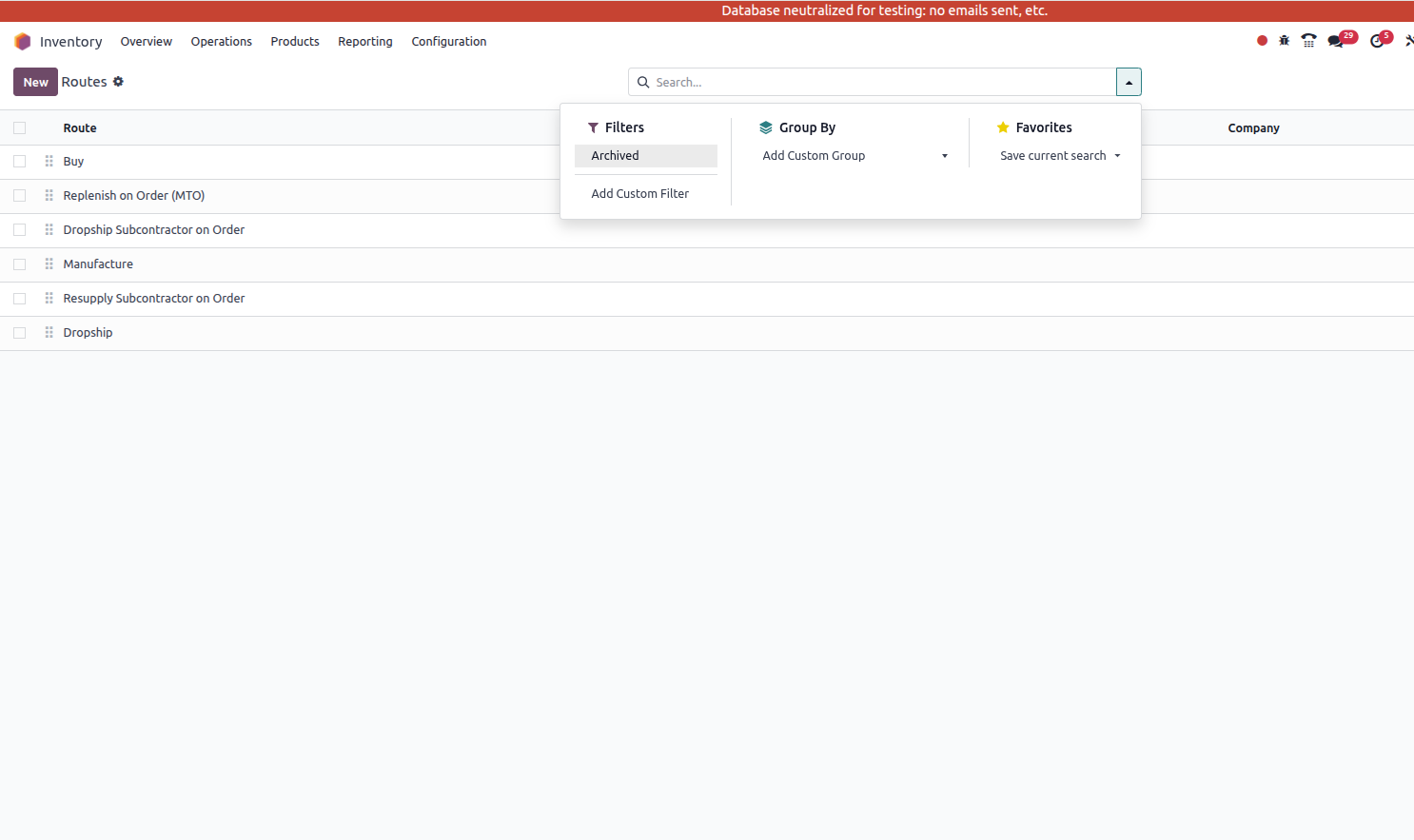
Navigate to the Inventory app ‣ Configuration ‣ Routes, click on 'Archive' as shown in below image and 'Unarchive' the route 'MTO'
make sure that all the route should be Unarchived as shown in below image.
STEP 4 :
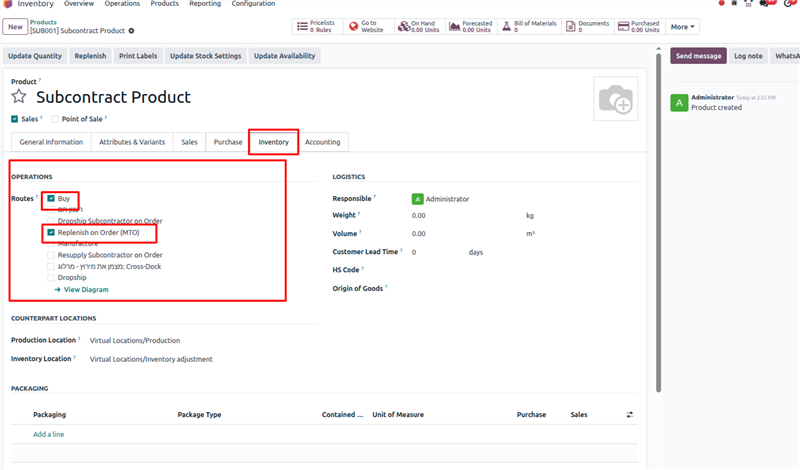
If the finished product is shipped back to the contracting company, make sure that the Buy route is selected.
In addition, click on the Inventory tab and select the Replenish on Order (MTO) route to automatically create a PO for the product upon confirmation of a sales order (SO),
unless there is enough stock on-hand to fulfill the SO as shown in below image
STEP 5 :
Configure BoM
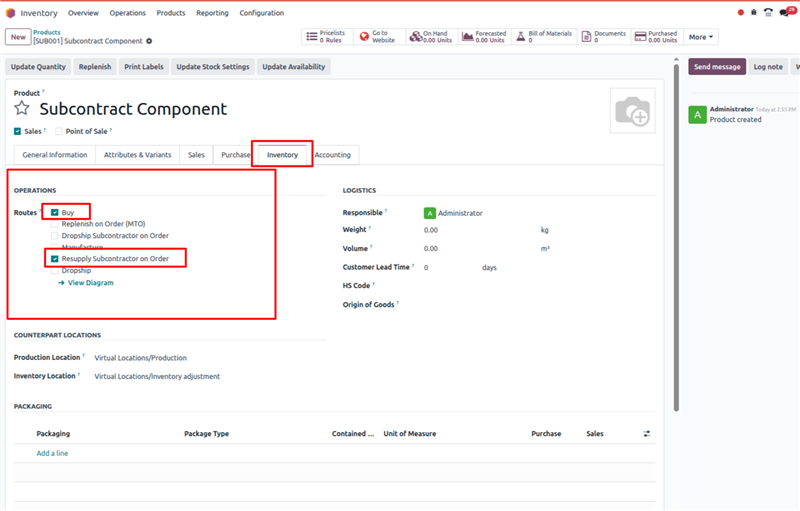
Beofre that Create a Component Product for 'Subcontract Product' as shown in below image.
On the component product form, click on the Inventory tab and select the Resupply Subcontractor on Order route in the Routes section.
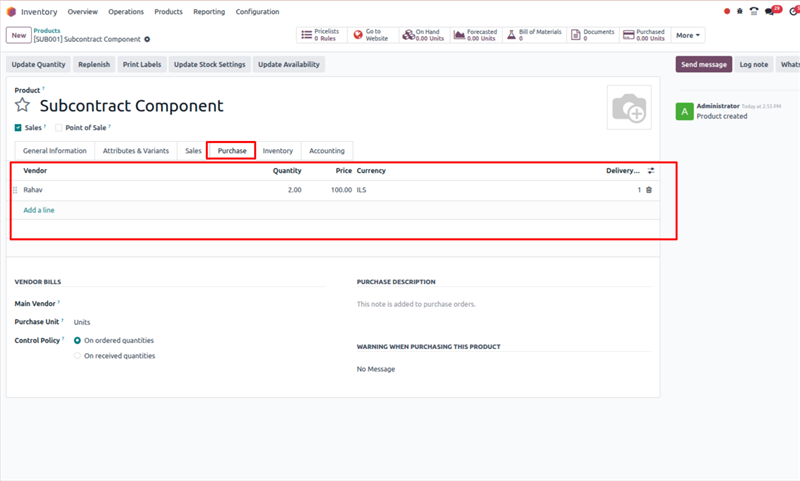
In addditon to set the vendor 'Rahav' in 'Purchase' Tab as I have already configure in 'Subcontract Product'.
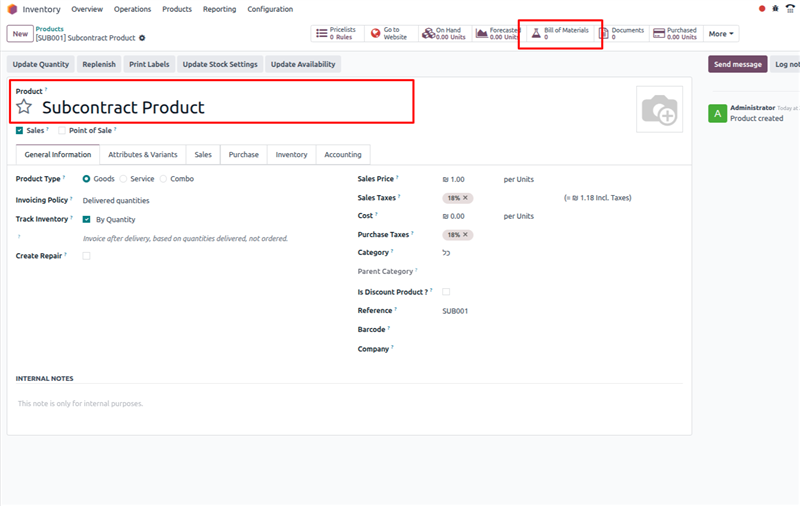
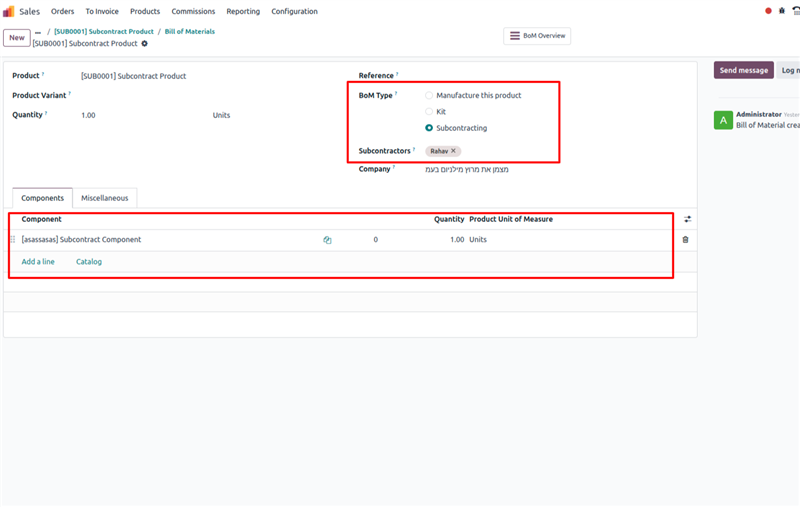
To configure a BoM for the Resupply Subcontractor on Order route, click the Bill of Materials smart button on the product’s page, and select the BoM.
In the BoM Type field, select the Subcontracting option. Then, add subcontractors in the Subcontractors field that appears in below image.
here I have added 'Rahav' as a subcontrcater, make sure that the subcontrcater will be same as vendor set in 'Subcontract Product' as shown in STEP 1:
STEP 6 :
Create SO
It is only necessary to complete this step if the product is being purchased from the subcontractor to fulfill a customer need.
If the product is being purchased to increase the quantity of stock on-hand, move on to the next step.
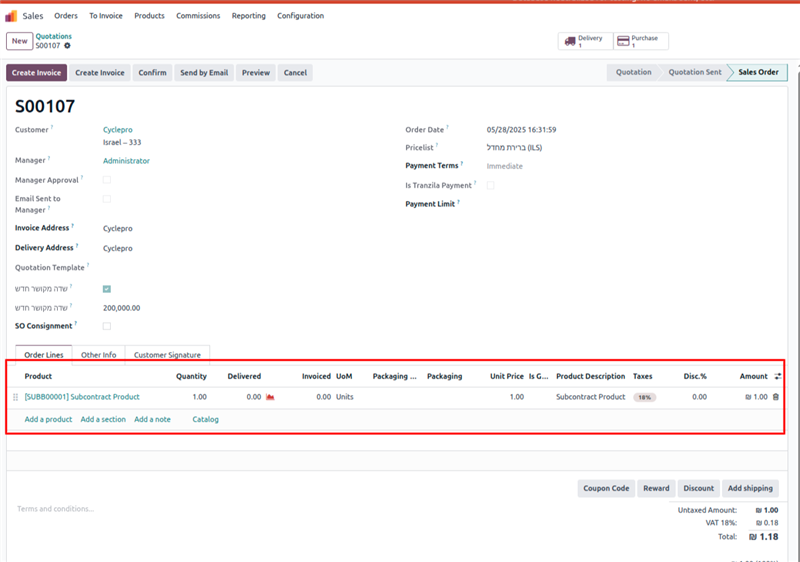
To create a new SO, navigate to Sales app ‣ Orders ‣ Orders, and click New.
Select the customer in the Customer drop-down menu. Then, click Add a product on the Order Lines tab,
select a subcontracted product in the Product drop-down menu, and enter a quantity in the Quantity field.
Click Confirm to confirm the SO, at which point a Purchase smart button appears at the top of the page.
This opens the PO created to purchase the subcontracted product from the subcontractor.
STEP 7 :
Process PO
If a PO was created in the previous step, navigate to Purchase app –> Orders –> Purchase Orders, and select the PO. Then, click Confirm Order to confirm it.
or navigate to the PO from smartbutton,
If a PO was not created in the previous step, do so now by navigating to Purchase app ‣ Orders ‣ Purchase Orders, and clicking New.
Begin filling out the PO by selecting a subcontractor from the Vendor drop-down menu. In the Products tab,
click Add a product to create a new product line. Select a subcontracted product in the Product field,
and enter the quantity in the Quantity field. Finally, click Confirm Order to confirm the PO.
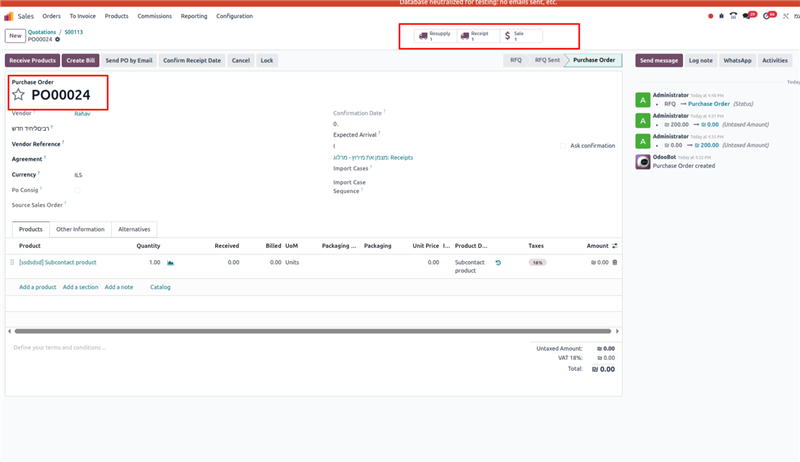
When a PO is confirmed for a product that requires resupplying a subcontractor with components,
a receipt or dropship order is automatically created, and can be accessed from the corresponding Receipt or Dropship smart button that appears at the top of the PO.
In addition, a Resupply Subcontractor order is created to ship the required components to the subcontractor.
This order can also be accessed from the PO, by clicking the Resupply smart button at the top of the pag
If you have any questions or need further assistance, feel free to reach out.
Thanks & Regards,
Email: odoo@aktivsoftware.com
Skype: kalpeshmaheshwari
Не оставайтесь в стороне – присоединяйтесь к обсуждению!
Создайте аккаунт сегодня, чтобы получить доступ к эксклюзивным функциям и стать частью нашего замечательного сообщества!
Регистрация| Похожие посты | Ответы | Просмотры | Активность | |
|---|---|---|---|---|

|
0
окт. 25
|
257 | ||


|
1
авг. 24
|
2738 | ||

|
0
нояб. 25
|
182 | ||


|
1
окт. 25
|
2284 | ||

|
2
июл. 24
|
2055 |
