Overslaan naar inhoud
Odoo Menu
  • Aanmelden
  • Probeer het gratis
  • Apps
    Financiën
    • Boekhouding
    • Facturatie
    • Onkosten
    • Spreadsheet (BI)
    • Documenten
    • Ondertekenen
    Verkoop
    • CRM
    • Verkoop
    • Kassasysteem winkel
    • Kassasysteem Restaurant
    • Abonnementen
    • Verhuur
    Websites
    • Websitebouwer
    • E-commerce
    • Blog
    • Forum
    • Live Chat
    • eLearning
    Bevoorradingsketen
    • Voorraad
    • Productie
    • PLM
    • Inkoop
    • Onderhoud
    • Kwaliteit
    Personeelsbeheer
    • Werknemers
    • Werving & Selectie
    • Verlof
    • Evaluaties
    • Aanbevelingen
    • Wagenpark
    Marketing
    • Sociale media-marketing
    • E-mailmarketing
    • Sms-marketing
    • Evenementen
    • Marketingautomatisering
    • Enquêtes
    Diensten
    • Project
    • Urenstaten
    • Buitendienst
    • Helpdesk
    • Planning
    • Afspraken
    Productiviteit
    • Chat
    • Goedkeuringen
    • IoT
    • VoIP
    • Kennis
    • WhatsApp
    Apps van derden Odoo Studio Odoo Cloud Platform
  • Bedrijfstakken
    Detailhandel
    • Boekhandel
    • kledingwinkel
    • Meubelzaak
    • Supermarkt
    • Bouwmarkt
    • Speelgoedwinkel
    Food & Hospitality
    • Bar en Pub
    • Restaurant
    • Fastfood
    • Gastenverblijf
    • Drankenhandelaar
    • Hotel
    Vastgoed
    • Makelaarskantoor
    • Architectenbureau
    • Bouw
    • Vastgoedbeheer
    • Tuinieren
    • Vereniging van eigenaren
    Consulting
    • Accountantskantoor
    • Odoo Partner
    • Marketingbureau
    • Advocatenkantoor
    • Talentenwerving
    • Audit & Certificering
    Productie
    • Textiel
    • Metaal
    • Meubels
    • Eten
    • Brewery
    • Relatiegeschenken
    Gezondheid & Fitness
    • Sportclub
    • Opticien
    • Fitnesscentrum
    • Wellness-medewerkers
    • Apotheek
    • Kapper
    Trades
    • Klusjesman
    • IT-hardware & support
    • Zonne-energiesystemen
    • Schoenmaker
    • Schoonmaakdiensten
    • HVAC-diensten
    Andere
    • Non-profitorganisatie
    • Milieuagentschap
    • Verhuur van Billboards
    • Fotograaf
    • Fietsleasing
    • Softwareverkoper
    Browse all Industries
  • Community
    Leren
    • Tutorials
    • Documentatie
    • Certificeringen
    • Training
    • Blog
    • Podcast
    Versterk het onderwijs
    • Onderwijs- programma
    • Scale Up! Business Game
    • Bezoek Odoo
    Download de Software
    • Downloaden
    • Vergelijk edities
    • Releases
    Werk samen
    • Github
    • Forum
    • Evenementen
    • Vertalingen
    • Word een Partner
    • Services for Partners
    • Registreer je accountantskantoor
    Diensten
    • Vind een partner
    • Vind een boekhouder
    • Een adviseur ontmoeten
    • Implementatiediensten
    • Klantreferenties
    • Ondersteuning
    • Upgrades
    Github Youtube Twitter Linkedin Instagram Facebook Spotify
    +1 (650) 691-3277
    Vraag een demo aan
  • Prijzen
  • Help

Odoo is the world's easiest all-in-one management software.
It includes hundreds of business apps:

  • CRM
  • e-Commerce
  • Boekhouding
  • Voorraad
  • PoS
  • Project
  • MRP
All apps
Je moet geregistreerd zijn om te kunnen communiceren met de community.
Alle posts Personen Badges
Labels (Bekijk alle)
odoo accounting v14 pos v15
Over dit forum
Je moet geregistreerd zijn om te kunnen communiceren met de community.
Alle posts Personen Badges
Labels (Bekijk alle)
odoo accounting v14 pos v15
Over dit forum
Help

Multi-step subcontracting process

Inschrijven

Ontvang een bericht wanneer er activiteit is op deze post

Deze vraag is gerapporteerd
QuickstartSF-Experts
1 Beantwoorden
3903 Weergaven
Avatar
Harishankar Unnikrishnan (hun)

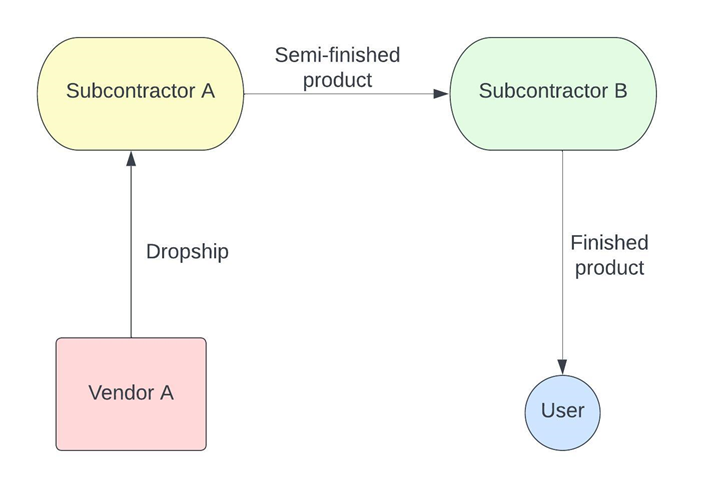
Our product goes through a lifecycle of 2 manufacturing processes done by separate subcontractors. We do not send the components for subcontracting, instead a vendor dropships it directly to the first subcontractor.


A good example of this would be subcontracting a T-shirt printing process. Let’s assume that Vendor A sells blank T-shirts that need printing. We need them to dropship the blank Tee to Subcontractor A, who does the black-and-white printing. Following this process, they should directly send it to Subcontractor B, who prints the colors on the T-shirt. Finally, the T-shirt is received into our inventory. 


At no point during the process do we receive any other semi-finished products. How do you configure this?
0
Avatar
Annuleer
Avatar
Harishankar Unnikrishnan (hun)
Auteur Beste antwoord

The process flow is as follows - 

Configurations

Since the process involves a multi-step process, we need to setup multiple products that represent the different stages of the product lifecycle. Apart from having the components (raw materials) and the finished product, we also need to have a semi-finished product because the product is essentially subcontracted twice. In this example, let us assume the raw material is a Blank T-shirt. After subcontractor A works on the black & white printing, let’s call it Semi-printed T-shirt. Finally, the finished product is called Graphic T-shirt. Lets take a look at how each of these products are configured in Odoo to ensure the correct route.

Firstly, make sure you have Subcontracting, Locations, Multi-step routes and Dropship turned on, without which we will not be able to configure these products.

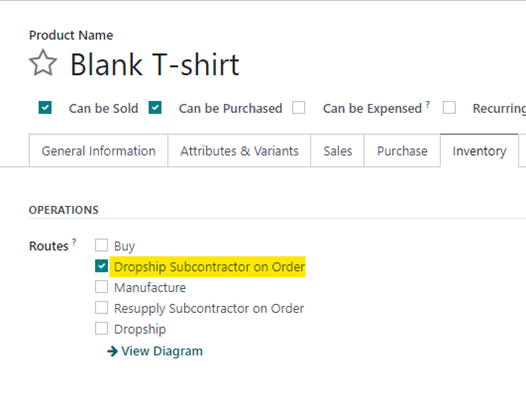
Blank T-shirt

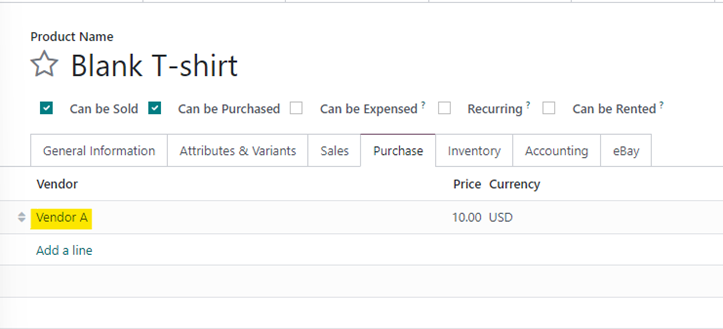
The Blank T-shirt will need to have “Dropship subcontractor on Order” set as the route, since it is being drop shipped from Vendor A to Subcontractor A.


To ensure that a PO is created for the right vendor, we also need to ensure that ‘Vendor A’ is set on the Purchase Tab.


Semi-Printed T-shirt

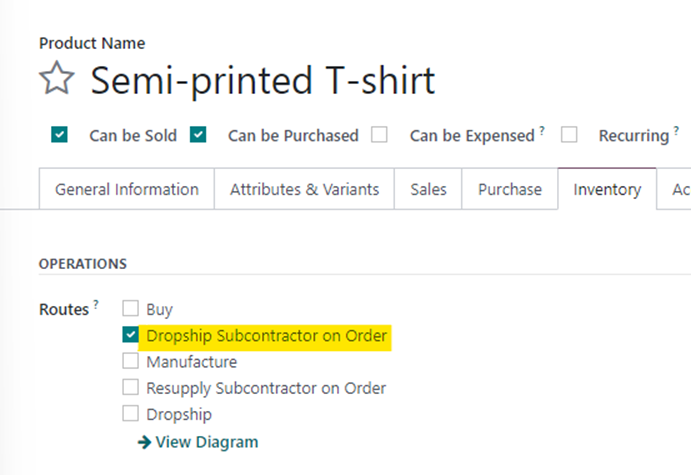
The semi-printed T-shirt will essentially be the finished product for subcontractor A. Since this product is then shipped to subcontractor B, we need to also set the route as “Dropship Subcontractor on Order”. 


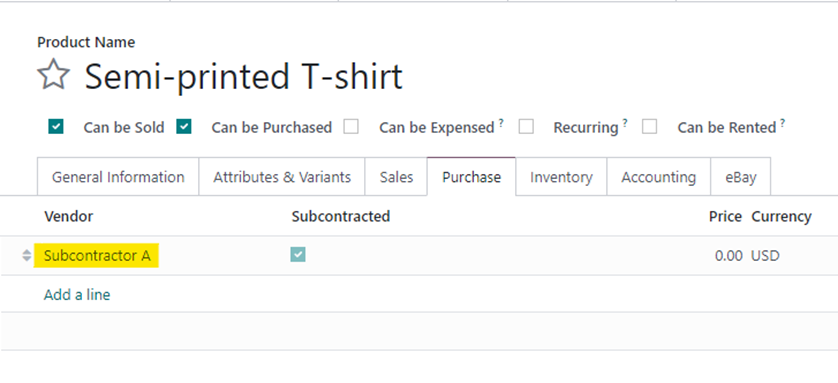
However, on the purchase Tab, the Vendor will be set as Subcontractor A.

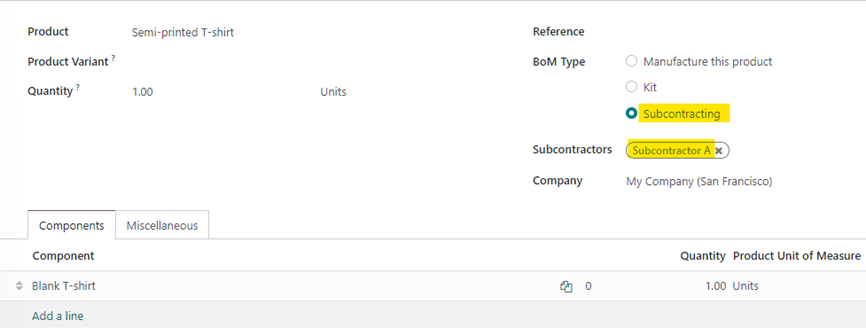
We also need to create a Bill of Material for this product since it is subcontracted. The BOM will need to be set to “Subcontracted” with the subcontractor being Subcontractor A. The component will be Blank T-shirt.

Graphic T-shirt

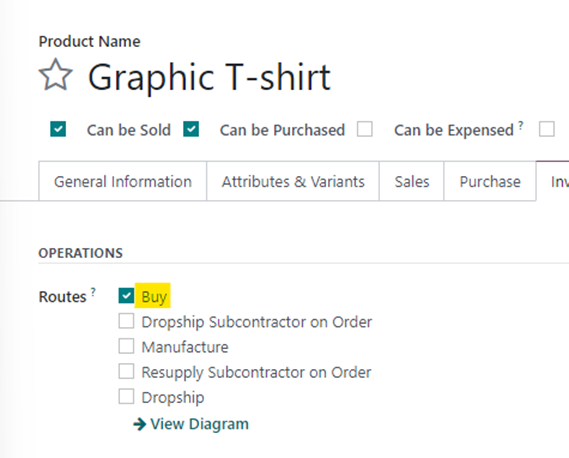
The Graphic T-shirt is the finished product that needs to be received by the user. This product needs to be set as “Buy” since we are simply buying it.


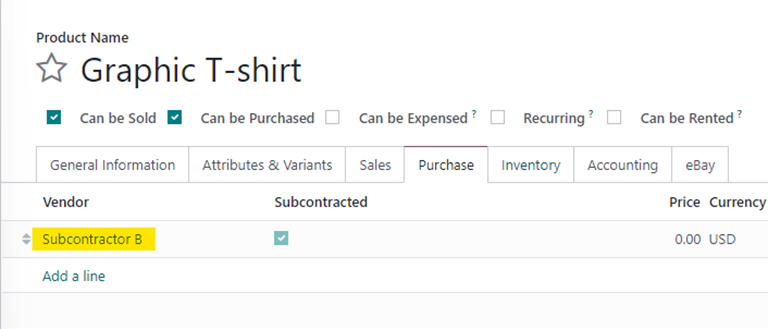
The Vendor will be set as Subcontractor B.


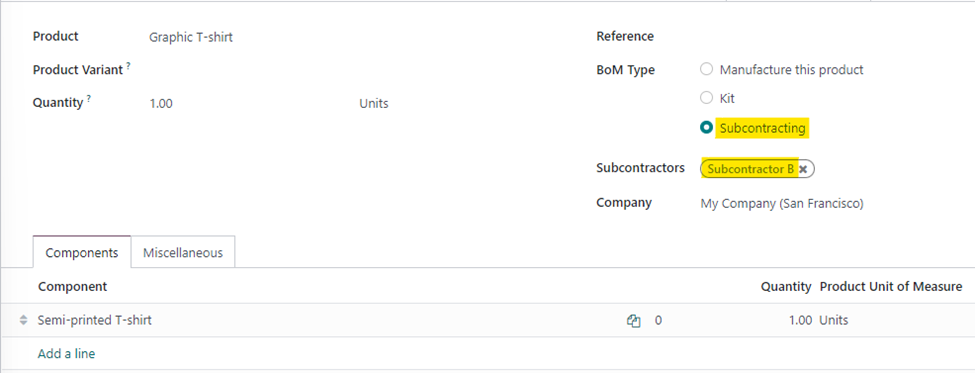
We will also need to setup a Bill of Material for the Graphic T-shirt since it is going through a second printing process with Subcontractor B. This time, the component will be semi-finished.

With this, all the product configurations and BOMs are setup to ensure that the user will only have to create a PO for the Graphic T-shirt. Let’s look at the process.

Process

  1. Create a Purchase Order for Graphic T-shirt from Subcontractor B and confirm it. This will generate a receipt of the Graphic T-shirt.
  2. This will trigger an RFQ for the Semi-printed T-shirt from Subcontractor A. The user will need to confirm this PO, which will generate a Dropship transfer.
  3. A new RFQ will be generated for Vendor A for Blank T-shirt, which, upon confirming will generate a dropship to Subcontractor A.
  4. The user processes the dropship of Blank T-shirt to subcontractor A and then processes the dropship from subcontractor A to subcontractor B.
  5. Finally, the Graphic T-shirt is received from subcontractor B.

Points to note

  1. By default, Odoo uses the generic “Physical Locations/Subcontracting Location” for both subcontractors. There’s nothing wrong with using this, but this means that both the dropship transfers will have the destination as the above-mentioned location, even though they are different vendors. It is recommended to create a separate subcontracting location for each subcontractor to ensure that you know exactly where the product is at any given point in time. To configure subcontracting locations, you can go into the subcontractor contact and view the Subcontractor Location field under the Sales/Purchase tab (ensure you are in debug mode).
  2. If any of the above configurations are missed, the flow could break and hence with increasing number of subcontractors, you must ensure that both the product and BOM configurations are setup correctly.


3
Avatar
Annuleer
Hemal Kamdar

Hi Harishankar,
Its a "wow" moment for me. By this 'so very well written and screenshots' I just got THE [almost] EXACT answer for my question. Thank you posting this.

I am looking for something more to this:

i.e.
Vendor A - Dropship Fabric to Subcontractor 1
|
Cutting
|
Stitching
|
Dropship to Subcontractor 2
|
Washing
|
Printing
|
Dropship to Subcontractor 1
|
Trimming & Finishing
|
Packing
|
Dropship Dispatch to Customer

As subcontracting doesn't allow us to add operations in BOM of finished goods, how to track work center like environment for subcontracting?

Harishankar Unnikrishnan (hun)
Auteur

Hey Hemal,

Thanks for your feedback.

As a follow-up question, why would you want to track work centers and operations for subcontracting? The whole idea of subcontracting is to outsource the manufacturing process so you are not involved in the actual manufacturing, apart from providing the components required.

Geniet je van het gesprek? Blijf niet alleen lezen, doe ook mee!

Maak vandaag nog een account aan om te profiteren van exclusieve functies en deel uit te maken van onze geweldige community!

Aanmelden
Gerelateerde posts Antwoorden Weergaven Activiteit
Using Cost per employee and Employee capacity correctly Opgelost
Quickstart SF-Experts
Avatar
Avatar
2
mei 25
6773
Why is there an Invoicing App Legacy Banner on my Invoice? Opgelost
Quickstart SF-Experts
Avatar
1
apr. 25
2487
How to configure customizable BOMs in Odoo? Opgelost
Quickstart SF-Experts
Avatar
Avatar
2
okt. 24
6347
Manufacturing using the barcode app Opgelost
Quickstart SF-Experts
Avatar
1
sep. 24
7703
[V17] Attribute value default extra price and pricelist use case. Opgelost
Quickstart SF-Experts
Avatar
1
feb. 24
4262
Community
  • Tutorials
  • Documentatie
  • Forum
Open Source
  • Downloaden
  • Github
  • Runbot
  • Vertalingen
Diensten
  • Odoo.sh Hosting
  • Ondersteuning
  • Upgrade
  • Gepersonaliseerde ontwikkelingen
  • Onderwijs
  • Vind een boekhouder
  • Vind een partner
  • Word een Partner
Over ons
  • Ons bedrijf
  • Merkelementen
  • Neem contact met ons op
  • Vacatures
  • Evenementen
  • Podcast
  • Blog
  • Klanten
  • Juridisch • Privacy
  • Beveiliging
الْعَرَبيّة Català 简体中文 繁體中文 (台灣) Čeština Dansk Nederlands English Suomi Français Deutsch हिंदी Bahasa Indonesia Italiano 日本語 한국어 (KR) Lietuvių kalba Język polski Português (BR) română русский язык Slovenský jazyk slovenščina Español (América Latina) Español ภาษาไทย Türkçe українська Tiếng Việt

Odoo is een suite van open source zakelijke apps die aan al je bedrijfsbehoeften voldoet: CRM, E-commerce, boekhouding, inventaris, kassasysteem, projectbeheer, enz.

Odoo's unieke waardepropositie is om tegelijkertijd zeer gebruiksvriendelijk en volledig geïntegreerd te zijn.

Website made with

Odoo Experience on YouTube

1. Use the live chat to ask your questions.
2. The operator answers within a few minutes.

Live support on Youtube
Watch now