I had a VM setup to test Odoo 9 a while back, and I could've sworn I had functionality where customers could log in, view their quotations/sales orders, and approve them. I might be wrong - is this possible?
Thanks for your help.

Odoo is the world's easiest all-in-one management software.
It includes hundreds of business apps:

I had a VM setup to test Odoo 9 a while back, and I could've sworn I had functionality where customers could log in, view their quotations/sales orders, and approve them. I might be wrong - is this possible?
Thanks for your help.

Assuming v9e (this will be slightly different in v10e).
Just to make things clear in regard with the question: when a quotation is confirmed it becomes a sale order; it's the same document in 2 different statuses.
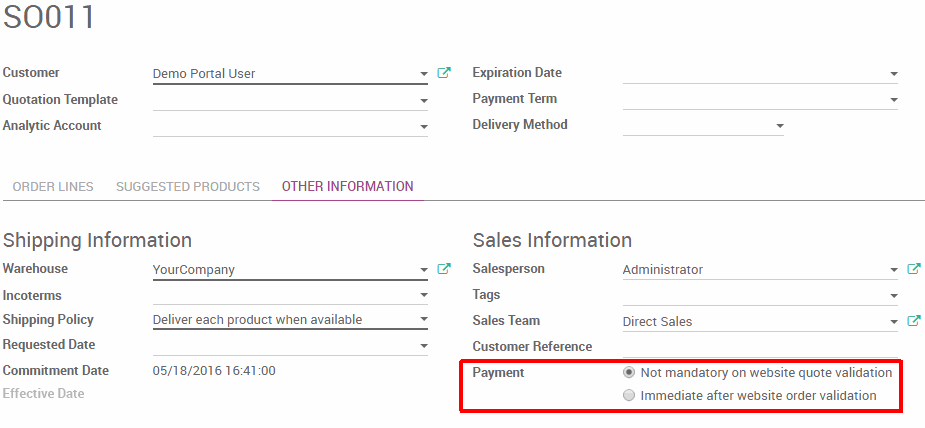
There are 2 use cases for a customer to confirm his quotation into a sale order and no matter which one you want to use you have to install the module website_quote which corresponds to the "Send online quotations based on templates (advanced)" setting. It will display a "Preview" or "View online quotation" button on your quotation and create an email template generating the button for when you send it to your prospect. The 2 use cases are defined by the following:
If the first option displayed on the screenshot is selected, then only a signature will be required from the customer for the quotation to be confirmed into a sale order.
If the second option displayed on the screenshot is selected, then a successful payment will be required from the customer for the quotation to be confirmed into a sale order. A successful payment means that the payment acquirer will send a call back to Odoo notifying that the payment was successful (this is done through the object payment.transaction).
A few remarks:
Just like for any external-facing document in Odoo, there is a public URL and a secret URL.
The public URL requires the authorized user to be logged in to see the document and looks like this in the case of a quotation: http://yourodooserver.com/quote/13
The secret URL does not require the user to be logged in to see the document and looks like this in the case of a quotation: http://yourodooserver.com/quote/13/b5c19a4a-e1bf-4198-b842-f7233b0cef52
Apart from the email that he would receive, the user can also access his quotation through the "My Account" section on your Odoo website (in the top right menu under his name) which is his portal with all his other related documents. If you don't install website_quote, the quotation will still be accessible but it will be a static page displaying the content and without the signature/payment capability and without any way for the user to confirm the quotation himself. The URL will then look like this: http://yourodooserver.com/my/orders/13
The reason why there is a public and secret URL is because depending on how you communicate with your prospect, you might need somone else in his company to access the quotation and confirm it. For example, if you send your prospect an email with the link, he might forward it to an Account Payable person who does not have a portal account on your website. This is why the email template uses the secret URL.
Even if you don't use Odoo as your website (CMS or eCommerce), installing website_quote will install the website module as well which only correspond to the frontend view of the quotation. So when I talk about "your Odoo website" above, what I mean is "the frontend view of your document located at http://yourodooserver.com".
It is necessary for a prospect to be a portal user in order to access the quotation via the public URL (since the access right is verified in that case). It is not necessary for a prospect to be a portal user in order to access the quotation via the secret URL. In the latter case, if the visitor take action (comment, rejection, signature, or payment) it will show as the "Public User" (ie. unidentified) in the backend.
This is perfect, and exactly what I was looking for. Thank you!
@Fabrice. Prefect explanation, ThankQ.
Hello,
Sorry for replying to this old post. I am working with Odoo v15 and notice the following:
- Customer is of type person then Odoo sends the secret URL and everything works as expected.
- If Customer is of type company however then Odoo sends the public link and the end user is required to login.
Can you (or someone) explain why the difference? And can I make change so the secret link is send always? I do not want the customer to need to create a login in order to view the quotation.
Thanks
Davy

Sorry to awaken an old post.
Can Odoo only use the secret URL to view a quote so a customer does not need to log in to pay for a quote? In our Odoo13, Odoo forces a customer login, and it angers my customers.

checked portal in user access right and select see all lead for sale order
The question is about quotations and sale orders, not leads and opportunities.
Buat akun sekarang untuk menikmati fitur eksklufi dan agar terlibat dengan komunitas kami!
Daftar| Post Terkait | Replies | Tampilan | Aktivitas | |
|---|---|---|---|---|


|
2
Nov 25
|
789 | ||


|
1
Nov 25
|
634 | ||
|
|
1
Nov 25
|
545 | ||


|
2
Jul 25
|
2412 | ||


|
1
Mei 24
|
4052 |
1. Use the live chat to ask your questions.
2. The operator answers within a few minutes.