Ir al contenido
Odoo Menú
  • Identificarse
  • Pruébalo gratis
  • Aplicaciones
    Finanzas
    • Contabilidad
    • Facturación
    • Gastos
    • Hoja de cálculo (BI)
    • Documentos
    • Firma electrónica
    Ventas
    • CRM
    • Ventas
    • TPV para tiendas
    • TPV para restaurantes
    • Suscripciones
    • Alquiler
    Sitios web
    • Creador de sitios web
    • Comercio electrónico
    • Blog
    • Foro
    • Chat en directo
    • e-learning
    Cadena de suministro
    • Inventario
    • Fabricación
    • PLM
    • Compra
    • Mantenimiento
    • Calidad
    Recursos Humanos
    • Empleados
    • Reclutamiento
    • Ausencias
    • Evaluación
    • Referencias
    • Flota
    Marketing
    • Marketing social
    • Marketing por correo electrónico
    • Marketing por SMS
    • Eventos
    • Automatización de marketing
    • Encuestas
    Servicios
    • Proyecto
    • Partes de horas
    • Servicio de campo
    • Servicio de asistencia
    • Planificación
    • Citas
    Productividad
    • Conversaciones
    • Aprobaciones
    • IoT
    • VoIP
    • Conocimientos
    • WhatsApp
    Aplicaciones de terceros Studio de Odoo Plataforma de Odoo Cloud
  • Industrias
    Comercio al por menor
    • Librería
    • Tienda de ropa
    • Tienda de muebles
    • Tienda de ultramarinos
    • Ferretería
    • Juguetería
    Alimentación y hostelería
    • Bar y pub
    • Restaurante
    • Comida rápida
    • Casa de huéspedes
    • Distribuidor de bebidas
    • Hotel
    Inmueble
    • Agencia inmobiliaria
    • Estudio de arquitectura
    • Construcción
    • Gestión inmobiliaria
    • Jardinería
    • Asociación de propietarios
    Consultoría
    • Empresa contable
    • Partner de Odoo
    • Agencia de marketing
    • Bufete de abogados
    • Adquisición de talentos
    • Auditorías y certificaciones
    Fabricación
    • Textil
    • Metal
    • Muebles
    • Alimentos
    • Cervecería
    • Regalos de empresas
    Salud y bienestar
    • Club deportivo
    • Óptica
    • Gimnasio
    • Terapeutas
    • Farmacia
    • Peluquería
    Oficios
    • Handyman
    • Hardware y soporte técnico
    • Sistemas de energía solar
    • Zapatero
    • Servicios de limpieza
    • Servicios de calefacción, ventilación y aire acondicionado
    Otros
    • Organización sin ánimo de lucro
    • Agencia de protección del medio ambiente
    • Alquiler de paneles publicitarios
    • Estudio fotográfico
    • Alquiler de bicicletas
    • Distribuidor de software
    Explorar todos los sectores
  • Comunidad
    Aprender
    • Tutoriales
    • Documentación
    • Certificaciones
    • Formación
    • Blog
    • Podcast
    Potenciar la educación
    • Programa de formación
    • Scale Up! El juego empresarial
    • Visita Odoo
    Obtener el software
    • Descargar
    • Comparar ediciones
    • Versiones
    Colaborar
    • GitHub
    • Foro
    • Eventos
    • Traducciones
    • Convertirse en partner
    • Servicios para partners
    • Registrar tu empresa contable
    Obtener servicios
    • Encontrar un partner
    • Encontrar un asesor fiscal
    • Contacta con un experto
    • Servicios de implementación
    • Referencias de clientes
    • Ayuda
    • Actualizaciones
    GitHub YouTube Twitter Linkedin Instagram Facebook Spotify
    +1 (650) 691-3277
    Solicitar una demostración
  • Precios
  • Ayuda

Odoo is the world's easiest all-in-one management software.
It includes hundreds of business apps:

  • CRM
  • e-Commerce
  • Contabilidad
  • Inventario
  • PoS
  • Proyecto
  • MRP
All apps
Debe estar registrado para interactuar con la comunidad.
Todas las publicaciones Personas Insignias
Etiquetas (Ver todo)
odoo accounting v14 pos v15
Acerca de este foro
Debe estar registrado para interactuar con la comunidad.
Todas las publicaciones Personas Insignias
Etiquetas (Ver todo)
odoo accounting v14 pos v15
Acerca de este foro
Ayuda

Remove Powered by Odoo from Website footer. Instructions. Enjoy.

Suscribirse

Reciba una notificación cuando haya actividad en esta publicación

Se marcó esta pregunta
removeodooodooV8
14 Respuestas
128307 Vistas
Avatar
JA

1. Log in to the Odoo admin as administrator. Activate Technical Features, if not already activated, by going to Settings > Users > Users > Admin > Edit > Usability > Technical Features > check the box (on), click Save.


2. Go to Settings > Technical > User Interface > Views.
In the search box, next to filter icon, type "Footer Copyright", and hit enter to search.


3. It will show: View name: Footer Copyright. Click to open it. Click Edit.


Comment out lines of the code as follows:
<!-- Powered by <a class="label label-danger" href="http://www.odoo.com/page/website-builder">Odoo</a>,
the #1 <a href="http://www.odoo.com/page/e-commerce">Open Source eCommerce</a>. -->
Click Save.


4. Refresh the browser view of your Odoo front end website. Log out and try to logi in again. The previously visible "Powered by" backlinks and text, are gone.

Congrats.

9
Avatar
Descartar
Zahin

How to make it permanent

Ankit Gauri

hello try this it will remove Powered by Odoo from your website footer i have perform this in my project

Copyright © Company name
Tarek Mohamed Ibrahim

I did these steps and didn't find the mentioned view

iWesabe Technologies

Good !! It will be permanent if edit by code.

OdooBot
Hello can anyone assist me here I want to make my website more good

On Thu, Sep 21, 2023 at 5:01 PM yonathan.cardoso@alfred-eyes.ai <notifications@mail.odoo.com> wrote:
Une nouvelle réponse sur Remove Powered by Odoo from Website footer. Instructions. Enjoy. a été publiée. Cliquez ici pour accéder au message : Voir la publication ͏ ​ ͏ ​ ͏ ​ ͏ ​ ͏ ​ ͏ ​ ͏ ​ ͏ ​ ͏ ​ ͏ ​ ͏ ​ ͏ ​ ͏ ​ ͏ ​ ͏ ​ ͏ ​ ͏ ​ ͏ ​ ͏ ​ ͏ ​ ͏ ​ ͏ ​ ͏ ​ ͏ ​ ͏ ​ ͏ ​ ͏ ​ ͏ ​ ͏ ​ ͏ ​ ͏ ​ ͏ ​ ͏ ​ ͏ ​ ͏ ​ ͏ ​ ͏ ​ ͏ ​ ͏ ​ ͏ ​ ͏ ​ ͏ ​ ͏ ​ ͏ ​ ͏ ​ ͏ ​ ͏ ​ ͏ ​ ͏ ​ ͏ ​ ͏ ​ ͏ ​ ͏ ​ ͏ ​ ͏ ​ ͏ ​ ͏ ​ ͏ ​ ͏ ​ ͏ ​ ͏ ​ ͏ ​ ͏ ​ ͏ ​ ͏ ​ ͏ ​ ͏ ​ ͏ ​ ͏ ​ ͏ ​ ͏ ​ ͏ ​ ͏ ​ ͏ ​ ͏ ​ ͏ ​ ͏ ​ ͏ ​ ͏ ​ ͏ ​ ͏ ​ ͏ ​ ͏ ​ ͏ ​ ͏ ​ ͏ ​ ͏ ​ ͏ ​ ͏ ​ ͏ ​ ͏ ​ ͏ ​ ͏ ​ ͏ ​ ͏ ​ ͏ ​ ͏ ​ ͏ ​ ͏ ​ ͏ ​ ͏ ​ ͏ ​ ͏ ​ ͏ ​ ͏ ​ ͏ ​ ͏ ​ ͏ ​ ͏ ​ ͏ ​ ͏ ​ ͏ ​ ͏ ​ ͏ ​ ͏ ​ ͏ ​ ͏ ​ ͏ ​ ͏ ​ ͏ ​ ͏ ​ ͏ ​ ͏ ​ ͏ ​ ͏ ​ ͏ ​ ͏ ​ ͏ ​ ͏ ​ ͏ ​ ͏ ​ ͏ ​ ͏ ​ ͏ ​ ͏ ​ ͏ ​ ͏ ​ ͏ ​ ͏ ​ ͏ ​

Une nouvelle réponse sur Remove Powered by Odoo from Website footer. Instructions. Enjoy. a été publiée. Cliquez ici pour accéder au message :

Voir la publication


Odoo S.A.

+32 81 81 37 00 | info@odoo.com | https://www.odoo.com

Powered by Odoo
Sehrish

Enhance your Odoo experience with the Custom Branding and Copyrights module. This powerful tool allows you to remove default branding messages and personalize your Odoo instance to reflect your company's identity seamlessly.

https://apps.odoo.com/apps/modules/17.0/mh_hide_powered_by_odoo_website

Avatar
Ismail Hamzah
Mejor respuesta

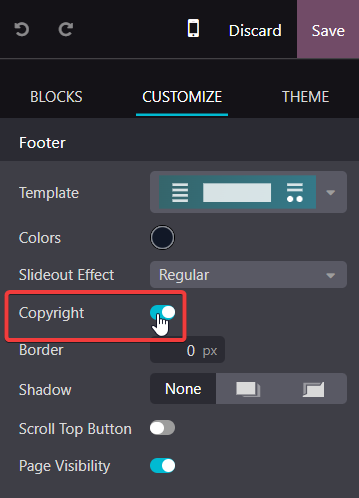
for anyone who did not want to touch any kind of code, can be tried with by disable the "Copyright" at "Footer Block" through website editor mode. Just try it at Odoo 17 EE.

2
Avatar
Descartar
Avatar
shiyi
Mejor respuesta

odoo 12.0+ 

In the search box type:Brand Promotion Message

View name: Brand Promotion Message. Click to open it. Click Edit

delete:

<t t-set="final_message">Powered by %s%s</t> 

<t t-raw="final_message % (odoo_logo, _message and ('- %s' % _message) or '')"/>

"Save":Congrats.

11
Avatar
Descartar
Rimvydas Kanapka

Worked on Odoo 13.0e. Thanks.

Iñaki

It worked also in Odoo 14. Just go to the web, up right click on "Customize Theme" and then on "HTML/CSS editor" and click on "home" (white bar), then search for "Brand Promotion Message" and delete as Shiyi said.

Ahmed Rashad

Worked on Odoo 14.0e Thank u very much

Avatar
Nazmus Shakib
Mejor respuesta

This is what worked for me. ODOO 10 and 11.

  1. log in as administrator and "Activate Technical Features", if not activated this is done by going to Settings => Users => Users => ( select your Administrator username by default is Administrator) > Edit > Usability > Technical Features > check the box (active), then Save.

  2. Go to Settings > Technical > User Interface > Views. In the search box, next to "(filter icon) Active", type "Login Layout", and hit enter to search. There will be one search result. (View name: Login Layout. View type: QWeb view.) Click to open it.

  3. Then Click Edit

  4. search for "web.menu_secondary" and edit it as your requirement
  5. Save it
  6. Refresh your browser to get the change otherwise log out and again in to see the change.

       Thanks...

3
Avatar
Descartar
Peter Kayatz

does not work in odoo 12.0e+

Avatar
Emad Akram
Mejor respuesta

Hello
If you are using odoo16, you can use this module
https://apps.odoo.com/apps/modules/16.0/hide_website_powered_by_odoo/

1
Avatar
Descartar
Avatar
Md Kamrul Hasan
Mejor respuesta

Remove Powered by odoo from website, you can use this module instead of Saves time compared to manually editing templates: 

https://apps.odoo.com/apps/modules/18.0/ace_remove_website_powered_by_odoo

0
Avatar
Descartar
Avatar
Edgardo L.
Mejor respuesta

In the search box type:Brand Promotion Message

View name: Brand Promotion Message. Click to open it. ClickEdit

delete:

Powered by %s%s 

"Save":Congratulations.


I followed this and I got a 500: internal server error. :)

0
Avatar
Descartar
Avatar
Dmab92
Mejor respuesta

Follow this link https://sortedodoo.com/how-to-remove-powered-by-odoo-from-login-screen-and-website-footer/

0
Avatar
Descartar
Avatar
Viindoo Technology Joint Stock Company
Mejor respuesta

You need to check "Non Updatable" checkbox so that the change will not be reverted everytime you update (-u all)

0
Avatar
Descartar
TEIMI Yassine

This is a great feature, is it available for every view on Odoo ?

Viindoo Technology Joint Stock Company

yes, it is.

Avatar
Thoutmos Sanebankh
Mejor respuesta

in Odoo 14:
FULL CODE
 Go to the web, up right click on "Customize Theme" and then on "HTML/CSS editor" and click on "home" (white bar), then search for "Brand Promotion Message"  :
 
Comment :  <t t-set="final_message">Powered by %s%s</t>   like  this :

    <?xml version="1.0"?>
<t name="Brand Promotion Message" t-name="web.brand_promotion_message">
        <t t-set="odoo_logo">
            <a target="_blank" t-attf-href="http://www.odoo.com?utm_source=db&amp;utm_medium=#{_utm_medium}" class="badge badge-light">
                <img alt="Odoo" src="/web/static/src/img/odoo_logo_tiny.png" style="height: 1em; vertical-align: baseline;"/>
            </a>
        </t>
       
        <!--  <t t-set="final_message">Powered by %s%s</t>
        <t t-raw="final_message % (odoo_logo, _message and ('- %s' % _message) or '')"/>
        -->
       
    </t>


It works ! Enjoy !

0
Avatar
Descartar
Avatar
Denis Baranov
Mejor respuesta

Or just install this module: https://apps.odoo.com/apps/modules/8.0/colors_customization/

0
Avatar
Descartar
Avatar
Dr Obx
Mejor respuesta

It doesn't work ....zachiny ..... which module is required to make it work ?

ParseError: "The ID "website.layout_footer_copyright" refers to an uninstalled m odule" while parsing None:4, near

<data inherit_id="website.layout" name="Footer Copyright">

<xpath expr="//footer" position="inside">

<div class="container mt16 mb8">

<div class="pull-left text-muted">

Copyright <span t-field="res_company.name">Company name</span>

</div>

</div>

</xpath>

</data>

0
Avatar
Descartar
Avatar
Mr.R
Mejor respuesta

Why not just use odoo debrand from the apps section? Works for me and it'll survive core updates etc  :)

0
Avatar
Descartar
Avatar
Ankit Gauri
Mejor respuesta

hello try this it will work for sure if you put this code properly bcoz i have perform this in my project and it removes powered by odoo from my website footer


<template id="website.layout_footer_copyright" inherit_id="website.layout" name="Footer Copyright">

<xpath expr="//footer" position="inside">

<div class="container mt16 mb8">

<div class="pull-left text-muted">

Copyright &copy; <span t-field="res_company.name">Company name</span>

</div>

</div>

</xpath>

</template>


Thank You

0
Avatar
Descartar
Avatar
Zahin
Mejor respuesta


1. Log in to the Odoo admin as administrator. Activate Technical Features, if not already activated, by going to Settings > Users > Users > Admin > Edit > Usability > Technical Features > check the box (on), click Save.

2. Go to Settings > Technical > User Interface > Views.

In the search box, next to filter icon, type "Footer Copyright", and hit enter to search.

3. It will show: View name: Footer Copyright. Click to open it. Click Edit.

Comment out lines of the code as follows:

<!-- Powered by <a class="label label-danger" href="http://www.odoo.com/page/website-builder">Odoo</a>,

the #1 <a href="http://www.odoo.com/page/e-commerce">Open Source eCommerce</a>. -->

Click Save.

4. Refresh the browser view of your Odoo front end website. Log out and try to logi in again. The previously visible "Powered by" backlinks and text, are gone.

Congrats.
-1
Avatar
Descartar
¿Le interesa esta conversación? ¡Participe en ella!

Cree una cuenta para poder utilizar funciones exclusivas e interactuar con la comunidad.

Inscribirse
Publicaciones relacionadas Respuestas Vistas Actividad
Add a button to a ValidationError
odoo odooV8
Avatar
Avatar
1
nov 22
4519
How to get values of one record of a many2many relation displayed in a tree view when clicking on a button
odoo odooV8
Avatar
0
jun 21
6997
How to pass string in wizard context
odoo odooV8
Avatar
0
mar 21
3880
How to create sample sale order and sale order line in odoo? Resuelto
odoo odooV8
Avatar
Avatar
Avatar
2
ene 20
23784
How to replace invoice number sequence by invoice id from database
odoo odooV8
Avatar
Avatar
2
may 18
5111
Comunidad
  • Tutoriales
  • Documentación
  • Foro
Código abierto
  • Descargar
  • GitHub
  • Runbot
  • Traducciones
Servicios
  • Alojamiento Odoo.sh
  • Ayuda
  • Actualizar
  • Desarrollos personalizados
  • Educación
  • Encontrar un asesor fiscal
  • Encontrar un partner
  • Convertirse en partner
Sobre nosotros
  • Nuestra empresa
  • Activos de marca
  • Contacta con nosotros
  • Puestos de trabajo
  • Eventos
  • Podcast
  • Blog
  • Clientes
  • Información legal • Privacidad
  • Seguridad
الْعَرَبيّة Català 简体中文 繁體中文 (台灣) Čeština Dansk Nederlands English Suomi Français Deutsch हिंदी Bahasa Indonesia Italiano 日本語 한국어 (KR) Lietuvių kalba Język polski Português (BR) română русский язык Slovenský jazyk slovenščina Español (América Latina) Español ภาษาไทย Türkçe українська Tiếng Việt

Odoo es un conjunto de aplicaciones empresariales de código abierto que cubre todas las necesidades de tu empresa: CRM, comercio electrónico, contabilidad, inventario, punto de venta, gestión de proyectos, etc.

La propuesta única de valor de Odoo es ser muy fácil de usar y estar totalmente integrado.

Website made with

Odoo Experience on YouTube

1. Use the live chat to ask your questions.
2. The operator answers within a few minutes.

Live support on Youtube
Watch now