Ir al contenido
Odoo Menú
  • Identificarse
  • Pruébalo gratis
  • Aplicaciones
    Finanzas
    • Contabilidad
    • Facturación
    • Gastos
    • Hoja de cálculo (BI)
    • Documentos
    • Firma electrónica
    Ventas
    • CRM
    • Ventas
    • TPV para tiendas
    • TPV para restaurantes
    • Suscripciones
    • Alquiler
    Sitios web
    • Creador de sitios web
    • Comercio electrónico
    • Blog
    • Foro
    • Chat en directo
    • e-learning
    Cadena de suministro
    • Inventario
    • Fabricación
    • PLM
    • Compra
    • Mantenimiento
    • Calidad
    Recursos Humanos
    • Empleados
    • Reclutamiento
    • Ausencias
    • Evaluación
    • Referencias
    • Flota
    Marketing
    • Marketing social
    • Marketing por correo electrónico
    • Marketing por SMS
    • Eventos
    • Automatización de marketing
    • Encuestas
    Servicios
    • Proyecto
    • Partes de horas
    • Servicio de campo
    • Servicio de asistencia
    • Planificación
    • Citas
    Productividad
    • Conversaciones
    • Aprobaciones
    • IoT
    • VoIP
    • Conocimientos
    • WhatsApp
    Aplicaciones de terceros Studio de Odoo Plataforma de Odoo Cloud
  • Industrias
    Comercio al por menor
    • Librería
    • Tienda de ropa
    • Tienda de muebles
    • Tienda de ultramarinos
    • Ferretería
    • Juguetería
    Alimentación y hostelería
    • Bar y taberna
    • Restaurante
    • Comida rápida
    • Casa de huéspedes
    • Distribuidor de bebidas
    • Hotel
    Inmueble
    • Agencia inmobiliaria
    • Estudio de arquitectura
    • Construcción
    • Gestión inmobiliaria
    • Jardinería
    • Asociación de propietarios
    Consultoría
    • Empresa contable
    • Partner de Odoo
    • Agencia de marketing
    • Bufete de abogados
    • Adquisición de talentos
    • Auditorías y certificaciones
    Fabricación
    • Textil
    • Metal
    • Muebles
    • Alimentos
    • Brewery
    • Regalos de empresas
    Salud y bienestar
    • Club deportivo
    • Óptica
    • Gimnasio
    • Terapeutas
    • Farmacia
    • Peluquería
    Oficios
    • Handyman
    • Hardware y asistencia informática
    • Sistemas de energía solar
    • Zapatero
    • Servicios de limpieza
    • Servicios de calefacción, ventilación y aire acondicionado
    Otros
    • Organización sin ánimo de lucro
    • Agencia de protección del medio ambiente
    • Alquiler de paneles publicitarios
    • Estudio fotográfico
    • Alquiler de bicicletas
    • Distribuidor de software
    Explorar todos los sectores
  • Comunidad
    Aprender
    • Tutoriales
    • Documentación
    • Certificaciones
    • Formación
    • Blog
    • Podcast
    Potenciar la educación
    • Programa de formación
    • Scale Up! El juego empresarial
    • Visita Odoo
    Obtener el software
    • Descargar
    • Comparar ediciones
    • Versiones
    Colaborar
    • GitHub
    • Foro
    • Eventos
    • Traducciones
    • Convertirse en partner
    • Servicios para partners
    • Registrar tu empresa contable
    Obtener servicios
    • Encontrar un partner
    • Encontrar un asesor fiscal
    • Contacta con un experto
    • Servicios de implementación
    • Referencias de clientes
    • Ayuda
    • Actualizaciones
    GitHub YouTube Twitter Linkedin Instagram Facebook Spotify
    +1 (650) 691-3277
    Solicitar una demostración
  • Precios
  • Ayuda

Odoo is the world's easiest all-in-one management software.
It includes hundreds of business apps:

  • CRM
  • e-Commerce
  • Contabilidad
  • Inventario
  • PoS
  • Proyecto
  • MRP
All apps
Debe estar registrado para interactuar con la comunidad.
Todas las publicaciones Personas Insignias
Etiquetas (Ver todo)
odoo accounting v14 pos v15
Acerca de este foro
Debe estar registrado para interactuar con la comunidad.
Todas las publicaciones Personas Insignias
Etiquetas (Ver todo)
odoo accounting v14 pos v15
Acerca de este foro
Ayuda

Remove access rights to a date

Suscribirse

Reciba una notificación cuando haya actividad en esta publicación

Se marcó esta pregunta
users
2 Respuestas
833 Vistas
Avatar
Bruno S

Hi,


We have an employee who will be leaving the company on December 31, 2025. 

Can we schedule the end of his license usage rights in advance on that date? Odoo V.17

 Thank you in advance for your feedback. 

Sincerely,

0
Avatar
Descartar
faOtools

This app - https://apps.odoo.com/apps/modules/17.0/security_user_roles - lets you do so. The tool allows combining access groups in user roles and then assigning them to users. Such an assignment might be automatic based on the time rules. Thus, it is possible to remove a role for a particular period (e.g., 12/31/2025 - forever) or, conversely, add it for periods.

Bruno S
Autor

Hi,

Thank you very much for your answers. 

It's a shame there's simply no contract end date in Odoo that would automate all this. 

I'll look into external modules. 

Have a great day.

Avatar
Christoph Farnleitner
Mejor respuesta

While there is no "click here - done" solution to your requirement, you can certainly achieve this by setting up an Automation Rule.

If you haven't already, go to Apps, remove the Apps filter and search for and install Automation Rules (technical name base_automation).

Once this is out of the way, enable the Developer Mode (https://www.odoo.com/documentation/17.0/applications/general/developer_mode.html) and navigate to Settings -> Technical --> Automation -> Automation Rules. Here, create a new Automation Rule, looking something like this*:

Name: (something speaking, such as) 
Archive Employee User on Contract expiration
Model: 
Contract
Trigger: 
State is set to - Expired
Before Update Domain: (leave as is)
Apply on: (now, this is the most tricky part - you need to be clear about your rules specifying in detail how 'leaving your company' is defined your database)
Match all of the following rules:
Employee > Current Contract > Status is in (Expired, Cancelled)


Action To Do:
Update Employee > User > Active to No (False)


Your final result may look something like this:
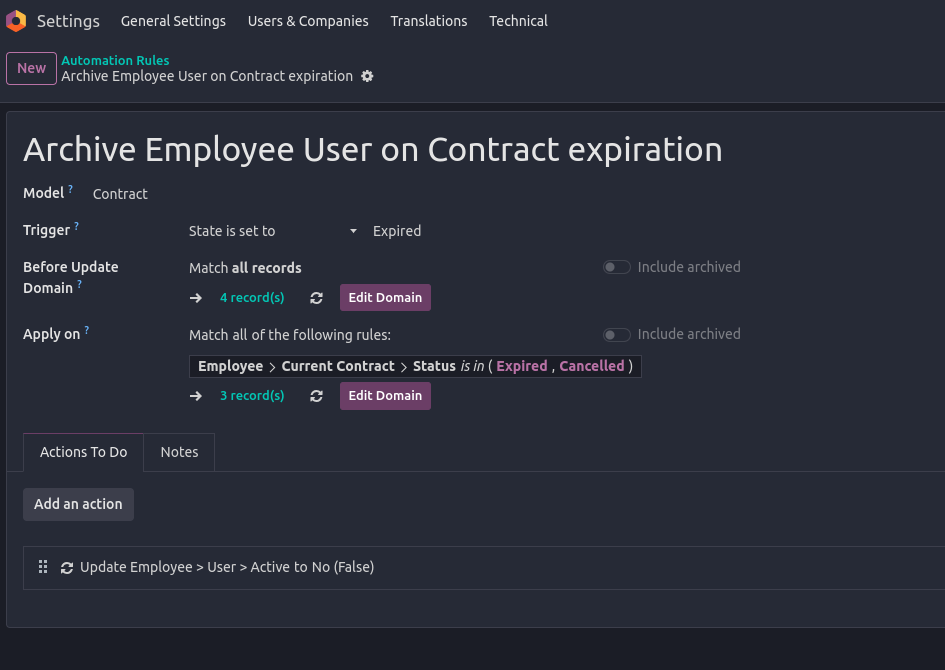


*) Note: The exact way of implementing this depends on how you manage your Employees and their Contracts, and as already stated, how you define a leaving Employee in your database.

In any case, the record(s) listed under Apply on should give you a clear indication of whom's contracts are falling under your current configuration.

I'd highly recommend you to try this Automation Rule in a Testing Environment (note: you will have to manually trigger the Automation Rule execution in a properly set up Test environment yourself since Scheduled Actions are not executed by default!).

Furthermore, don't set Actions To Do as long as you are not completely sure the rules specified don't lead to lock yourself out of your database or have any other unwanted side-effects on current employees!

--

In general, what above Automation Rule is meant to do is to Archive Users of Employees once the current Employees's Contract is expired/cancelled. This also means, in case you use multiple Contracts on Employees, you need to further on-wards ensure that new contracts are set up prior to ending existing ones.

Finally, in case you're not fully familiar with how Employee Contracts are managed, you should take a detailed look at the documentation available:

  • https://www.odoo.com/slides/slide/9654 (and other Human Resources videos)
  • https://www.odoo.com/slides/slide/6862 (about Automations)
  • https://www.odoo.com/documentation/17.0/applications/hr.html
1
Avatar
Descartar
Avatar
Cybrosys Techno Solutions Pvt.Ltd
Mejor respuesta

Hi,

In Odoo, there’s no built-in feature to automatically deactivate a user on a future date, such as December 31, 2025. Deactivation must typically be done manually by archiving the user on the day they leave.

However, there are several ways to manage this more efficiently. The easiest is to use a third-party module from the Odoo App Store—search for apps like “Auto Deactivate Users” or “Deactivate User by Date.” These allow you to set a deactivation date on the user profile or trigger it after inactivity.

If you prefer not to use external modules, you can create a scheduled automated action in Developer Mode to run Python code that deactivates users on a set date. For example:


env['res.users'].search([('login','=','user@example.com')]).write({'active': False})


Alternatively, create a calendar reminder or task for the admin to manually archive the user on the specified date.


Hope it helps

0
Avatar
Descartar
¿Le interesa esta conversación? ¡Participe en ella!

Cree una cuenta para poder utilizar funciones exclusivas e interactuar con la comunidad.

Inscribirse
Publicaciones relacionadas Respuestas Vistas Actividad
Managing users access rights UI changed from last week Resuelto
users
Avatar
Avatar
1
sept 25
2469
What is exact difference between portal and public user in odoo? when We need to create a public user? Resuelto
users
Avatar
Avatar
Avatar
Avatar
3
jul 25
9552
How can I view user login history in my Odoo Standard v18 database?
users
Avatar
Avatar
1
may 25
2346
What is the minimum number of users need to purchase ? Resuelto
users
Avatar
Avatar
Avatar
2
ene 25
3031
How do I add a new user type field? Ex. In addition to Salesperson, we also want to have an Event Coordinator field. Resuelto
users
Avatar
Avatar
1
ago 24
2748
Comunidad
  • Tutoriales
  • Documentación
  • Foro
Código abierto
  • Descargar
  • GitHub
  • Runbot
  • Traducciones
Servicios
  • Alojamiento Odoo.sh
  • Ayuda
  • Actualizar
  • Desarrollos personalizados
  • Educación
  • Encontrar un asesor fiscal
  • Encontrar un partner
  • Convertirse en partner
Sobre nosotros
  • Nuestra empresa
  • Activos de marca
  • Contacta con nosotros
  • Puestos de trabajo
  • Eventos
  • Podcast
  • Blog
  • Clientes
  • Información legal • Privacidad
  • Seguridad
الْعَرَبيّة Català 简体中文 繁體中文 (台灣) Čeština Dansk Nederlands English Suomi Français Deutsch हिंदी Bahasa Indonesia Italiano 日本語 한국어 (KR) Lietuvių kalba Język polski Português (BR) română русский язык Slovenský jazyk slovenščina Español (América Latina) Español ภาษาไทย Türkçe українська Tiếng Việt

Odoo es un conjunto de aplicaciones de código abierto que cubren todas las necesidades de tu empresa: CRM, comercio electrónico, contabilidad, inventario, punto de venta, gestión de proyectos, etc.

La propuesta única de valor de Odoo es ser muy fácil de usar y totalmente integrado.

Website made with

Odoo Experience on YouTube

1. Use the live chat to ask your questions.
2. The operator answers within a few minutes.

Live support on Youtube
Watch now