
I want to manage my labels directly from Odoo but I do not understand if it is possible or not to print them automatically with a label printer such as Zebra ZD410.
Odoo is the world's easiest all-in-one management software.
It includes hundreds of business apps:
- 客戶關係
- e-Commerce
- 會計
- 庫存
- PoS
- 專案管理
- MRP
此問題已被標幟
4
回覆
19411
瀏覽次數


Hello Marius
With the standard Odoo functionality, you cannot print product labels without first downloading a PDF file.
You should use additional Odoo apps, that can allow you to print labels direct to your printer or your system printer manager.
They are implemented in several approaches:
1) Ones of them are using of third-party servers, such as "qz.io", "PrintNode", and etc., to connect your local printers. Usually, the using of these servers is paid.
2) Another modules handle the PDF generation process and open a new browser window, where you can select one of your local printer and send file to it. Apps with this way of printing can be as paid, and free as well.
You can find solutions with these approaches in Odoo Apps by the search term "direct print": https://apps.odoo.com/apps/modules/browse?search=direct+print
If you are interested in creating and designing the own PDF product labels through UI, might the "Product Label Builder" solution will be helpful for you. It contains the ability to print PDF labels directly with the second approach - generate a PDF file in background and provide you a browser print window. You can found out more about it in this video: https://youtu.be/NqZMPPCRMOk
If you have any additional questions, please feel free to ask here.
Best regards, Yurii Razumovskyi.
Company Garazd Creation - Odoo solutions for eCommerce, SEO, Data Feeds, Marketing and Analytics.

Hello Marius,
yes, you can easily print your product labels and other reports in Odoo instantly to a printer without downloading.
Please watch this video - https://youtu.be/vabMJ5zAHts
This module is good because it doesn't require additional hardware and very simple in usage (no tech knowledge needed).
Since Odoo allows you to manage your labels, you might wonder if it's possible to print them easily. The answer is divided in 2 parts. Beforehand, remember that Odoo proposes you to print them thanks to the ZPL protocol which is integrated in the Zebra ZD410 printer, as you can see on that website page.
I don't have an IoT Box :
- In that case, you can click the "print label" button on the product form.
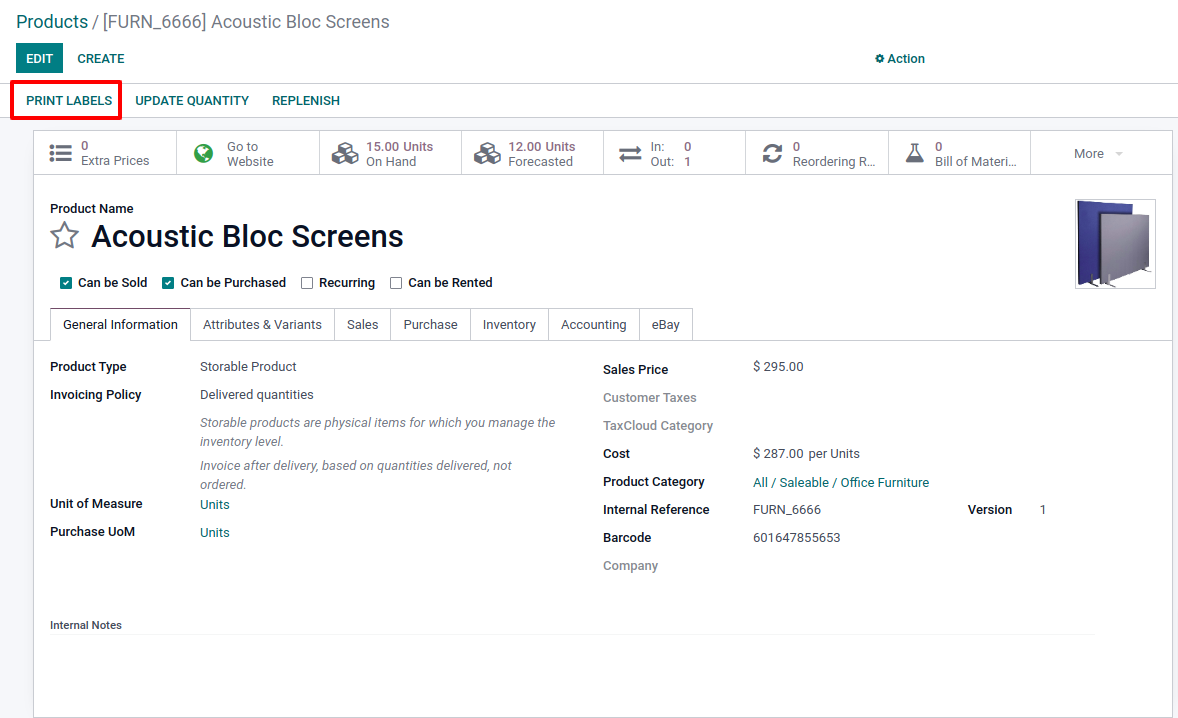
- A pop-up appears with the possibility to select the format. You can select one of the zpl formats. Odoo will download the file on your computer and you will be able to print it from your Zebra printer thanks to the driver integrated to your computer.
I do have an IoT box :
- In that case, the automatic printing is possible. From your IoT app, select your box and then, the zebra printer linked to it. Enter the "Printer Reports" tab and add the label report in zpl format in the lines.

- Once it is done, when coming back to the action of "print label" on the product form, Odoo will automatically send the information to the Zebra to print the label and you do not need to download the file on your computer anymore.
do you have an idea why I don't have the option to Add a line in the Zebra printer popup under Printer Reports?
If your are missing the "Add a line", it is probably because you are looking at the printer through the IoT Boxes view. As this view can't be edited, you can't edit the related sub-views neither.
Make sure to go to IoT > Devices menu then choose the printer there. See:
https://watch.screencastify.com/v/S0zpKDQgCpvpEDO1Bvo9
Related Odoo documentation:
https://www.odoo.com/documentation/15.0/applications/productivity/iot/devices/printer.html#to-reports

Choose the right label paper. While many kinds of paper can be used in a printer, picking a paper specifically for the labels you want to print works best.
Inspect the label paper through thermal shipping label printer.
Design the label.
Test the label.
Load the label paper.
Set print settings.
Print.
| 相關帖文 | 回覆 | 瀏覽次數 | 活動 | |
|---|---|---|---|---|

|
1
4月 22
|
3113 | ||

|
1
4月 22
|
4205 | ||

|
1
2月 22
|
5801 | ||
|
|
1
8月 24
|
3712 | ||
|
|
1
8月 22
|
3977 |
