
I would like to move all the data from Xero to Odoo, we don't have any proper study material/video. If someone can help, it would be a great help.
Odoo is the world's easiest all-in-one management software.
It includes hundreds of business apps:
- 客戶關係
- e-Commerce
- 會計
- 庫存
- PoS
- 專案管理
- MRP
此問題已被標幟
2
回覆
7423
瀏覽次數


Hi,
The Xero Odoo Connector for Odoo V17 is designed to simplify this process, seamlessly integrating Odoo's robust ERP capabilities with Xero's powerful accounting software. This integration facilitates the seamless transfer of financial data between systems, allowing you to maintain accurate records and make informed business decisions.
For more details:- https://www.cybrosys.com/blog/how-to-connect-xero-with-odoo-erp
Hope it helps

Migration can be a headache and can't be answered in just as few sentences as your question is written in.
While the migration of some data is relatively straight forward, for example contacts and - up to some extend - products, the migration of movement data, such as sales, purchase, invoices, stock levels etc. is a whole different story.
Therefore, I would like to suggest you first of all to evaluate the need of migrating data. More often then not migration just is done for the sake of it and rarely - or never - actually needed future onwards. Sure, having a history of sales is nice, but is it wort the effort and what is the value of knowing some random customer purchased some random product in June 2022.
I do get the idea of why one would want to move all data from <put name of old ERP here> to <put name of new ERP here>, no question. But, is it really necessary?
Obviously, certain jurisdiction require you to keep a history of past invoices, for my country for example this would be seven years. Nowhere however it states that this history must be within a particular software, nor does it state it has to be a record in a relational database. A PDF, even a print out of said past invoice is an acceptable way of archiving.
Now, I'm not asking you to go ahead an print out old your old invoices, but I really want to highlight the difference between convenience and benefit here.
That being said, as some sort of preamble if you wish, there are certainly ways to migrate all data. At the end it's about the cost and effort involved.
To answer your actual question, this would be my take:
Note that I have no idea about Xero, nor did you provide any details about what your exports would be structured.
General:
Odoo provides you with a powerful import and export tool for data in CSV and XLSX format. It may take some time to get used to it and understand it's general approach on linking records together. There is a nice section in the documentation providing insights and demo files which can be found here: https://www.odoo.com/documentation/18.0/applications/essentials/export_import_data.html#import-data-into-odoo
It's important to note that importing massive sets of data requires careful planing. Switching from one ERP to another, or from on accounting application to another is not a trivial thing to do.
Pay specific attention to the External ID field of import files - this will help you to identify and link records later down the road.
I would also like to suggest to take a small sample set of your current data and manually enter it in Odoo before anything else. Doing so will allow you to the export this set of data from Odoo with the 'I want to update data (import-compatible export)' option set. This way you can best learn about requirements and structures:
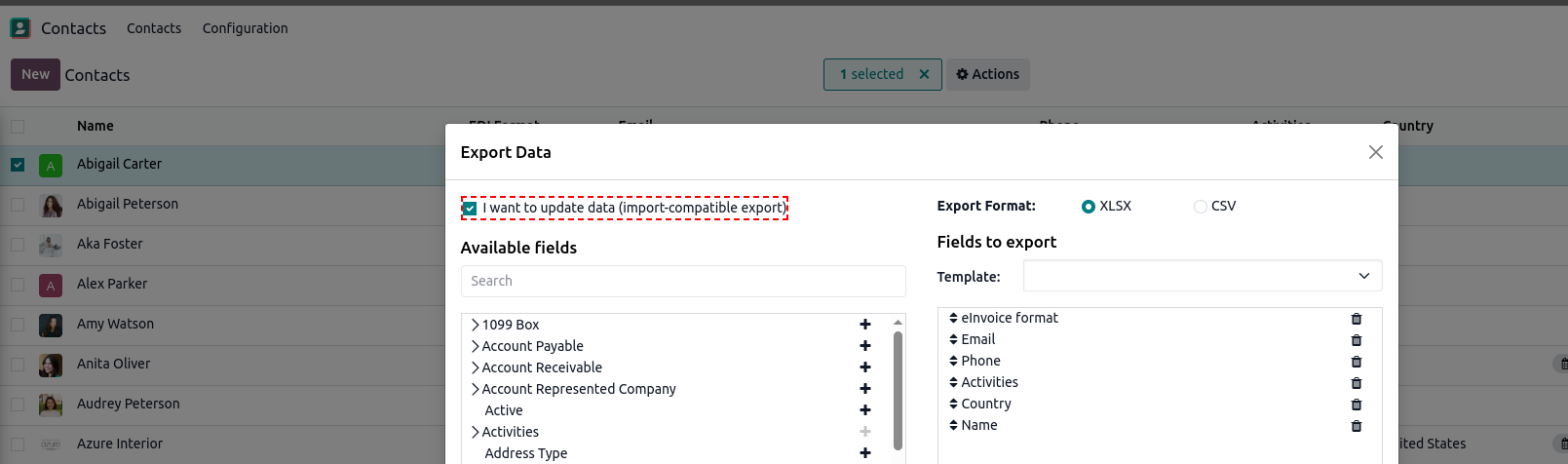
While not directly related to data migration or imports, I would like to highly suggest you to have thoughtful look at https://www.odoo.com/slides and https://www.odoo.com/documentation/18.0/applications/finance/accounting.html next to all the other articles available in the user documentation.
Contacts and Products:
In my opinion (again, note that this is a generic description since there is no actual example export from Xero involved) the default import of Odoo should most likely work for you. Records may require some sort of manipulation in a spreadsheet tool (use any one you're comfortable with such as Libre Calc or MS Excel, or get a hand on Odoo's in-built Spreadsheet app).
(Customer) Invoices and (Vendor) Bills:
While you could utilize the import feature of Odoo for these records as well, a more meaningful way, if supported, probably would be to go with some sort of e-invoice compatible format (UBL etc.) You could simply upload these XML files - or even PDF files incorporating such structured data - to Odoo and have it converted to records in Odoo. Also, OCR could be an option, but is not free of charge (IAP token are required to utilize this feature, see https://www.odoo.com/documentation/18.0/applications/essentials/in_app_purchase.html and https://iap.odoo.com/iap/in-app-services/259) and will definitely require manual validation of data integrity and correctness.
However, more often than not, a transition from an accounting app to Odoo would be done on another level, basically based on a balance-sheet friendly accounting. Odoo does not need to know about all your historical data - it needs to now where to start from, i.e. what are the balances across the various accounts, what is your opening balance etc.
Related to this topic you may refer to https://www.odoo.com/slides/slide/7312 and related videos. Also, even though referring to slightly older versions of Odoo, https://www.odoo.com/slides/67 holds some valuable information about the general flows in Odoo.
Sales and Purchases:
This may sound like a broken record player, but, do you actually need that data in Odoo? If yes, the generic data import can assist you in importing some data. Linking sales and purchases to invoices and bills however may become quite tricky. Odoo does support importing of sub/related records (i.e. a sale order and its individual line aka products sold). Efforts involved in this highly depend on what you can export from your current software.
A more technical approach:
If you must, there is certainly a possibility to import each and every bit of data to Odoo. One would usually create a custom import script directly dealing with the individual data models from contacts and products via sale orders and their lines up to invoices and their lines. One way of doing this is to utilize the external API Odoo comes with: https://www.odoo.com/documentation/18.0/developer/reference/external_api.html
This way you could do pretty much everything - when throwing enough money at it this is.
