İçereği Atla
Odoo Menü
  • Portal
  • Ücretsiz deneyin
  • Uygulamalar
    Finans
    • Muhasebe
    • Faturalama
    • Masraf Yönetimi
    • Elektronik Çizelge (BI)
    • Belgeler
    • İmza
    Satış
    • Müşteri İlişkileri Yönetimi (CRM)
    • Satış
    • Satış Noktası Mağaza
    • Satış Noktası Restoran
    • Abonelikler
    • Kiralama
    Web Sitesi
    • Web Sitesi Oluşturucu
    • eTicaret
    • Blog
    • Forum
    • Canlı Sohbet
    • eÖğrenme
    Tedarik Zinciri
    • Envanter
    • Üretim
    • Ürün Yaşam Döngüsü Yönetimi
    • Satın Alma
    • Bakım
    • Kalite
    İnsan Kaynakları
    • Çalışanlar
    • İşe Alım
    • İzin
    • Değerlendirme
    • Referans
    • Filo Yönetimi
    Pazarlama
    • Sosyal Medyada Pazarlama
    • E-posta ile Pazarlama
    • SMS ile Pazarlama
    • Etkinlikler
    • Pazarlama Otomasyonu
    • Anket
    Hizmetler
    • Proje Yönetimi
    • Çalışma Çizelgeleri
    • Saha Hizmeti
    • Yardım Masası
    • Planlama
    • Randevular
    Verimlilik
    • Sohbet
    • Onay
    • Nesnelerin İnterneti
    • VoIP
    • Bilgi Bankası
    • WhatsApp
    Üçüncü taraf uygulamalar Odoo Stüdyo Odoo Bulut Platformu
  • Sektörler
    Perakende satış
    • Kitapçı
    • Giyim Mağazası
    • Mobilya Mağazası
    • Gıda Marketi
    • Hırdavat Dükkanı
    • Oyuncak Dükkanı
    Gıda ve Konaklama
    • Bar ve Pub
    • Restoran
    • Fast Food Restoranı
    • Konuk Evi
    • İçecek Distribütörü
    • Otel
    Gayrimenkul
    • Emlak Acentesi
    • Mimarlık Firması
    • İnşaat
    • Emlak Yönetimi
    • Bahçe Tasarımı
    • Mülk Sahipleri Derneği
    Uzmanlık
    • Muhasebe Firması
    • Odoo Partner
    • Pazarlama Ajansı
    • Hukuk Firması
    • Yetenek Kazanımı
    • Denetim ve Belgelendirme
    Üretim
    • Tekstil
    • Metal
    • Mobilyalar
    • Gıda
    • Bira fabrikası
    • Kurumsal Hediye
    Sağlık ve Spor
    • Spor Kulübü
    • Optik Mağazası
    • Fitness Merkezi
    • Sağlıklı Yaşam Merkezi
    • Eczane
    • Kuaför Salonu
    Ticaret
    • Tamirci
    • BT Donanım & Destek
    • Güneş Enerjisi Sistemleri
    • Ayakkabı İmalatçısı
    • Temizlik Hizmetleri
    • HVAC Hizmetleri
    Diğerleri
    • Kar Amacı Gütmeyen Kuruluş
    • Çevre Ajansı
    • Reklam Panosu Kiralama
    • Fotoğrafçılık
    • Bisiklet Kiralama
    • Yazılım Bayisi
    Tüm Sektörlere Göz Atın
  • Topluluk
    Öğrenim
    • Eğitim Araçları
    • Dokümantasyon
    • Sertifikasyonlar
    • Eğitim Etkinlikleri
    • Blog
    • Podcast
    Eğitim ve Gelişim
    • Eğitim Programı
    • Scale Up! İşletme Oyunu
    • Odoo'yu Ziyaret Edin
    Yazılım
    • İndirin
    • Sürümleri Kıyaslayın
    • Sürümler
    İş Birliği
    • Github
    • Forum
    • Etkinlikler
    • Çeviriler
    • Partner Olun
    • Partnerler için Hizmetler
    • Muhasebe Firmanızı Kaydettirin
    Hizmetler
    • Partner Bulun
    • Muhasebeci Bulun
    • Bir danışmanla görüşün
    • Kurulum Hizmetleri
    • Müşteri Referansları
    • Destek
    • Sürüm Yükseltme
    Github Youtube Twitter Linkedin Instagram Facebook Spotify
    +1 (650) 691-3277
    Demo randevusu alın
  • Fiyatlandırma
  • Yardım

Odoo is the world's easiest all-in-one management software.
It includes hundreds of business apps:

  • Müşteri İlişkileri Yönetimi
  • e-Commerce
  • Muhasebe
  • Envanter
  • PoS
  • Proje Yönetimi
  • MRP
All apps
You need to be registered to interact with the community.
All Posts People Badges
Etiketler (View all)
odoo accounting v14 pos v15
About this forum
You need to be registered to interact with the community.
All Posts People Badges
Etiketler (View all)
odoo accounting v14 pos v15
About this forum
Yardım

How to implement Google Tag Manager?

Abone Ol

Get notified when there's activity on this post

Bu soru işaretlendi
googlemanagerimplementationtagwebsite
4 Cevaplar
23825 Görünümler
Avatar
MRG

I would like to implement Google Tag Manager (https://developers.google.com/tag-manager/quickstart) in our Odoo installation, but I can not find much information on the topic.

I tried to put the Google Tag Manager code via the website HTML editor just beneath the body tag (as required by Tag Manager) but it results in a XML Malformed error.

Does anyone know how to implement Google Tag Manager within Odoo?

2
Avatar
Vazgeç
Avatar
Sofie Van Looveren
En İyi Yanıt

We faced the same problem. To be able to add the tag manager to the main layout we updated the & (ampersand) to &

This fixed the XML Malformed error.

<!-- Google Tag Manager -->
<noscript>
<iframe src="//www.googletagmanager.com/ns.html?id=GTM-XXXX" height="0" width="0" style="display:none;visibility:hidden"></iframe>
</noscript>
<script>
(function(w,d,s,l,i){
w[l]=w[l]||[];w[l].push({
'gtm.start':new Date().getTime(),event:'gtm.js'});
var f=d.getElementsByTagName(s)[0], j=d.createElement(s),dl=l!='dataLayer'?'&amp;l='+l:'';
j.async=true;
j.src='//www.googletagmanager.com/gtm.js?id='+i+dl;
f.parentNode.insertBefore(j,f);
})
(window,document,'script','dataLayer','GTM-XXXX');
</script>
<!-- End Google Tag Manager -->

If this appears in the developer console of the browser:
Failed to load resource: the server responded with a status of 404 () - https://www.googletagmanager.com/gtm.js?id=GTM-XXXX

Replace the id GTM-XXXX with your personal Google id.

4
Avatar
Vazgeç
Avatar
Yurii Razumovskyi
En İyi Yanıt

Hello,

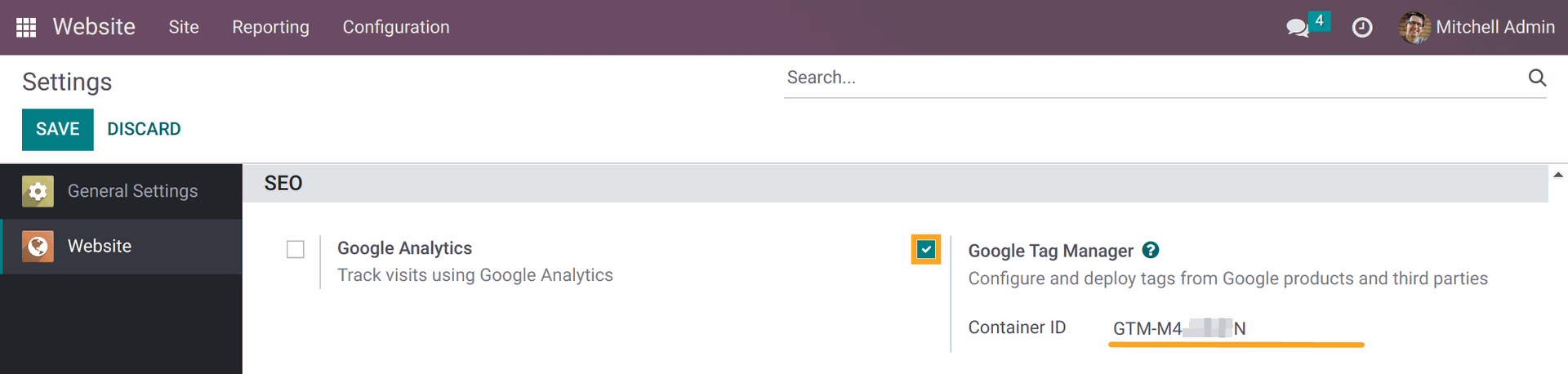
Let me share our experience of integration the Google Tag Manager on Odoo websites. The GTM script, it's a JS script that should be added to all website pages. You can insert it manually, but it's more convenient to use some free module. It allows avoiding possible manual errors and formatting issues. 

The Odoo GTM app, that we provide for free, is easily configurable and can be extended with the Google Consent Mode extension to meet the Google requirements for websites since March 2024.


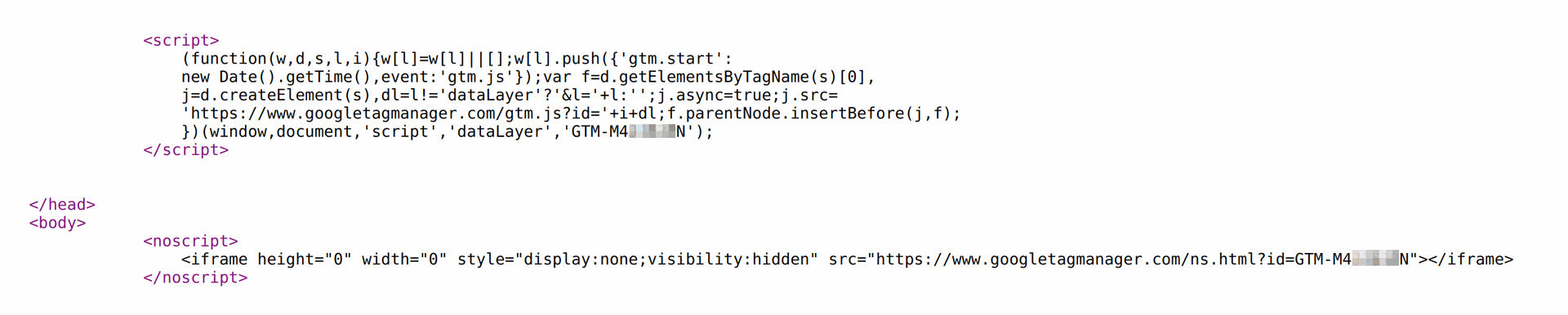
The GTM script code on a webpage of Odoo website:


Best regards, Yurii Razumovskyi.

Company Garazd Creation — Odoo solutions for e-Commerce, SEO, Data Feeds, Website Tracking, Marketing and Analytics integrations, Product Label designing and printing.

https://garazd.biz

0
Avatar
Vazgeç
Avatar
Ron Calliou
En İyi Yanıt

I know that this is an older post, but I wanted to let others know that this worked for me in 2021, on v.14 community edition. I also wanted to note that it is important that when you add the "amp" that you also remember to add the semicolon ";" after, this was my little miss.

Thank you Sofie for this post.

0
Avatar
Vazgeç
Jacob Grundy

Hi Ron,
I'm just looking at this as well in V14 enterprise. Did you use the new insert code feature to paste the code into the body? or did you use the HTML editor?
I'm hoping we can use the insert code feature so upgrades are supported.

Ron Calliou

Jacob, I added this through the html editor, after a little exploration and some trial and error on my part.

Avatar
Oscar Alca
En İyi Yanıt

you can get this app right here that does the trick https://apps.odoo.com/apps/modules/13.0/google_tag_manager_app/

0
Avatar
Vazgeç
Enjoying the discussion? Don't just read, join in!

Create an account today to enjoy exclusive features and engage with our awesome community!

Üye Ol
İlgili Gönderiler Cevaplar Görünümler Aktivite
Google Places Autocomplete
google website website_sale
Avatar
Avatar
Avatar
2
Eki 25
3785
google search troubles hidden website /certifications or unused pages shown, how to prevent
google website webpage
Avatar
0
May 16
4039
How to unreference Odoo from search engine
google seo website Odoo13.0 odoosh
Avatar
Avatar
1
Ara 24
3789
Google Analytics Dashboard
google dashboard analytics website googlelogin
Avatar
Avatar
Avatar
Avatar
Avatar
6
Ara 20
10309
Is there really multi website code in odoo 9?
v8 multi implementation website odoo
Avatar
Avatar
1
Eki 15
5880
Topluluk
  • Eğitim Araçları
  • Dokümantasyon
  • Forum
Açık Kaynak
  • İndirin
  • Github
  • Runbot
  • Çeviriler
Hizmetler
  • Odoo.sh Hosting
  • Destek
  • Sürüm Yükseltme
  • Özel Geliştirmeler
  • Eğitim
  • Muhasebeci Bulun
  • Partner Bulun
  • Partner Olun
Hakkında
  • Şirketimiz
  • Pazarlama Gereçleri
  • İletişim
  • Kariyer
  • Etkinlikler
  • Podcast
  • Blog
  • Müşteriler
  • Hukuki • Gizlilik
  • Güvenlik
الْعَرَبيّة Català 简体中文 繁體中文 (台灣) Čeština Dansk Nederlands English Suomi Français Deutsch हिंदी Bahasa Indonesia Italiano 日本語 한국어 (KR) Lietuvių kalba Język polski Português (BR) română русский язык Slovenský jazyk slovenščina Español (América Latina) Español ภาษาไทย Türkçe українська Tiếng Việt

Odoo, müşteri ilişkileri yönetimi, eTicaret, muhasebe, envanter, satış noktası, proje yönetimi gibi şirketinizin tüm ihtiyaçlarını karşılayan bir açık kaynak işletme uygulamaları paketidir.

Odoo’nun eşsiz değer önermesi, aynı anda hem kullanımının çok kolay olup hem de tamamen entegre olmasıdır.

Website made with

Odoo Experience on YouTube

1. Use the live chat to ask your questions.
2. The operator answers within a few minutes.

Live support on Youtube
Watch now