Passa al contenuto
Odoo Menu
  • Accedi
  • Provalo gratis
  • App
    Finanze
    • Contabilità
    • Fatturazione
    • Note spese
    • Fogli di calcolo (BI)
    • Documenti
    • Firma
    Vendite
    • CRM
    • Vendite
    • Punto vendita Negozio
    • Punto vendita Ristorante
    • Abbonamenti
    • Noleggi
    Siti web
    • Configuratore sito web
    • E-commerce
    • Blog
    • Forum
    • Live chat
    • E-learning
    Supply chain
    • Magazzino
    • Produzione
    • PLM
    • Acquisti
    • Manutenzione
    • Qualità
    Risorse umane
    • Dipendenti
    • Assunzioni
    • Ferie
    • Valutazioni
    • Referral dipendenti
    • Parco veicoli
    Marketing
    • Social marketing
    • E-mail marketing
    • SMS marketing
    • Eventi
    • Marketing automation
    • Sondaggi
    Servizi
    • Progetti
    • Fogli ore
    • Assistenza sul campo
    • Helpdesk
    • Pianificazione
    • Appuntamenti
    Produttività
    • Comunicazioni
    • Approvazioni
    • IoT
    • VoIP
    • Knowledge
    • WhatsApp
    App di terze parti Odoo Studio Piattaforma cloud Odoo
  • Settori
    Retail
    • Libreria
    • Negozio di abbigliamento
    • Negozio di arredamento
    • Alimentari
    • Ferramenta
    • Negozio di giocattoli
    Cibo e ospitalità
    • Bar e pub
    • Ristorante
    • Fast food
    • Pensione
    • Grossista di bevande
    • Hotel
    Agenzia immobiliare
    • Agenzia immobiliare
    • Studio di architettura
    • Edilizia
    • Gestione immobiliare
    • Impresa di giardinaggio
    • Associazione di proprietari immobiliari
    Consulenza
    • Società di contabilità
    • Partner Odoo
    • Agenzia di marketing
    • Studio legale
    • Selezione del personale
    • Audit e certificazione
    Produzione
    • Tessile
    • Metallo
    • Arredamenti
    • Alimentare
    • Birrificio
    • Ditta di regalistica aziendale
    Benessere e sport
    • Club sportivo
    • Negozio di ottica
    • Centro fitness
    • Centro benessere
    • Farmacia
    • Parrucchiere
    Commercio
    • Tuttofare
    • Hardware e assistenza IT
    • Ditta di installazione di pannelli solari
    • Calzolaio
    • Servizi di pulizia
    • Servizi di climatizzazione
    Altro
    • Organizzazione non profit
    • Ente per la tutela ambientale
    • Agenzia di cartellonistica pubblicitaria
    • Studio fotografico
    • Punto noleggio di biciclette
    • Rivenditore di software
    Carica tutti i settori
  • Community
    Apprendimento
    • Tutorial
    • Documentazione
    • Certificazioni 
    • Formazione
    • Blog
    • Podcast
    Potenzia la tua formazione
    • Programma educativo
    • Scale Up! Business Game
    • Visita Odoo
    Ottieni il software
    • Scarica
    • Versioni a confronto
    • Note di versione
    Collabora
    • Github
    • Forum
    • Eventi
    • Traduzioni
    • Diventa nostro partner
    • Servizi per partner
    • Registra la tua società di contabilità
    Ottieni servizi
    • Trova un partner
    • Trova un contabile
    • Incontra un esperto
    • Servizi di implementazione
    • Testimonianze dei clienti
    • Supporto
    • Aggiornamenti
    GitHub Youtube Twitter Linkedin Instagram Facebook Spotify
    +1 (650) 691-3277
    Richiedi una demo
  • Prezzi
  • Aiuto

Odoo is the world's easiest all-in-one management software.
It includes hundreds of business apps:

  • CRM
  • e-Commerce
  • Contabilità
  • Magazzino
  • PoS
  • Progetti
  • MRP
All apps
È necessario essere registrati per interagire con la community.
Tutti gli articoli Persone Badge
Etichette (Mostra tutto)
odoo accounting v14 pos v15
Sul forum
È necessario essere registrati per interagire con la community.
Tutti gli articoli Persone Badge
Etichette (Mostra tutto)
odoo accounting v14 pos v15
Sul forum
Assistenza

Tutorials / Examples for ONLY static/XML/Data Modules for odoo online ??

Iscriviti

Ricevi una notifica quando c'è un'attività per questo post

La domanda è stata contrassegnata
modulesxmlactionstutorialsstaticexampleshosted
4 Risposte
4724 Visualizzazioni
Avatar
Lutz

Odoo online can only be extended with modules, which are resticted to static / XML content, so no python files are allowed in such modules.


For me it looks like, a lot can be achived with this, because python code could also be used in XML.


But if i search for tutorials / examples, i find only such, which include python files. So they are not compatible with odoo online.


Where can i find examples for modules, which show, what is possible, with this limitations to static / XML content?


With try and error and experimenting with studio and exporting it, i have still learned how to add fields and how to extend views with pure xml modules. But i look for examples, which show also how to implement actions, reports, automations using pure static content. 


So in example i want to load the res.company settings using XML. This includes the choice of account_fiscal_country_id and chart_template. When doing so, it looks like an action have to be triggered, to not only select the chart_template, but also load it into the database...


0
Avatar
Abbandona
Avatar
Justin MASSIOT
Risposta migliore

Hello Lutz,

I'm in the process of doing similar things. On my side, I managed to deploy a static module on Odoo Online with both frontend and backend code (though Server Actions accessible with GET requests).

The most useful resource for me was this page of the documentation: https://www.odoo.com/documentation/18.0/developer/tutorials/importable_modules.html
There is a section at the end dedicated to the "Website controllers": https://www.odoo.com/documentation/18.0/developer/tutorials/importable_modules.html#website-controllers

I also analyzed the source code of free Odoo Online apps (Aircall connectors by Caret IT, at https://apps.odoo.com/apps/modules/browse?price=Free&series=18.0&search=online) but it didn't help me much.

Hope this can help.
Justin

1
Avatar
Abbandona
Lutz
Autore

Thanks for you answer Justin! I mark it as the best answer, because it cares about resources and also about examples. The keyword which i have not cared enough about was "importable". This really means what i'm looking for: A description how to write modules, which not have to be copied into the addon folder on the server, but could by imported using the "import module" dialog in the apps app. So thanks for that link! Markable was also that you found a working filter setting (?price=Free), which is not chooseable (anymore?) from the filter bar. But unfortunatly searching for only "online" brings up mainly modules which are not importable to odoo online. But as you say "Aircall" is one, which is importable. But what still is missing in the odoo documentation is a -tutorial like- simple example for such an module. - BTW: What are the similar things you do?

Justin MASSIOT

Hello Lutz,
Glad to read that my info was useful to you.

My custom module implements a web form in the form of a website building block (a.k.a. snippet) that aims to be integrated in a page of our company website. The goal is to 1) capture a file from the visitor in order to be able to 2) compute some key metrics about it, 3a) create a Sale Order based on those metrics and 3b) send the SO to the visitor.
The snippet is the front-end part (1), packaged in the same "importable module" as the Sale Order creation (3) which is executed on the backend (Server Action exposed to the public, triggered by a GET request from the front-end).

The file analysis step (2) involves advanced routines and unfortunately can't be executed from an Odoo SaaS instance because I need to import external Python libraries, which Odoo Online doesn't accept. This part of the process is executed remotely at a serverless function provider, is developed in Python, and is triggered by a POST request of the web form.

Avatar
Ray Carnes (ray)
Risposta migliore

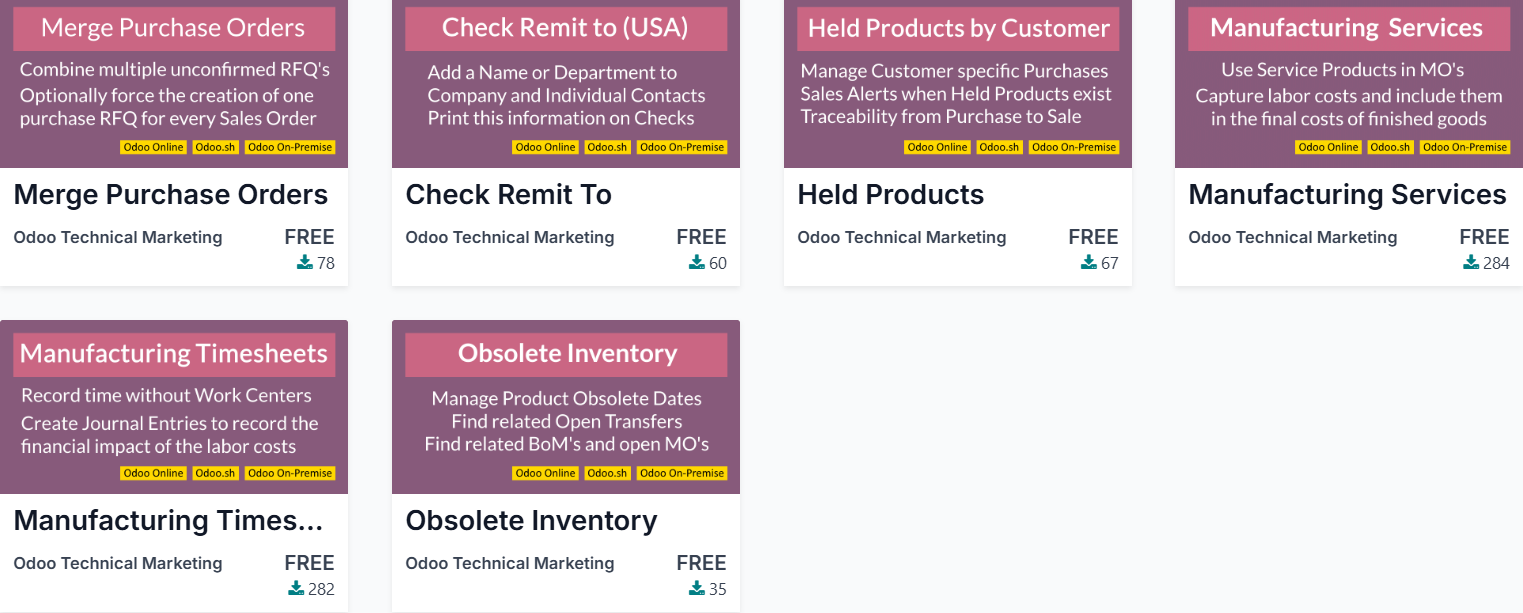
https://apps.odoo.com/apps/modules/browse?search=technical+marketing

0
Avatar
Abbandona
Lutz
Autore

Thanks, great idea! I still looked for apps before using the "odoo online" filter on that marketplace. But this only shows apps from Odoo S.A., which are called "FREE", but are not downloadable. So it does not help as example. Inspired by your shown apps, i have now simply searched for "odoo online" in the search field and got 17 apps. Three are free apps for "Aircall ...". These are only for odoo online, made for version 18, are downloadable, and contain a lot of python code in XML. I guess this will help me. THX!
https://apps.odoo.com/apps/modules/browse?search=odoo+online

Ray Carnes (ray)

All of the Apps I shared are downloadable, they are just not updated for Odoo 18.0, but glad you have what yu need.

Lutz
Autore

Good to know, that these examples are made from you (with studio). They are more compact, so possibly they would be better as example. But i have tried to install one (stock_obsolete), to see the result. Unfortunately installing (in odoo demo) ended with an error. Possibly this is the result in a version change of odoo. So this is the reason, why it is not so good as example for odoo 18. I don't know about the historical changes in odoo. But with errors in 18, it is simply no easy starting point, what an example should be. But you helped me anyway. :-)

Avatar
Yahoo Baba Innovations Pvt.Ltd
Risposta migliore

Hello Lutz Hohle,

If your project involves extensive customizations, it’s better to use Odoo.sh or a dedicated server, as they provide more flexibility for customization.

However, some customizations can be done directly in Odoo Online, including:

  1. Implementing Automated Actions
  2. Defining Server Actions in XML

Example XML for a server action:

<record id="update_field_action" model="ir.actions.server"> <field name="name">Update Field Action</field> <field name="model_id" ref="model_model_name"/> <field name="state">code</field> <field name="code"> <![CDATA[ # Your code here ]]> </field> </record>

For more advanced customizations, Odoo.sh or a dedicated server is recommended.


Thanks & Regards,

Skype : Yahoo Baba Official

Email:  yahoobaba077@gmail.com

0
Avatar
Abbandona
Lutz
Autore

Thanks for your response and your code snipped. It helps a bit. But what i really looking for are full examples, from which i can also see, how to run the code which i have defined in the update_field_action record. So how can i run it (using xml) when installing the module. But also how can i run it from a view.
BTW: I understand that there are better ways as odoo online. But i want to use it for accounting. There are a lot of payed accounting tools in germany. I have selected odoo because it claims it is free with one app and supports double entry accounting, which i need... In former times I had a lot of turn around and earned a lot of money, so i needed to change to double entry by law. I stoped my bussines 4 years ago. Now I only trade (like a hobby) for some thousand Euros a year, and i feel lucky with this. If you ever need to change to double entry accounting in germany, you need to stay with it, also if you do little business. So for me, i'm on my way to a solution, to do double entry bookkepping, without paying a tax advisor, or an expensive software, for hundreds or thousands of euros a year. because this would make no sense with only some thousend euros turnaround. - So Odoo.sh is no solution, for me. Possibly i could install the open source version on my vserver (possibly i will try this later). but as i understand, only odoo enterprise have full accounting and is compliend to german tax law. So for the moment i am tied to odoo online. And this is the reason, why i want to find out, how far i can go only with using data files. (may be, this could also be a start in becoming an expert in that field, with offering services or tools for others. This is not my focus at the moment. But it would justify the enormous effort I am currently putting into Odoo for understanding and adjusting it to my needs.)

Avatar
Andry Ang
Risposta migliore

Hi Lutz,

I have never tried such things and I don't think it's doable in the first place.

I do think about using Scheduled Actions (if it's available in the Odoo online), where you can put your python code into the code section. But, it's quite limited I guess.

And a Scheduled Actions record can be uploaded through XML of course.


Hope this give a little bit of insights.

0
Avatar
Abbandona
Lutz
Autore

Thanks for your answer, Andry. I guess, because of the database driven design of odoo (nearly) anything should be possible also with data only modules. Here is an example, for a integration of a phone / chat service, which i found now. It is realized only with a data/xml module: https://apps.odoo.com/apps/modules/18.0/cit_aircall_online_api_integration

Ti stai godendo la conversazione? Non leggere soltanto, partecipa anche tu!

Crea un account oggi per scoprire funzionalità esclusive ed entrare a far parte della nostra fantastica community!

Registrati
Post correlati Risposte Visualizzazioni Attività
How to update config setting from XML in Odoo
modules xml
Avatar
0
apr 17
6256
what is wrong with this code? error is on name="arch" type="xml"
modules xml
Avatar
Avatar
Avatar
Avatar
3
mag 16
9079
server actions and scheduled actions
xml data actions
Avatar
Avatar
Avatar
3
dic 23
7185
Automatic module update after .xml file change
modules xml update
Avatar
Avatar
Avatar
Avatar
3
giu 20
22593
Error while Installing a module
modules error xml
Avatar
Avatar
Avatar
2
set 18
4424
Community
  • Tutorial
  • Documentazione
  • Forum
Open source
  • Scarica
  • Github
  • Runbot
  • Traduzioni
Servizi
  • Hosting Odoo.sh
  • Supporto
  • Aggiornamenti
  • Sviluppi personalizzati
  • Formazione
  • Trova un contabile
  • Trova un partner
  • Diventa nostro partner
Chi siamo
  • La nostra azienda
  • Branding
  • Contattaci
  • Lavora con noi
  • Eventi
  • Podcast
  • Blog
  • Clienti
  • Note legali • Privacy
  • Sicurezza
الْعَرَبيّة Català 简体中文 繁體中文 (台灣) Čeština Dansk Nederlands English Suomi Français Deutsch हिंदी Bahasa Indonesia Italiano 日本語 한국어 (KR) Lietuvių kalba Język polski Português (BR) română русский язык Slovenský jazyk slovenščina Español (América Latina) Español ภาษาไทย Türkçe українська Tiếng Việt

Odoo è un gestionale di applicazioni aziendali open source pensato per coprire tutte le esigenze della tua azienda: CRM, Vendite, E-commerce, Magazzino, Produzione, Fatturazione elettronica, Project Management e molto altro.

Il punto di forza di Odoo è quello di offrire un ecosistema unico di app facili da usare, intuitive e completamente integrate tra loro.

Website made with

Odoo Experience on YouTube

1. Use the live chat to ask your questions.
2. The operator answers within a few minutes.

Live support on Youtube
Watch now