Skip ke Konten
Odoo Menu
  • Login
  • Uji coba gratis
  • Aplikasi
    Keuangan
    • Akuntansi
    • Faktur
    • Pengeluaran
    • Spreadsheet (BI)
    • Dokumen
    • Tanda Tangan
    Sales
    • CRM
    • Sales
    • POS Toko
    • POS Restoran
    • Langganan
    • Rental
    Website
    • Website Builder
    • eCommerce
    • Blog
    • Forum
    • Live Chat
    • eLearning
    Rantai Pasokan
    • Inventaris
    • Manufaktur
    • PLM
    • Purchase
    • Maintenance
    • Kualitas
    Sumber Daya Manusia
    • Karyawan
    • Rekrutmen
    • Cuti
    • Appraisal
    • Referensi
    • Armada
    Marketing
    • Social Marketing
    • Email Marketing
    • SMS Marketing
    • Acara
    • Otomatisasi Marketing
    • Survei
    Layanan
    • Project
    • Timesheet
    • Layanan Lapangan
    • Meja Bantuan
    • Planning
    • Appointment
    Produktivitas
    • Diskusi
    • Approval
    • IoT
    • VoIP
    • Pengetahuan
    • WhatsApp
    Aplikasi pihak ketiga Odoo Studio Platform Odoo Cloud
  • Industri-Industri
    Retail
    • Toko Buku
    • Toko Baju
    • Toko Furnitur
    • Toko Kelontong
    • Toko Hardware
    • Toko Mainan
    Makanan & Hospitality
    • Bar dan Pub
    • Restoran
    • Fast Food
    • Rumah Tamu
    • Distributor Minuman
    • Hotel
    Real Estate
    • Agensi Real Estate
    • Firma Arsitektur
    • Konstruksi
    • Estate Management
    • Perkebunan
    • Asosiasi Pemilik Properti
    Konsultansi
    • Firma Akuntansi
    • Mitra Odoo
    • Agensi Marketing
    • Firma huku
    • Talent Acquisition
    • Audit & Sertifikasi
    Manufaktur
    • Tekstil
    • Logam
    • Perabotan
    • Makanan
    • Brewery
    • Corporate Gift
    Kesehatan & Fitness
    • Sports Club
    • Toko Kacamata
    • Fitness Center
    • Wellness Practitioners
    • Farmasi
    • Salon Rambut
    Perdagangan
    • Handyman
    • IT Hardware & Support
    • Sistem-Sistem Energi Surya
    • Pembuat Sepatu
    • Cleaning Service
    • Layanan HVAC
    Lainnya
    • Organisasi Nirlaba
    • Agen Lingkungan
    • Rental Billboard
    • Fotografi
    • Penyewaan Sepeda
    • Reseller Software
    Browse semua Industri
  • Komunitas
    Belajar
    • Tutorial-tutorial
    • Dokumentasi
    • Sertifikasi
    • Pelatihan
    • Blog
    • Podcast
    Empower Education
    • Program Edukasi
    • Game Bisnis 'Scale Up!'
    • Kunjungi Odoo
    Dapatkan Softwarenya
    • Download
    • Bandingkan Edisi
    • Daftar Rilis
    Kolaborasi
    • Github
    • Forum
    • Acara
    • Terjemahan
    • Menjadi Partner
    • Layanan untuk Partner
    • Daftarkan perusahaan Akuntansi Anda.
    Dapatkan Layanan
    • Temukan Mitra
    • Temukan Akuntan
    • Temui penasihat
    • Layanan Implementasi
    • Referensi Pelanggan
    • Bantuan
    • Upgrades
    Github Youtube Twitter Linkedin Instagram Facebook Spotify
    +1 (650) 691-3277
    Dapatkan demo
  • Harga
  • Bantuan

Odoo is the world's easiest all-in-one management software.
It includes hundreds of business apps:

  • CRM
  • e-Commerce
  • Akuntansi
  • Inventaris
  • PoS
  • Project
  • MRP
All apps
Anda harus terdaftar untuk dapat berinteraksi di komunitas.
Semua Post Orang Lencana-Lencana
Label (Lihat semua)
odoo accounting v14 pos v15
Mengenai forum ini
Anda harus terdaftar untuk dapat berinteraksi di komunitas.
Semua Post Orang Lencana-Lencana
Label (Lihat semua)
odoo accounting v14 pos v15
Mengenai forum ini
Help

Shareholders Equity (common stock) missing from default chart of accounts (United Kingdom)

Langganan

Dapatkan notifikasi saat terdapat aktivitas pada post ini

Pertanyaan ini telah diberikan tanda
accounting
5 Replies
2466 Tampilan
Avatar
Leon Chadwick

The cheat sheet clearly lists an account and entry on the balance sheet for Common Stock:

www.odoo.com/documentation/18.0/applications/finance/accounting/get_started/cheat_sheet.html

I don't have an account to enter common stock, so I created one with code 310005.
When I generate my Balance Sheet report, the common stock is being reported as "Retained Earnings".


  1. What code range does the UK chart of accounts have setup for the common stock/equity?
  2. Why does the UK defaults not already have this account for common stock (or perhaps it does, but under an obscure name?)
0
Avatar
Buang
Jacqueline Gleason

Having the same issue and freaking out since this was not the way it was handled in Odoo 16.

Roger Brugger

I hope we soon find a solution for this problem. 

Avatar
Jacqueline Gleason
Jawaban Terbai

I worked with the Odoo dev team for two days on this and have a fix. I believe they are working on a wider update but this will work for now. I'm not elevated enough on support to add pics so it'll just have to be step-by-step for now. See below:

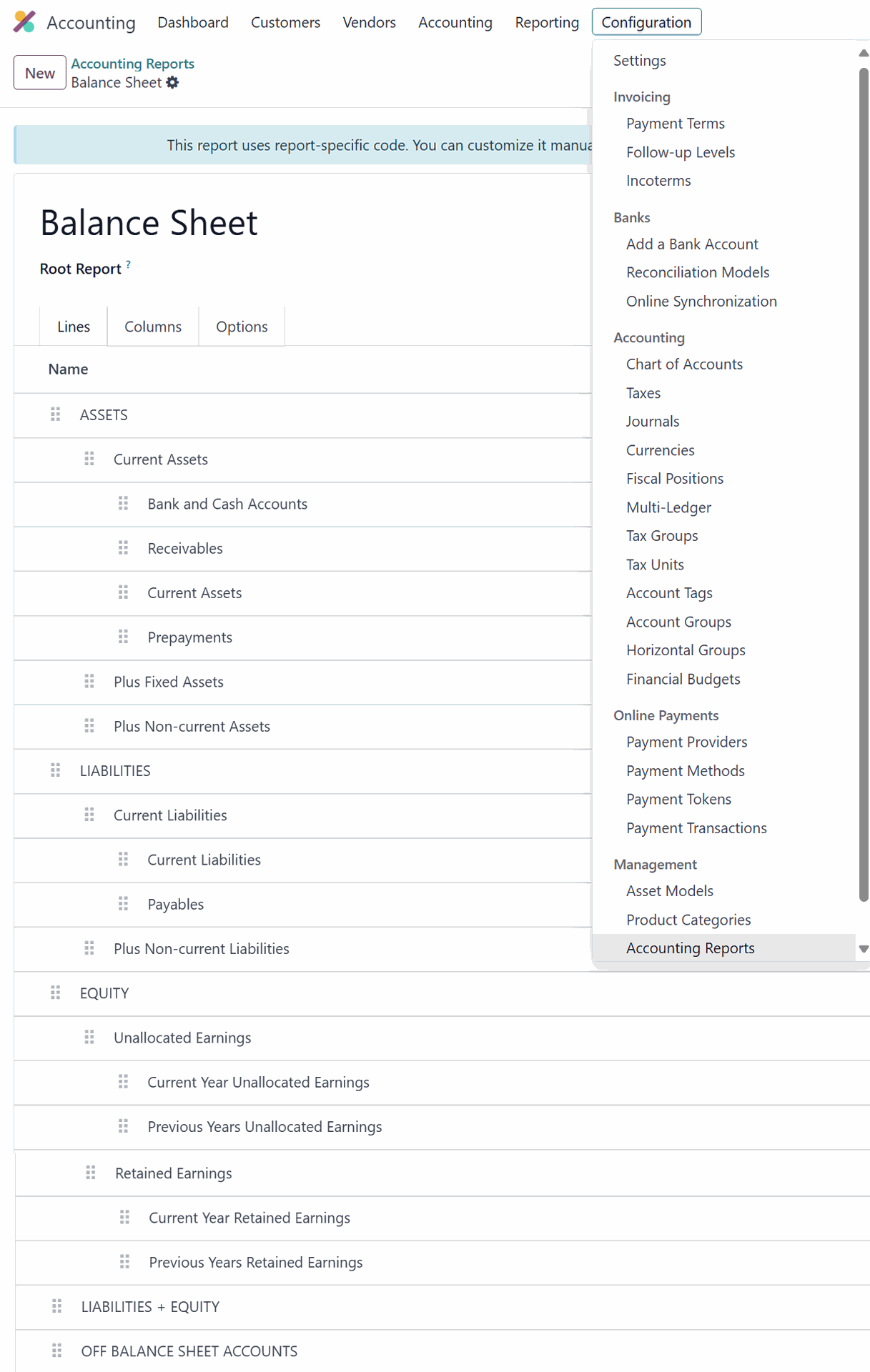
1. To access this, you will need to enable Developer Mode. Then, navigate to your Balance Sheet, and click on the cogs at the end of the header bar. This will open the Accounting Report view of the Balance Sheet.
2. To implement a Preferred Equity account in Odoo 18.0, you first need to add a line to your balance sheet.
3. Name the line "Preferred Equity" and set the level to 5 so that it is indented enough to appear below other equity items, then drag it below Retained Earnings.
4. Next, create a new line and label it "Balance."
5. Set the computation engine to Odoo Domain, and use the formula [("account_id.name", "ilike", "Preferred Equity")] to grab any chart of account that contains "Preferred Equity" in its name. Set the subformula to -sum in order to have a subtotal of the accounts, and set Group By to account_id.
6. After that, update the formula for Current Year Retained Earnings so that Preferred Equity is not counted twice. The formula to use is ["&", ("account_id.account_type", "=", "equity"), ("account_id.name", "not ilike", "Preferred Equity")].
7. Finally click into retained earnings…
8. …update the formula to include the code of the Preferred Equity account. This will ensure that the total equity reflects both retained earnings and preferred equity.

If you need to make a few distinctions for accounts that don't get rolled into REs, each time you add another item to Preferred Equity, you will also need to add an inverse condition to the Retained Earnings formula to ensure it is not counted twice. For example:

["&", "&",
("account_id.account_type", "=", "equity"),
("account_id.name", "not ilike", "Preferred Equity"),
("account_id.name", "not ilike", "Insert Text")
]

You must add another "&" at the beginning for every additional condition you include in the domain.

Thank you.

3
Avatar
Buang
Roger Brugger

I just share my edits on the above which made everything work for me. Thanks Jacqueline!
See the loom video for more details.

https://www.loom.com/share/e942ea944234487bab4d9bde78b87b3f
Odoo 18 Share capital: Avoiding it to be put under retained earnings 😊

I justed added some steps

I worked with the Odoo dev team for two days on this and have a fix. I believe they are working on a wider update but this will work for now. I'm not elevated enough on support to add pics so it'll just have to be step-by-step for now. See below:
0. You need to define your share capital account correctly. Check on you CoA how you name it. For me it is “Share Capital” – if its a different name – please change below each instance where it says Share Capital to your own name.
1. To access this, you will need to enable Developer Mode. Then, navigate to your Balance Sheet, and click on the cogs at the end of the header bar. This will open the Accounting Report view of the Balance Sheet.
2. To implement a Share Capital account in Odoo 18.0, you first need to add a line to your balance sheet.
3. Name the line "Share Capital" and set the level to 5 so that it is indented enough to appear below other equity items, then drag it below Retained Earnings.
4+5 not used.
6. After that, update the formula for Current Year Retained Earnings so that Share Capital is not counted twice. The formula to use is ["&", ("account_id.account_type", "=", "equity"), ("account_id.name", "not ilike", "Share Capital")].
6. We have changed the above 6.
[('account_id.code', 'in', ['301010'])]
Imporant on the label balance – ensure that its a b not a B.

7. Finally click into retained earnings…
8. …update the formula to include the code of the Share Capital account
[('account_id.account_type', '=', 'equity'), ('account_id.name', 'not ilike', 'Share Capital')]
This will ensure that the total equity reflects both retained earnings and Share Capital.
If you need to make a few distinctions for accounts that don't get rolled into REs, each time you add another item to Share Capital, you will also need to add an inverse condition to the Retained Earnings formula to ensure it is not counted twice. For example:
Not needed:
["&", "&",
("account_id.account_type", "=", "equity"),
("account_id.name", "not ilike", "Share Capital"),
("account_id.name", "not ilike", "Insert Text")

[('account_id.account_type', '=', 'equity'), ('account_id.name', 'not ilike', 'Share Capital')]

9 do the same for previous years retained earnings to remove as well the share capital account
[('account_id.account_type', '=', 'equity'), ('account_id.name', 'not ilike', 'Share Capital')]

10. On Equity add the last part:

UNAFFECTED_EARNINGS.balance + RETAINED_EARNINGS.balance - SC.balance
Note the SC is coming from the ‘Code’ field on Share capital which is called SC
Attention prefix is a “minus”

Avatar
Visions Africa Ltd
Jawaban Terbai

Can I ask how this was resolved? Because share capital can never become retained earnings. I don't know who at Odoo approved this change - complete beginner error??? 

Now we all need to manually change the system? Doesn't make sense either but I need to do it for our customers. Happy for any solution on this. 

0
Avatar
Buang
Jacqueline Gleason

I'm working with Odoo developers as we speak. I will report back here by EOD. Thanks.

Avatar
Cybrosys Techno Solutions Pvt.Ltd
Jawaban Terbai

Hi,


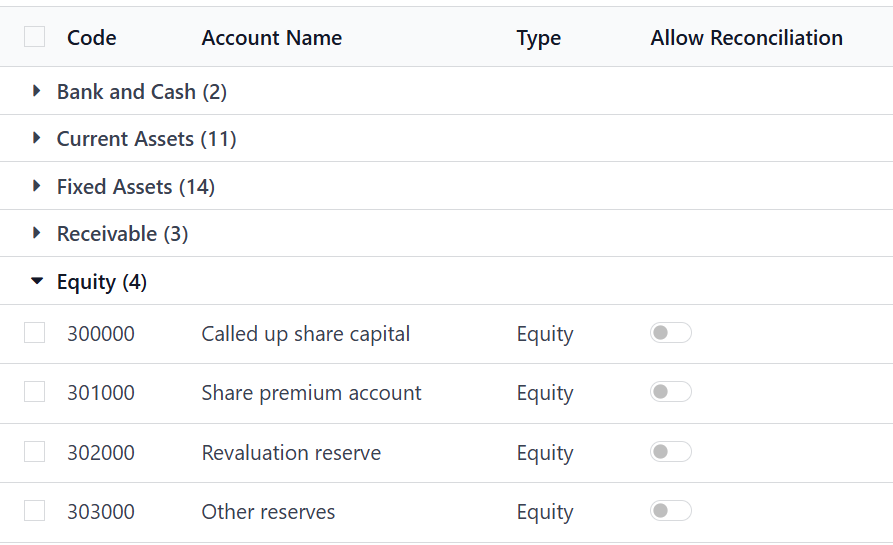
In Odoo, the Balance Sheet is structured using account tags rather than just account codes. The UK chart of accounts that ships with Odoo follows UK GAAP conventions, so you won’t find a “Common Stock” account like in US accounting. Instead, equity is represented through accounts such as “Called Up Share Capital,” “Share Premium Account,” and “Other Reserves.”


When you created your own account with code 310005, Odoo placed it under Retained Earnings because it wasn’t linked to the proper equity tag. This happens since Odoo uses those tags to decide where accounts appear on the Balance Sheet report.


In the UK CoA, equity accounts usually fall in the 300000–399999 range. To align with UK standards, you should either use existing accounts like “Called Up Share Capital” or assign the correct tags to your custom account. This ensures it shows up under the right Equity section instead of Retained Earnings.


Hope it helps

0
Avatar
Buang
Avatar
Leon Chadwick
Penulis Jawaban Terbai
  1. The screenshot from Chris Tringham shows a structure of the calculation, where can I access that structure?  (I am presuming there is some way to edit it once I know where to look at that)
  2. What will be needed achieve the layout I expect showing common stock as its own line under Equity, as per the cheat sheet (and what I would expect on a set of accounts anywhere)?
  3. Whatever those steps are, will they something all users are expected to setup, or is this some error in the UK defaults as it feels like this should already be in place for me?
0
Avatar
Buang
Chris TRINGHAM

Hi Leon - I updated my answer - it looks as if this has been changed in v18

Avatar
Chris TRINGHAM
Jawaban Terbai

The code range doesn't really matter, it's the formula (and labels) on the Balance Sheet that control this.

In v17, the "Retained Earnings" line is the sum of the balances of all the Equity accounts:

I assume your new account is of type Equity, so indeed it will be included in Retained Earnings.


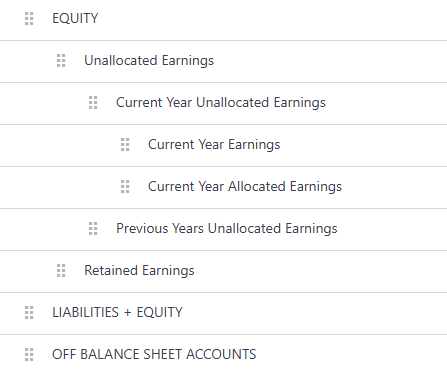
You can change the structure of the Financial Reports in the Settings menu (this is v18):

Note that in v18 there are two lines for Retained Earnings, current year and previous years but it does not separate out the Common Stock.  In v17 there is one line.


Unfortunately, Odoo documentation is sometimes like that - the "Cheat Sheet" is helpful but doesn't quite match up with current system!

0
Avatar
Buang
Menikmati diskusi? Jangan hanya membaca, ikuti!

Buat akun sekarang untuk menikmati fitur eksklufi dan agar terlibat dengan komunitas kami!

Daftar
Post Terkait Replies Tampilan Aktivitas
Array Filter
accounting
Avatar
0
Nov 25
5
Berapa nomor telepon layanan Tokopedia?
accounting
Avatar
0
Nov 25
2
what is the best girl mexico
accounting
Avatar
0
Nov 25
2
Error ir.actions.report . default_print_option field is undefined
accounting
Avatar
Avatar
Avatar
2
Nov 25
998
dfgfdgdf fgfgf xcvdf fgdf dsf
accounting
Avatar
0
Nov 25
3
Komunitas
  • Tutorial-tutorial
  • Dokumentasi
  • Forum
Open Source
  • Download
  • Github
  • Runbot
  • Terjemahan
Layanan
  • Odoo.sh Hosting
  • Bantuan
  • Peningkatan
  • Custom Development
  • Pendidikan
  • Temukan Akuntan
  • Temukan Mitra
  • Menjadi Partner
Tentang Kami
  • Perusahaan kami
  • Aset Merek
  • Hubungi kami
  • Tugas
  • Acara
  • Podcast
  • Blog
  • Pelanggan
  • Hukum • Privasi
  • Keamanan
الْعَرَبيّة Català 简体中文 繁體中文 (台灣) Čeština Dansk Nederlands English Suomi Français Deutsch हिंदी Bahasa Indonesia Italiano 日本語 한국어 (KR) Lietuvių kalba Język polski Português (BR) română русский язык Slovenský jazyk slovenščina Español (América Latina) Español ภาษาไทย Türkçe українська Tiếng Việt

Odoo adalah rangkaian aplikasi bisnis open source yang mencakup semua kebutuhan perusahaan Anda: CRM, eCommerce, akuntansi, inventaris, point of sale, manajemen project, dan seterusnya.

Mudah digunakan dan terintegrasi penuh pada saat yang sama adalah value proposition unik Odoo.

Website made with

Odoo Experience on YouTube

1. Use the live chat to ask your questions.
2. The operator answers within a few minutes.

Live support on Youtube
Watch now