Skip ke Konten
Odoo Menu
  • Login
  • Uji coba gratis
  • Aplikasi
    Keuangan
    • Akuntansi
    • Faktur
    • Pengeluaran
    • Spreadsheet (BI)
    • Dokumen
    • Tanda Tangan
    Sales
    • CRM
    • Sales
    • POS Toko
    • POS Restoran
    • Langganan
    • Rental
    Website
    • Website Builder
    • eCommerce
    • Blog
    • Forum
    • Live Chat
    • eLearning
    Rantai Pasokan
    • Inventaris
    • Manufaktur
    • PLM
    • Purchase
    • Maintenance
    • Kualitas
    Sumber Daya Manusia
    • Karyawan
    • Rekrutmen
    • Cuti
    • Appraisal
    • Referensi
    • Armada
    Marketing
    • Social Marketing
    • Email Marketing
    • SMS Marketing
    • Acara
    • Otomatisasi Marketing
    • Survei
    Layanan
    • Project
    • Timesheet
    • Layanan Lapangan
    • Meja Bantuan
    • Planning
    • Appointment
    Produktivitas
    • Discuss
    • Approval
    • IoT
    • VoIP
    • Pengetahuan
    • WhatsApp
    Aplikasi pihak ketiga Odoo Studio Platform Odoo Cloud
  • Industri-Industri
    Retail
    • Toko Buku
    • Toko Baju
    • Toko Furnitur
    • Toko Kelontong
    • Toko Hardware
    • Toko Mainan
    Makanan & Hospitality
    • Bar dan Pub
    • Restoran
    • Fast Food
    • Rumah Tamu
    • Distributor Minuman
    • Hotel
    Real Estate
    • Agensi Real Estate
    • Firma Arsitektur
    • Konstruksi
    • Estate Management
    • Perkebunan
    • Asosiasi Pemilik Properti
    Konsultansi
    • Firma Akuntansi
    • Mitra Odoo
    • Agensi Marketing
    • Firma huku
    • Talent Acquisition
    • Audit & Sertifikasi
    Manufaktur
    • Tekstil
    • Logam
    • Perabotan
    • Makanan
    • Brewery
    • Corporate Gift
    Kesehatan & Fitness
    • Sports Club
    • Toko Kacamata
    • Fitness Center
    • Wellness Practitioners
    • Farmasi
    • Salon Rambut
    Perdagangan
    • Handyman
    • IT Hardware & Support
    • Sistem-Sistem Energi Surya
    • Pembuat Sepatu
    • Cleaning Service
    • Layanan HVAC
    Lainnya
    • Organisasi Nirlaba
    • Agen Lingkungan
    • Rental Billboard
    • Fotografi
    • Penyewaan Sepeda
    • Reseller Software
    Browse semua Industri
  • Komunitas
    Belajar
    • Tutorial-tutorial
    • Dokumentasi
    • Sertifikasi
    • Pelatihan
    • Blog
    • Podcast
    Empower Education
    • Program Edukasi
    • Game Bisnis 'Scale Up!'
    • Kunjungi Odoo
    Dapatkan Softwarenya
    • Download
    • Bandingkan Edisi
    • Daftar Rilis
    Kolaborasi
    • Github
    • Forum
    • Acara
    • Terjemahan
    • Menjadi Partner
    • Layanan untuk Partner
    • Daftarkan perusahaan Akuntansi Anda.
    Dapatkan Layanan
    • Temukan Mitra
    • Temukan Akuntan
    • Temui penasihat
    • Layanan Implementasi
    • Referensi Pelanggan
    • Bantuan
    • Upgrades
    Github Youtube Twitter Linkedin Instagram Facebook Spotify
    +1 (650) 691-3277
    Dapatkan demo
  • Harga
  • Bantuan

Odoo is the world's easiest all-in-one management software.
It includes hundreds of business apps:

  • CRM
  • e-Commerce
  • Akuntansi
  • Inventaris
  • PoS
  • Project
  • MRP
All apps
Anda harus terdaftar untuk dapat berinteraksi di komunitas.
Semua Post Orang Lencana-Lencana
Label (Lihat semua)
odoo accounting v14 pos v15
Mengenai forum ini
Anda harus terdaftar untuk dapat berinteraksi di komunitas.
Semua Post Orang Lencana-Lencana
Label (Lihat semua)
odoo accounting v14 pos v15
Mengenai forum ini
Help

How to create auto sequences for a new record?

Langganan

Dapatkan notifikasi saat terdapat aktivitas pada post ini

Pertanyaan ini telah diberikan tanda
sequenceprefixsequencenumberodoo
5 Replies
21655 Tampilan
Avatar
Haris Masqati

A CODE Char Field available analytic account module, when we create a new analytic account and save CODE with ABC Value it auto creates a new sequence with Code Value (ABC) Prefix (ABC0001). How to do it?

0
Avatar
Buang
Avatar
Mohammad Ahsan Maqbool
Jawaban Terbai

If you are looking for to create an auto sequence of Char field. You need to follow the following steps

  • Create a sequence in data directly in xml format as below:

    • id="sale_invoice_seq" model="ir.sequence">
      name="name">Sale Invoice Sequence
      name="code">account.move.invoice
      name="prefix">SI23-
      name="padding">6
      name="company_id" eval="False"/>

      id="seq_purchase_bill" model="ir.sequence">
      name="name">Purchase Bill Sequence
      name="code">account.move.bill
      name="prefix">BILL/
      name="padding">6
      name="company_id" eval="False"/>

    • In above you will see I am creating 2 sequences of in same model but with different move_type
  • Then you need to create a field in your respective model as follows and inheriting the create function to assign new sequence by next code as follows
    • custom_invoice_number = fields.Char('Custom Invoice Number')

      @api.model
      def create(self, vals):
      result = super(InheritInvoice, self).create(vals)

      if result['move_type'] == 'out_invoice':
      result['custom_invoice_number'] = self.env['ir.sequence'].next_by_code(
      'account.move.invoice')
      if result['move_type'] == 'in_invoice':
      result['custom_invoice_number'] = self.env['ir.sequence'].next_by_code(
      'account.move.bill')

      return result
    • In above code I have added a new field in account.move model by inheriting account.move model
    • Then you need to display your inherited field in your actual view where you want to show the generated sequence as follows
      • xml version="1.0" encoding="utf-8"?>

        id="view_invoice_company_logo_name" model="ir.ui.view">
        name="name">account.move.form
        name="model">account.move
        name="inherit_id" ref="account.view_move_form"/>
        name="arch" type="xml">
        expr="//form/sheet/div/span/field[@name='move_type']" position="after" >
        id="custom_invoice" string="Custom Invoice Seqence">


        name="custom_invoice_number" readonly="1"/>


        id="inherit_invoice_for_custom_field" model="ir.ui.view">
        name="name">account.move.inherit.custom.field

        name="model">account.move
        name="inherit_id" ref="account.view_account_invoice_filter" />
        name="arch" type="xml">
        name="name" position="after">
        name="custom_invoice_number"/>


      • In above code I have shown my custom field in account.move form and create a filter so that end user would be able to search record for that specific custom field.
      • I hope this will help you to understand the creation of sequence If the above code helps you just give me a like and let me know if you need clarification for any point

        Thanks
        Regards

        Muhammad Ahsan Maqbool

        1
        Avatar
        Buang
        Avatar
        Devintelle Consulting Services Pvt Ltd
        Jawaban Terbai

         HI , 

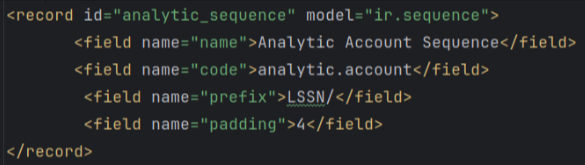
        You want to create auto sequence for new record so you can try below code

        •  Create Sequence.xml file.


          -  Add below code in your .py file of the object in which you want to create auto sequence.


        class AnalyticAccount(models.Model):

        _name=” analytic.account”


                        name = fields.Char(string=“Number”,default=“New”,readonly=True)

                        @api.model

              def create(self, vals):

            vals['name'] = self.env['ir.sequence'].sudo().next_by_code(‘analytic.account’) or 'New'

            res = super(AnalyticAccount,self).create(vals)

               return res


        • And access name field in view file like this ,



         I hope this is helpful to you.


         Thanks & Regards,

         Email: odoo@devintellecs.com

         Skype: devintelle


        0
        Avatar
        Buang
        Avatar
        Cybrosys Techno Solutions Pvt.Ltd
        Jawaban Terbai

        Hi,

        You can change the create function as follows,
        def create(self, vals):
            vals['name'] = self.code + self.env['ir.sequence'].next_by_code('my_sequence_code')
            return super(MyModel, self).create(vals)

        Add this data file, 

        <?xml version="1.0" encoding="utf-8"?>
        <odoo>
          <data noupdate="1">
            <record id="my_sequence_id" model="ir.sequence">
              <field name="name">My Sequence</field>
        <field name="code">my_sequence_code</field>
              <field name="prefix"></field>
              <field name="padding">5</field>
              <field name="number_next">1</field>
            </record>
          </data>
        </odoo>


        For more details, refer to the blog:

        https://www.cybrosys.com/blog/how-to-create-sequence-numbers-in-odoo-16

        Hope it helps

        0
        Avatar
        Buang
        Avatar
        Support GeminateCS
        Jawaban Terbai

        Hii Haris,
        If you want to create auto sequence in odoo it can be achieved by 'ir.sequence' model ,
        Take a look : https://geminatecs.com/blog/sales-editable-auto-sequence
        I Hope this information is helpful to you
        Feel Free for further assistance at contact@geminatecs.com
        Thank You,
        Geminate Consultancy Services,
        w : www.geminatecs.com

        0
        Avatar
        Buang
        Avatar
        Niyas Raphy (Walnut Software Solutions)
        Jawaban Terbai

        Hi,

        If you are looking for how to generate a sequential value for a field in Odoo, it can be done using the ir.sequence in Odoo.

        Either it can be done from the user interface using the developer mode or from the code side.

        The steps is as follows:

        1. Create a sequence in ir.sequence table

        2. Inherit the create method of corresponding model and assign sequential value from the created sequence.


        For reference:

        1. Generating Sequence from UI using sequence and automated action:  https://www.youtube.com/watch?v=Cz5eM5FDmTE

        2. Generating sequence from code: https://www.youtube.com/watch?v=69pCFI8uRIw&t=470s


        Thanks

        0
        Avatar
        Buang
        Haris Masqati
        Penulis

        Thanks for your reply, I am looking for auto create a dynamic sequence for every new record like in the account.journal model.

        Niyas Raphy (Walnut Software Solutions)

        if you need similar to the journal sequence, set a many2one to ir.sequence from your master record and configure the sequence in it. then using the configured sequence you can get the next number

        Ramya

        I am autogenerating sequence similar to the journal sequence. I have a doubt, IN my scenario I want a new sequence record to be generated for every incident the user creates , so there is probability to have 100's and 1000's of sequence id's in ir.sequence table is that acceptable? Or Should I plan to have my autoincrement logic in my incident model itself?
        Which of the option is better. I just dont want the performance to be degraded when 100's of records get added to ir.sequence. or will making the ir.sequence active to false when incident is closed help ?

        Menikmati diskusi? Jangan hanya membaca, ikuti!

        Buat akun sekarang untuk menikmati fitur eksklufi dan agar terlibat dengan komunitas kami!

        Daftar
        Post Terkait Replies Tampilan Aktivitas
        How to change the Quotation, Order, Invoice sequence numbers ? Diselesaikan
        sequence sequencenumber
        Avatar
        Avatar
        Avatar
        2
        Des 23
        30260
        Production Sequence error
        manufacturing sequence sequencenumber
        Avatar
        Avatar
        Avatar
        2
        Okt 25
        676
        Sequence on invoices numbers not working anymore
        sequence prefix invoice_number
        Avatar
        Avatar
        1
        Mei 25
        3441
        Odoo Sequence Issue Across Multiple Companies
        sequence sequencenumber sequences
        Avatar
        0
        Jan 25
        2321
        Where is the configuration for the rental order number prefix?
        rental sequence prefix
        Avatar
        Avatar
        1
        Sep 24
        2204
        Komunitas
        • Tutorial-tutorial
        • Dokumentasi
        • Forum
        Open Source
        • Download
        • Github
        • Runbot
        • Terjemahan
        Layanan
        • Odoo.sh Hosting
        • Bantuan
        • Peningkatan
        • Custom Development
        • Pendidikan
        • Temukan Akuntan
        • Temukan Mitra
        • Menjadi Partner
        Tentang Kami
        • Perusahaan kami
        • Aset Merek
        • Hubungi kami
        • Tugas
        • Acara
        • Podcast
        • Blog
        • Pelanggan
        • Hukum • Privasi
        • Keamanan
        الْعَرَبيّة Català 简体中文 繁體中文 (台灣) Čeština Dansk Nederlands English Suomi Français Deutsch हिंदी Bahasa Indonesia Italiano 日本語 한국어 (KR) Lietuvių kalba Język polski Português (BR) română русский язык Slovenský jazyk slovenščina Español (América Latina) Español ภาษาไทย Türkçe українська Tiếng Việt

        Odoo adalah rangkaian aplikasi bisnis open source yang mencakup semua kebutuhan perusahaan Anda: CRM, eCommerce, akuntansi, inventaris, point of sale, manajemen project, dan seterusnya.

        Mudah digunakan dan terintegrasi penuh pada saat yang sama adalah value proposition unik Odoo.

        Website made with

        Odoo Experience on YouTube

        1. Use the live chat to ask your questions.
        2. The operator answers within a few minutes.

        Live support on Youtube
        Watch now