It often happens that your employees have to spend their personal money while working on a project for your client. Let’s take the example of an consultant paying an hotel to work on the site of your client. As a company, you would like to be able to invoice that expense to your client.
Declaratie configuratie
To track & invoice expenses, you will need the expenses app. Go to to install it.
You should also activate the analytic accounts feature to link expenses to the sales order, to do so, go to and activate Analytic Accounting.
Voeg declaraties toe aan uw verkooporder
From the expense app, you or your consultant can create a new one, e.g. the hotel for the first week on the site of your customer.
You can then enter a relevant description and select an existing product or create a new one from right there.

Hier maken we een Hotel product:

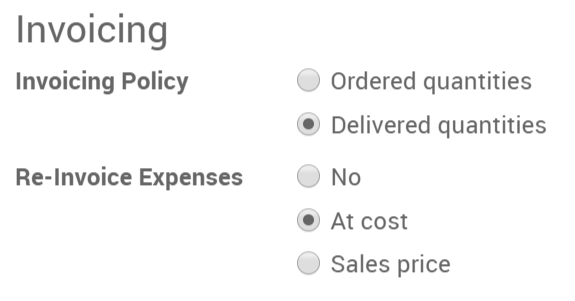
Under the invoicing tab, select Delivered quantities and either At cost or Sales price as well depending if you want to invoice the cost of your expense or a previously agreed on sales price.
To modify or create more products go to .
Back on the expense, add the original sale order in the expense to submit.

Het kan hierna ingediend worden bij de manager, goedgekeurd worden en geboekt worden.



Het komt dan op de verkooporder en is klaar om te factureren.