
Where can able to enable the delivery status in Odoo 16 . The same will appear in the sale order.
Odoo is the world's easiest all-in-one management software.
It includes hundreds of business apps:
- CRM
- e-Commerce
- Účetnictví
- Sklad
- PoS
- Project
- MRP
This question has been flagged
2
Odpovědi
864
Zobrazení


Hi,
To enable delivery status in Odoo 16:
1. Install the inventory and sales module from the Apps menu.
2. Enable delivery methods in Inventory -> Configuration -> Settings.
3. Configure and manage delivery methods under Inventory -> Configuration -> Delivery Methods.
4. Enable delivery methods in Sales -> Configuration -> Settings to integrate with sales orders.
5. Track delivery status in sales orders under Sales -> Orders, and in inventory transfers under Inventory -> Operations -> Transfers.
Hope this helps.

In Odoo 16 standard it is not possible to enable the delivery status in the Sales orders list view.
The way to get this information is to "group" Sales orders by "delivery status".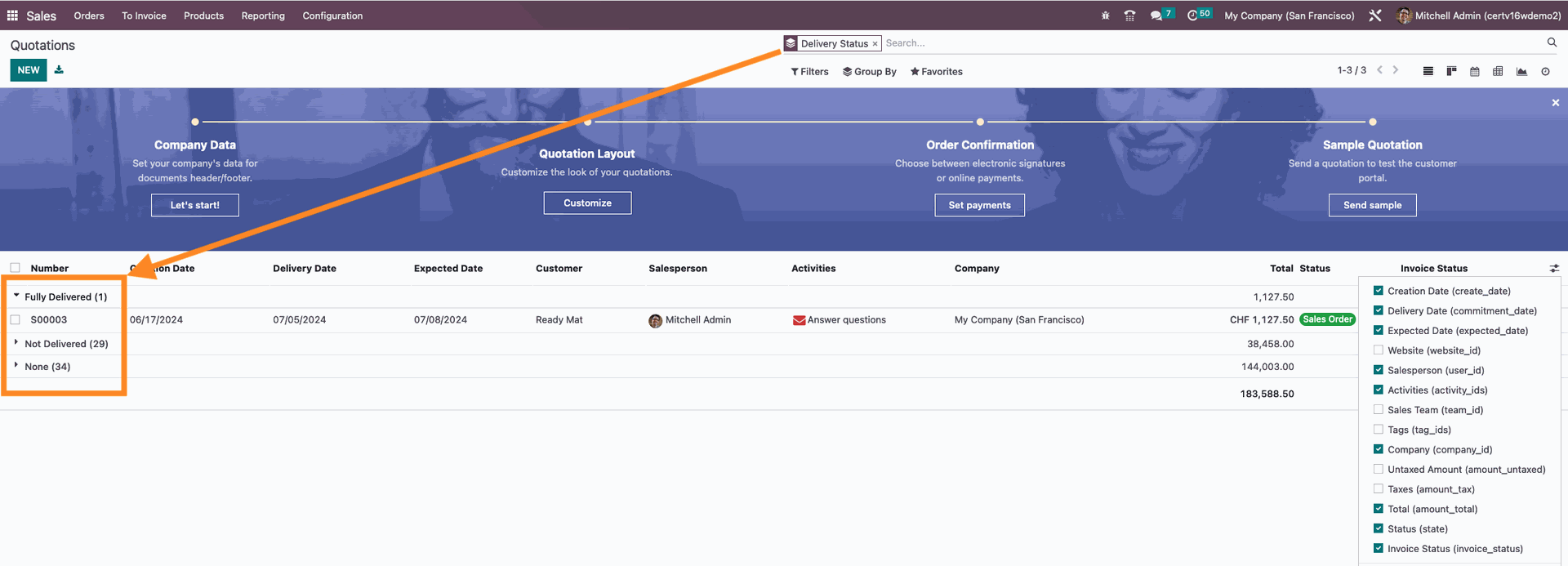
Enjoying the discussion? Don't just read, join in!
Create an account today to enjoy exclusive features and engage with our awesome community!
Přihlásit se