Hello,
How do i remove the view invoice button in odoo online 17?
In the template, i can't see the button...

Odoo is the world's easiest all-in-one management software.
It includes hundreds of business apps:

Hello,
How do i remove the view invoice button in odoo online 17?
In the template, i can't see the button...

Hi,
You can easily hide the button by using Studio. Just enable developer mode and open the view where the button is located and open studio.

Select the button and click REMOVE FROM VIEW
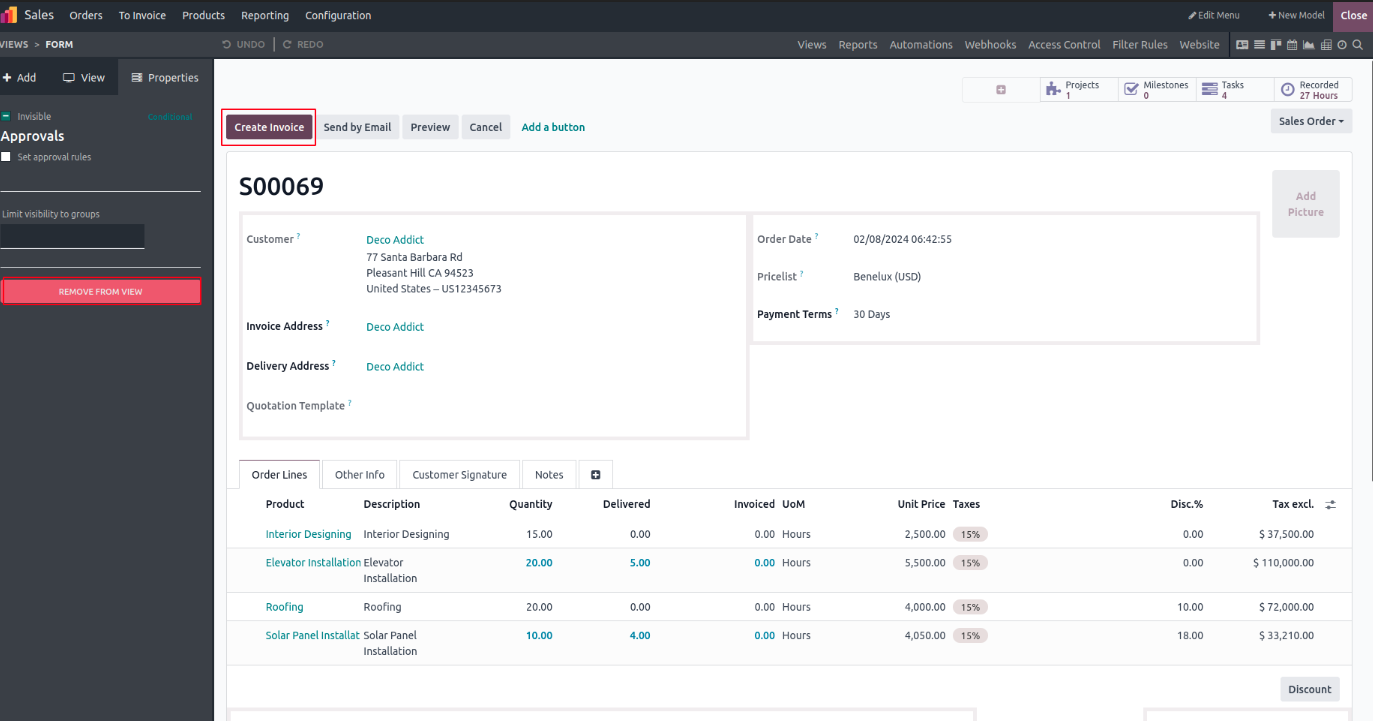
This can also be accomplished using code. To do so, you can employ the following code structure.
<xpath expr="//button[@name='button_
<attribute name="invisible">1</attribute>
</xpath>
Regards
and how do i know the button name?
Odoo V17 online

1
Buat akun sekarang untuk menikmati fitur eksklufi dan agar terlibat dengan komunitas kami!
Daftar
1. Use the live chat to ask your questions.
2. The operator answers within a few minutes.

You can do with the help of this code just replace your button name with button_name_here.
<xpath expr="//button[@name='button_name_here']" position="attributes">
<attribute name="invisible">1</attribute>
</xpath>