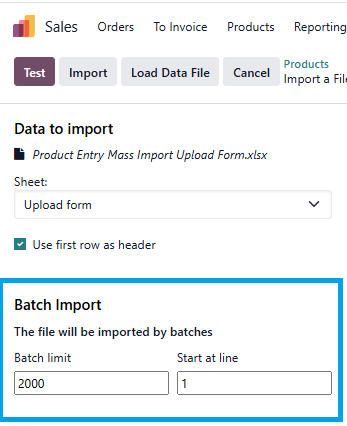
How can I make the error message to display to enable me understad the problem?
Thanks in advance!
Odoo is the world's easiest all-in-one management software.
It includes hundreds of business apps:
- सीआरएम
- e-Commerce
- लेखांकन
- इन्वेंटरी
- PoS
- प्रोजेक्ट
- MRP
This question has been flagged
Hi,
When Odoo import/export spins and stops without showing a red error or warning, it is usually due to server-side limits or timeouts, not a UI problem. In such cases, Odoo may silently hit CPU, real-time, or request size limits, especially on Linux servers or when using domain filters. To surface the issue, first check the Odoo server logs and PostgreSQL logs, as errors are often logged there even if the UI shows nothing. Increasing the limits in odoo.conf (such as limit_time_cpu, limit_time_real, and limit_request) and restarting the service often resolves this. It also helps to reduce the batch size by importing fewer records at a time to identify problematic rows. Once limits are adjusted or the faulty record is isolated, the import/export process will show proper errors or complete successfully.
Hope it helps
limit_time_cpu = 1200
Sometimes it can help to reduce the batch size and see what happens with just a few records:

I know this
Check the log file.
If you don't see an error in the web client it could be timing out.
No error in the log file
Enjoying the discussion? Don't just read, join in!
Create an account today to enjoy exclusive features and engage with our awesome community!
Sign up| Related Posts | Replies | Views | Activity | |
|---|---|---|---|---|
|
|
2
मई 24
|
3654 | ||
|
|
2
नव॰ 24
|
2514 | ||
|
|
1
नव॰ 24
|
3437 | ||
|
|
1
अक्तू॰ 23
|
4223 | ||
|
|
3
दिस॰ 23
|
22021 |