Skip to Content
Odoo मेन्यू
  • Sign in
  • मुफ़्त में आज़माएं
  • ऐप्लिकेशन
    फ़ाइनेंस
    • अकाउंटिंग
    • इनवॉइसिंग
    • एक्सपेंस
    • स्प्रेडशीट (बीआई)
    • डॉक्यूमेंट्स
    • साइन
    सेल्स
    • सीआरएम
    • सेल्स
    • पीओएस शॉप
    • पीओएस रेस्टोरेंट
    • सब्सक्रिप्शन
    • रेंटल
    वेबसाइट
    • वेबसाइट बिल्डर
    • ई-कॉमर्स
    • ब्लॉग
    • फ़ोरम
    • लाइव चैट
    • ई-लर्निंग
    सप्लाई चेन
    • इन्वेंट्री
    • मैन्युफ़ैक्चरिंग
    • पीएलएम
    • परचेज़
    • मेंटेनेंस
    • क्वालिटी
    मानव संसाधन
    • कर्मचारी
    • रिक्रूटमेंट
    • टाइम ऑफ़
    • अप्रेज़ल
    • रेफ़रल
    • फ़्लीट
    मार्केटिंग
    • सोशल मार्केटिंग
    • ईमेल मार्केटिंग
    • एसएमएस मार्केटिंग
    • इवेंट
    • मार्केटिंग ऑटोमेशन
    • सर्वे
    सेवाएं
    • प्रोजेक्ट
    • टाइमशीट
    • फ़ील्ड सर्विस
    • हेल्पडेस्क
    • प्लानिंग
    • अपॉइंटमेंट
    प्रॉडक्टिविटी
    • डिस्कस
    • अप्रूवल
    • आईओटी
    • वीओआईपी
    • नॉलेज
    • WhatsApp
    तीसरे पक्ष के ऐप्लिकेशन Odoo स्टूडियो Odoo क्लाउड प्लेटफ़ॉर्म
  • इंडस्ट्री
    रीटेल
    • बुक स्टोर
    • क्लोदिंग स्टोर
    • फ़र्नीचर स्टोर
    • ग्रॉसरी स्टोर
    • हार्डवेयर स्टोर
    • टॉय स्टोर
    Food & Hospitality
    • बार और पब
    • रेस्टोरेंट
    • फ़ास्ट फ़ूड
    • Guest House
    • बेवरिज डिस्ट्रीब्यूटर
    • होटल
    रियल एस्टेट
    • Real Estate Agency
    • आर्किटेक्चर फ़र्म
    • कंसट्रक्शन
    • एस्टेट मैनेजमेंट
    • गार्ड्निंग
    • प्रॉपर्टी ओनर असोसिएशन
    कंसल्टिंग
    • अकाउंटिंग फ़र्म
    • Odoo पार्टनर
    • मार्केटिंग एजेंसी
    • लॉ फ़र्म
    • टैलेंट ऐक्विज़िशन
    • ऑडिट & सर्टिफ़िकेशन
    मैन्युफ़ैक्चरिंग
    • टेक्सटाइल
    • Metal
    • फ़र्नीचर
    • फ़ूड
    • Brewery
    • कॉर्पोरेट गिफ़्ट
    हेल्थ & फिटनेस
    • स्पोर्ट्स क्लब
    • आईवियर स्टोर
    • फिटनेस सेंटर
    • वेलनेस प्रैक्टिशनर
    • फॉर्मेसी
    • हेयर सैलून
    Trades
    • Handyman
    • आईटी हॉर्डवेयर और सपोर्ट
    • Solar Energy Systems
    • Shoe Maker
    • Cleaning Services
    • HVAC Services
    अन्य
    • Nonprofit Organization
    • एन्वायरमेंटल एजेंसी
    • बिलबोर्ड रेंटल
    • फ़ोटोग्राफी
    • बाइक लीजिंग
    • सॉफ़्टवेयर रीसेलर
    Browse all Industries
  • कम्यूनिटी
    सीखें
    • ट्यूटोरियल्स
    • दस्तावेज़
    • सर्टिफ़िकेशन
    • ट्रेनिंग
    • ब्लॉग
    • पॉडकास्ट
    शिक्षा को बढ़ावा दें
    • एजुकेशन प्रोग्राम
    • स्केल अप! बिजनेस गेम
    • Odoo के ऑफ़िस में आएं
    सॉफ़्टवेयर पाएं
    • डाउनलोड
    • वर्शन की तुलना करें
    • रिलीज़
    साथ मिलकर काम करें
    • Github
    • फ़ोरम
    • इवेंट
    • अनुवाद
    • पार्टनर बनें
    • Services for Partners
    • अपना अकाउंटिंग फ़र्म रजिस्टर करें
    सेवाएं पाएं
    • पार्टनर ढूंढें
    • अकाउंटेंट खोजें
    • सलाहकार की मदद लें
    • इम्प्लिमेंटेशन सेवाएं
    • कस्टमर रेफ़रेंस
    • सहायता
    • अपग्रेड
    Github Youtube Twitter Linkedin Instagram Facebook Spotify
    +1 (650) 691-3277
    डेमो देखें
  • कीमत
  • सहायता

Odoo is the world's easiest all-in-one management software.
It includes hundreds of business apps:

  • सीआरएम
  • e-Commerce
  • लेखांकन
  • इन्वेंटरी
  • PoS
  • प्रोजेक्ट
  • MRP
All apps
You need to be registered to interact with the community.
All Posts People Badges
टैग (View all)
odoo accounting v14 pos v15
About this forum
You need to be registered to interact with the community.
All Posts People Badges
टैग (View all)
odoo accounting v14 pos v15
About this forum
Help

Issue with Product Weight Barcode Not Working as Expected in POS

Subscribe

Get notified when there's activity on this post

This question has been flagged
pos
2 Replies
1326 Views
Avatar
Nedal Alaffouri

I’ve been facing an issue with configuring the Product Weight Barcode in the POS application. Despite following the instructions provided in the documentation, the system does not fetch the product and weight as expected.

The documentation itself appears contradictory:

  • In one instance, it states that the barcode should end with a check digit of 8.
  • In another example, the barcode ends with a check digit of 2
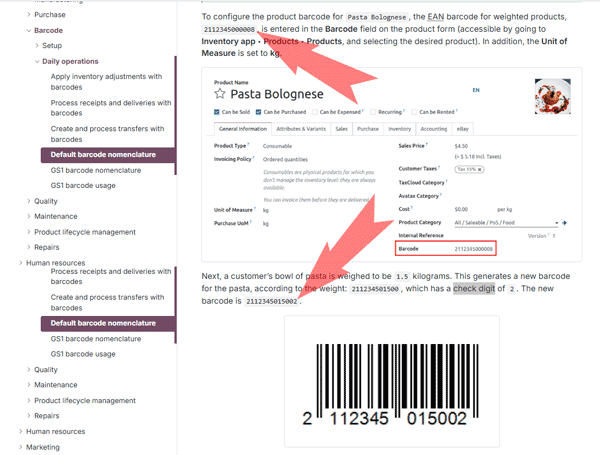
Additionally, the video tutorial linked below demonstrates configuring the Product Weight Barcode without including a check digit, which further adds to the confusion.

I have tried all these configurations, but none of them seem to work correctly in my POS setup.

Could someone help please?

Documentation link:

Product Weight Barcode Documentation

Video link:

Odoo Product Weight Barcode Tutorial

Thank you in advance for your support!

0
Avatar
Discard
Avatar
Waleed Ali Mohsen
Best Answer

Hello,

The last digit of EAN–13 barcodes is a check digit. The check digit is used to detect errors mostly caused by human transcription and it computed using a formula as below:

To compute the check digit follow the simple rules:

  1. Sum all the digits in even positions and multiply by 3;
  2. Add all the the digits in odd positions (except for the last one which is check digit) to the number you’ve got;
  3. Divide that number by 10 and take the remainder;
  4. If the remainder is not 0, subtract it from 10.

After applying the above formula to the barcodes mentioned in documentation:

211234501500   -- > Th check digit will be 2 ---> 2112345015002

211234500000 --> Th check digit will be 8 --> 2112345000008

You can check this using any online EAN Check Digit Calculator like the below:

https://boxshot.com/barcode/tutorials/ean-13-calculator/ ​


You can check the below for how to configure it in Odoo:

How to use barcode to scan the weight of my product in PoS | Odoo

1
Avatar
Discard
Avatar
Nedal Alaffouri
Author Best Answer

Thank you, Waleed, for your response.

I understand how check digits work. My question is: what check digit should we enter in the product profile?

For example, the check digit for the barcode starting with 211234500000 is 8, resulting in the full barcode 2112345000008.

If we enter this barcode in the product page, the system recognizes only barcodes ending with 8, such as:

  • 2112345005508
  • 2112345039978

However, any other barcode with a different check digit does not work.

To solve this, I entered 2112345000000 in the product page and created additional Packaging for the same product with 9 other barcodes:

  • 2112345000001
  • 2112345000002
  • 2112345000003
  • 2112345000004
  • 2112345000005
  • 2112345000006
  • 2112345000007
  • 2112345000008
  • 2112345000009

This workaround works well, but it requires entering 10 barcodes for every weighted product, which is not efficient.

Is there a better solution to avoid adding multiple barcodes for each product?

0
Avatar
Discard
Enjoying the discussion? Don't just read, join in!

Create an account today to enjoy exclusive features and engage with our awesome community!

Sign up
Related Posts Replies Views Activity
Odoo 19 POS – How to Set “Walk-in Customer” as Default Customer in POS?
pos
Avatar
0
दिस॰ 25
40
(((Oficial ~ I.B.E.R.I.A!@!Costa~Rica))) ¿Cómo puedo llamar a Iberia en Costa Rica?
pos
Avatar
0
दिस॰ 25
89
Kitchen printing printer other than odoo provided list
pos
Avatar
Avatar
1
नव॰ 25
401
POS Table Synchronization Issue Between Devices in Odoo v17 CE
pos
Avatar
Avatar
Avatar
2
नव॰ 25
2926
Refund and Discount access to admin user only for Pos selling
pos
Avatar
Avatar
1
नव॰ 25
653
कम्यूनिटी
  • ट्यूटोरियल्स
  • दस्तावेज़
  • फ़ोरम
ओपन सोर्स
  • डाउनलोड
  • Github
  • रनबॉट
  • अनुवाद
सेवाएं
  • Odoo.sh Hosting
  • सहायता
  • अपग्रेड
  • कस्टम डेवलपमेंट्स
  • शिक्षा
  • अकाउंटेंट खोजें
  • पार्टनर ढूंढें
  • पार्टनर बनें
हमारे बारे में
  • हमारी कंपनी
  • ब्रांड ऐसेट
  • संपर्क करें
  • नौकरियां
  • इवेंट
  • पॉडकास्ट
  • ब्लॉग
  • ग्राहक
  • लीगल • गोपनीयता
  • सुरक्षा
الْعَرَبيّة Català 简体中文 繁體中文 (台灣) Čeština Dansk Nederlands English Suomi Français Deutsch हिंदी Bahasa Indonesia Italiano 日本語 한국어 (KR) Lietuvių kalba Język polski Português (BR) română русский язык Slovenský jazyk slovenščina Español (América Latina) Español ภาษาไทย Türkçe українська Tiếng Việt

Odoo, बिज़नेस से जुड़े ऐप्लिकेशन का एक कलेक्शन है जो ओपन सोर्स पर आधारित है. इसमें आपकी कंपनी की हर ज़रूरत के लिए ऐप्लिकेशन हैं. जैसे, सीआरएम, ई-कॉमर्स, अकाउंटिंग, इन्वेंट्री, पॉइंट ऑफ़ सेल, प्रोजेक्ट मैनेजमेंट वगैरह.

Odoo की सबसे बड़ी खासियत है कि यह इस्तेमाल करने में बहुत आसान है और यह पूरी तरह से इंटिग्रेट किया हुआ है.

Website made with

Odoo Experience on YouTube

1. Use the live chat to ask your questions.
2. The operator answers within a few minutes.

Live support on Youtube
Watch now
