Skip to Content
Odoo मेन्यू
  • Sign in
  • मुफ़्त में आज़माएं
  • ऐप्लिकेशन
    फ़ाइनेंस
    • अकाउंटिंग
    • इनवॉइसिंग
    • एक्सपेंस
    • स्प्रेडशीट (बीआई)
    • डॉक्यूमेंट्स
    • साइन
    सेल्स
    • सीआरएम
    • सेल्स
    • पीओएस शॉप
    • पीओएस रेस्टोरेंट
    • सब्सक्रिप्शन
    • रेंटल
    वेबसाइट
    • वेबसाइट बिल्डर
    • ई-कॉमर्स
    • ब्लॉग
    • फ़ोरम
    • लाइव चैट
    • ई-लर्निंग
    सप्लाई चेन
    • इन्वेंट्री
    • मैन्युफ़ैक्चरिंग
    • पीएलएम
    • परचेज़
    • मेंटेनेंस
    • क्वालिटी
    मानव संसाधन
    • कर्मचारी
    • रिक्रूटमेंट
    • टाइम ऑफ़
    • अप्रेज़ल
    • रेफ़रल
    • फ़्लीट
    मार्केटिंग
    • सोशल मार्केटिंग
    • ईमेल मार्केटिंग
    • एसएमएस मार्केटिंग
    • इवेंट
    • मार्केटिंग ऑटोमेशन
    • सर्वे
    सेवाएं
    • प्रोजेक्ट
    • टाइमशीट
    • फ़ील्ड सर्विस
    • हेल्पडेस्क
    • प्लानिंग
    • अपॉइंटमेंट
    प्रॉडक्टिविटी
    • डिस्कस
    • अप्रूवल
    • आईओटी
    • वीओआईपी
    • नॉलेज
    • WhatsApp
    तीसरे पक्ष के ऐप्लिकेशन Odoo स्टूडियो Odoo क्लाउड प्लेटफ़ॉर्म
  • इंडस्ट्री
    रीटेल
    • बुक स्टोर
    • क्लोदिंग स्टोर
    • फ़र्नीचर स्टोर
    • ग्रॉसरी स्टोर
    • हार्डवेयर स्टोर
    • टॉय स्टोर
    Food & Hospitality
    • बार और पब
    • रेस्टोरेंट
    • फ़ास्ट फ़ूड
    • Guest House
    • बेवरिज डिस्ट्रीब्यूटर
    • होटल
    रियल एस्टेट
    • Real Estate Agency
    • आर्किटेक्चर फ़र्म
    • कंसट्रक्शन
    • एस्टेट मैनेजमेंट
    • गार्ड्निंग
    • प्रॉपर्टी ओनर असोसिएशन
    कंसल्टिंग
    • अकाउंटिंग फ़र्म
    • Odoo पार्टनर
    • मार्केटिंग एजेंसी
    • लॉ फ़र्म
    • टैलेंट ऐक्विज़िशन
    • ऑडिट & सर्टिफ़िकेशन
    मैन्युफ़ैक्चरिंग
    • टेक्सटाइल
    • Metal
    • फ़र्नीचर
    • फ़ूड
    • Brewery
    • कॉर्पोरेट गिफ़्ट
    हेल्थ & फिटनेस
    • स्पोर्ट्स क्लब
    • आईवियर स्टोर
    • फिटनेस सेंटर
    • वेलनेस प्रैक्टिशनर
    • फॉर्मेसी
    • हेयर सैलून
    Trades
    • Handyman
    • आईटी हॉर्डवेयर और सपोर्ट
    • Solar Energy Systems
    • Shoe Maker
    • Cleaning Services
    • HVAC Services
    अन्य
    • Nonprofit Organization
    • एन्वायरमेंटल एजेंसी
    • बिलबोर्ड रेंटल
    • फ़ोटोग्राफी
    • बाइक लीजिंग
    • सॉफ़्टवेयर रीसेलर
    Browse all Industries
  • कम्यूनिटी
    सीखें
    • ट्यूटोरियल्स
    • दस्तावेज़
    • सर्टिफ़िकेशन
    • ट्रेनिंग
    • ब्लॉग
    • पॉडकास्ट
    शिक्षा को बढ़ावा दें
    • एजुकेशन प्रोग्राम
    • स्केल अप! बिजनेस गेम
    • Odoo के ऑफ़िस में आएं
    सॉफ़्टवेयर पाएं
    • डाउनलोड
    • वर्शन की तुलना करें
    • रिलीज़
    साथ मिलकर काम करें
    • Github
    • फ़ोरम
    • इवेंट
    • अनुवाद
    • पार्टनर बनें
    • Services for Partners
    • अपना अकाउंटिंग फ़र्म रजिस्टर करें
    सेवाएं पाएं
    • पार्टनर ढूंढें
    • अकाउंटेंट खोजें
    • सलाहकार की मदद लें
    • इम्प्लिमेंटेशन सेवाएं
    • कस्टमर रेफ़रेंस
    • सहायता
    • अपग्रेड
    Github Youtube Twitter Linkedin Instagram Facebook Spotify
    +1 (650) 691-3277
    डेमो देखें
  • कीमत
  • सहायता

Odoo is the world's easiest all-in-one management software.
It includes hundreds of business apps:

  • सीआरएम
  • e-Commerce
  • लेखांकन
  • इन्वेंटरी
  • PoS
  • प्रोजेक्ट
  • MRP
All apps
You need to be registered to interact with the community.
All Posts People Badges
टैग (View all)
odoo accounting v14 pos v15
About this forum
You need to be registered to interact with the community.
All Posts People Badges
टैग (View all)
odoo accounting v14 pos v15
About this forum
Help

How to convert a Storable Item to a Fixed Asset for depreciation

Subscribe

Get notified when there's activity on this post

This question has been flagged
stockaccounting
2 Replies
3143 Views
Avatar
Ahlem Mehri

.

0
Avatar
Discard
Avatar
Ray Carnes (ray)
Best Answer

This is a two step process.   

First: devalue the Current Asset to $0 and transfer the value to your Fixed Asset account.

By devaluing the product to $0, you are removing the value from your Inventory (keeping the item so you can move it around the company and keep track of the current location).  The counterpart is the Fixed Assets account, which will show on your Balance Sheet. 

Next: define the depreciation schedule of the amount to create a running Fixed Asset.

By defining the depreciation schedule, you will start to see the value depreciate over time, reducing the value on your Balance sheet by moving portions of the value to depreciation expense on your Profit and Loss statement.

Note: You can only do this for Products within a Category defined with a Costing Method (ie: not standard cost) and Automated Inventory valuation.


Steps:

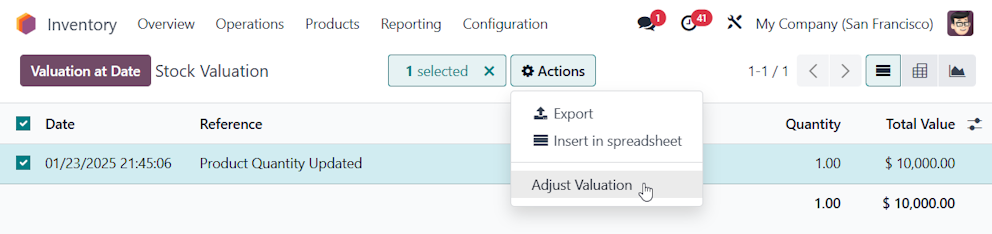
A. Via Inventory --> Reporting --> Valuation, find the product you want to Capitalize and select it. From the ACTION Menu, select Adjust Valuation to open the Add Manual Valuation Wizard:

B. In Added Value, enter the entire amount of the product(s) but with a negative sign, to indicate you are de-valuing the current asset value to $0.
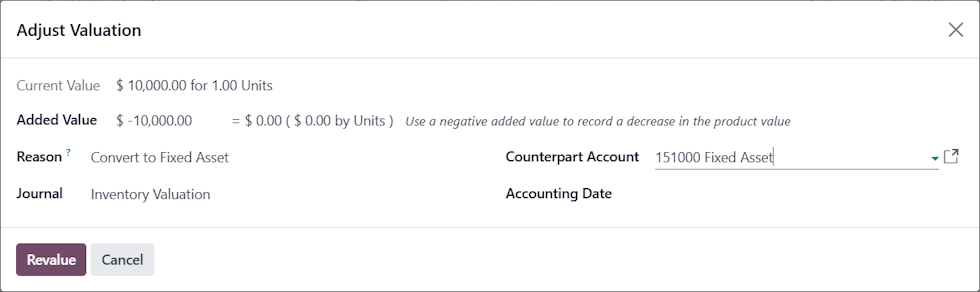
Note: In this example, our finished product was worth $10,000 based on the Bill of Materials and other construction costs.


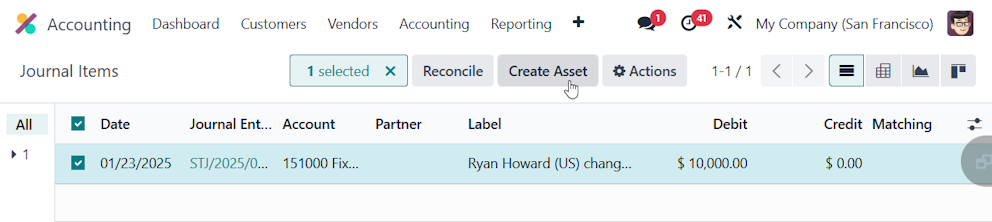
C. Open the Journal Items Menu, view entries in the Fixed Asset Account, find the entry just created (use the Product to filter). Select it and click Create Asset.

D. Define the depreciation parameters, and create the Asset following the standard process documented at https://www.odoo.com/documentation/18.0/applications/finance/accounting/vendor_bills/assets.html#assets-entries


You will then have the same functionality and reporting capabilities as if you had created the Fixed Asset via a Vendor Bill (Fixed Assets you buy).


1
Avatar
Discard
Avatar
Ahlem Mehri
Author Best Answer

Thank you Ray, very helpful.

one more question:

Should I update the quantity also? I mean make the quantity 0 because the item still have 1 quantity on hand?


because the revaluation is about item's value to make it $0 and it does not make its quantity to 0.

0
Avatar
Discard
Klevi

Also, if quantity is bigger than one, the user must press the "Create Asset" button multiple times?

Enjoying the discussion? Don't just read, join in!

Create an account today to enjoy exclusive features and engage with our awesome community!

Sign up
Related Posts Replies Views Activity
Stock value on the 31st December Solved
stock accounting
Avatar
Avatar
2
फ़र॰ 25
1837
Stock valuation account based on location
stock accounting
Avatar
Avatar
Avatar
2
अक्तू॰ 22
22641
odoo v18 analytic items analytic distribution
stock accounting v18
Avatar
0
जून 25
3213
Serial Numbers Not Visible in Intercompany (Branch) Invoices – But Visible for Other Customers
stock accounting pdf
Avatar
0
अप्रैल 25
1499
Automatic Accounting: Stock Input/Output Account Solved
stock accounting automation
Avatar
Avatar
1
फ़र॰ 25
3026
कम्यूनिटी
  • ट्यूटोरियल्स
  • दस्तावेज़
  • फ़ोरम
ओपन सोर्स
  • डाउनलोड
  • Github
  • रनबॉट
  • अनुवाद
सेवाएं
  • Odoo.sh Hosting
  • सहायता
  • अपग्रेड
  • कस्टम डेवलपमेंट्स
  • शिक्षा
  • अकाउंटेंट खोजें
  • पार्टनर ढूंढें
  • पार्टनर बनें
हमारे बारे में
  • हमारी कंपनी
  • ब्रांड ऐसेट
  • संपर्क करें
  • नौकरियां
  • इवेंट
  • पॉडकास्ट
  • ब्लॉग
  • ग्राहक
  • लीगल • गोपनीयता
  • सुरक्षा
الْعَرَبيّة Català 简体中文 繁體中文 (台灣) Čeština Dansk Nederlands English Suomi Français Deutsch हिंदी Bahasa Indonesia Italiano 日本語 한국어 (KR) Lietuvių kalba Język polski Português (BR) română русский язык Slovenský jazyk slovenščina Español (América Latina) Español ภาษาไทย Türkçe українська Tiếng Việt

Odoo, बिज़नेस से जुड़े ऐप्लिकेशन का एक कलेक्शन है जो ओपन सोर्स पर आधारित है. इसमें आपकी कंपनी की हर ज़रूरत के लिए ऐप्लिकेशन हैं. जैसे, सीआरएम, ई-कॉमर्स, अकाउंटिंग, इन्वेंट्री, पॉइंट ऑफ़ सेल, प्रोजेक्ट मैनेजमेंट वगैरह.

Odoo की सबसे बड़ी खासियत है कि यह इस्तेमाल करने में बहुत आसान है और यह पूरी तरह से इंटिग्रेट किया हुआ है.

Website made with

Odoo Experience on YouTube

1. Use the live chat to ask your questions.
2. The operator answers within a few minutes.

Live support on Youtube
Watch now