Skip to Content
Odoo मेन्यू
  • Sign in
  • मुफ़्त में आज़माएं
  • ऐप्लिकेशन
    फ़ाइनेंस
    • अकाउंटिंग
    • इनवॉइसिंग
    • एक्सपेंस
    • स्प्रेडशीट (बीआई)
    • डॉक्यूमेंट्स
    • साइन
    सेल्स
    • सीआरएम
    • सेल्स
    • पीओएस शॉप
    • पीओएस रेस्टोरेंट
    • सब्सक्रिप्शन
    • रेंटल
    वेबसाइट
    • वेबसाइट बिल्डर
    • ई-कॉमर्स
    • ब्लॉग
    • फ़ोरम
    • लाइव चैट
    • ई-लर्निंग
    सप्लाई चेन
    • इन्वेंट्री
    • मैन्युफ़ैक्चरिंग
    • पीएलएम
    • परचेज़
    • मेंटेनेंस
    • क्वालिटी
    मानव संसाधन
    • कर्मचारी
    • रिक्रूटमेंट
    • टाइम ऑफ़
    • अप्रेज़ल
    • रेफ़रल
    • फ़्लीट
    मार्केटिंग
    • सोशल मार्केटिंग
    • ईमेल मार्केटिंग
    • एसएमएस मार्केटिंग
    • इवेंट
    • मार्केटिंग ऑटोमेशन
    • सर्वे
    सेवाएं
    • प्रोजेक्ट
    • टाइमशीट
    • फ़ील्ड सर्विस
    • हेल्पडेस्क
    • प्लानिंग
    • अपॉइंटमेंट
    प्रॉडक्टिविटी
    • डिस्कस
    • अप्रूवल
    • आईओटी
    • वीओआईपी
    • नॉलेज
    • WhatsApp
    तीसरे पक्ष के ऐप्लिकेशन Odoo स्टूडियो Odoo क्लाउड प्लेटफ़ॉर्म
  • इंडस्ट्री
    रीटेल
    • बुक स्टोर
    • क्लोदिंग स्टोर
    • फ़र्नीचर स्टोर
    • ग्रॉसरी स्टोर
    • हार्डवेयर स्टोर
    • टॉय स्टोर
    Food & Hospitality
    • बार और पब
    • रेस्टोरेंट
    • फ़ास्ट फ़ूड
    • Guest House
    • बेवरिज डिस्ट्रीब्यूटर
    • होटल
    रियल एस्टेट
    • Real Estate Agency
    • आर्किटेक्चर फ़र्म
    • कंसट्रक्शन
    • एस्टेट मैनेजमेंट
    • गार्ड्निंग
    • प्रॉपर्टी ओनर असोसिएशन
    कंसल्टिंग
    • अकाउंटिंग फ़र्म
    • Odoo पार्टनर
    • मार्केटिंग एजेंसी
    • लॉ फ़र्म
    • टैलेंट ऐक्विज़िशन
    • ऑडिट & सर्टिफ़िकेशन
    मैन्युफ़ैक्चरिंग
    • टेक्सटाइल
    • Metal
    • फ़र्नीचर
    • फ़ूड
    • Brewery
    • कॉर्पोरेट गिफ़्ट
    हेल्थ & फिटनेस
    • स्पोर्ट्स क्लब
    • आईवियर स्टोर
    • फिटनेस सेंटर
    • वेलनेस प्रैक्टिशनर
    • फॉर्मेसी
    • हेयर सैलून
    Trades
    • Handyman
    • आईटी हॉर्डवेयर और सपोर्ट
    • Solar Energy Systems
    • Shoe Maker
    • Cleaning Services
    • HVAC Services
    अन्य
    • Nonprofit Organization
    • एन्वायरमेंटल एजेंसी
    • बिलबोर्ड रेंटल
    • फ़ोटोग्राफी
    • बाइक लीजिंग
    • सॉफ़्टवेयर रीसेलर
    Browse all Industries
  • कम्यूनिटी
    सीखें
    • ट्यूटोरियल्स
    • दस्तावेज़
    • सर्टिफ़िकेशन
    • ट्रेनिंग
    • ब्लॉग
    • पॉडकास्ट
    शिक्षा को बढ़ावा दें
    • एजुकेशन प्रोग्राम
    • स्केल अप! बिजनेस गेम
    • Odoo के ऑफ़िस में आएं
    सॉफ़्टवेयर पाएं
    • डाउनलोड
    • वर्शन की तुलना करें
    • रिलीज़
    साथ मिलकर काम करें
    • Github
    • फ़ोरम
    • इवेंट
    • अनुवाद
    • पार्टनर बनें
    • Services for Partners
    • अपना अकाउंटिंग फ़र्म रजिस्टर करें
    सेवाएं पाएं
    • पार्टनर ढूंढें
    • अकाउंटेंट खोजें
    • सलाहकार की मदद लें
    • इम्प्लिमेंटेशन सेवाएं
    • कस्टमर रेफ़रेंस
    • सहायता
    • अपग्रेड
    Github Youtube Twitter Linkedin Instagram Facebook Spotify
    +1 (650) 691-3277
    डेमो देखें
  • कीमत
  • सहायता

Odoo is the world's easiest all-in-one management software.
It includes hundreds of business apps:

  • सीआरएम
  • e-Commerce
  • लेखांकन
  • इन्वेंटरी
  • PoS
  • प्रोजेक्ट
  • MRP
All apps
You need to be registered to interact with the community.
All Posts People Badges
टैग (View all)
odoo accounting v14 pos v15
About this forum
You need to be registered to interact with the community.
All Posts People Badges
टैग (View all)
odoo accounting v14 pos v15
About this forum
Help

Cached views on Staging and Main after deleting model fields

Subscribe

Get notified when there's activity on this post

This question has been flagged
viewsOdoo.shv18
1 Reply
1558 Views
Avatar
Beulah Mathenge

I am doing custom development on Odoo Enterprise V18, with hosting on Odoo.sh. 

Recently, when I make edits to a model, specifically by deleting existing fields, the ir.views doesn't seen to take a note of this. Builds fail with the error that the deleted field does not exists in the model, which is correct. 

Flow: 

  • There are requests to change the flow of features (removing fields or a full overhaul)
  • I delete the fields from the models
  • I delete the views as well from the xml files
  • Build the feature, test on local and deploy to Odoo.sh
  • The DB update is successful in develop and the consequent branch, but fails in staging and main. 

I have tried to manually update the DB using the update command with the flag --dev=all but this doesn't work since the next time I build, the current successful staging branch will still be the reference for the next build and not the dummy DB that's created on failed builds.

0
Avatar
Discard
Avatar
Christoph Farnleitner
Best Answer

This is normal behavior.

You could adapt your workflow in development to

  1. delete the fields from view
  2. push and upgrade the module
  3. delete the fields from model
  4. push and upgrade the module

However, when using version numbering correctly in your module, even committing all changes at once should work just fine.
In this scenario this would also make sense, since 1) would be a minor release (if committed individually), still backwards compatible from the model's perspective (i.e 18.0.x.0.1), and 3) would then be a db table modification with, usually, greater impact (i.e 18.0.x.1.0).


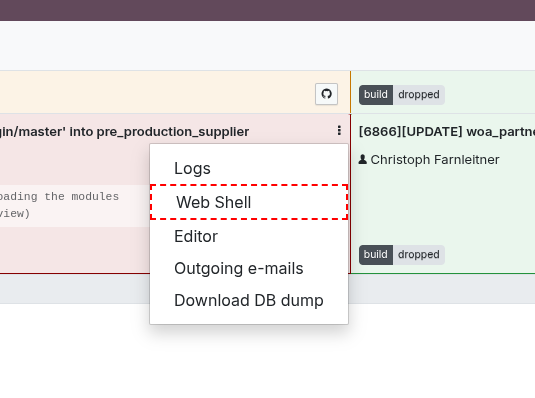
See also the output on odoo.sh Shell for odoo-update:

cfarnleitner-xyz [staging/18.0]:~$ odoo-update -h
Update Odoo module

This script proceed to a manual update of one or more Odoo modules in the database.

NOTE: this command is handy to quickly test updates during some development iterations,
      however keep in mind that on Odoo.sh the convention is to increase a module's
      version number in it's manifest file whenever the committed changes requires
      a database upgrade. Please refer to the documentation for more details:
      https://www.odoo.sh/doc/getting_started/branches.html#production


Usage:
  odoo-update [--help] <module>

Options:
  -h, --help           Show this screen and exit.
  <module>             Module list to update separated by comma.
                       Use 'all' as module name to update all modules at once.


In addition, in odoo.sh you may navigate to the Builds menu. Here you should be able to access recent, failed instances as well:

1
Avatar
Discard
Beulah Mathenge
Author

Thank you @Christoph.
I had tried versioning but that did not work. I'll see if deleting the views from the current branch will work, since I do know their IDs.

Christoph Farnleitner

Before and After source could be helpful in that case

Enjoying the discussion? Don't just read, join in!

Create an account today to enjoy exclusive features and engage with our awesome community!

Sign up
Related Posts Replies Views Activity
Hide Records based on user group only in a particular view
views record_rule v18 CommunityEdition
Avatar
Avatar
Avatar
2
सित॰ 25
1670
Creating New Views causing an Error
views v18 V18.1 v18.2
Avatar
0
अप्रैल 25
18
Change Sign & Pay Button on Quotation E-mails
v18
Avatar
Avatar
Avatar
Avatar
3
नव॰ 25
500
Problem including JS asset in v18
v18
Avatar
Avatar
Avatar
3
नव॰ 25
8688
How to Add a User to Access the Database on Odoo.sh? Solved
Odoo.sh
Avatar
Avatar
1
नव॰ 25
4236
कम्यूनिटी
  • ट्यूटोरियल्स
  • दस्तावेज़
  • फ़ोरम
ओपन सोर्स
  • डाउनलोड
  • Github
  • रनबॉट
  • अनुवाद
सेवाएं
  • Odoo.sh Hosting
  • सहायता
  • अपग्रेड
  • कस्टम डेवलपमेंट्स
  • शिक्षा
  • अकाउंटेंट खोजें
  • पार्टनर ढूंढें
  • पार्टनर बनें
हमारे बारे में
  • हमारी कंपनी
  • ब्रांड ऐसेट
  • संपर्क करें
  • नौकरियां
  • इवेंट
  • पॉडकास्ट
  • ब्लॉग
  • ग्राहक
  • लीगल • गोपनीयता
  • सुरक्षा
الْعَرَبيّة Català 简体中文 繁體中文 (台灣) Čeština Dansk Nederlands English Suomi Français Deutsch हिंदी Bahasa Indonesia Italiano 日本語 한국어 (KR) Lietuvių kalba Język polski Português (BR) română русский язык Slovenský jazyk slovenščina Español (América Latina) Español ภาษาไทย Türkçe українська Tiếng Việt

Odoo, बिज़नेस से जुड़े ऐप्लिकेशन का एक कलेक्शन है जो ओपन सोर्स पर आधारित है. इसमें आपकी कंपनी की हर ज़रूरत के लिए ऐप्लिकेशन हैं. जैसे, सीआरएम, ई-कॉमर्स, अकाउंटिंग, इन्वेंट्री, पॉइंट ऑफ़ सेल, प्रोजेक्ट मैनेजमेंट वगैरह.

Odoo की सबसे बड़ी खासियत है कि यह इस्तेमाल करने में बहुत आसान है और यह पूरी तरह से इंटिग्रेट किया हुआ है.

Website made with

Odoo Experience on YouTube

1. Use the live chat to ask your questions.
2. The operator answers within a few minutes.

Live support on Youtube
Watch now
