
I am working in Odoo 18. For non-admin users, when they create a quotation, sales order, purchase order, or RFQ in the Sales and Purchase modules, the option to create a new product in the Add Line should not be visible. Only the 'Search More' option should be available. This option should be visible only to the admin, while other users should see only the 'Search More' option.
This question has been flagged
2
Odpovědi
625
Zobrazení


Hi,
To prevent non-admin users in Odoo 18 from creating new products directly when adding lines to sales orders, purchase orders, or RFQs, you need to adjust their access rights. By activating developer mode, navigating to the relevant user groups (like Sales User or Purchase User), and then editing the access rights for the "Product" model (product.product), you can uncheck the "Create" and "Write" permissions. This modification ensures that these non-admin users can only see and use the "Search More" option to select existing products, while administrators, who typically retain full access, will still have the ability to create new products.
Code:
<record id="access_product_product_restrict_sales_user" model="ir.model.access">
<field name="name">Product Product Sales User Restriction</field>
<field name="model_id" ref="product.model_product_product"/>
<field name="group_id" ref="sales.group_sales_user"/> <!-- Target the standard Sales User group -->
<field name="perm_read" eval="1"/> <!-- Users can read/view products -->
<field name="perm_write" eval="0"/> <!-- Users cannot write/edit products -->
<field name="perm_create" eval="0"/> <!-- Users cannot create new products -->
<field name="perm_unlink" eval="0"/> <!-- Users cannot delete products -->
</record>
Or
Inherit the field and add option no_create
<xpath expr="//field[@name='product_id']" position="attributes">
<attribute name="options">{'no_create': True}</attribute>
</xpath>
Hope it helps.

You'll have to enable the Developer mode first, to perform this configuration: https://www.odoo.com/documentation/18.0/de/applications/general/developer_mode.html
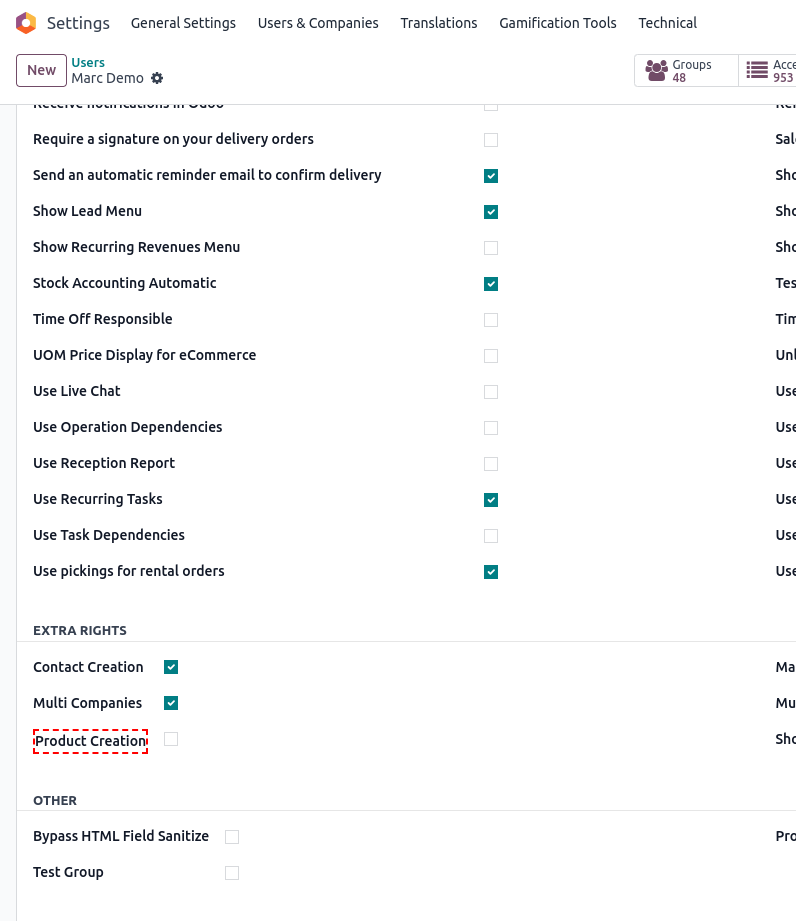
Then, navigate to Settings -> Users & Companies -> Users --> *open a user* and untick the Product creation option from the EXTRA RIGHTS section:
Enjoying the discussion? Don't just read, join in!
Create an account today to enjoy exclusive features and engage with our awesome community!
Přihlásit se