
Hi guys,
I am still new to Odoo and my first setup attempt could have been better. Now I have a new database and I am replicating the 100 or so SO and PO in the previous database and things were looking really good.
That is until, after doing the first PO and validating delivery, then I noticed the PO number is wrong and I do not know how to change it. This is annoying, because I usually sort by PO number and now that one PO will always sit at the top, even years from now.
I would be very grateful if anyone knows how I could fix this and can share with me.
Thank you.
Odoo is the world's easiest all-in-one management software.
It includes hundreds of business apps:
- Müşteri İlişkileri Yönetimi
- e-Commerce
- Muhasebe
- Envanter
- PoS
- Proje Yönetimi
- MRP
Bu soru işaretlendi
4
Cevaplar
3602
Görünümler


Hi,
You can change the Purchase Order number using an Odoo Server Action and set the next Purchase Order number from the Odoo Sequence settings.
1. Change a Specific Purchase Order Number (already created):
Settings->Technical->Actions->Server Actions
Type: Execute Code
Model: Purchase Order
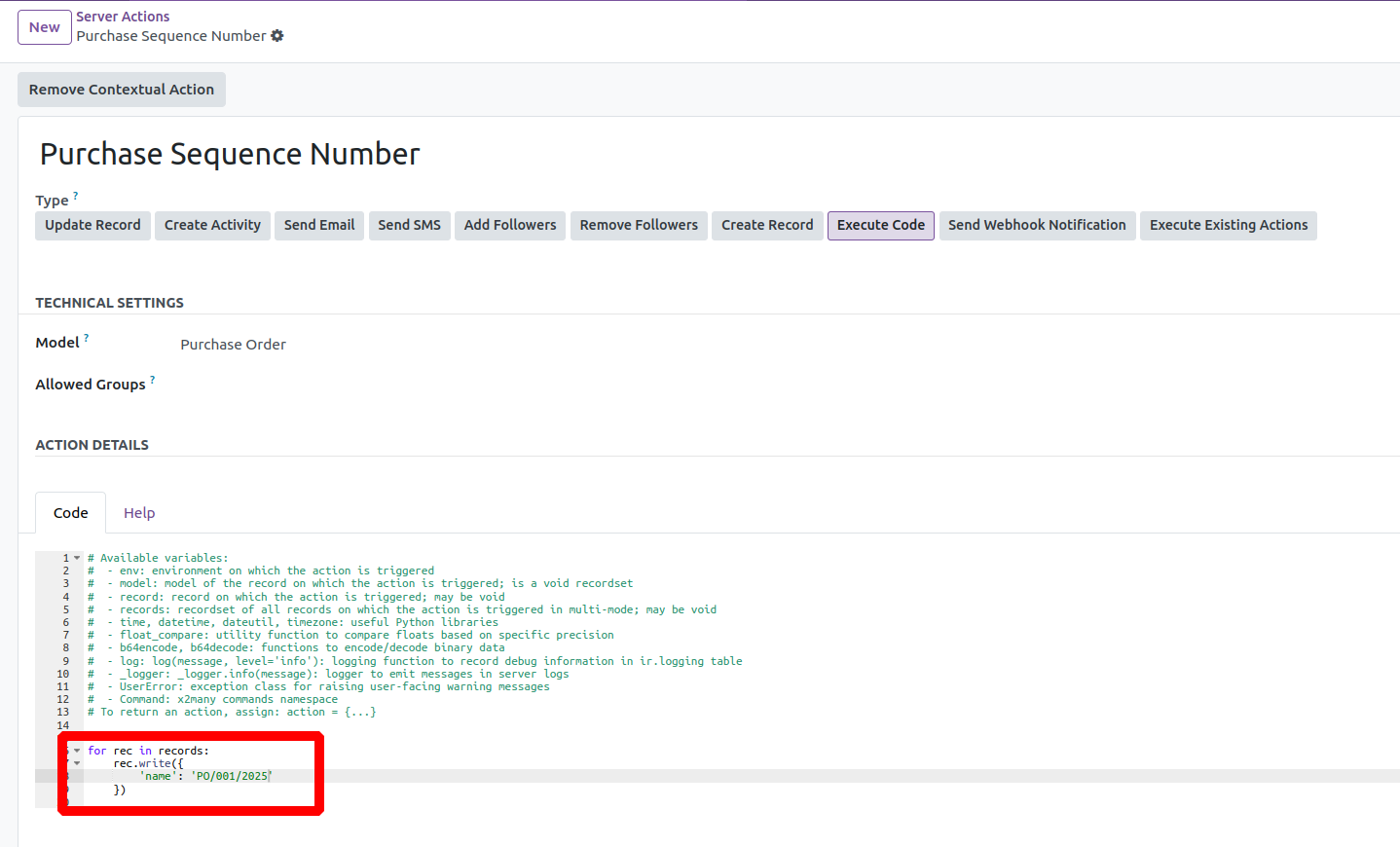
Here, I am changing the Purchase Order number to 'PO/001/2025'. You can modify it to any other pattern as needed.
Then, open your Purchase Order and run the 'Purchase Sequence Number' server action from the Action button. You will see that the sequence has been updated to the value specified in the server action.
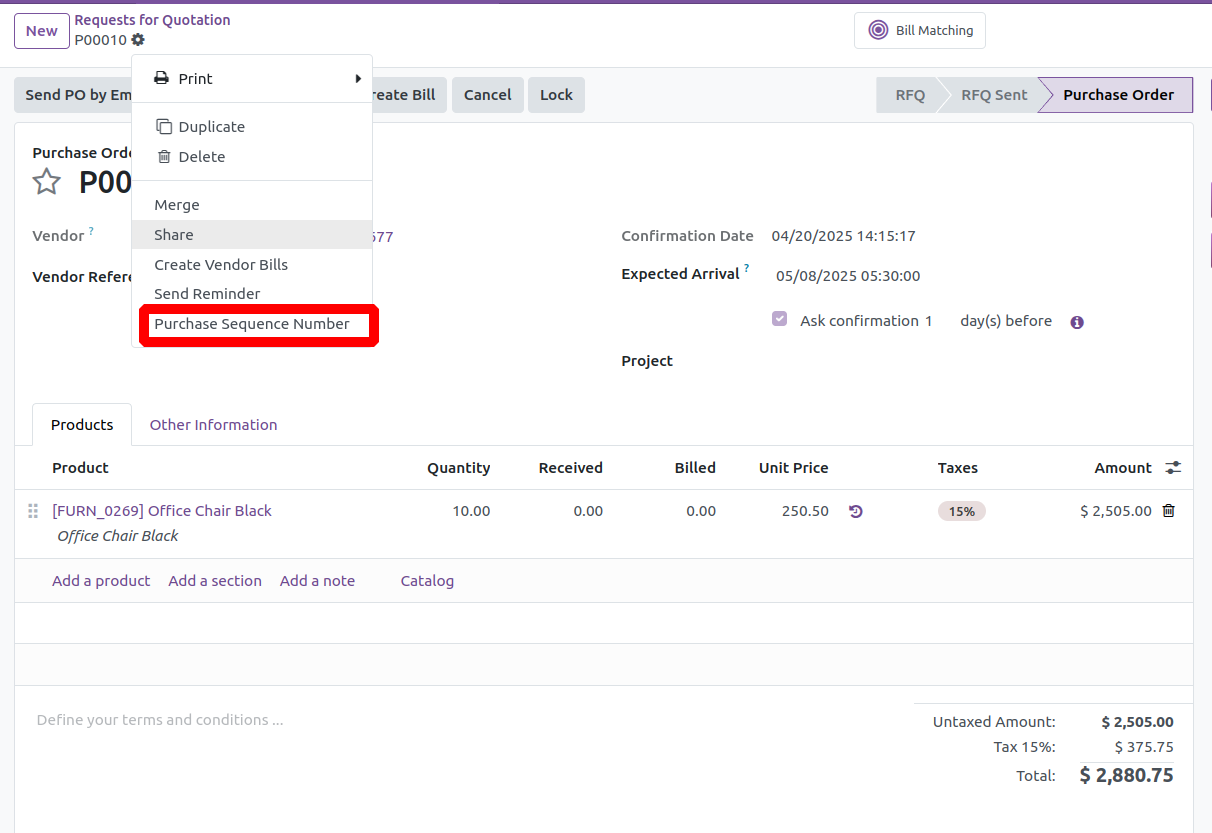
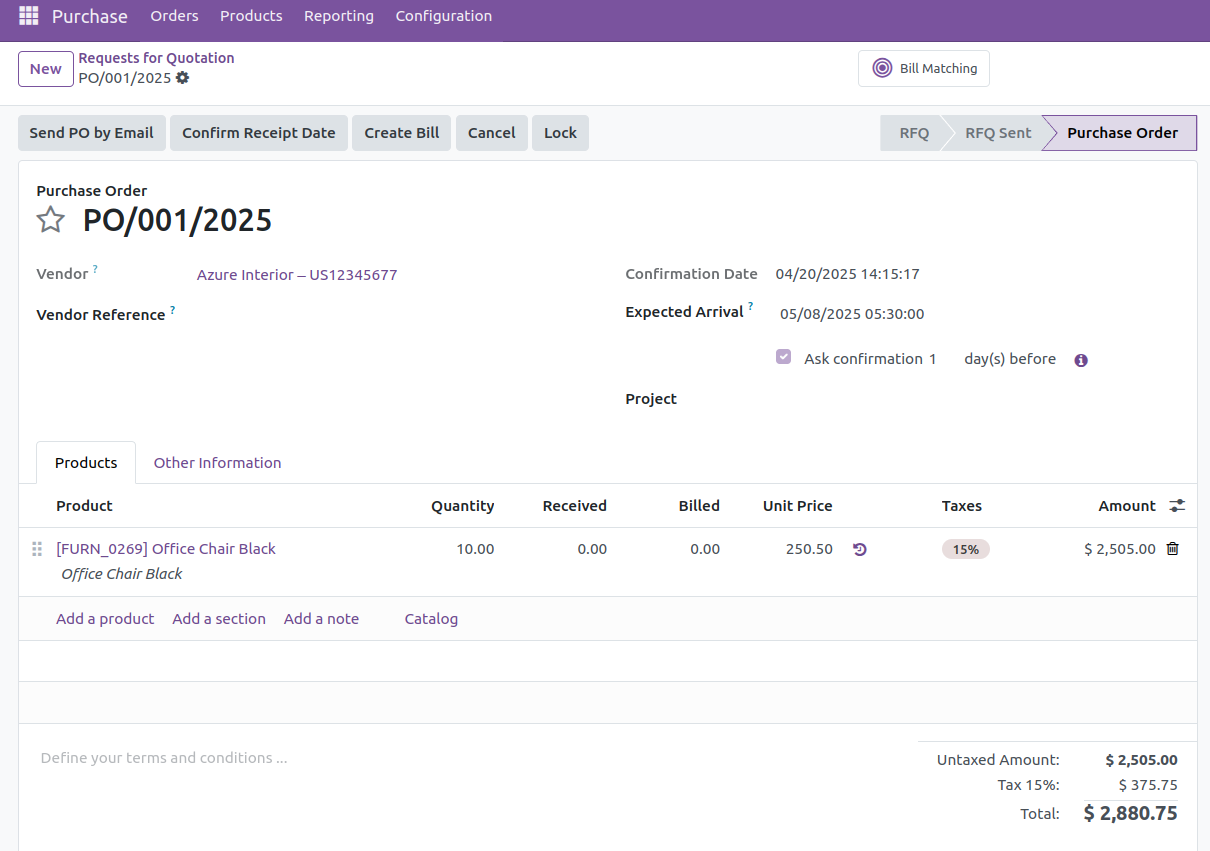
After running the server action, you will see that the sequence 'P00010' has been changed to 'PO/001/2025'.
2. Set the Next Purchase Order Number:
Settings->Technical->Sequences & Identifiers-> Sequences
Open the Purchase Order sequence in tree view. You can set the prefix, suffix, next number, sequence size, and more. Here, I set the prefix as 'PO' and the suffix as '%(year)s' to include the year. I set the next number to 2, and since the step is set to 1, the next number will automatically increment by 1 for each new Purchase Order.
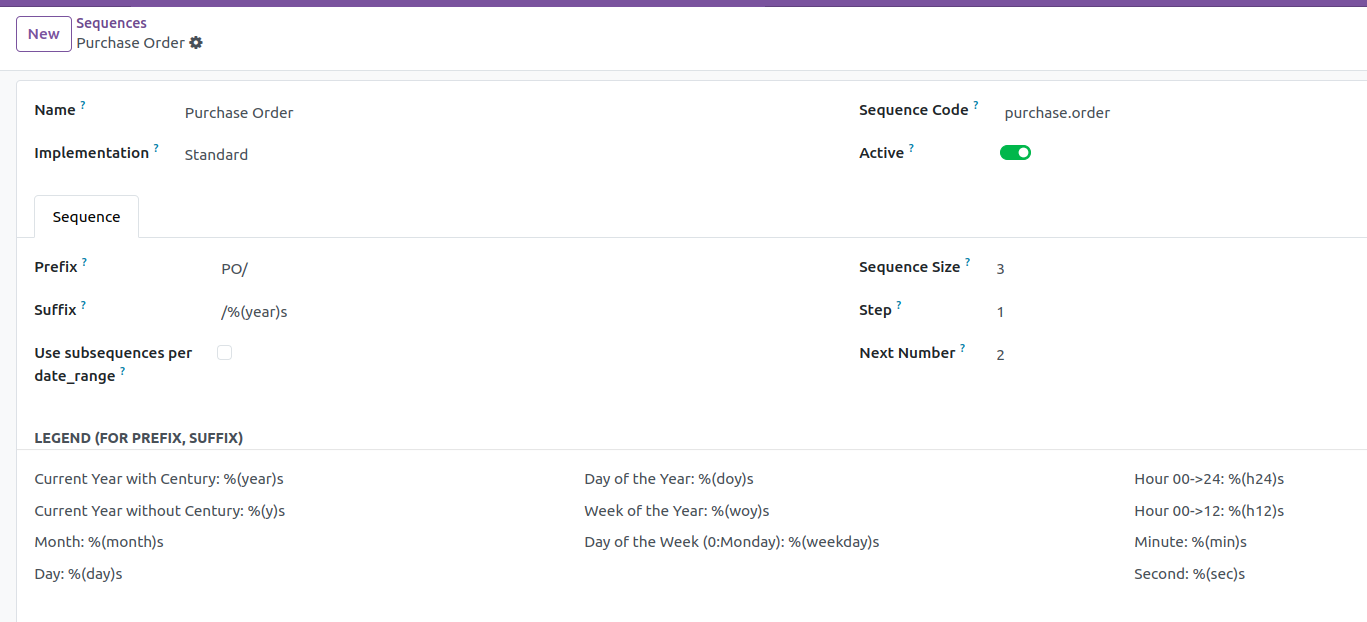
Then, when I create a new Purchase Order, we will see the sequence number generated based on the sequence settings we configured.
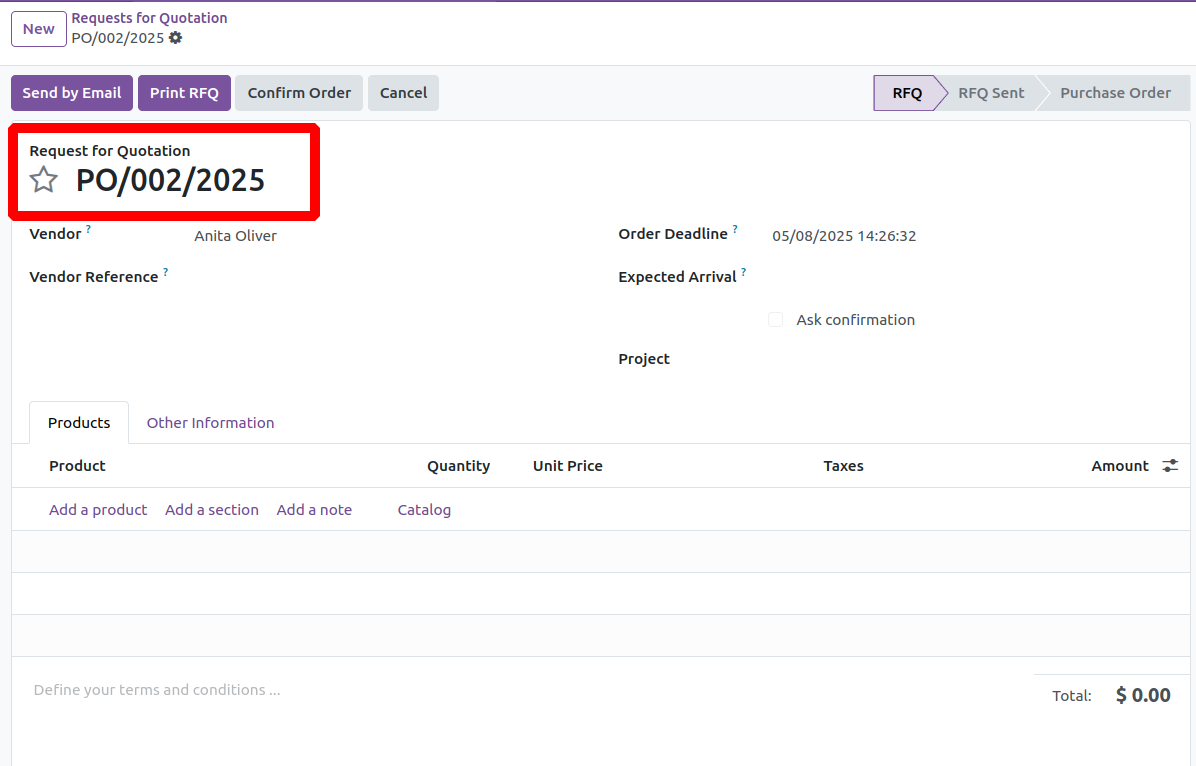
Hope it helps.
hi Cybrosys, I tried looking for this Server Action in the Technical Settings (you mentioned "Change a Specific Purchase Order Number" or the one on your screenshot "Purchase Sequence Number"). I can't seem to find it in the pre-built list (I'm using Odoo Online, currently at v18.4e).
Hi @kiko Cruz,
That server action isn’t pre-installed, you’ll need to create it yourself.
First, activate Developer Mode in Odoo. Then go to:
Settings → Technical → Actions → Server Actions → New,
choose Model: Purchase Order, Action To Do: Execute Python Code, and paste in the code snippet you want (e.g., to change the PO number).
After saving, you’ll see it in the Actions menu on your Purchase Order and can run it to update the number.
Hi Cybrosys Techno Solutions,
Thank you for your answer. I have marked your answer as best answer because it sounds like what I needed. However, I already uninstalled the Purchase app and reinstalled it again. This fixed the problem for us.
Hi @Simon - I actually tried this but for some reason the newly created Server Action is not appearing in the Actions menu (either when selecting the PO in the Purchase Order list or opening the Purchase Order form itself first). I also tried using the "Create Contextual Action" button for the Server Action, and still nothing appears. Am I missing something?

You need to access your database using a SQL tool and change the value directly there. AFAIK it is not possible from within odoo to change a PO or SO name once it has been recorded.
Simon's answer will only work for newly created POs and SOs.
How to access your db using SQL will depend on how is your db deployed.
Hi Apiuser,
Thank you for your reply. Our new database is just standard v18 Odoo Online. I have no idea how to do SQL.
I came across this code for a scheduled action on another post:
env['stock.move'].search([('id', '!=', False)]).sudo().write({'state': 'draft'})
env['stock.move'].search([('id', '!=', False)]).sudo().unlink()
but I don't know how to do that properly either (I gave it a try).
I am upset with myself. I spent months on this again, I've redone thousands of products without variants this time to keep thing simple. Then I make one stupid mistake like this, and we are forever stuck seeing this PO at the top of the list.
I can delete the related invoice, change the receipt quantity to zero, and redo a new correct PO but I cannot delete the old one. I can't even archive it.
If you are on Odoo Online just submit a ticket and ask help from an Odoo worker, I don't know how to access the database in Odoo Online but they will defenetly know.
Thanks for your help, Apiuser.
I uninstalled the Purchase app and reinstalled it again. This has worked perfectly, and the problem no longer exists. Thanks.

To adjust the Purchase Order (PO) numbering in Odoo, you can modify the sequence settings to align with your desired format. Here's how:
- Activate Developer Mode:
- Navigate to Settings .
- Scroll down and click on Activate the developer mode .
- Access Sequence Settings:
- Go to Settings > Technical > Sequences & Identifiers > Sequences .
- Locate and select the sequence labeled Purchase Order .
- Modify the Sequence:
- In the sequence form, adjust the Next Number field to set the starting point for future POs.
- If needed, update the Prefix and Suffix fields to customize the PO numbering format.
Thanks for your reply, I appreciate it. However this does not change the existing PO number or delete the stock move that is preventing me from deleting the PO that I wish to remove or rename.
I had already changed the PO sequence but unfortunately I changed it to the invoice number sequence instead of the PO number sequence.
So I found the easiest solution, although it is not recommended for most use cases and should be only done with caution. It was ok for our situation as there was very limited transaction data in the system.
I uninstalled the Purchase app and reinstalled it again. Problem solved.
Thanks for the replies received.
Enjoying the discussion? Don't just read, join in!
Create an account today to enjoy exclusive features and engage with our awesome community!
Üye Ol| İlgili Gönderiler | Cevaplar | Görünümler | Aktivite | |
|---|---|---|---|---|


|
1
Ara 25
|
3347 | ||


|
3
Kas 25
|
591 | ||


|
3
Kas 25
|
8968 | ||

|
2
Eyl 25
|
907 | ||

|
1
Haz 25
|
2035 |
