
I want to create custom fields on my invoices and have them visible when printed. In Odoo 16, I could do this easily, but now it seems more complicated. Does anyone know how to do it.?
Odoo is the world's easiest all-in-one management software.
It includes hundreds of business apps:
- CRM
- e-Commerce
- Księgowość
- Zapasy
- PoS
- Project
- MRP
To pytanie dostało ostrzeżenie
2
Odpowiedzi
3099
Widoki


Hi,
Try this code:
In python file inherit account.move:
from odoo import models, fields
class AccountInvoice(models.Model):
_inherit = 'account.move'
custom_field = fields.Char(string='Custom Field')
We can inherit the report_invoice_document and add the corresponding changes to the file.:
<template id="report_invoice_customized" inherit_id="account.report_
<xpath expr="//t[@t-set='address']" position="after">
<span t-field="o.custom_field"/></
</xpath>
</template>
Hope it helps

This way you can achieve this ,
- First of all you have to inherit field into account.move object so create .py file
And import this file into your _init_.py file of models.
.py file
from odoo import fields, models,api,_
class Invoice_Account(models.Model):
_inherit = 'account.move'
custom_field_name= fields.Char(string=’demo’)
Xml file
- Now create report template xml file for inheriting this field into report of invoice
- Create a report template xml file and give a path to this file into your manifest file.
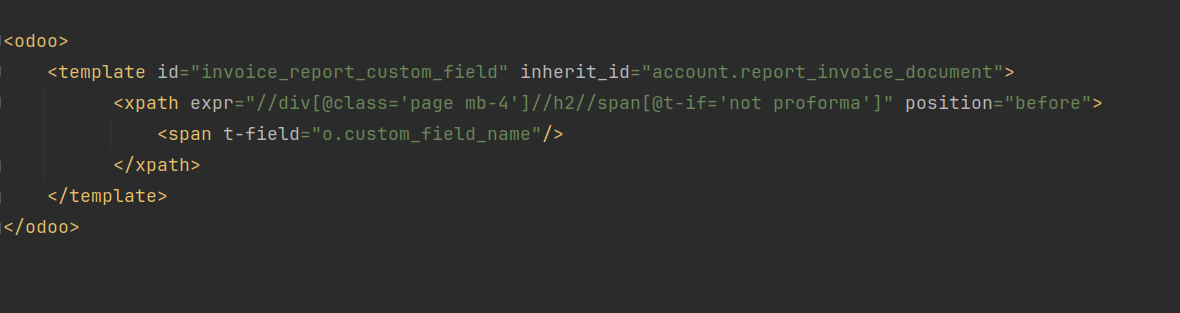
- You can add your custom field at any place in the invoice report by giving xpath like above pic.
- So here this way , you can add custom fields into the invoice report.
I hope this is helpful to you.
Thanks & Regards,
Email: odoo@devintellecs.com
Skype: devintelle
Podoba Ci się ta dyskusja? Dołącz do niej!
Stwórz konto dzisiaj, aby cieszyć się ekskluzywnymi funkcjami i wchodzić w interakcje z naszą wspaniałą społecznością!
Zarejestruj się| Powiązane posty | Odpowiedzi | Widoki | Czynność | |
|---|---|---|---|---|


|
2
lip 25
|
2058 | ||

|
0
mar 25
|
1137 | ||

|
1
lip 24
|
1992 | ||


|
7
lip 24
|
25648 | ||

|
1
maj 25
|
3212 |
