Skip to Content
Odoo मेन्यू
  • Sign in
  • मुफ़्त में आज़माएं
  • ऐप्लिकेशन
    फ़ाइनेंस
    • अकाउंटिंग
    • इनवॉइसिंग
    • एक्सपेंस
    • स्प्रेडशीट (बीआई)
    • डॉक्यूमेंट्स
    • साइन
    सेल्स
    • सीआरएम
    • सेल्स
    • पीओएस शॉप
    • पीओएस रेस्टोरेंट
    • सब्सक्रिप्शन
    • रेंटल
    वेबसाइट
    • वेबसाइट बिल्डर
    • ई-कॉमर्स
    • ब्लॉग
    • फ़ोरम
    • लाइव चैट
    • ई-लर्निंग
    सप्लाई चेन
    • इन्वेंट्री
    • मैन्युफ़ैक्चरिंग
    • पीएलएम
    • परचेज़
    • मेंटेनेंस
    • क्वालिटी
    मानव संसाधन
    • कर्मचारी
    • रिक्रूटमेंट
    • टाइम ऑफ़
    • अप्रेज़ल
    • रेफ़रल
    • फ़्लीट
    मार्केटिंग
    • सोशल मार्केटिंग
    • ईमेल मार्केटिंग
    • एसएमएस मार्केटिंग
    • इवेंट
    • मार्केटिंग ऑटोमेशन
    • सर्वे
    सेवाएं
    • प्रोजेक्ट
    • टाइमशीट
    • फ़ील्ड सर्विस
    • हेल्पडेस्क
    • प्लानिंग
    • अपॉइंटमेंट
    प्रॉडक्टिविटी
    • डिस्कस
    • अप्रूवल
    • आईओटी
    • वीओआईपी
    • नॉलेज
    • WhatsApp
    तीसरे पक्ष के ऐप्लिकेशन Odoo स्टूडियो Odoo क्लाउड प्लेटफ़ॉर्म
  • इंडस्ट्री
    रीटेल
    • बुक स्टोर
    • क्लोदिंग स्टोर
    • फ़र्नीचर स्टोर
    • ग्रॉसरी स्टोर
    • हार्डवेयर स्टोर
    • टॉय स्टोर
    Food & Hospitality
    • बार और पब
    • रेस्टोरेंट
    • फ़ास्ट फ़ूड
    • Guest House
    • बेवरिज डिस्ट्रीब्यूटर
    • होटल
    रियल एस्टेट
    • Real Estate Agency
    • आर्किटेक्चर फ़र्म
    • कंसट्रक्शन
    • एस्टेट मैनेजमेंट
    • गार्ड्निंग
    • प्रॉपर्टी ओनर असोसिएशन
    कंसल्टिंग
    • अकाउंटिंग फ़र्म
    • Odoo पार्टनर
    • मार्केटिंग एजेंसी
    • लॉ फ़र्म
    • टैलेंट ऐक्विज़िशन
    • ऑडिट & सर्टिफ़िकेशन
    मैन्युफ़ैक्चरिंग
    • टेक्सटाइल
    • Metal
    • फ़र्नीचर
    • फ़ूड
    • Brewery
    • कॉर्पोरेट गिफ़्ट
    हेल्थ & फिटनेस
    • स्पोर्ट्स क्लब
    • आईवियर स्टोर
    • फिटनेस सेंटर
    • वेलनेस प्रैक्टिशनर
    • फॉर्मेसी
    • हेयर सैलून
    Trades
    • Handyman
    • आईटी हॉर्डवेयर और सपोर्ट
    • Solar Energy Systems
    • Shoe Maker
    • Cleaning Services
    • HVAC Services
    अन्य
    • Nonprofit Organization
    • एन्वायरमेंटल एजेंसी
    • बिलबोर्ड रेंटल
    • फ़ोटोग्राफी
    • बाइक लीजिंग
    • सॉफ़्टवेयर रीसेलर
    Browse all Industries
  • कम्यूनिटी
    सीखें
    • ट्यूटोरियल्स
    • दस्तावेज़
    • सर्टिफ़िकेशन
    • ट्रेनिंग
    • ब्लॉग
    • पॉडकास्ट
    शिक्षा को बढ़ावा दें
    • एजुकेशन प्रोग्राम
    • स्केल अप! बिजनेस गेम
    • Odoo के ऑफ़िस में आएं
    सॉफ़्टवेयर पाएं
    • डाउनलोड
    • वर्शन की तुलना करें
    • रिलीज़
    साथ मिलकर काम करें
    • Github
    • फ़ोरम
    • इवेंट
    • अनुवाद
    • पार्टनर बनें
    • Services for Partners
    • अपना अकाउंटिंग फ़र्म रजिस्टर करें
    सेवाएं पाएं
    • पार्टनर ढूंढें
    • अकाउंटेंट खोजें
    • सलाहकार की मदद लें
    • इम्प्लिमेंटेशन सेवाएं
    • कस्टमर रेफ़रेंस
    • सहायता
    • अपग्रेड
    Github Youtube Twitter Linkedin Instagram Facebook Spotify
    +1 (650) 691-3277
    डेमो देखें
  • कीमत
  • सहायता

Odoo is the world's easiest all-in-one management software.
It includes hundreds of business apps:

  • सीआरएम
  • e-Commerce
  • लेखांकन
  • इन्वेंटरी
  • PoS
  • प्रोजेक्ट
  • MRP
All apps
You need to be registered to interact with the community.
All Posts People Badges
टैग (View all)
odoo accounting v14 pos v15
About this forum
You need to be registered to interact with the community.
All Posts People Badges
टैग (View all)
odoo accounting v14 pos v15
About this forum
Help

v16 Ent. app icon not showing correctly

Subscribe

Get notified when there's activity on this post

This question has been flagged
odoo16featureswebicon
3 Replies
3407 Views
Avatar
SmithJohn45

i am following an Odoo Technical video guide which uses 16 CE and I have 16 Ent.

in a view file menu_items.xml i have included:

web_icon="real_state_ads,static/description/icon.png"

this is showing correctly when click on Apps and it render its kanban view to show all Apps
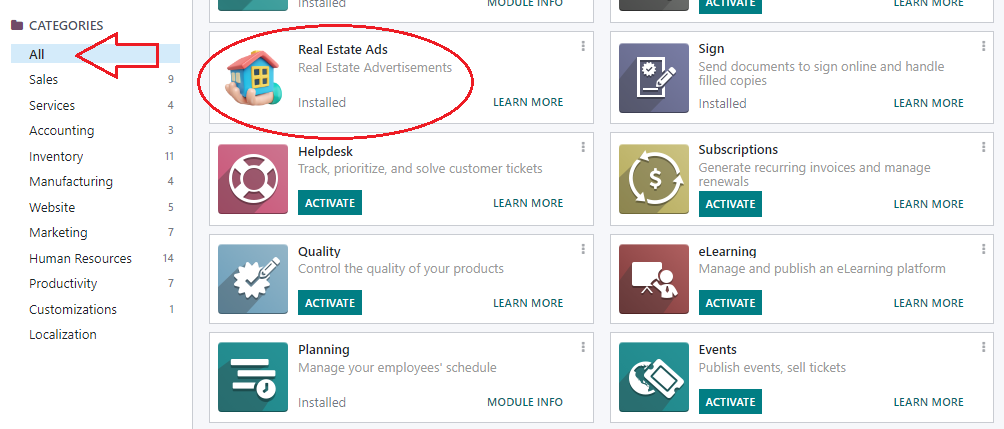

but not showing same icon on main page (when i enter in browser localhost:8069 and press enter the very first page/screen).


i searched and tried in Technical -> Menu Items then search for my menu item and add web icon manually on this screen then return to main screen and it was showing icon correctly, but when i 'Upgrade' app/module now it will not show that icon.

how i can have this custom icon on both screens forever?

please help.

regards

0
Avatar
Discard
SmithJohn45
Author

can somebody help please???

SmithJohn45
Author

nobody has faced this problem yet?

SmithJohn45
Author

still waiting for an Answer...

Savya Sachin

Did you try clearing the browser cache files or site cookies?

SmithJohn45
Author

@Savya
i did it several times... but nothing helped yet.

Avatar
Niyas Raphy (Walnut Software Solutions)
Best Answer

Hi,

Ensure that you have assigned the image to the root menu, that is the menu shown in the main screen. To ensure cache is not causing any sort of issues, check in a new db and in a private window.

          web_icon="base,static/description/modules.png" groups="base.group_system"/>


Also ensure module is upgraded in the db, after adding the change and no update attribute is not set.


Thanks

0
Avatar
Discard
Avatar
Peter Romão
Best Answer

You should restart your odor server. You have several other posts showing you how to do that. It is a different process depending on your installation type.

Also see if the module has an icon for the app in the records.


Hope this helps.

0
Avatar
Discard
Avatar
Eric Chew
Best Answer

I'm still new to Odoo myself, but I ran into this before but it has been a while since I did it.  I believe what I did was activate developer mode by going to settings and scrolling to the bottom and clicking "Activate the developer mode".

Then, click the little bug icon in the top right of the screen and click "Regenerate Assets Bundles".  I believe what is happening is the style sheets and assets are cached and this makes Odoo refresh them.

0
Avatar
Discard
SmithJohn45
Author

@Eric Chew thank you, will try this and confirm.

Enjoying the discussion? Don't just read, join in!

Create an account today to enjoy exclusive features and engage with our awesome community!

Sign up
Related Posts Replies Views Activity
DeprecationWarning: The longpolling-port is a deprecated alias to the gevent-port option, please use the latter Solved
odoo16features
Avatar
Avatar
Avatar
Avatar
Avatar
5
सित॰ 25
25671
How to Add wizard under print button inside the form view.
odoo16features
Avatar
Avatar
Avatar
Avatar
3
अग॰ 25
3945
How to add @api.onchange in _get_view() method odoo 16
odoo16features
Avatar
Avatar
1
मई 25
3851
get all partners which are internal users or portal users odoo16
odoo16features
Avatar
Avatar
1
अप्रैल 25
4660
How to add decoration color green with bold to a record with a single conditon
odoo16features
Avatar
Avatar
1
अप्रैल 25
5482
कम्यूनिटी
  • ट्यूटोरियल्स
  • दस्तावेज़
  • फ़ोरम
ओपन सोर्स
  • डाउनलोड
  • Github
  • रनबॉट
  • अनुवाद
सेवाएं
  • Odoo.sh Hosting
  • सहायता
  • अपग्रेड
  • कस्टम डेवलपमेंट्स
  • शिक्षा
  • अकाउंटेंट खोजें
  • पार्टनर ढूंढें
  • पार्टनर बनें
हमारे बारे में
  • हमारी कंपनी
  • ब्रांड ऐसेट
  • संपर्क करें
  • नौकरियां
  • इवेंट
  • पॉडकास्ट
  • ब्लॉग
  • ग्राहक
  • लीगल • गोपनीयता
  • सुरक्षा
الْعَرَبيّة Català 简体中文 繁體中文 (台灣) Čeština Dansk Nederlands English Suomi Français Deutsch हिंदी Bahasa Indonesia Italiano 日本語 한국어 (KR) Lietuvių kalba Język polski Português (BR) română русский язык Slovenský jazyk slovenščina Español (América Latina) Español ภาษาไทย Türkçe українська Tiếng Việt

Odoo, बिज़नेस से जुड़े ऐप्लिकेशन का एक कलेक्शन है जो ओपन सोर्स पर आधारित है. इसमें आपकी कंपनी की हर ज़रूरत के लिए ऐप्लिकेशन हैं. जैसे, सीआरएम, ई-कॉमर्स, अकाउंटिंग, इन्वेंट्री, पॉइंट ऑफ़ सेल, प्रोजेक्ट मैनेजमेंट वगैरह.

Odoo की सबसे बड़ी खासियत है कि यह इस्तेमाल करने में बहुत आसान है और यह पूरी तरह से इंटिग्रेट किया हुआ है.

Website made with

Odoo Experience on YouTube

1. Use the live chat to ask your questions.
2. The operator answers within a few minutes.

Live support on Youtube
Watch now
