Skip to Content
Odoo मेन्यू
  • Sign in
  • मुफ़्त में आज़माएं
  • ऐप्लिकेशन
    फ़ाइनेंस
    • अकाउंटिंग
    • इनवॉइसिंग
    • एक्सपेंस
    • स्प्रेडशीट (बीआई)
    • डॉक्यूमेंट्स
    • साइन
    सेल्स
    • सीआरएम
    • सेल्स
    • पीओएस शॉप
    • पीओएस रेस्टोरेंट
    • सब्सक्रिप्शन
    • रेंटल
    वेबसाइट
    • वेबसाइट बिल्डर
    • ई-कॉमर्स
    • ब्लॉग
    • फ़ोरम
    • लाइव चैट
    • ई-लर्निंग
    सप्लाई चेन
    • इन्वेंट्री
    • मैन्युफ़ैक्चरिंग
    • पीएलएम
    • परचेज़
    • मेंटेनेंस
    • क्वालिटी
    मानव संसाधन
    • कर्मचारी
    • रिक्रूटमेंट
    • टाइम ऑफ़
    • अप्रेज़ल
    • रेफ़रल
    • फ़्लीट
    मार्केटिंग
    • सोशल मार्केटिंग
    • ईमेल मार्केटिंग
    • एसएमएस मार्केटिंग
    • इवेंट
    • मार्केटिंग ऑटोमेशन
    • सर्वे
    सेवाएं
    • प्रोजेक्ट
    • टाइमशीट
    • फ़ील्ड सर्विस
    • हेल्पडेस्क
    • प्लानिंग
    • अपॉइंटमेंट
    प्रॉडक्टिविटी
    • डिस्कस
    • अप्रूवल
    • आईओटी
    • वीओआईपी
    • नॉलेज
    • WhatsApp
    तीसरे पक्ष के ऐप्लिकेशन Odoo स्टूडियो Odoo क्लाउड प्लेटफ़ॉर्म
  • इंडस्ट्री
    रीटेल
    • बुक स्टोर
    • क्लोदिंग स्टोर
    • फ़र्नीचर स्टोर
    • ग्रॉसरी स्टोर
    • हार्डवेयर स्टोर
    • टॉय स्टोर
    Food & Hospitality
    • बार और पब
    • रेस्टोरेंट
    • फ़ास्ट फ़ूड
    • Guest House
    • बेवरिज डिस्ट्रीब्यूटर
    • होटल
    रियल एस्टेट
    • Real Estate Agency
    • आर्किटेक्चर फ़र्म
    • कंसट्रक्शन
    • एस्टेट मैनेजमेंट
    • गार्ड्निंग
    • प्रॉपर्टी ओनर असोसिएशन
    कंसल्टिंग
    • अकाउंटिंग फ़र्म
    • Odoo पार्टनर
    • मार्केटिंग एजेंसी
    • लॉ फ़र्म
    • टैलेंट ऐक्विज़िशन
    • ऑडिट & सर्टिफ़िकेशन
    मैन्युफ़ैक्चरिंग
    • टेक्सटाइल
    • Metal
    • फ़र्नीचर
    • फ़ूड
    • Brewery
    • कॉर्पोरेट गिफ़्ट
    हेल्थ & फिटनेस
    • स्पोर्ट्स क्लब
    • आईवियर स्टोर
    • फिटनेस सेंटर
    • वेलनेस प्रैक्टिशनर
    • फॉर्मेसी
    • हेयर सैलून
    Trades
    • Handyman
    • आईटी हॉर्डवेयर और सपोर्ट
    • Solar Energy Systems
    • Shoe Maker
    • Cleaning Services
    • HVAC Services
    अन्य
    • Nonprofit Organization
    • एन्वायरमेंटल एजेंसी
    • बिलबोर्ड रेंटल
    • फ़ोटोग्राफी
    • बाइक लीजिंग
    • सॉफ़्टवेयर रीसेलर
    Browse all Industries
  • कम्यूनिटी
    सीखें
    • ट्यूटोरियल्स
    • दस्तावेज़
    • सर्टिफ़िकेशन
    • ट्रेनिंग
    • ब्लॉग
    • पॉडकास्ट
    शिक्षा को बढ़ावा दें
    • एजुकेशन प्रोग्राम
    • स्केल अप! बिजनेस गेम
    • Odoo के ऑफ़िस में आएं
    सॉफ़्टवेयर पाएं
    • डाउनलोड
    • वर्शन की तुलना करें
    • रिलीज़
    साथ मिलकर काम करें
    • Github
    • फ़ोरम
    • इवेंट
    • अनुवाद
    • पार्टनर बनें
    • Services for Partners
    • अपना अकाउंटिंग फ़र्म रजिस्टर करें
    सेवाएं पाएं
    • पार्टनर ढूंढें
    • अकाउंटेंट खोजें
    • सलाहकार की मदद लें
    • इम्प्लिमेंटेशन सेवाएं
    • कस्टमर रेफ़रेंस
    • सहायता
    • अपग्रेड
    Github Youtube Twitter Linkedin Instagram Facebook Spotify
    +1 (650) 691-3277
    डेमो देखें
  • कीमत
  • सहायता

Odoo is the world's easiest all-in-one management software.
It includes hundreds of business apps:

  • सीआरएम
  • e-Commerce
  • लेखांकन
  • इन्वेंटरी
  • PoS
  • प्रोजेक्ट
  • MRP
All apps
You need to be registered to interact with the community.
All Posts People Badges
टैग (View all)
odoo accounting v14 pos v15
About this forum
You need to be registered to interact with the community.
All Posts People Badges
टैग (View all)
odoo accounting v14 pos v15
About this forum
Help

How to hide the Log note button in crm view from

Subscribe

Get notified when there's activity on this post

This question has been flagged
odooodoocommunityodoocrmodoocode
3 Replies
12865 Views
Avatar
afjal khan

0
Avatar
Discard
Avatar
Gracious Joseph
Best Answer

To hide the Log Note button in the Chatter for the CRM view (or any other model) in Odoo, you are using an XML modification to override the mail.Chatter template. Here's how to ensure your approach works correctly:

1. Review Your Current Code

Your current XML code:

<templates xml:space="preserve">
    <t t-name="Chatter" t-inherit="mail.Chatter" t-inherit-mode="primary">
        <xpath expr="//button[@class='o-mail-Chatter-logNote']" position="attributes">
            <attribute name="invisible">1</attribute>
        </xpath>
    </t>
</templates>

Checklist for your code:

  • Correct Template Name: Ensure mail.Chatter is the correct template to inherit. This is the main template for the Chatter component in Odoo.
  • XPath Accuracy: The XPath targets the Log Note button using the class o-mail-Chatter-logNote. Ensure the button has this class.
  • Inherit Mode: You are using t-inherit-mode="primary", which is correct for adding or overriding content in the parent template.

2. Common Issues

  • Incorrect Class: If the button class is dynamic or incorrect, the XPath will not match the element. Inspect the Chatter DOM in the browser (Developer Tools > Inspect) to verify the class.
  • Incorrect Template Loading: Ensure the XML file is loaded in the module's __manifest__.py file.
  • Incorrect Field Usage: The invisible attribute might not work as expected here. Use t-attributes to dynamically set visibility.

3. Fix the Code

If invisible doesn’t work, use t-attributes to hide the button dynamically:

<templates xml:space="preserve">
    <t t-name="Chatter" t-inherit="mail.Chatter" t-inherit-mode="primary">
        <xpath expr="//button[@class='o-mail-Chatter-logNote']" position="attributes">
            <attribute name="t-attributes">{'class': 'd-none'}</attribute>
        </xpath>
    </t>
</templates>

Here, the d-none class is added, which hides the button using Bootstrap's utility class.

4. Ensure XML File is Loaded

In the __manifest__.py file of your module, include the XML file:

'data': [
    'view/chatter_inherit.xml',
],

5. Test the Changes

  1. Restart your Odoo server:
    ./odoo-bin -c odoo.conf
    
  2. Upgrade your module:
    ./odoo-bin -u your_module_name
    
  3. Check the CRM view and ensure the Log Note button is hidden.

6. Debugging Tips

  • Inspect with Developer Tools: Ensure the Log Note button exists and the class matches your XPath.
  • Check Logs: Look for errors in the Odoo logs (odoo.log) if the changes don’t take effect.
  • Test XPath Separately: Use a broader XPath to ensure the targeting works:
    <xpath expr="//button" position="attributes">
        <attribute name="t-attributes">{'class': 'd-none'}</attribute>
    </xpath>
    

By following these steps, you should be able to successfully hide the Log Note button in the Chatter for the CRM view. Let me know if you need further assistance!

0
Avatar
Discard
Avatar
afjal khan
Author Best Answer

Can you provide the full code?


0
Avatar
Discard
Avatar
Anaghan Heri
Best Answer

Hi you can inherit a CRM XML view and add inside CSS value 
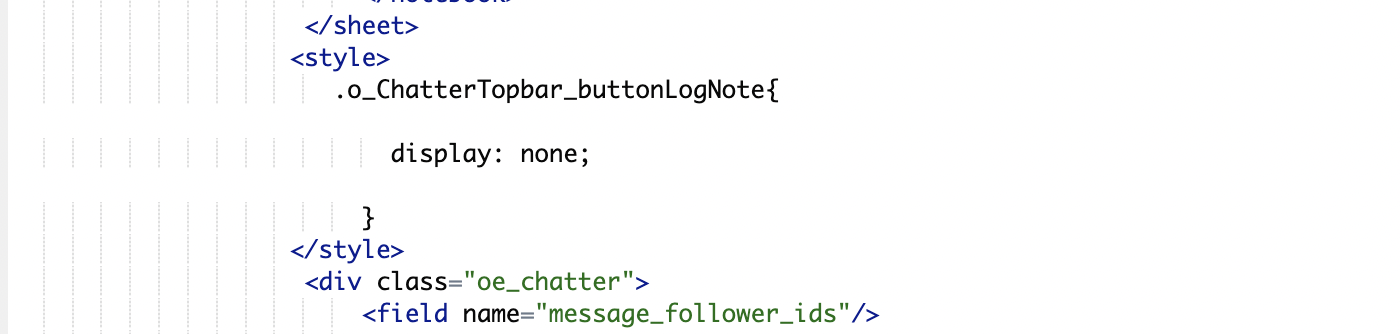


.o_ChatterTopbar_buttonLogNote{

            display: none;

   }


0
Avatar
Discard
Nimesh Parikh

Is it possible to keep it on based on state, like the button should get invisible if project.state is done

Enjoying the discussion? Don't just read, join in!

Create an account today to enjoy exclusive features and engage with our awesome community!

Sign up
Related Posts Replies Views Activity
In Odoo CRM, when you make changes to a CRM lead in the form view (e.g., updating the stage in crm.crm_lead_view_form), you want the lead to automatically appear at the top of the Kanban view (crm.crm_case_kanban_view_leads).
kanban odoo odoocommunity odoocrm
Avatar
0
अक्तू॰ 24
1657
How to hide the Log note button in crm view from with code
odoo odoocommunity Odoo18.0 odoocrm
Avatar
0
सित॰ 24
1390
Here I am adding the filed in crm activity from after the Due Date I want time filed but show this error
odoo odoocommunity
Avatar
0
सित॰ 24
1497
Inquiry About Odoo SMS Module Pricing in India
odoo odoocommunity odoosms
Avatar
0
अक्तू॰ 24
1516
How to hide the Log note button in crm view from
odoo odoocommunity odoo17
Avatar
Avatar
2
सित॰ 24
1762
कम्यूनिटी
  • ट्यूटोरियल्स
  • दस्तावेज़
  • फ़ोरम
ओपन सोर्स
  • डाउनलोड
  • Github
  • रनबॉट
  • अनुवाद
सेवाएं
  • Odoo.sh Hosting
  • सहायता
  • अपग्रेड
  • कस्टम डेवलपमेंट्स
  • शिक्षा
  • अकाउंटेंट खोजें
  • पार्टनर ढूंढें
  • पार्टनर बनें
हमारे बारे में
  • हमारी कंपनी
  • ब्रांड ऐसेट
  • संपर्क करें
  • नौकरियां
  • इवेंट
  • पॉडकास्ट
  • ब्लॉग
  • ग्राहक
  • लीगल • गोपनीयता
  • सुरक्षा
الْعَرَبيّة Català 简体中文 繁體中文 (台灣) Čeština Dansk Nederlands English Suomi Français Deutsch हिंदी Bahasa Indonesia Italiano 日本語 한국어 (KR) Lietuvių kalba Język polski Português (BR) română русский язык Slovenský jazyk slovenščina Español (América Latina) Español ภาษาไทย Türkçe українська Tiếng Việt

Odoo, बिज़नेस से जुड़े ऐप्लिकेशन का एक कलेक्शन है जो ओपन सोर्स पर आधारित है. इसमें आपकी कंपनी की हर ज़रूरत के लिए ऐप्लिकेशन हैं. जैसे, सीआरएम, ई-कॉमर्स, अकाउंटिंग, इन्वेंट्री, पॉइंट ऑफ़ सेल, प्रोजेक्ट मैनेजमेंट वगैरह.

Odoo की सबसे बड़ी खासियत है कि यह इस्तेमाल करने में बहुत आसान है और यह पूरी तरह से इंटिग्रेट किया हुआ है.

Website made with

Odoo Experience on YouTube

1. Use the live chat to ask your questions.
2. The operator answers within a few minutes.

Live support on Youtube
Watch now
