Skip to Content
Odoo मेन्यू
  • Sign in
  • मुफ़्त में आज़माएं
  • ऐप्लिकेशन
    फ़ाइनेंस
    • अकाउंटिंग
    • इनवॉइसिंग
    • एक्सपेंस
    • स्प्रेडशीट (बीआई)
    • डॉक्यूमेंट्स
    • साइन
    सेल्स
    • सीआरएम
    • सेल्स
    • पीओएस शॉप
    • पीओएस रेस्टोरेंट
    • सब्सक्रिप्शन
    • रेंटल
    वेबसाइट
    • वेबसाइट बिल्डर
    • ई-कॉमर्स
    • ब्लॉग
    • फ़ोरम
    • लाइव चैट
    • ई-लर्निंग
    सप्लाई चेन
    • इन्वेंट्री
    • मैन्युफ़ैक्चरिंग
    • पीएलएम
    • परचेज़
    • मेंटेनेंस
    • क्वालिटी
    मानव संसाधन
    • कर्मचारी
    • रिक्रूटमेंट
    • टाइम ऑफ़
    • अप्रेज़ल
    • रेफ़रल
    • फ़्लीट
    मार्केटिंग
    • सोशल मार्केटिंग
    • ईमेल मार्केटिंग
    • एसएमएस मार्केटिंग
    • इवेंट
    • मार्केटिंग ऑटोमेशन
    • सर्वे
    सेवाएं
    • प्रोजेक्ट
    • टाइमशीट
    • फ़ील्ड सर्विस
    • हेल्पडेस्क
    • प्लानिंग
    • अपॉइंटमेंट
    प्रॉडक्टिविटी
    • डिस्कस
    • अप्रूवल
    • आईओटी
    • वीओआईपी
    • नॉलेज
    • WhatsApp
    तीसरे पक्ष के ऐप्लिकेशन Odoo स्टूडियो Odoo क्लाउड प्लेटफ़ॉर्म
  • इंडस्ट्री
    रीटेल
    • बुक स्टोर
    • क्लोदिंग स्टोर
    • फ़र्नीचर स्टोर
    • ग्रॉसरी स्टोर
    • हार्डवेयर स्टोर
    • टॉय स्टोर
    Food & Hospitality
    • बार और पब
    • रेस्टोरेंट
    • फ़ास्ट फ़ूड
    • Guest House
    • बेवरिज डिस्ट्रीब्यूटर
    • होटल
    रियल एस्टेट
    • Real Estate Agency
    • आर्किटेक्चर फ़र्म
    • कंसट्रक्शन
    • एस्टेट मैनेजमेंट
    • गार्ड्निंग
    • प्रॉपर्टी ओनर असोसिएशन
    कंसल्टिंग
    • अकाउंटिंग फ़र्म
    • Odoo पार्टनर
    • मार्केटिंग एजेंसी
    • लॉ फ़र्म
    • टैलेंट ऐक्विज़िशन
    • ऑडिट & सर्टिफ़िकेशन
    मैन्युफ़ैक्चरिंग
    • टेक्सटाइल
    • Metal
    • फ़र्नीचर
    • फ़ूड
    • Brewery
    • कॉर्पोरेट गिफ़्ट
    हेल्थ & फिटनेस
    • स्पोर्ट्स क्लब
    • आईवियर स्टोर
    • फिटनेस सेंटर
    • वेलनेस प्रैक्टिशनर
    • फॉर्मेसी
    • हेयर सैलून
    Trades
    • Handyman
    • आईटी हॉर्डवेयर और सपोर्ट
    • Solar Energy Systems
    • Shoe Maker
    • Cleaning Services
    • HVAC Services
    अन्य
    • Nonprofit Organization
    • एन्वायरमेंटल एजेंसी
    • बिलबोर्ड रेंटल
    • फ़ोटोग्राफी
    • बाइक लीजिंग
    • सॉफ़्टवेयर रीसेलर
    Browse all Industries
  • कम्यूनिटी
    सीखें
    • ट्यूटोरियल्स
    • दस्तावेज़
    • सर्टिफ़िकेशन
    • ट्रेनिंग
    • ब्लॉग
    • पॉडकास्ट
    शिक्षा को बढ़ावा दें
    • एजुकेशन प्रोग्राम
    • स्केल अप! बिजनेस गेम
    • Odoo के ऑफ़िस में आएं
    सॉफ़्टवेयर पाएं
    • डाउनलोड
    • वर्शन की तुलना करें
    • रिलीज़
    साथ मिलकर काम करें
    • Github
    • फ़ोरम
    • इवेंट
    • अनुवाद
    • पार्टनर बनें
    • Services for Partners
    • अपना अकाउंटिंग फ़र्म रजिस्टर करें
    सेवाएं पाएं
    • पार्टनर ढूंढें
    • अकाउंटेंट खोजें
    • सलाहकार की मदद लें
    • इम्प्लिमेंटेशन सेवाएं
    • कस्टमर रेफ़रेंस
    • सहायता
    • अपग्रेड
    Github Youtube Twitter Linkedin Instagram Facebook Spotify
    +1 (650) 691-3277
    डेमो देखें
  • कीमत
  • सहायता

Odoo is the world's easiest all-in-one management software.
It includes hundreds of business apps:

  • सीआरएम
  • e-Commerce
  • लेखांकन
  • इन्वेंटरी
  • PoS
  • प्रोजेक्ट
  • MRP
All apps
You need to be registered to interact with the community.
All Posts People Badges
टैग (View all)
odoo accounting v14 pos v15
About this forum
You need to be registered to interact with the community.
All Posts People Badges
टैग (View all)
odoo accounting v14 pos v15
About this forum
Help

Credited invoices appear again in "To Invoice".

Subscribe

Get notified when there's activity on this post

This question has been flagged
invoicecreditnotesv14odoo16features
2 Replies
2122 Views
Avatar
Dr. Thomas Koliwer

When crediting a partial amount of an invoice, the full invoice amount reappears in "To Invoice", marked as "To Invoice"- which is wrong (and dangerous) according to my understanding. Do I have a thinking error or am I doing something wrong?

I tried it in V14 and V16 - same result


0
Avatar
Discard
Macaulay Spencer

Hi,

Did you ever find an answer to this? We're getting the same issue. Our only way around this is to raise a manual credit note and not tie it to the initial invoice. V18

Avatar
Christoph Farnleitner
Best Answer

Assuming the following scenario:

Customer Sale Order with i.e. two lines, Product A and Product B.

  1. Create a regular Invoice for that Sale Order (assuming everything is invoicable) and confirm it
  2. Create a Credit Note from that Invoice and confirm it

Odoo will reconcile the Credit Note (return payment) against the Invoice, resulting in a Paid Credit Note and a Partially Paid Invoice.

Now, the Sale Order can be invoiced with the credited Product again, because it keeps track of the total quantity invoiced compared to the number of items ordered (or delivered, depending on your invoicing policy).


So, next to manually creating a Credit Note that isn't linked to anything, you have this more "history-friendly" option to reduce the originally (ordered) Quantity to reflect the amount that is actually invoicable in total - which may sound counter intuitive, but ultimately this is what the customer is paying for.*

In general, this behavior stems from the fact that Odoo doesn't know why you've created a Credit Note - it could just have been a premature or in any other way incorrect Invoice, thus allowing you to still fully Invoice what ever was on the original Sale Order.


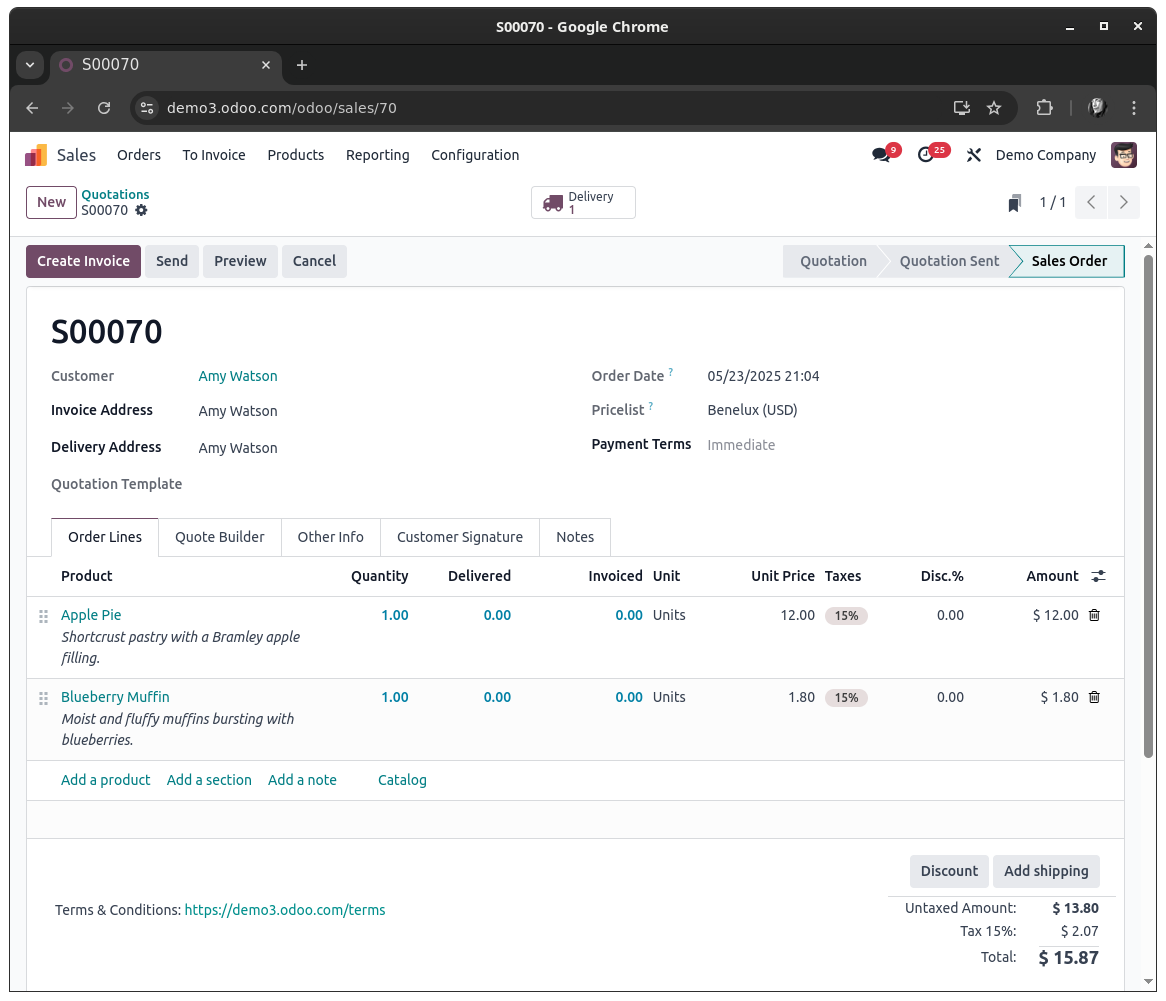
Order of 2 Products:


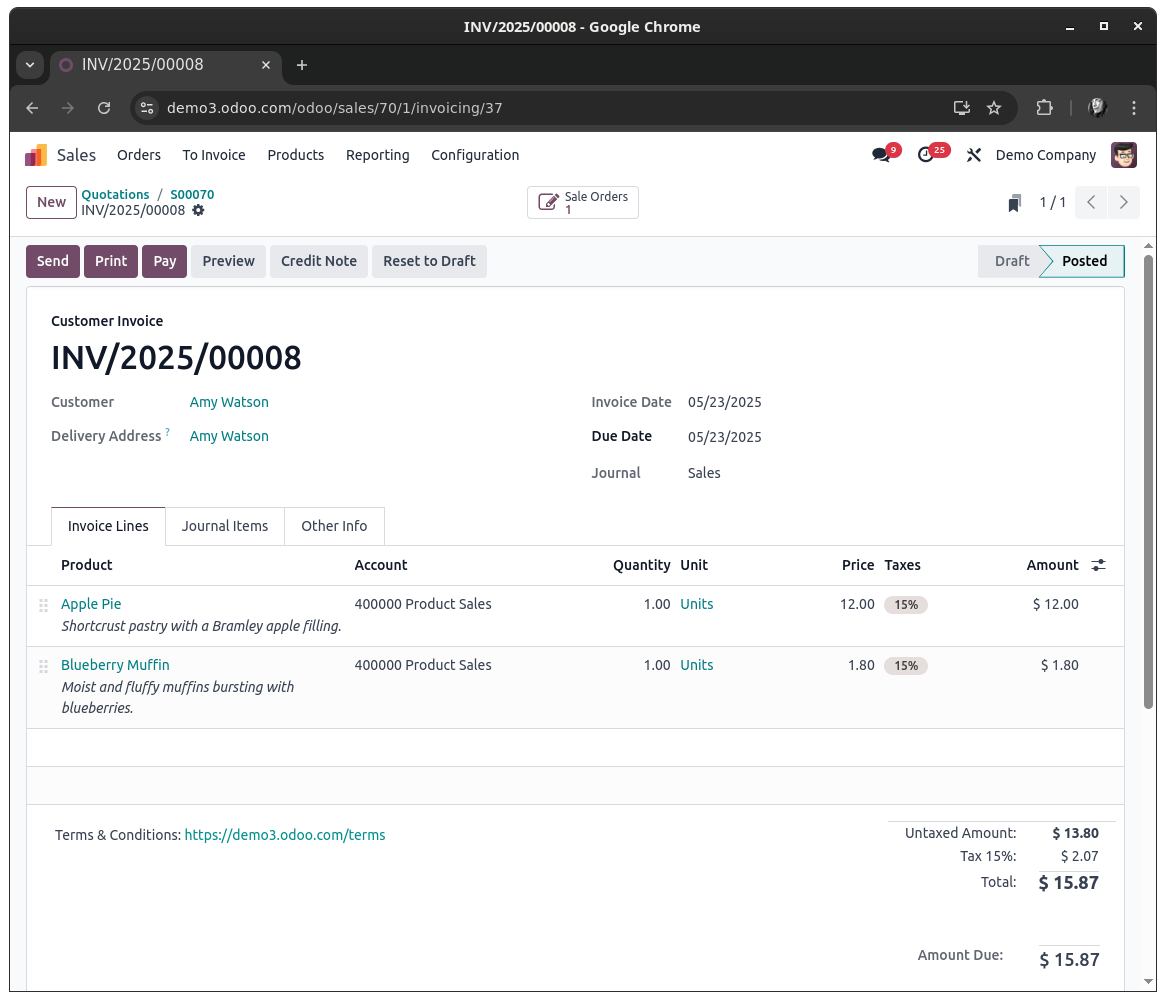
The confirmed Regular Invoice for that Sale Order:


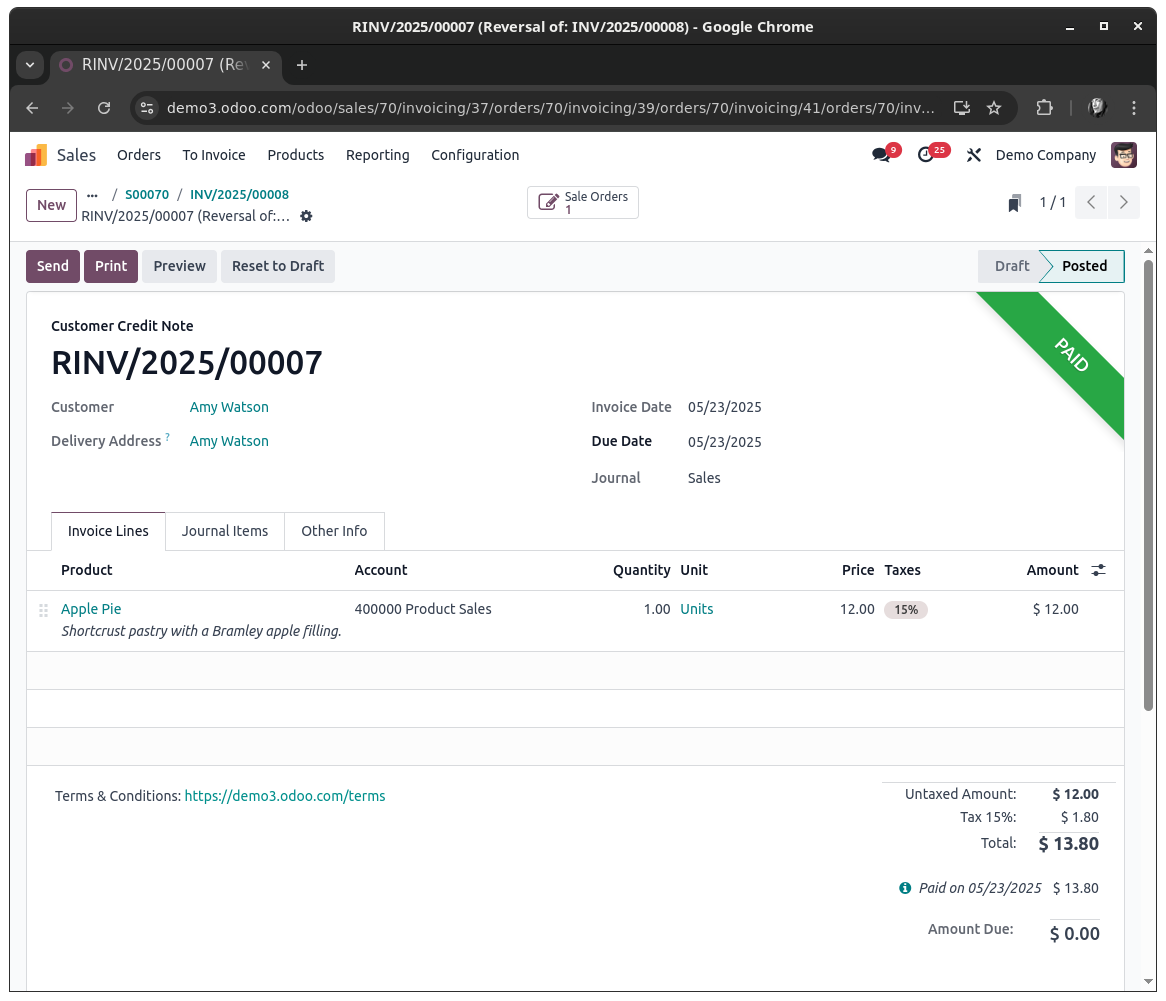
The Credit Note for this Invoice:


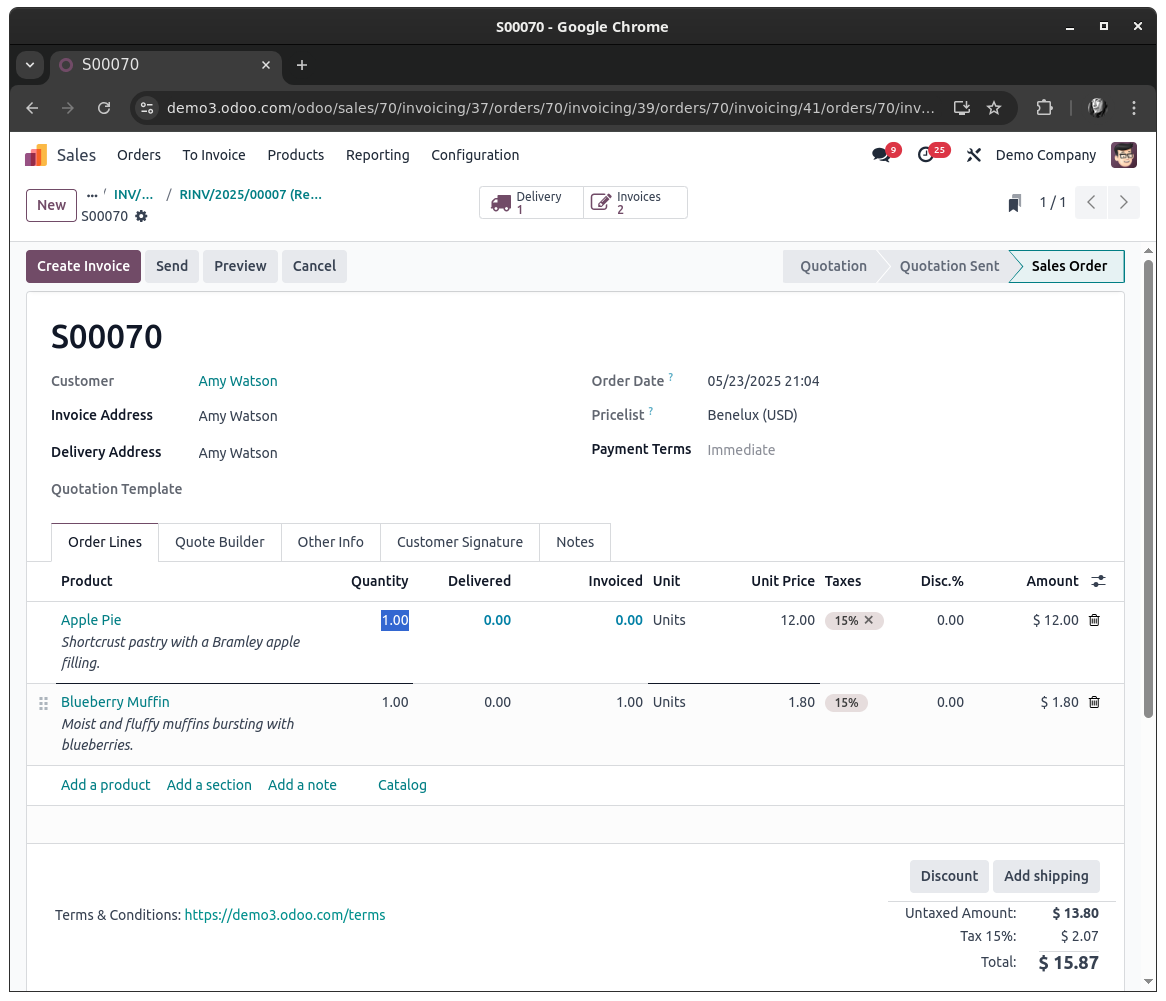
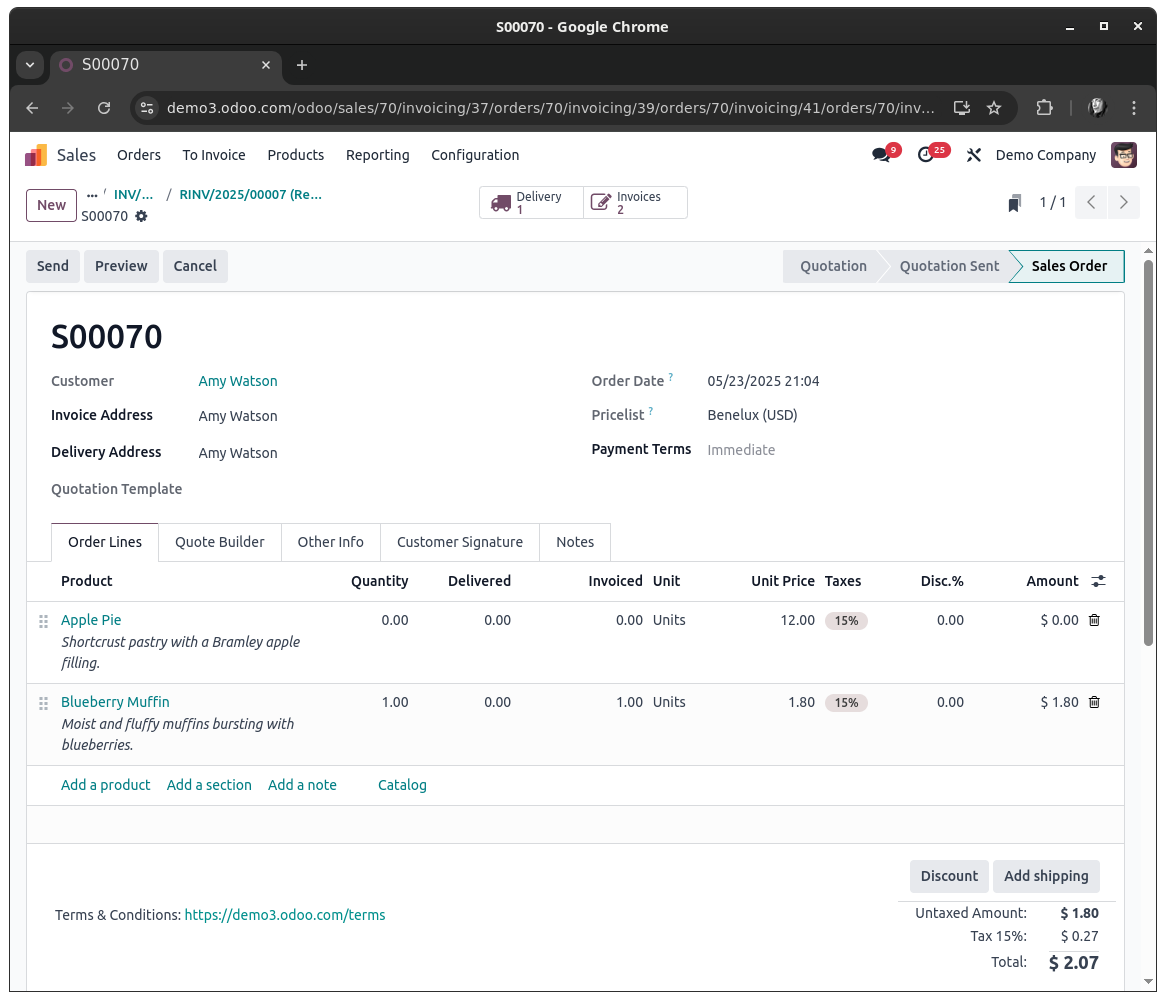
The State of the Sale Order at this point:


The state after adjusting the (ordered) Quantity - note that Odoo does not provide an option to create an Invoice anymore:


*) Now, granted the fact that this is not an always-use-this-approach kind of a thing. There may be scenarios where you actually want to have an ordered Quantity deferring from the quantity invoiced which again would have you use your current approach of manually creating a Credit Note.

-1
Avatar
Discard
Enjoying the discussion? Don't just read, join in!

Create an account today to enjoy exclusive features and engage with our awesome community!

Sign up
Related Posts Replies Views Activity
ODOO 14: How can I change the default accounts from a Credit Note
invoice retrive creditnotes v14
Avatar
0
सित॰ 21
3132
AttributeError("The 'Customer' object does not have the 'create_message' attribute") Solved
invoice v14
Avatar
Avatar
1
अप्रैल 24
2830
Hide sensitive Contacts from specific users
v14 odoo16features
Avatar
Avatar
1
फ़र॰ 24
2815
Add bank account number under company details of a invoice - Odoo 16 Community Edition Solved
invoice odoo16features
Avatar
Avatar
1
मार्च 24
1476
how to create customer invoice from code odoo 14 Solved
invoice v14
Avatar
Avatar
Avatar
Avatar
3
अक्तू॰ 23
9330
कम्यूनिटी
  • ट्यूटोरियल्स
  • दस्तावेज़
  • फ़ोरम
ओपन सोर्स
  • डाउनलोड
  • Github
  • रनबॉट
  • अनुवाद
सेवाएं
  • Odoo.sh Hosting
  • सहायता
  • अपग्रेड
  • कस्टम डेवलपमेंट्स
  • शिक्षा
  • अकाउंटेंट खोजें
  • पार्टनर ढूंढें
  • पार्टनर बनें
हमारे बारे में
  • हमारी कंपनी
  • ब्रांड ऐसेट
  • संपर्क करें
  • नौकरियां
  • इवेंट
  • पॉडकास्ट
  • ब्लॉग
  • ग्राहक
  • लीगल • गोपनीयता
  • सुरक्षा
الْعَرَبيّة Català 简体中文 繁體中文 (台灣) Čeština Dansk Nederlands English Suomi Français Deutsch हिंदी Bahasa Indonesia Italiano 日本語 한국어 (KR) Lietuvių kalba Język polski Português (BR) română русский язык Slovenský jazyk slovenščina Español (América Latina) Español ภาษาไทย Türkçe українська Tiếng Việt

Odoo, बिज़नेस से जुड़े ऐप्लिकेशन का एक कलेक्शन है जो ओपन सोर्स पर आधारित है. इसमें आपकी कंपनी की हर ज़रूरत के लिए ऐप्लिकेशन हैं. जैसे, सीआरएम, ई-कॉमर्स, अकाउंटिंग, इन्वेंट्री, पॉइंट ऑफ़ सेल, प्रोजेक्ट मैनेजमेंट वगैरह.

Odoo की सबसे बड़ी खासियत है कि यह इस्तेमाल करने में बहुत आसान है और यह पूरी तरह से इंटिग्रेट किया हुआ है.

Website made with

Odoo Experience on YouTube

1. Use the live chat to ask your questions.
2. The operator answers within a few minutes.

Live support on Youtube
Watch now