Skip to Content
Odoo मेन्यू
  • Sign in
  • मुफ़्त में आज़माएं
  • ऐप्लिकेशन
    फ़ाइनेंस
    • अकाउंटिंग
    • इनवॉइसिंग
    • एक्सपेंस
    • स्प्रेडशीट (बीआई)
    • डॉक्यूमेंट्स
    • साइन
    सेल्स
    • सीआरएम
    • सेल्स
    • पीओएस शॉप
    • पीओएस रेस्टोरेंट
    • सब्सक्रिप्शन
    • रेंटल
    वेबसाइट
    • वेबसाइट बिल्डर
    • ई-कॉमर्स
    • ब्लॉग
    • फ़ोरम
    • लाइव चैट
    • ई-लर्निंग
    सप्लाई चेन
    • इन्वेंट्री
    • मैन्युफ़ैक्चरिंग
    • पीएलएम
    • परचेज़
    • मेंटेनेंस
    • क्वालिटी
    मानव संसाधन
    • कर्मचारी
    • रिक्रूटमेंट
    • टाइम ऑफ़
    • अप्रेज़ल
    • रेफ़रल
    • फ़्लीट
    मार्केटिंग
    • सोशल मार्केटिंग
    • ईमेल मार्केटिंग
    • एसएमएस मार्केटिंग
    • इवेंट
    • मार्केटिंग ऑटोमेशन
    • सर्वे
    सेवाएं
    • प्रोजेक्ट
    • टाइमशीट
    • फ़ील्ड सर्विस
    • हेल्पडेस्क
    • प्लानिंग
    • अपॉइंटमेंट
    प्रॉडक्टिविटी
    • डिस्कस
    • अप्रूवल
    • आईओटी
    • वीओआईपी
    • नॉलेज
    • WhatsApp
    तीसरे पक्ष के ऐप्लिकेशन Odoo स्टूडियो Odoo क्लाउड प्लेटफ़ॉर्म
  • इंडस्ट्री
    रीटेल
    • बुक स्टोर
    • क्लोदिंग स्टोर
    • फ़र्नीचर स्टोर
    • ग्रॉसरी स्टोर
    • हार्डवेयर स्टोर
    • टॉय स्टोर
    Food & Hospitality
    • बार और पब
    • रेस्टोरेंट
    • फ़ास्ट फ़ूड
    • Guest House
    • बेवरिज डिस्ट्रीब्यूटर
    • होटल
    रियल एस्टेट
    • Real Estate Agency
    • आर्किटेक्चर फ़र्म
    • कंसट्रक्शन
    • एस्टेट मैनेजमेंट
    • गार्ड्निंग
    • प्रॉपर्टी ओनर असोसिएशन
    कंसल्टिंग
    • अकाउंटिंग फ़र्म
    • Odoo पार्टनर
    • मार्केटिंग एजेंसी
    • लॉ फ़र्म
    • टैलेंट ऐक्विज़िशन
    • ऑडिट & सर्टिफ़िकेशन
    मैन्युफ़ैक्चरिंग
    • टेक्सटाइल
    • Metal
    • फ़र्नीचर
    • फ़ूड
    • Brewery
    • कॉर्पोरेट गिफ़्ट
    हेल्थ & फिटनेस
    • स्पोर्ट्स क्लब
    • आईवियर स्टोर
    • फिटनेस सेंटर
    • वेलनेस प्रैक्टिशनर
    • फॉर्मेसी
    • हेयर सैलून
    Trades
    • Handyman
    • आईटी हॉर्डवेयर और सपोर्ट
    • Solar Energy Systems
    • Shoe Maker
    • Cleaning Services
    • HVAC Services
    अन्य
    • Nonprofit Organization
    • एन्वायरमेंटल एजेंसी
    • बिलबोर्ड रेंटल
    • फ़ोटोग्राफी
    • बाइक लीजिंग
    • सॉफ़्टवेयर रीसेलर
    Browse all Industries
  • कम्यूनिटी
    सीखें
    • ट्यूटोरियल्स
    • दस्तावेज़
    • सर्टिफ़िकेशन
    • ट्रेनिंग
    • ब्लॉग
    • पॉडकास्ट
    शिक्षा को बढ़ावा दें
    • एजुकेशन प्रोग्राम
    • स्केल अप! बिजनेस गेम
    • Odoo के ऑफ़िस में आएं
    सॉफ़्टवेयर पाएं
    • डाउनलोड
    • वर्शन की तुलना करें
    • रिलीज़
    साथ मिलकर काम करें
    • Github
    • फ़ोरम
    • इवेंट
    • अनुवाद
    • पार्टनर बनें
    • Services for Partners
    • अपना अकाउंटिंग फ़र्म रजिस्टर करें
    सेवाएं पाएं
    • पार्टनर ढूंढें
    • अकाउंटेंट खोजें
    • सलाहकार की मदद लें
    • इम्प्लिमेंटेशन सेवाएं
    • कस्टमर रेफ़रेंस
    • सहायता
    • अपग्रेड
    Github Youtube Twitter Linkedin Instagram Facebook Spotify
    +1 (650) 691-3277
    डेमो देखें
  • कीमत
  • सहायता

Odoo is the world's easiest all-in-one management software.
It includes hundreds of business apps:

  • सीआरएम
  • e-Commerce
  • लेखांकन
  • इन्वेंटरी
  • PoS
  • प्रोजेक्ट
  • MRP
All apps
You need to be registered to interact with the community.
All Posts People Badges
टैग (View all)
odoo accounting v14 pos v15
About this forum
You need to be registered to interact with the community.
All Posts People Badges
टैग (View all)
odoo accounting v14 pos v15
About this forum
Help

Can we import a custom function from one of the custom modules, not from odoo...?

Subscribe

Get notified when there's activity on this post

This question has been flagged
functionimportcustomize
4 Replies
3309 Views
Avatar
noone

Hello guys:


I'm developing in inherit/extension way. 

Some self-made functions are common I want share and reuse in my custom modules, I tried to put them in a module and import them in others,  so I do not need to repeat them everywhere. 

But seems it's not supported ,  an error raised as below:
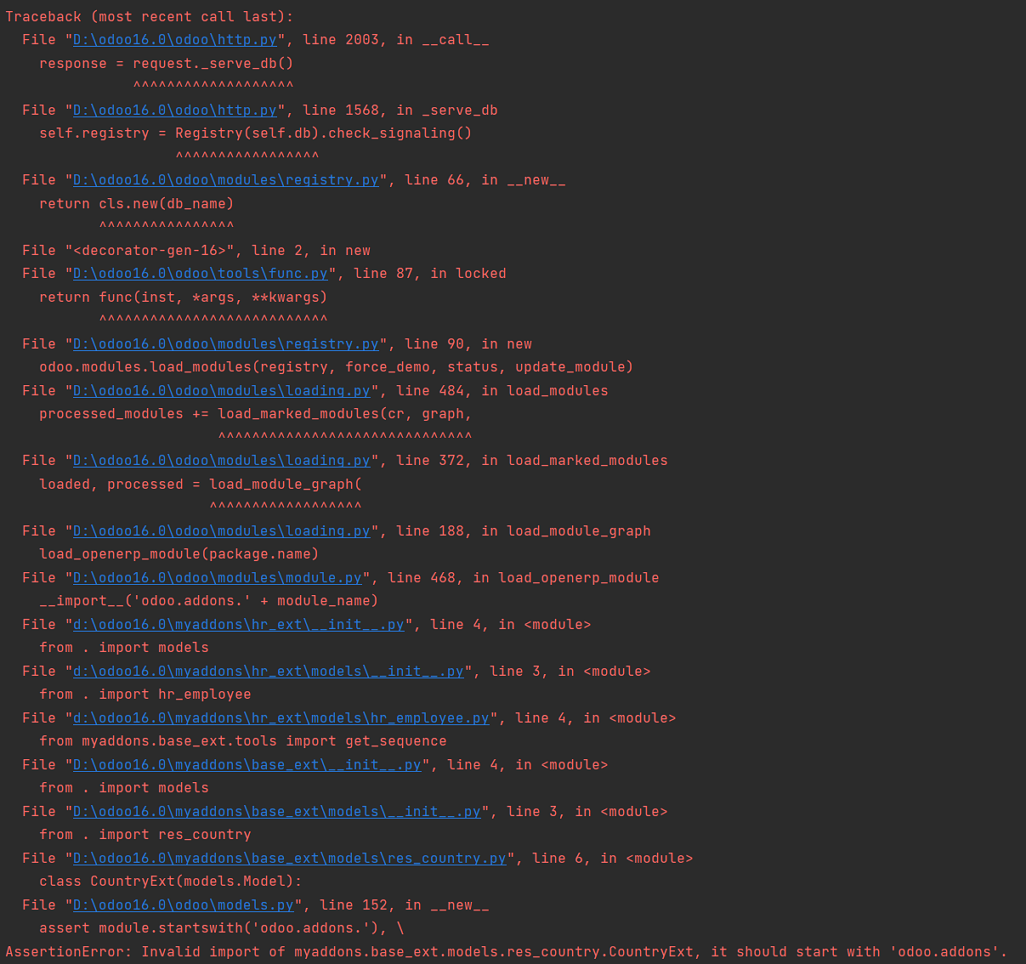

The directories' structure like this:
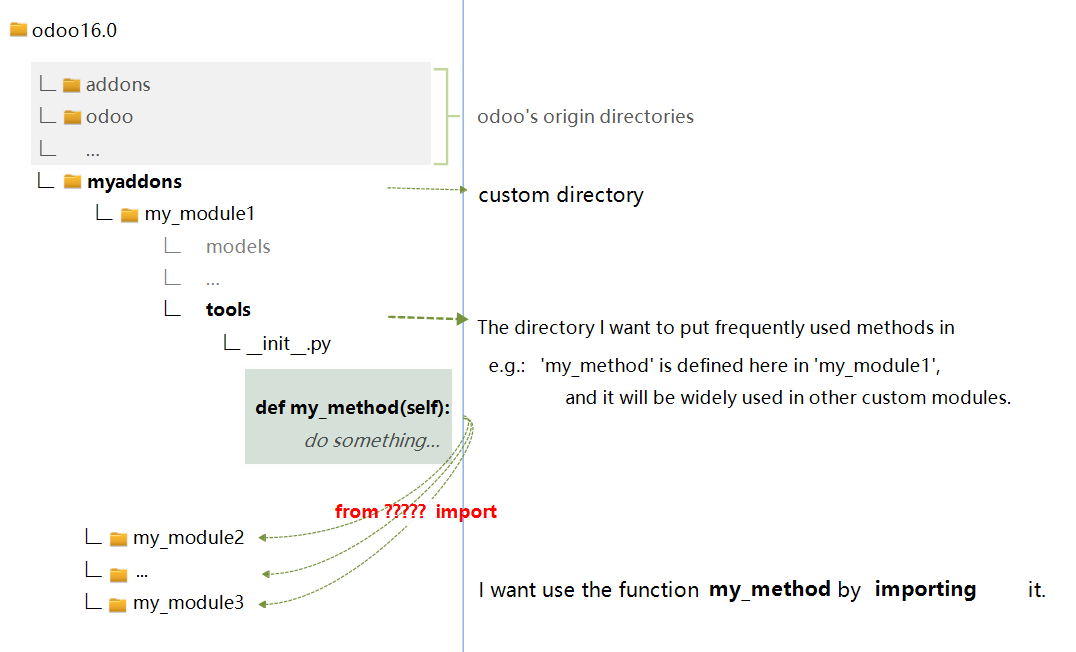
Can we import functions from self-made modules?  or we can ONLY import from odoo source directories ?


1
Avatar
Discard
Avatar
Savya Sachin
Best Answer

Hi, 

You can import Odoo functions from self-made modules and from Odoo source directories. following are a few scenarios with examples.

Importing Odoo Functions in Custom Modules

1. Importing from Odoo source directories

from odoo import models, fields, api

from odoo.exceptions import ValidationError


2. Importing from your own custom modules

# Assuming you have a custom module named 'my_module' with a file 'helpers.py'

from . import helpers

from .models import my_model


3. Relative imports within your module

# In a file within your module, e.g., 'models/product.py'

from . import common

from ..helpers import utils


4. Importing specific functions or classes

from odoo.addons.base.models.res_partner import Partner


5. Using imported functions

class CustomModel(models.Model):

    _name = 'custom.model'


    @api.model

    def custom_method(self):

        #Using a function from Odoo core

        self.env['res.partner'].create({'name': 'New Partner'})


        #Using a function from your custom helper

        result = helpers.custom_calculation()


        #Using a model from another custom module

        my_model.do_something()


6. Importing and using external libraries

#Make sure the library is installed in your Odoo environment

import requests


def external_api_call(self):

    response = requests.get('https://api.example.com/data')

    # Process the response...


In your case, Try this way to import,

from odoo.addons.my_module1.your_python_file_name import my_method


Note: When importing external libraries, ensure they're listed in your module's external dependencies.

Thanks

1
Avatar
Discard
noone
Author

Hi Savya:

Thanks a lot for your wide-ranging answer! My case is more like the scenario #4, importing across modules but NOT odoo source modules.
Please refer to the lower picture i attached, I defined a method in one of my customized module, and I also need it in other customized modules. So the importing path like ‘ odoo.addons.base... ’ is not applicable.

Yes, i know the solution #5 using "self.env['model_name']. method_name" and it works indeed,
but I'm wondering any chance in 'import' way?

Yahoo Baba Innovations Pvt.Ltd

Hello noone,

You just import below line :
from odoo import fields, models, api

Savya Sachin

I have updated the answer for your case.

Avatar
Alex Dhika
Best Answer

Add all module to depends section in your manifest file

0
Avatar
Discard
Yahoo Baba Innovations Pvt.Ltd

Hii noone,

Use this line and add you custom logic. This is just an example.

from odoo.addons.account.tools import format_rf_reference

from odoo.addons.account.tools import format_rf_reference

class CustomModule(models.Model):
_name = 'custom.module'

reference_number = fields.Char('Reference Number')
formatted_reference = fields.Char('Formatted Reference', compute='_compute_formatted_reference')

@api.depends('reference_number')
def _compute_formatted_reference(self):
for record in self:
if record.reference_number:
# Use Odoo's format_rf_reference function for formatting
record.formatted_reference = format_rf_reference(record.reference_number)
else:
record.formatted_reference = False

Let me know if you need further clarification!

Avatar
noone
Author Best Answer

I believe most of us must have some functions which are  converged、common and to be used in some other modules. That's what modularity is all about. 

Example #1 :

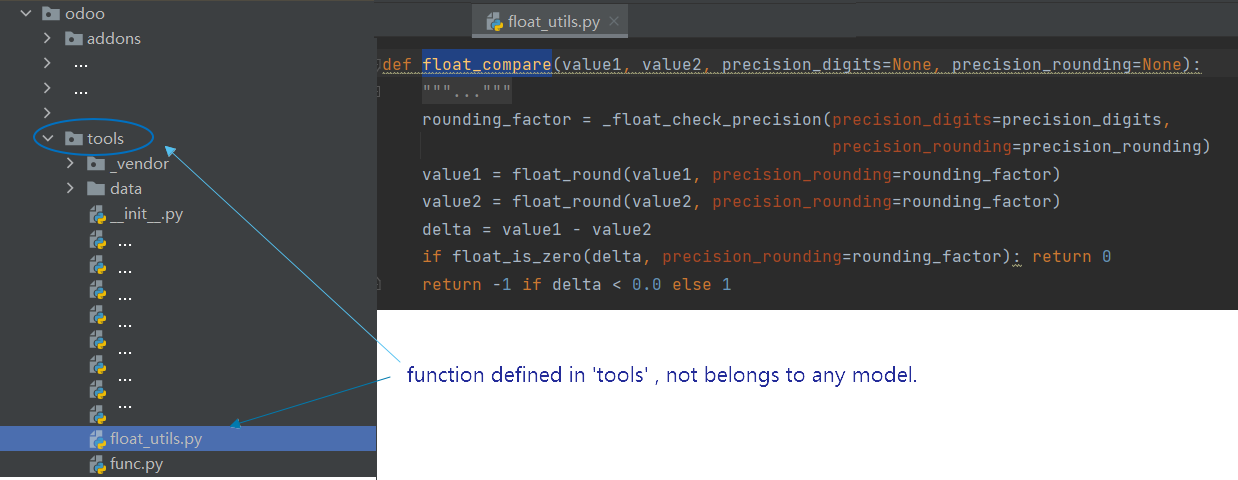
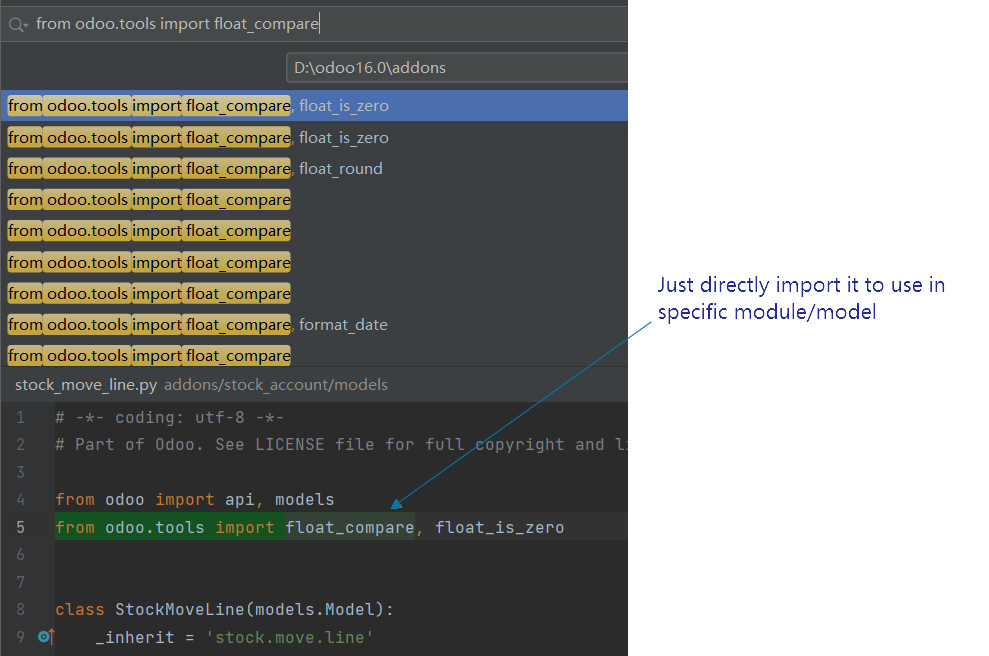
we know the function 'float_compare()' in base module,  which comparing 2 floats' value.  It's just a function,  not belongs to any model . And it can be used everywhere you need by simply importing it :


Example #2 :

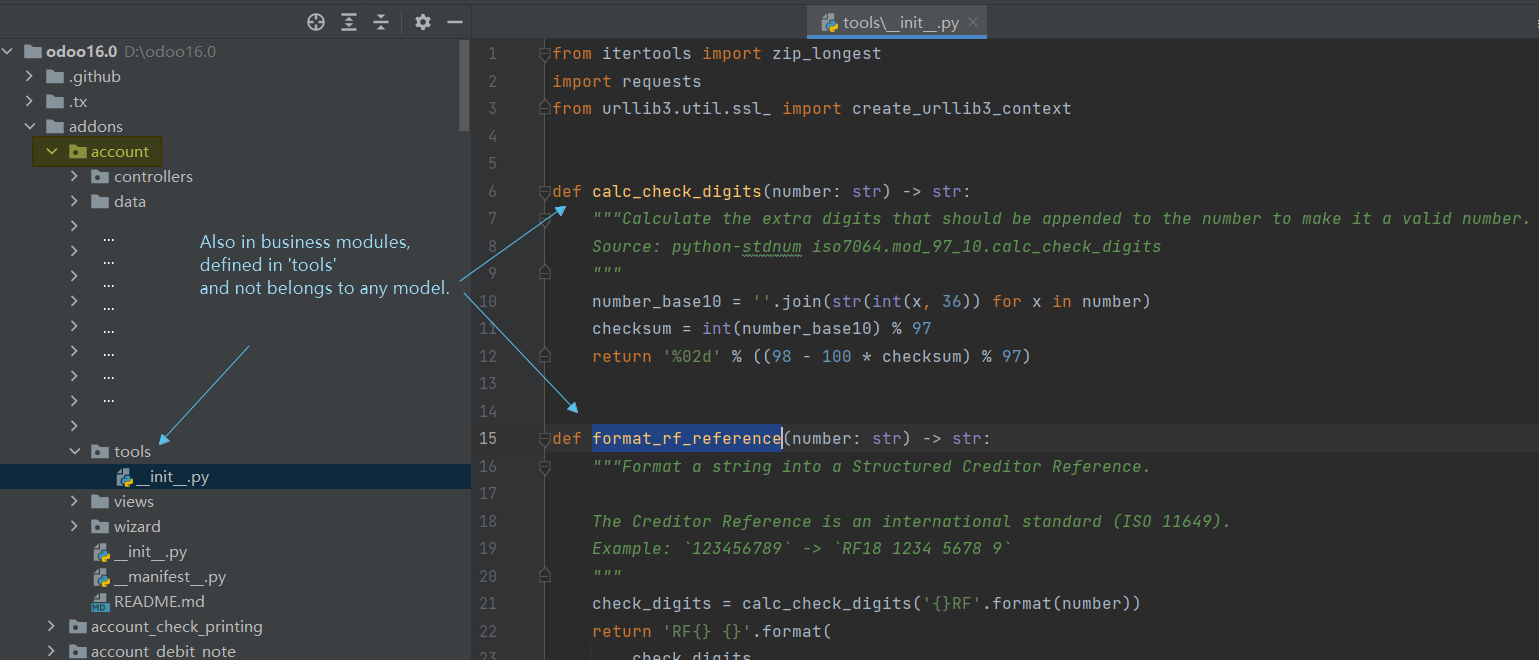
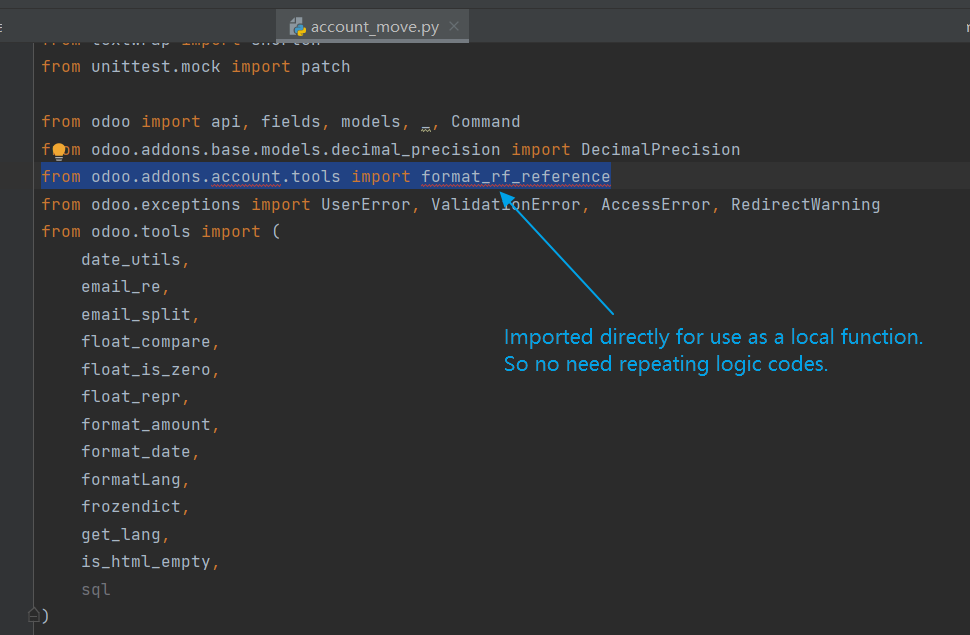
Even in business modules, there also have some shared functions defined in 'tools'  and to be imported in other places. 

In use: 


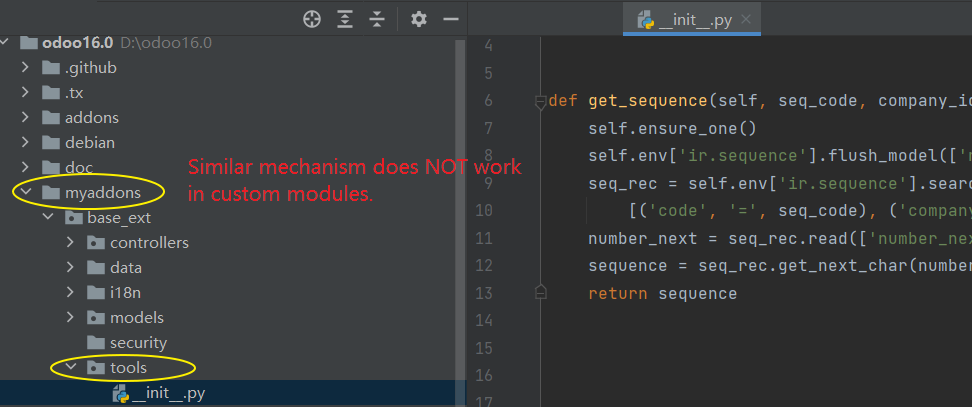
But similar mechanism does not work in custom modules. I defined a function to compute sequence,  and want to use it in business module (such as employee、partner、products、orders etc.) .  But importing raises error.


Of course I know there're 2 ways :

#1 、 Just repeating the code where I need it ;

#2、 Using "self.env['source_model'].get_sequence " to call it ;

But seems both above are not the reasonable solution,  efficiency or readability is not good. 

I just wondering if and how we can import such custom function from one custom module into another?

0
Avatar
Discard
Avatar
Yahoo Baba Innovations Pvt.Ltd
Best Answer

Hello noone,

If you are confused please share image what you do or you can connect with me i'll guide where you mistake.

Skype : Yahoo Baba Official

Email:  yahoobaba077@gmail.com

0
Avatar
Discard
noone
Author

Thanks friend ! I've update the image of file structure above.
In short : how to import a custom function from one custom module to another ? Not odoo's function in source / original directories.

Yahoo Baba Innovations Pvt.Ltd

Hii noone,

You need to add this type of function in your local function and add another module name in manifest file in depends.

To add a custom class and use the onchange_custom_function, you can define your custom model class and override the method. Here's the reformatted code including the custom class:

python :
from odoo import models, fields

class CustomModel(models.Model):
_inherit = 'another.module' # Inherit from the appropriate one module.

custom_field = fields.Char('Custom Field')

def onchange_custom_function(self):
rec = super(CustomModel, self).onchange_custom_function()
# Add your custom logic here
return rec
Make sure to include the module's name in the depends section of the manifest file (__manifest__.py), like so:

python copy code:
'depends': ['base_module', 'your_custom_module']

noone
Author

Thank you very much my friend! Your solution looks like inheriting an exsiting model and override its method.
I meant an indiviual、customized method itself, defined in one custom module and can be utilized in other custom modules.
Let me explain more detail afterwards.

Enjoying the discussion? Don't just read, join in!

Create an account today to enjoy exclusive features and engage with our awesome community!

Sign up
Related Posts Replies Views Activity
How to override IMPORT button on tree view using Odoo 12
import customize button odoo12
Avatar
0
मई 20
3421
Import Contact Notes (Help! Which is the correct Odoo Field?) Solved
import
Avatar
Avatar
Avatar
2
दिस॰ 25
171
Importacion de Atributos y Valores
import
Avatar
Avatar
Avatar
Avatar
3
दिस॰ 25
2511
Issue with import and comma in Excel File (odoo 19)
import
Avatar
0
सित॰ 25
235
production of not enough materials for a PO
function
Avatar
Avatar
Avatar
2
सित॰ 25
1250
कम्यूनिटी
  • ट्यूटोरियल्स
  • दस्तावेज़
  • फ़ोरम
ओपन सोर्स
  • डाउनलोड
  • Github
  • रनबॉट
  • अनुवाद
सेवाएं
  • Odoo.sh Hosting
  • सहायता
  • अपग्रेड
  • कस्टम डेवलपमेंट्स
  • शिक्षा
  • अकाउंटेंट खोजें
  • पार्टनर ढूंढें
  • पार्टनर बनें
हमारे बारे में
  • हमारी कंपनी
  • ब्रांड ऐसेट
  • संपर्क करें
  • नौकरियां
  • इवेंट
  • पॉडकास्ट
  • ब्लॉग
  • ग्राहक
  • लीगल • गोपनीयता
  • सुरक्षा
الْعَرَبيّة Català 简体中文 繁體中文 (台灣) Čeština Dansk Nederlands English Suomi Français Deutsch हिंदी Bahasa Indonesia Italiano 日本語 한국어 (KR) Lietuvių kalba Język polski Português (BR) română русский язык Slovenský jazyk slovenščina Español (América Latina) Español ภาษาไทย Türkçe українська Tiếng Việt

Odoo, बिज़नेस से जुड़े ऐप्लिकेशन का एक कलेक्शन है जो ओपन सोर्स पर आधारित है. इसमें आपकी कंपनी की हर ज़रूरत के लिए ऐप्लिकेशन हैं. जैसे, सीआरएम, ई-कॉमर्स, अकाउंटिंग, इन्वेंट्री, पॉइंट ऑफ़ सेल, प्रोजेक्ट मैनेजमेंट वगैरह.

Odoo की सबसे बड़ी खासियत है कि यह इस्तेमाल करने में बहुत आसान है और यह पूरी तरह से इंटिग्रेट किया हुआ है.

Website made with

Odoo Experience on YouTube

1. Use the live chat to ask your questions.
2. The operator answers within a few minutes.

Live support on Youtube
Watch now