
AI in email templates
Odoo allows AI prompts to be embedded directly into email templates.
When an email is sent, the prompt is evaluated in context, and the generated content is inserted into the message automatically. This feature makes it possible to create dynamic, personalized emails at scale, while keeping templates concise and reusable.
An AI-enabled email template contains one or more AI prompts that are evaluated at send time. Unlike static templates, AI prompts:
Adapt the message content to the current record
Use available context such as customer data, document content, or related records
Generate natural language text automatically
How AI prompts are evaluated in email templates
When the database creates an email based on a template with an AI prompt, the prompt uses the current record as context to complete the prompt’s objective. If the email is sent in bulk, the prompt is evaluated separately for each record. This allows a single template to produce personalized content for multiple recipients.
Adding an AI prompt to an email template
First, navigate to .
Note
Developer mode needs to be activated to view the Technical menu.
Select an existing template, or click New to create a new one. In the body of the
template, type /, to open the powerbox. Select
Prompt from the drop-down menu. This adds a banner to the template. In the banner,
enter a prompt describing the expected output.
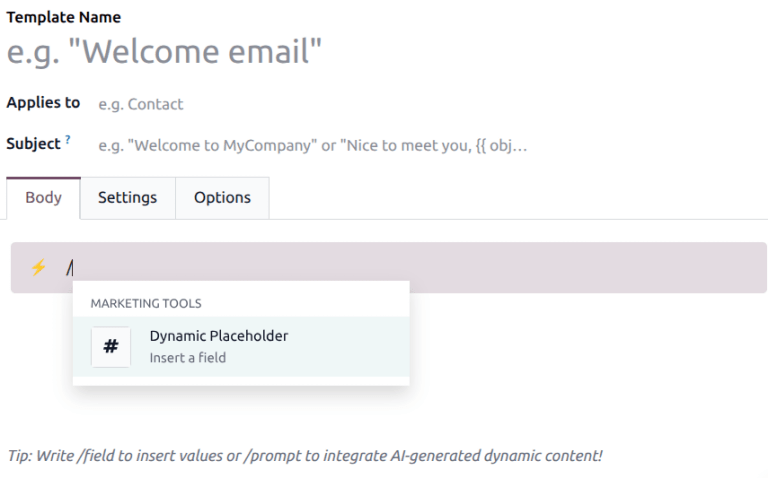
To utilize dynamic placeholders within the prompt, type
/, then select Dynamic Placeholder from the drop-down menu.
Note
Dynamic placeholders reference specific fields within the database to produce unique data in the template. Adding these placeholders is what allows the database to customize the email based on the record referenced.
Example use cases
Sales follow-ups: Automatically generate tailored follow-up emails based on opportunity stage, customer activity, or recent communication.
HR communication: Generate personalized onboarding or interview emails based on application or employee data.
Project updates: Create progress summaries using task descriptions and recent activity.
See also