
Context:
1. I use Field Services tasks to Invoice Material.
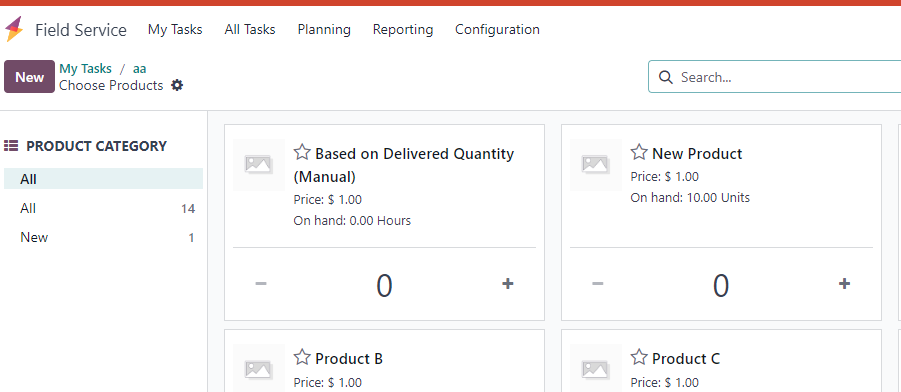
2. When I click on the Products Smart Button I cannot find the Service Product that I created and I would like to add and Invoice.

Odoo is the world's easiest all-in-one management software.
It includes hundreds of business apps:

Context:
1. I use Field Services tasks to Invoice Material.
2. When I click on the Products Smart Button I cannot find the Service Product that I created and I would like to add and Invoice.
Solution:
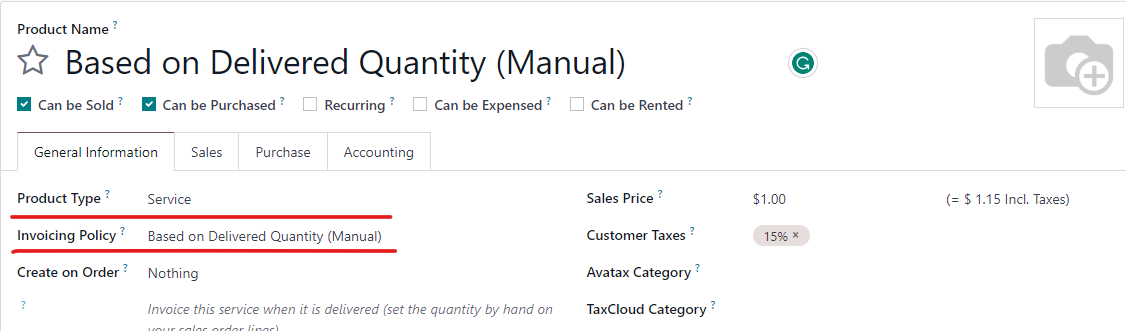
The Service Product has to have an Invoicing Policy: "Based on Delivered Quantity (Manual)" for it to appear when you click on the Products smart button on the Field Service task.
Thank you

Hi,
The SALES & INVOICING section in task form has three options Billable, Products on Tasks, and Extra Quotations.
If
the timesheets and material need to be invoiced to the customer, enable
the Billable option. To track products consumed during the task, enable
the Products on Tasks option. Then, if the user needs to add an extra
quotation, then enable the Extra Quotations.
Please go through our blog 'How to Manage Field Service Tasks in Odoo 16'
https://www.cybrosys.com/blog/how-to-manage-field-service-tasks-in-odoo-16https://www.cybrosys.com/blog/how-to-manage-a-field-service-task-for-your-project-in-odoo-16
Hope it helps
Stwórz konto dzisiaj, aby cieszyć się ekskluzywnymi funkcjami i wchodzić w interakcje z naszą wspaniałą społecznością!
Zarejestruj się| Powiązane posty | Odpowiedzi | Widoki | Czynność | |
|---|---|---|---|---|
|
Printing a field on a report. based on value
Rozwiązane
|

|
1
lut 24
|
2475 | |


|
2
paź 25
|
10321 | ||
|
|
1
gru 23
|
4620 | ||
|
|
1
gru 24
|
6211 | ||
|
Tax distribution import template
Rozwiązane
|
|
1
wrz 23
|
2723 |
1. Use the live chat to ask your questions.
2. The operator answers within a few minutes.
