
if i made a mistake using studio and now if i want to open the contacts module and it crashes. How do you restore it to the default view if you cant open the view you were editing.
To pytanie dostało ostrzeżenie
1
Odpowiedz
1800
Widoki


Hi,
You can find all Odoo views as below:
- Enable developer mode.
- Go to settings -> technical -> Views or you can press CTRL+K and type views
- In views you can find all views and from there you can search for contacts studio view and deactivate it.
Make sure to deactivate the correct view, all studio customization views name starts with odoo studio: [Name of the customized view]
so for contacts form view, the name will be (Odoo Studio: res.partner.form customization(
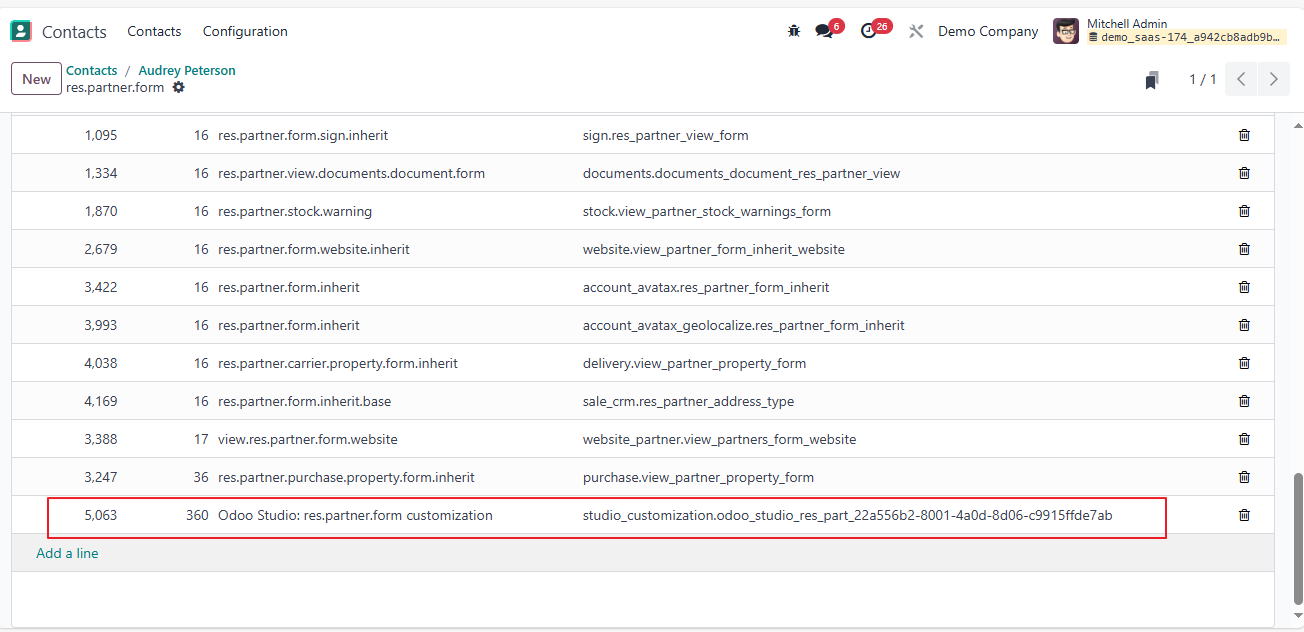
Thanks the one that i disabled removed all the customization i did.
Am a free to redo the work that i did as i know what not to do now.
Podoba Ci się ta dyskusja? Dołącz do niej!
Stwórz konto dzisiaj, aby cieszyć się ekskluzywnymi funkcjami i wchodzić w interakcje z naszą wspaniałą społecznością!
Zarejestruj się| Powiązane posty | Odpowiedzi | Widoki | Czynność | |
|---|---|---|---|---|


|
2
mar 26
|
411 | ||
|
Menu's with different default filter
Rozwiązane
|


|
1
gru 25
|
3002 | |
|
How to add or reorder columns in Studio
Rozwiązane
|

|
1
gru 25
|
994 | |


|
1
gru 25
|
955 | ||

|
1
lis 25
|
2792 |
