Ir al contenido
Odoo Menú
  • Iniciar sesión
  • Pruébalo gratis
  • Aplicaciones
    Finanzas
    • Contabilidad
    • Facturación
    • Gastos
    • Hoja de cálculo (BI)
    • Documentos
    • Firma electrónica
    Ventas
    • CRM
    • Ventas
    • PdV para tiendas
    • PdV para restaurantes
    • Suscripciones
    • Alquiler
    Sitios web
    • Creador de sitios web
    • Comercio electrónico
    • Blog
    • Foro
    • Chat en vivo
    • eLearning
    Cadena de suministro
    • Inventario
    • Manufactura
    • PLM
    • Compras
    • Mantenimiento
    • Calidad
    Recursos humanos
    • Empleados
    • Reclutamiento
    • Vacaciones
    • Evaluaciones
    • Referencias
    • Flotilla
    Marketing
    • Redes sociales
    • Marketing por correo
    • Marketing por SMS
    • Eventos
    • Automatización de marketing
    • Encuestas
    Servicios
    • Proyectos
    • Registro de horas
    • Servicio externo
    • Soporte al cliente
    • Planeación
    • Citas
    Productividad
    • Conversaciones
    • Aprobaciones
    • IoT
    • VoIP
    • Artículos
    • WhatsApp
    Aplicaciones externas Studio de Odoo Plataforma de Odoo en la nube
  • Industrias
    Venta minorista
    • Librería
    • Tienda de ropa
    • Mueblería
    • Tienda de abarrotes
    • Ferretería
    • Juguetería
    Alimentos y hospitalidad
    • Bar y pub
    • Restaurante
    • Comida rápida
    • Casa de huéspedes
    • Distribuidora de bebidas
    • Hotel
    Bienes inmuebles
    • Agencia inmobiliaria
    • Estudio de arquitectura
    • Construcción
    • Gestión de bienes inmuebles
    • Jardinería
    • Asociación de propietarios
    Consultoría
    • Firma contable
    • Partner de Odoo
    • Agencia de marketing
    • Bufete de abogados
    • Adquisición de talentos
    • Auditorías y certificaciones
    Manufactura
    • Textil
    • Metal
    • Muebles
    • Comida
    • Cervecería
    • Regalos corporativos
    Salud y ejercicio
    • Club deportivo
    • Óptica
    • Gimnasio
    • Especialistas en bienestar
    • Farmacia
    • Peluquería
    Trades
    • Personal de mantenimiento
    • Hardware y soporte de TI
    • Sistemas de energía solar
    • Zapateros y fabricantes de calzado
    • Servicios de limpieza
    • Servicios de calefacción, ventilación y aire acondicionado
    Otros
    • Organización sin fines de lucro
    • Agencia para la protección del medio ambiente
    • Alquiler de anuncios publicitarios
    • Fotografía
    • Alquiler de bicicletas
    • Distribuidor de software
    Descubre todas las industrias
  • Odoo Community
    Aprende
    • Tutoriales
    • Documentación
    • Certificaciones
    • Capacitación
    • Blog
    • Podcast
    Fortalece la educación
    • Programa educativo
    • Scale Up! El juego empresarial
    • Visita Odoo
    Obtén el software
    • Descargar
    • Compara ediciones
    • Versiones
    Colabora
    • GitHub
    • Foro
    • Eventos
    • Traducciones
    • Conviértete en partner
    • Servicios para partners
    • Registra tu firma contable
    Obtén servicios
    • Encuentra un partner
    • Encuentra un contador
    • Contacta a un consultor
    • Servicios de implementación
    • Referencias de clientes
    • Soporte
    • Actualizaciones
    GitHub YouTube Twitter LinkedIn Instagram Facebook Spotify
    +1 (650) 691-3277
    Solicita una demostración
  • Precios
  • Ayuda

Odoo is the world's easiest all-in-one management software.
It includes hundreds of business apps:

  • CRM
  • e-Commerce
  • Contabilidad
  • Inventario
  • PoS
  • Proyectos
  • MRP
All apps
Debe estar registrado para interactuar con la comunidad.
Todas las publicaciones Personas Insignias
Etiquetas (Ver todo)
odoo accounting v14 pos v15
Acerca de este foro
Debe estar registrado para interactuar con la comunidad.
Todas las publicaciones Personas Insignias
Etiquetas (Ver todo)
odoo accounting v14 pos v15
Acerca de este foro
Ayuda

How can I configure 3 shifts per day in Odoo 17?

Suscribirse

Reciba una notificación cuando haya actividad en esta publicación

Se marcó esta pregunta
4 Respuestas
4682 Vistas
Avatar
Will A

I'm trying to set up a company that currently has 3 working shifts,

Shift 1: 0600-1400 hours

Shift 2: 1400-2200 hours

Shift 3: 2200-0600 hours

All shifts work 8 hours. A paid half hour lunch does not need to be identified as a break.


Currently Odoo by default only allows for a morning and afternoon shift, with another option for a break that I wont use. Only my morning and afternoon shifts, shifts 1 and 2, can be set up with templates. How do I account for the third shift? Is there a way to set up an evening shift either in base or in Studio that doesn't require I write some code? I can't be the only one that has a company that operates off of 24 hour operations.


Thanks

0
Avatar
Descartar
faOtools

Maybe this app - https://apps.odoo.com/apps/modules/18.0/itlibertas_timesheet - will partially solve the challenge.

Will A
Autor

Thanks faOtools, but I am trying to do this in version 17. I appreciate the link! I'll keep it in mind for V18.

Avatar
Will A
Autor Mejor respuesta

Hi All, I did end up coming finding a work-around. Unfortunately, I am not able to use the shift templates as I had hoped. Hopefully a future version of Odoo will allow us to configure 24-hour operations in the shift templates. 

What I ended up doing was completely ignoring the shift templates and manually inputting the shifts in the Planning app. This is a lot more manual work than I would like to do but it will work for now. 

I was able to make the process quicker by using the duplicate feature, i.e. pressing the ctrl button and then dragging the scheduled shift to the next line. I was then able to repeat this every week since the shift will stay the same as long as they work here. 

What I don't like now is that Odoo automatically changes the hours based on when Daylight Savings begins and ends. One more thing to try to figure out. I'll do my own preliminary research before asking for help here though.

---UPDATE---

While looking at the Planning documentation, I noticed it says, "Company working hours: Are taken into account when assigning shifts to employees or materials." This was specifically talking about when resources could be used, but I thought I would try updating the company working hours and not just the employee working hours. This may have been what Saif Sabri's AI-generated response may have been hinting at, but it wasn't specific enough to get me to the finish line. 

I updated the company working hours to 2 different shifts (morning/afternoon) covering a full 24 hours. I then went back and tried creating shift templates for the three different shifts and didn't have a single issue! Time worked and end of shift all calculated exactly as I hoped it would. I was then able to use these shift templates for planning purposes and had no issues. 

So, to sum up...

If you want to enable 24-hour Ops, go to Settings → Employees → Company Working Hours, and then create a Company Working Hour schedule that covers the time period that your company actually has employees at the facility working to be able to set up those shift templates. 

0
Avatar
Descartar
Avatar
Saif Sabri
Mejor respuesta

My response was crafted with AI assistance, tailored to provide detailed and actionable guidance for your query.

In Odoo 17, you can configure multiple shifts for a 24-hour operation by customizing the Working Hours and Shifts settings. While Odoo's default setup allows for morning and afternoon shifts, you can extend this to include a third shift (evening/night shift) without writing custom code. Here's how you can do it:

Step 1: Configure Working Hours

  1. Go to Settings > Employees > Working Hours.
  2. Create a new working time entry:
    • Name: 24-Hour Operation
    • Set the working hours for each shift:
      • Shift 1: 06:00 to 14:00
      • Shift 2: 14:00 to 22:00
      • Shift 3: 22:00 to 06:00 (next day)
  3. Save the working hours configuration.

Step 2: Create Shift Templates

  1. Go to Employees > Configuration > Shifts.
  2. Create three shift templates:
    • Shift 1 Template:
      • Name: Shift 1 (06:00-14:00)
      • Working Hours: Select the 06:00-14:00 time slot.
    • Shift 2 Template:
      • Name: Shift 2 (14:00-22:00)
      • Working Hours: Select the 14:00-22:00 time slot.
    • Shift 3 Template:
      • Name: Shift 3 (22:00-06:00)
      • Working Hours: Select the 22:00-06:00 time slot.

Step 3: Assign Shifts to Employees

  1. Go to Employees > Employees.
  2. Select an employee and assign them to a shift:
    • Under the Work Information tab, set the Working Hours to the appropriate shift template (e.g., Shift 1 (06:00-14:00)).
  3. Repeat this for all employees, assigning them to their respective shifts.

Step 4: Handle the Night Shift (22:00-06:00)

For the night shift (Shift 3), Odoo will automatically handle the transition to the next day. Ensure that:

  • The working hours for Shift 3 are set as 22:00-06:00.
  • The system recognizes the shift as spanning two days.

Step 5: Use Studio for Advanced Customization (Optional)

If you need more flexibility (e.g., adding shift-specific rules or fields), you can use Odoo Studio:

  1. Go to Settings > Technical > Studio.
  2. Customize the Shifts model to add fields like:
    • Shift-specific pay rates.
    • Shift-specific attendance rules.
  3. Save your changes and test the new configuration.

Step 6: Test the Configuration

  • Go to Attendances and check if the shifts are correctly logged.
  • Ensure that employees can clock in and out according to their assigned shifts.

Key Notes

  • Odoo's default setup does not natively support three shifts, but by creating custom working hours and shift templates, you can achieve this.
  • If you need more advanced features (e.g., automated shift scheduling), consider using the Odoo Shifts module or a third-party app from the Odoo App Store.

By following these steps, you can configure three shifts per day in Odoo 17 without writing custom code.


1
Avatar
Descartar
Will A
Autor

Thanks Saif Sabri for the AI answer, but version 17 will not let me set working hours to automatically cross from one day to the next. I might have to work with my team to write some code for this to happen.

Avatar
Cybrosys Techno Solutions Pvt.Ltd
Mejor respuesta

Hi,

Please refer to the following links:

1. https://www.youtube.com/watch?v=xNf23Lv-Viw

2. https://www.youtube.com/watch?v=Xj9DGgQQ_t0

3. https://www.youtube.com/watch?v=o6BPck13VeU

4. https://www.cybrosys.com/blog/how-to-manage-plan-and-access-shift-in-odoo-16-planning-app

5. https://www.cybrosys.com/blog/how-to-manage-employee-schedules-with-odoo-17-planning-app


Hope it helps.

0
Avatar
Descartar
Avatar
Marcin Pieczyński
Mejor respuesta

Hi Every Body

I have also face the same problem. Your solution looks good.
But  I was unable to obtain the same result in Odoo 16-18.
To be precise, I was unable to introduce w shift overnight  from 22pm to 6 am (22:00 - 6:00 next day)
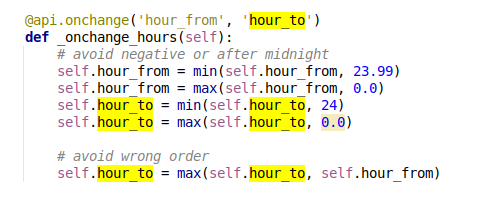
In Odoo core code there is a method which check if  hour_to is after hour_from, if its not, hour_to is changed.
So, when I have introduced shift from 22:00, and tried to put hour_to (6:00) Odoo automatically changed hour_to to 22.
I don't see possibility to mark this shift as 'overnight' or with the end in the next day.

How Odoo is able to recognize that the shift is spanning two days?

Below code comes from Odoo16, and is the same in Odoo18.


Marcin Pieczyński

0
Avatar
Descartar
¿Le interesa esta conversación? ¡Participe en ella!

Cree una cuenta para poder utilizar funciones exclusivas e interactuar con la comunidad.

Registrarse
Comunidad
  • Tutoriales
  • Documentación
  • Foro
Código abierto
  • Descargar
  • GitHub
  • Runbot
  • Traducciones
Servicios
  • Alojamiento en Odoo.sh
  • Soporte
  • Actualizaciones del software
  • Desarrollos personalizados
  • Educación
  • Encuentra un contador
  • Encuentra un partner
  • Conviértete en partner
Sobre nosotros
  • Nuestra empresa
  • Activos de marca
  • Contáctanos
  • Empleos
  • Eventos
  • Podcast
  • Blog
  • Clientes
  • Legal • Privacidad
  • Seguridad
الْعَرَبيّة Català 简体中文 繁體中文 (台灣) Čeština Dansk Nederlands English Suomi Français Deutsch हिंदी Bahasa Indonesia Italiano 日本語 한국어 (KR) Lietuvių kalba Język polski Português (BR) română русский язык Slovenský jazyk slovenščina Español (América Latina) Español ภาษาไทย Türkçe українська Tiếng Việt

Odoo es un conjunto de aplicaciones de código abierto que cubren todas las necesidades de tu empresa: CRM, comercio electrónico, contabilidad, inventario, punto de venta, gestión de proyectos, etc.

La propuesta única de valor de Odoo es ser muy fácil de usar y estar totalmente integrado.

Sitio web hecho con

Odoo Experience on YouTube

1. Use the live chat to ask your questions.
2. The operator answers within a few minutes.

Live support on Youtube
Watch now