i did search about Analytic tag in v 16 in account setting ,but no found it


Odoo is the world's easiest all-in-one management software.
It includes hundreds of business apps:

i did search about Analytic tag in v 16 in account setting ,but no found it

Dear Ray,
I am also trying to figure out how to do in v16 the same analysis that I was doing in v15... So thanks if you can explain me what I am missing!
Very simple example:
we have two product lines, Prod1 and Prod2, and we wanted to analyse costs on these two lines by keeping the possibility of selecting if a cost is for production or for R&D.
In v15 I had two analytic accounts ("Prod1" and "Prod2") and two analytic tags ("Production" and "R&S"), and I was able to filter, for example, the vendors bills in the "invoice analysis" view with any combination of account/tag: for ex. "Prod1" + "R&S" etc.
Now I can not find a similar way to do te same, even if I have created two differents analytic plans: one in "Activities" (with "Production" and "R&S") the other is "Lines" (with "Prod1" and "Prod2").
Could you explain me how can I combine the filtering across these two plans in a pivot view, for example? I am getting crazy...
Thank you,
Saverio
Analytic Account filtering was removed from the Invoice Analysis Menu at Odoo 16 - you are probably better off looking at the Journal Items or the Financial Reports and filtering from there
Also, answering a question on the Forum notifies the person who ASKED the question, none of the other ANSWERS will be notified - it is by chance that I saw this "answer" - you should comment on my answer if you want a notification to reach me.
Using an Advanced Filter twice gives you AND instead of OR.
And this is exactly the point! I think that we can conclude that analytic filtering based on the operation (“Account A” AND “Account B”) is no longer working in v16, while I have been extensively using it in v13, v14 and v15, by combining "Analytic Account A" AND "Analytic Tag B".
Please refer to the document that I have prepared, and confirm that this is an issue (I am still hoping I am wrong...):
https://drive.google.com/file/d/1ByjFf5VLr7T0Msp9nS04OVhv4x1eOZSm/view?usp=share_link
Dear Ray,
have you had the chance of checking if the issue that I reported is true?
I really need an answer in order to plan my next action regarding setting up analytic accounting on Odoo v16.
Thank you for!

Is there a way to integrate the piece of code from odoo v17 into odoo v16 so that i can cross my analytic plan distributions just like that (image from odoo17 but impossible in odoo v16)
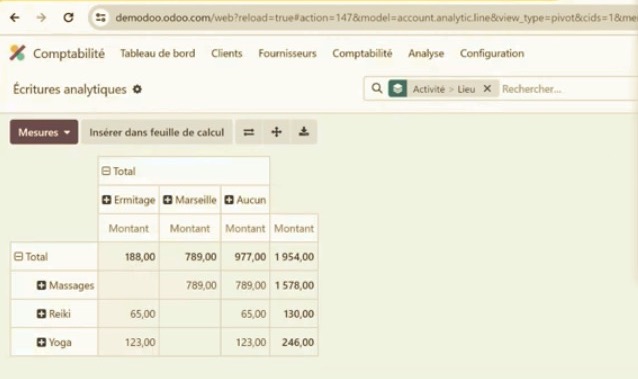

I completely agree with Saverio and the others.
Analytic Tags were such a powerful tool and with the new function, the same things cannot be done anymore. This is so frustrating and absolutely not understandable.
Cross filtering is not possible anymore. This may work for some businesses, but many of us are really disappointed why you took that feature away. I am still working with Odoo 14 and would like to update to 16, however this keeps me from updating because I cannot come up with a proper solution on how to structure my analytic accounting the way I need it with the new tool.
So frustrating :( :( :(

Hi Ray
I agree the new aproach is extremly more complex to configure than the aproach from before.
I'm trying to figure out how to use he new aproach, just to simulate the way it was working before and I don't even know how to configure distributions. I need no tags, no distribution... nothing. I just need to select an analtytic acount in a sale order or invoice. Nothing more.
Before was very easy to configure, using default analytic accounts for each product, category, financial account or any other value.
Today I'm completly lost. The documentation has not been updated. The course about analytics has not been updated to V16.
I can not evaluate if it's good move or not since I'm not able to configure and evaluate. Could we have any documentation or something to learn about it?
Thank you
Did you watch the video I posted below? You have a widget on Sales Orders, Purchase Orders and Invoices that let you chose one or more accounts without needing to setup Distributions.
Also, answering a question on the Forum notifies the person who ASKED the question, none of the other ANSWERS will be notified - it is by chance that I saw this "answer" - you should comment on my answer if you want a notification to reach me.

Analytic Tags have been removed at Odoo 16.
Please see the session from Odoo Experience where we explain the new approach
Sometimes i wonder, who makes these decisions to make Odoo much worse...? Removing analytic tag's did not give anything to users, people in Odoo think probably that it was used only for analytic distribution, but it was not the case. Imagine a large construction company with large multi-year project with more than one location. Yes, you have 1 analytic account (that can belong to a plan - also available for ages on Odoo), but maybe i want differentiate project objects more detail for profit and loss statement. Let's say we need to build 3 buildings, i want to have a analytic for 1,2,3 buildings. Now, i do use subcontractors for plumbing, electricity and so on. I still want to keep project + building + plumbing analytic tags. When i look at the profit and loss statement i can look > whole project and/or by building OR by subcontracting parts whole project or by building.
Why did remove so good feature? That's was really short sighted and you gained nothing and made large project managers really unhappy... !
We didn't really "remove tags". We made accounts work like tags. You can have as many accounts associated with an expense as you want. Project, Building, Service. At prior versions Project would be an account and Building and Service would be a tag. Now all three are accounts and you can even split easily 50% plumbing and 50% electricity for one expense. The filtering works the same way on the Financial Reports, you just filter by one or more accounts instead of one / many accounts and/or one / many tags.
Dear Ray,
thank you for your answer to my message, even if I wrot it in te wrong place.
If the only problem was that I need to lear a different way to perform the same analysis, I would be happy. But the problem, actually, is that in v16 I can no more do the same analytic analyses that I was able to do in previous versions.
In short, cross filtering by different analytic accounts is no more possible! This is a huge step back, in my opinion.
Please consider again the following example and try to replicate it on Odoo and to confirm it.
- I have created two different analytic plans: one in "Activities" (with "Production" and "R&S") the other is "Lines" (with "Prod1" and "Prod2"). In this way I can track if a bill, for example, is for Production or of R&S, and if it is for Prod1 or Prod2.
- Basing on that, from the "Journal Items" view, I select two invoices and assign the accounts "Production" and "Prod1" to the first one, and "Production" and "Prod2" to the second one.
- In v15 I was able to filter the combination of analytic accounts and tags in order to extract the bills used for "Production" of "Prod1"
- In v16, if I go to the "Analytic Item" view or to any other Financial Report view, I can not properly combine the filtering!!! If I filter by using the "add a condition" function I end up with an OR search, and I can only extract ALL the item assigned to "Production" plus ALL the items assigned to "Prod1". If I use twice the filtering option, first with the account "Production" and then with the account "Prod1" I ALWAYS get an EMPTY, even if I have hundreds if items assigned to both the accounts!
In my opinion this is a really big bug, and I can not understand how you can release a new analytic accounting platform without this funcionality!
Please tell me if you have understood my problem... Thank you!
Saverio
-
Cree una cuenta para poder utilizar funciones exclusivas e interactuar con la comunidad.
Registrarse| Publicaciones relacionadas | Respuestas | Vistas | Actividad | |
|---|---|---|---|---|


|
2
dic 25
|
1519 | ||

|
2
dic 25
|
463 | ||


|
3
dic 25
|
1610 | ||

|
0
dic 25
|
4 | ||

|
1
dic 25
|
1328 |
1. Use the live chat to ask your questions.
2. The operator answers within a few minutes.
